How Quality Control in Construction Reduces Rework by 40%

In construction, time is money, and rework is a costly leak in both. Studies show that rework can account for 5% to 15% of total construction costs. That means on a $10 million project, rework alone can burn up to $1.5 million. These aren’t just minor mistakes; they’re missed deadlines, wasted materials, frustrated workers, and unhappy clients.

But there’s good news: companies that prioritize quality control from the very beginning — especially those using robust construction project management software — have reported up to 40% fewer rework instances. That translates into significant savings and smoother project delivery.

In this blog, we’ll explore how quality control processes work, how they reduce costly mistakes, and how you can integrate them into your construction workflow, with or without digital tools.

The Real Cost of Rework in Construction

Rework happens when a completed task doesn’t meet quality standards and must be redone. Sometimes it’s as simple as fixing a paint job. Other times, it’s tearing down structural work or reordering expensive components. The consequences go far beyond money.

There’s a direct financial impact — wasted materials, extra labor hours, equipment rentals, and penalties for delays. Then there’s the schedule disruption, as rework ripples through your timeline and affects inspections, dependencies, and resource planning. Lastly, there’s the reputational cost. Teams get demoralized, and clients lose confidence.

The Construction Industry Institute (CII) estimates rework causes over $15 billion in direct costs annually in the U.S. alone. Globally, the cost is even higher, especially in regions where QC processes or project management tools are less standardized.
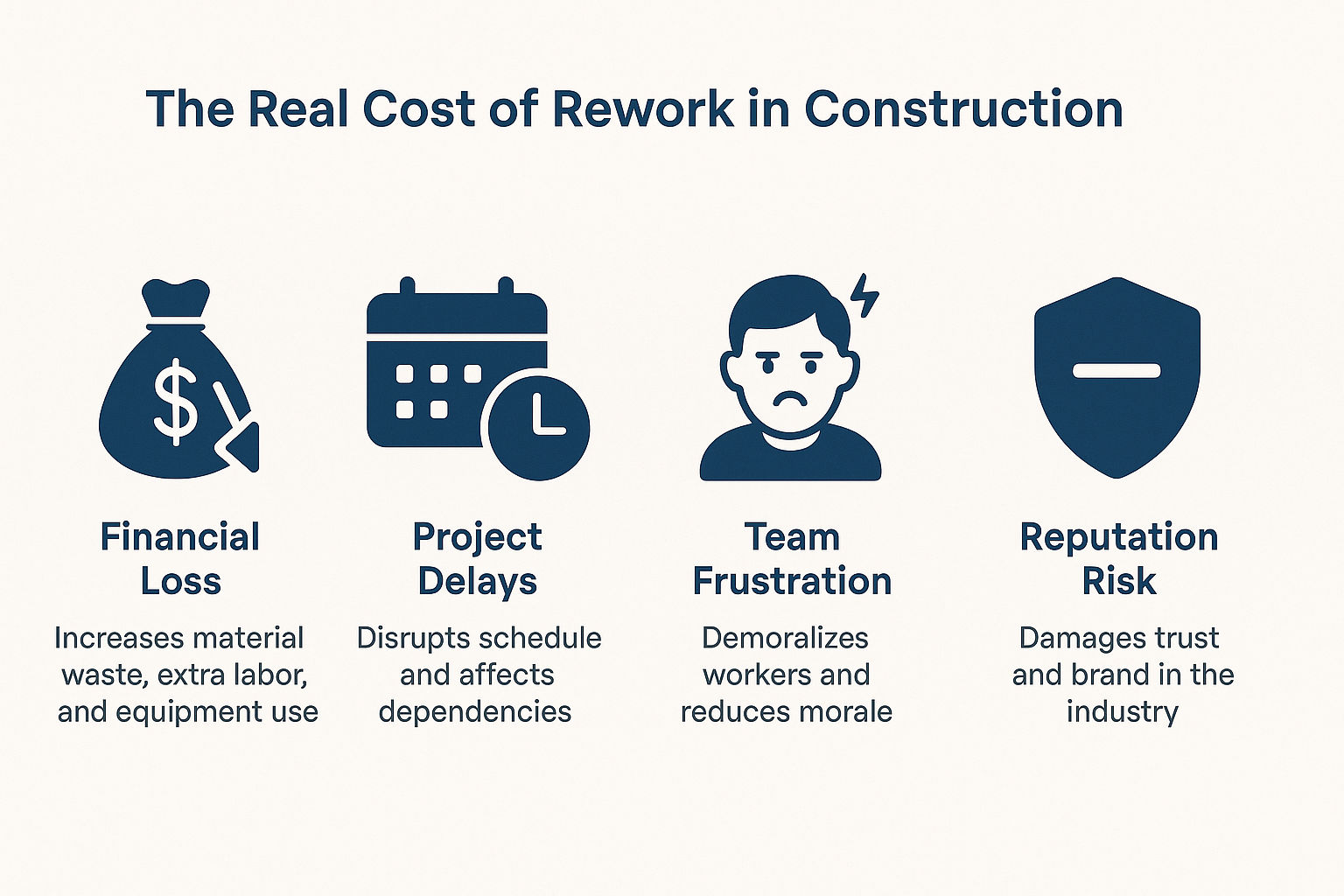
The Real Cost of Rework in Construction

What Is Quality Control in Construction?

Quality control (QC) in construction refers to the systematic monitoring, inspection, and verification processes used to ensure that all work and materials meet established project standards. It includes every phase of a build, from procurement to foundation to finishing.

Unlike Quality Assurance (QA), which is proactive and process-driven, QC is execution-focused. It involves on-site checks, documentation, supervisor approvals, and immediate corrective actions when issues arise.

When quality control is integrated into your workflow — especially through a digital solution like construction project management software — it becomes a safety net that catches mistakes before they require expensive rework.

How Quality Control Processes Reduce Rework by 40%

A structured QC process is one of the most effective ways to prevent mistakes from becoming money pits. Here’s how:

1. Early Detection Through Structured Checkpoints

Quality control inserts specific checkpoints into every construction phase. For example, before a slab is poured, the team verifies rebar spacing, alignment, and mix quality. These inspections prevent irreversible errors, saving both time and resources.

2. Better Communication and Documentation

When QC processes are digitized using construction project management software, they eliminate guesswork. Everyone — from architects to subcontractors — works off the same checklists, drawings, and specs. That consistency drastically reduces miscommunication-related errors.

3. Real-Time Tracking of Defects

With digital QC tools, site supervisors can instantly log defects, assign corrective actions, and track resolution. This speeds up the feedback loop and prevents small issues from spiraling into full-scale rework.

4. Built-In Accountability

Each inspection, photo, and approval is documented, making it easier to trace root causes, avoid repeat mistakes, and hold teams accountable. This transparency encourages more attention to detail across the board.

QC Best Practices That Actually Work

Companies that reduce rework consistently don’t just react to problems — they prevent them. Here’s what they do differently:

  • Use standardized QC checklists across all job sites, ensuring that every inspection is consistent and thorough.
  • Leverage construction project management software to capture quality data in real-time. This eliminates paperwork delays and improves oversight.
  • Train subcontractors and workers on quality expectations before they start. Education reduces misalignment and costly surprises.
  • Audit quality performance regularly, using reports from your software dashboard to identify repeat problem areas.

When QC is woven into your everyday operations — and supported by the right tools — it transforms from a task into a competitive advantage.

Case Study: Rework Reduced by 40% Using QC + Software

A mid-sized commercial contractor in Bengaluru faced chronic rework issues. Misaligned formwork and concrete curing problems caused delays and ballooned costs, with rework accounting for nearly 7% of the budget.

After adopting OConstruction’s construction project management software, they introduced structured quality checklists, digital inspections, and photo documentation. Supervisors logged and resolved issues in real time, while project managers tracked progress through a central dashboard.

The results were remarkable:

  • Rework dropped from 7% to just 3.5%
  • The project was completed 17 days ahead of schedule
  • Over 85 issues were caught and resolved before the execution

The software-driven QC process didn’t just reduce rework — it improved morale, client satisfaction, and profit margins.

Why Quality Control Is Easier with Construction Project Management Software

Manual QC is time-consuming and inconsistent. But when it’s powered by construction project management software, quality control becomes streamlined and scalable.

With a platform like Oconstruction, you can:

  • Create mobile-friendly quality checklists for each task phase
  • Log defects and issues with supporting photos
  • Set up automated alerts and approvals
  • Track corrections and resolutions in real-time
  • Generate reports for audits and improvement tracking

Instead of chasing paperwork, your teams stay focused on building — and building it right the first time.

Final Thoughts: Build Right the First Time

Rework eats away at margins, timelines, and team morale. But it’s also preventable. With proactive quality control, backed by the right construction project management software, your company can reduce rework by up to 40%, delivering faster, better, and more profitably.

Don’t wait until mistakes cost you. Build a culture of quality today.

Frequently Asked Questions

Q. What’s the difference between QA and QC in construction?

Ans. QA (Quality Assurance) focuses on processes and planning to avoid defects. QC (Quality Control) focuses on identifying and fixing errors during or after construction work.

Q. Is QC implementation expensive for small firms?

Ans. Not at all. Affordable construction project management software options exist for smaller teams, offering simple QC tools like checklists, logs, and mobile access.

Q. How soon will I see results from better QC?

Ans. Most companies see a drop in rework and faster project delivery within 1–2 project cycles after adopting formal quality control processes and tools.
5 Signs You Need Construction Project Management Software

Ten years ago, managing construction projects with spreadsheets, phone calls, and sticky notes might have been enough. But today’s job sites are faster, more dynamic, and more demanding. If you’re still juggling WhatsApp messages, handwritten notes, and scattered documents, your project workflow is likely disjointed and inefficient. This is where construction project management software like OConstruction steps in. It brings planning, scheduling, communication, cost tracking, and document control into one digital platform—accessible from both the field and the office. If you’ve been wondering whether your team needs a more modern solution, these five warning signs are your answer.

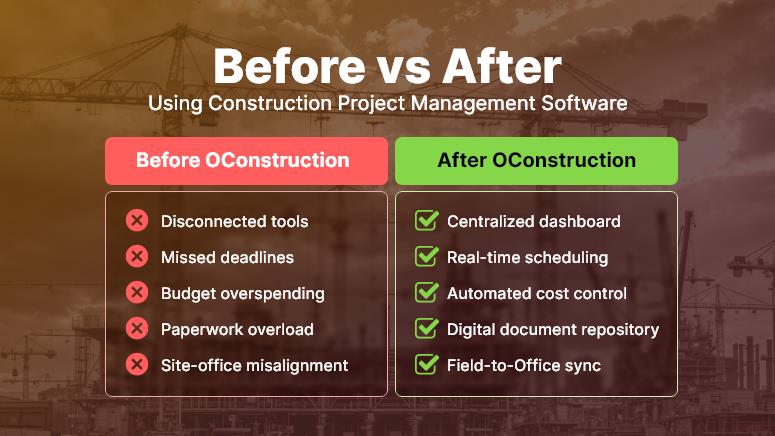
Before vs After Using Construction Project Management Software

Sign #1: You’re Constantly Behind Schedule

Why construction scheduling tools are non-negotiable

If deadlines feel more like flexible suggestions than fixed targets, it’s a red flag. Construction delays not only damage your client relationships — they also eat into profits, extend crew hours, and jeopardize future bids.

With construction scheduling software, you can:

  • Visualize project timelines using Gantt charts and task boards, helping you spot task dependencies and scheduling conflicts in real time.
  • Assign clear responsibilities with deadlines, supported by automated alerts so your team always knows what’s due and when.
  • Identify bottlenecks early and reallocate crews or resources to high-priority tasks before delays snowball.

A tool like OConstruction shifts your workflow from reactive fire-fighting to proactive project control—keeping builds on time and stress levels low.

Sign #2: Your Field and Office Teams Are Always Out of Sync

Your Field and Office Teams Are Always Out of Sync

Why site management software improves communication

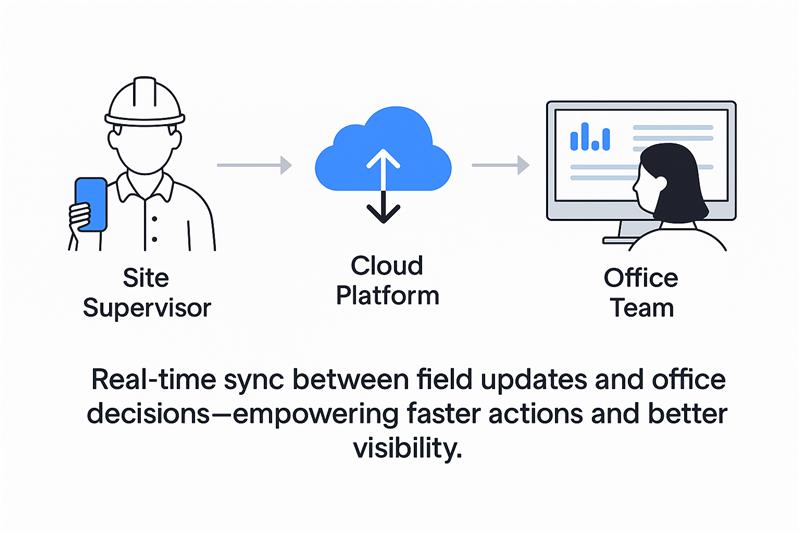
Site supervisors often rely on delayed emails or phone calls for updates, while head office waits for manual reports from the field. This disconnect leads to miscommunication, duplication of work, and costly rework.

Using site management software like OConstruction, you can:

  • Bridge the gap between the field and the office with real-time updates accessible from mobile and desktop.
  • Share annotated site photos, blueprints, and task notes, ensuring everyone has the latest information.
  • Use mobile checklists and real-time approvals, so site managers can log progress instantly, not days later.

When both your field crew and office team are aligned, project momentum builds naturally — and client satisfaction soars.

Sign #3: You Can’t Track Where the Budget Is Going

Why construction cost tracking software is a must

It’s common for managers to lose visibility into where money is spent — especially when juggling multiple sites, teams, and vendors. If your answer to “What’s the burn rate?” is vague, it’s time to upgrade.

With smart construction cost management tools, you can:

  • Track materials, labor hours, and equipment used across projects in a centralized platform.
  • Compare estimates to actuals to spot budget deviations quickly and prevent cost overruns.
  • Generate instant financial reports to keep clients and stakeholders in the loop.

OConstruction’s budgeting tools deliver real-time insights so you can take control of costs before they spiral.

Sign #4: You’re Drowning in Paperwork and Losing Documents

Why document management matters in construction software

Permits, contracts, change orders, site plans — these are the lifeblood of any build. But storing them across local drives, inboxes, and printed folders is a recipe for disaster.

With an integrated document management system like OConstruction, you can:

  • Digitally store and tag project documents so they’re easy to find, search, and share.
  • Set permission-based access, ensuring the right teams see the right files — no more email attachments or USB drives.
  • Track version history and approvals to prevent confusion over outdated plans or unauthorized changes.

Modern document control software isn’t a have—it’s essential for audit trails, collaboration, and avoiding costly mistakes.

Sign #5: You’re Wasting Time on Repetitive Tasks

Why automation in construction software saves your sanity

Construction teams often lose hours each week chasing updates, sending reminders, or recreating project templates. It’s time-consuming and drains valuable energy from critical site work.

With construction project management software like OConstruction, you can:

  • Automate recurring tasks, reminders, and alerts, keeping workflows moving without constant oversight.
  • Leverage pre-built templates for daily reports, safety inspections, and task lists, speeding up planning and execution.
  • Design workflows that trigger the next step as soon as the current one is completed, so your project never stalls.

By automating the busy work, your crew gets more time to focus on quality, safety, and delivery — the things that move your business forward.

Conclusion: Don’t Just Build — Build Smarter

If even one of these signs feels familiar, your construction operations are likely being held back by outdated tools and fragmented systems. From missed deadlines to unclear budgets and unorganized files, the cost of inaction is high.

With construction project management software like construction, you can:

  • Improve team coordination across job sites and offices
  • Gain real-time visibility into schedules, costs, and workloads
  • Ensure all documents and tasks are tracked and accessible
  • Deliver projects on time and budget

Whether you’re managing a residential project, commercial development, or industrial site, switching to the right construction software puts you in control.

Key Takeaways

  • Project delays, team silos, and cost uncertainty are clear signs you need construction software.
  • Tools like OConstruction offer powerful capabilities in scheduling, site collaboration, document management, and budget control.
  • Embracing digital tools helps small and mid-sized construction companies scale efficiently and stay competitive.

FAQs

Q1. What is construction project management software?
It’s a digital platform that helps construction teams manage scheduling, budgets, documents, communication, and compliance in one place.

Q2. How do I know if my business really needs it?
If you face frequent delays, miscommunication, budget overruns, or missing documents, it’s a strong sign you’ve outgrown spreadsheets and need a dedicated solution.

Q3. Is construction project management software only for large companies?
No. In fact, small and mid-sized businesses benefit the most since they need efficient processes to scale without adding more overhead.

Q4. Can OConstruction help my field and office teams work together?
Yes. OConstruction bridges the gap with mobile updates, real-time dashboards, annotated photos, and shared checklists. Everyone stays aligned, no matter where they are.

Q5. How does construction software save time and money?
By automating repetitive tasks, providing budget alerts, and streamlining communication, companies typically save 5–10% of project costs and reduce admin work by 30–40%.

How Digital Tools Are Revolutionizing the Construction Industry

The Construction Site is Going Digital with Construction Project Management Software

Construction has always been a hands-on industry, steel, concrete, boots on the ground. But in today’s fast-paced, tech-first world, construction is going digital faster than ever before.

According to a McKinsey report, companies that digitize their construction processes can increase productivity by up to 15% and reduce costs by as much as 6%.

So what’s driving this digital shift? It’s simple: manual workflows, paper blueprints, and scattered communication just aren’t cutting it anymore, especially for small and mid-sized businesses trying to scale.

In this post, we’ll explore how digital tools — especially construction project management software like OConstruction are transforming the way modern construction teams work.

Whether you’re managing tasks, budgets, timelines, or teams, construction project management software offers a smarter, more reliable way to build.

From real-time collaboration to budget tracking and safety compliance, you’ll walk away with insights and action steps to modernize your operations.

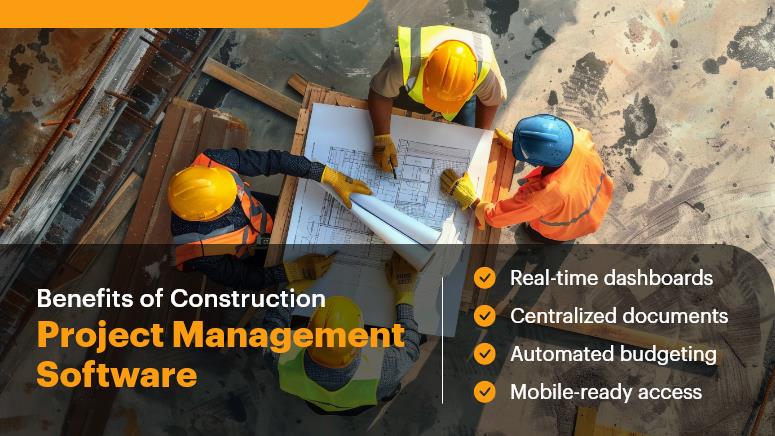
Benefits of Construction Project Management Software

Why Construction Project Management Software Matters for Construction Businesses

For decades, the construction industry lagged in tech adoption. But now, client expectations are changing, projects are more complex, and margins are tighter than ever.

Here’s why digital transformation is no longer optional:

  • Time is money, and delays are expensive. When updates are stuck in email threads or on paper forms, response times slow, and errors multiply. Digital tools ensure faster decision-making with real-time updates.
  • Small mistakes create big costs. Manual budgeting, change orders, or schedule conflicts often result in thousands in overruns. Construction software reduces risks by keeping everything visible and trackable.
  • Remote work and hybrid teams are here to stay. Project managers, subcontractors, and clients all need to collaborate across locations. Cloud-based tools like OConstruction provide mobile-friendly access from anywhere.
  • Hiring and retention depend on modern tools. Top talent, especially younger workers, expect tech-forward job sites. Equipping your team with the right digital tools makes your business more attractive and efficient.

Common use cases across industries:

  • Real estate developers are juggling multiple residential projects.
  • Infrastructure firms manage public works contracts.
  • Commercial builders oversee subcontractors and material flow.

Bottom line: Digital transformation isn’t just a tech upgrade; it’s a competitive advantage.

Best Practices for Using Construction Project Management Software

1. Centralize Communication Across Teams

  • Ditch the fragmented tools. When your crew is on WhatsApp, your PM is using Excel, and your engineer is emailing blueprints, chaos is guaranteed. Centralize everything on one platform like OConstruction for streamlined, transparent communication.
  • Set clear project roles and access permissions. Ensure that everyone from field workers to finance leads sees exactly what they need, when they need it, without clutter or confusion.

2. Use Real-Time Project Dashboards in Your Construction Project Management Software

  • Dashboards offer instant clarity on project status. From work completion to site issues and task deadlines, a real-time overview keeps decision-makers informed at every stage.
  • Eliminate the guessing game. Know exactly what’s been done, what’s overdue, and what’s ahead — so you can act quickly and avoid bottlenecks.

3. Automate Budget Tracking & Cost Control

  • Track expenses, invoices, and material usage in real-time. No more waiting until month-end to understand your project’s financial health.
  • Set up budget alerts and cost variance triggers. With OConstruction, you can get notified when expenses deviate from your estimates, helping you correct the course before it’s too late.

4. Simplify Document Management with Construction Project Management Software

  • Store blueprints, permits, contracts, and inspection logs in one digital hub. Say goodbye to lost paperwork and duplicated files.
  • Use version control to avoid costly errors. Everyone works from the same, most up-to-date documents — no confusion, no rework.

5. Enhance Site Safety & Compliance Tracking

  • Digitize safety checklists, audits, and training logs. Ensure that compliance documentation is completed and stored, not buried in binders.
  • Log incidents in real-time and assign corrective actions. Proactive tracking helps reduce risks and improve workplace safety.

6. Invest in Mobile-Ready Construction Project Management Software

  • Ensure your tools work seamlessly on phones and tablets. Field teams need fast access to plans, updates, and messaging without being tied to a desktop.
  • Enable photo uploads, GPS tagging, and voice-to-text notes. These features make it easier for on-site teams to stay engaged and productive.

7. Prioritize Ease of Use in Construction Project Management Software

  • Choose intuitive software that your team can adopt quickly. A tool is only useful if your people use it. OConstruction is designed with simplicity and speed in mind.
  • Offer onboarding and in-app support. Train your team well, and they’ll become champions of the platform.

Customer Success Snapshot: A Case in Point

“Titan Build Co., a mid-sized commercial construction company, used OConstruction to cut project delays by 40% and reduce admin workload by 60%.”

Before adopting OConstruction, Titan managed its operations through spreadsheets, emails, and disconnected mobile apps. Communication gaps and delayed updates were causing cost overruns and client frustration.

With OConstruction, Titan:

  • Centralized all documents, project updates, and team messaging in one place.
  • Enabled field teams to report progress and flag issues instantly via mobile.
  • Tracked budgets in real time, catching cost deviations before they escalated.

The result? More on-time deliveries, happier clients, and a more productive team.

Why Now Is the Time to Embrace Construction Project Management Software

  • Construction is evolving, and digital tools are at the heart of the transformation.
  • Small and mid-sized businesses benefit the most from streamlined, automated workflows.
  • OConstruction gives you everything you need to manage projects, budgets, teams, and documents in one user-friendly platform.

Construction project management software is no longer a nice-to-have — it’s a must for businesses that want to thrive in a fast-changing environment.

Whether you’re looking to save time, cut costs, or improve project visibility, the right software can make all the difference.

As the industry continues to evolve, investing in digital transformation today will pay off tomorrow in efficiency, growth, and client satisfaction.

Ready to see how OConstruction can help you streamline operations, cut delays, and boost team productivity? Book a free demo today!

FAQs

Q1. What is construction project management software?
It’s a digital tool that helps construction companies manage projects, budgets, teams, timelines, and compliance in one centralized system.

Q2. Why should small and mid-sized construction businesses use it?
Because it reduces errors, improves communication, prevents costly overruns, and allows teams to collaborate in real time—even remotely.

Q3. How does construction software save money?
By cutting delays, preventing budget overruns, eliminating duplicate work, and streamlining documentation, companies save 5–10% of project costs on average.

Q4. Is OConstruction mobile-friendly?
Yes. OConstruction is built for field teams with mobile access, photo uploads, GPS tagging, and voice-to-text notes.

Q5. How long does it take to see results?
Most companies start seeing efficiency improvements within the first 30–60 days of adopting construction project management software.

Q6. Does it require technical expertise to use?
No. OConstruction is designed to be intuitive, with onboarding support and in-app guidance for easy adoption.

Category: Construction Academy

Subcategory: Budgeting and Planning

Subcategory: Construction Phase

Subcategory: Design Coordination

Subcategory: Estimation Techniques

Subcategory: Initiation and Feasibility

Subcategory: Introduction

Subcategory: Personal Management

Subcategory: Project Close-Out

Subcategory: Project Scheduling

Subcategory: Project Teams

Subcategory: Proposal Management

Subcategory: Total Quality Management

Subcategory: Tracking and Control

Subcategory: Work Breakdown

Category: Help Desk

Subcategory: Client

Subcategory: Construction 101

Subcategory: Contractor Management

Subcategory: Expense

Subcategory: Finance Budget

Subcategory: Inventory Management

Subcategory: My Approvals

Subcategory: Site Management

Subcategory: Vendor Management