OConstruction Release Notes: Latest Updates and Enhancements

Keeping your projects running smoothly is our top priority at OConstruction. Our latest release notes highlight productivity improvements, performance upgrades, and critical bug fixes across modules. Each update focuses on enhancing user experience, boosting efficiency, and ensuring reliable project workflows.

Here’s a detailed look at the latest OConstruction updates and enhancements that make construction project management more seamless than ever.

Release Update – 22/10: Cross-Tenant & Vendor Fixes

This release improves vendor management and cross-tenant workflows to ensure smoother collaboration and reliable system performance.

Vendor Item Management

  • Accurate notifications: The incorrect toast messages for Vendor Item Received entries have been fixed.
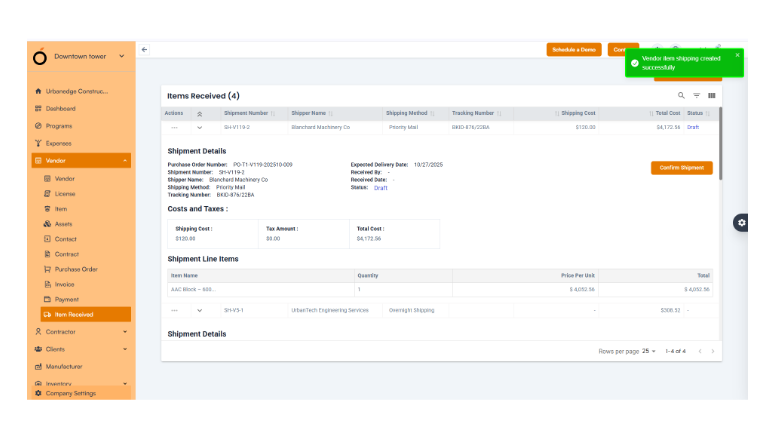
 

  • Users now receive clear and accurate feedback, improving confidence during vendor operations.

Cross-Tenant User Invitations

  • Verification issues resolved: Invite users from one tenant to another with different roles, without conflicts.
  • This supports multi-tenant project structures and enhances team collaboration across vendors, auditors, and clients.
OConstruction-Release

Release Update – 21/10: Production Fixes

This update focuses on stabilizing production environments, ensuring error-free billing, and improving overall project visibility.

Invoice Management

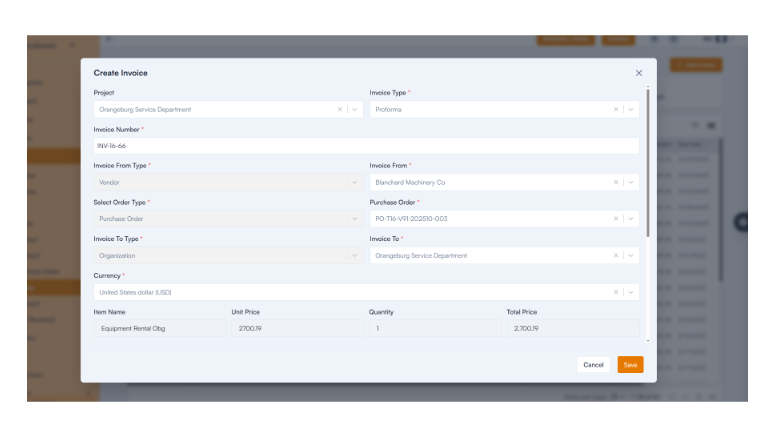
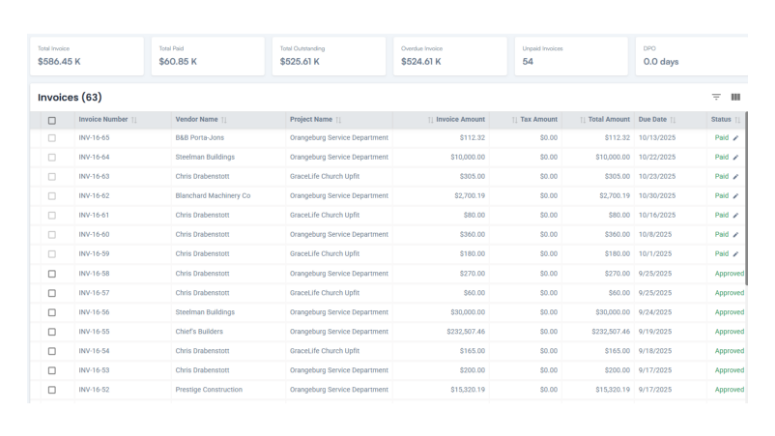
  • Invoice creation errors fixed: You can now create invoices even when the PO balance is adjusted, ensuring accurate billing and financial integrity.
 

Project Card View

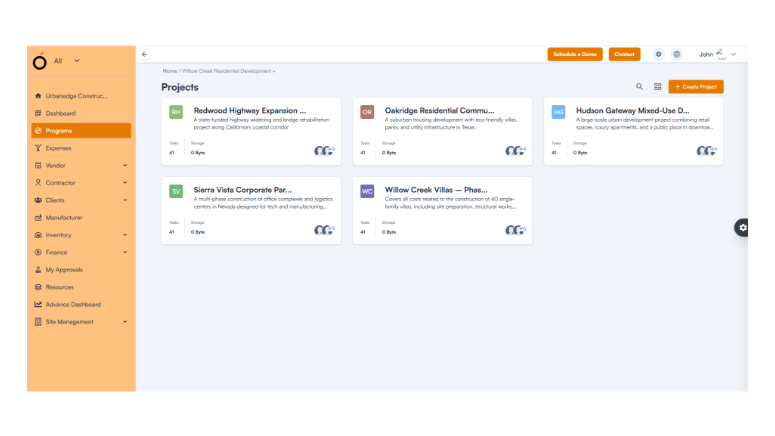
  • Relevant project display: Users now see only projects they belong to, making navigation simpler and more relevant.
Vendor Contracts and POs

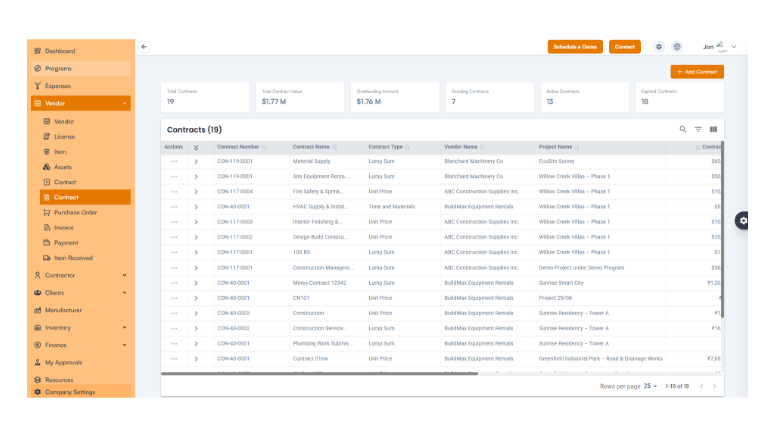
  • Accurate information: Vendor contracts and purchase orders display the correct details, improving procurement visibility.
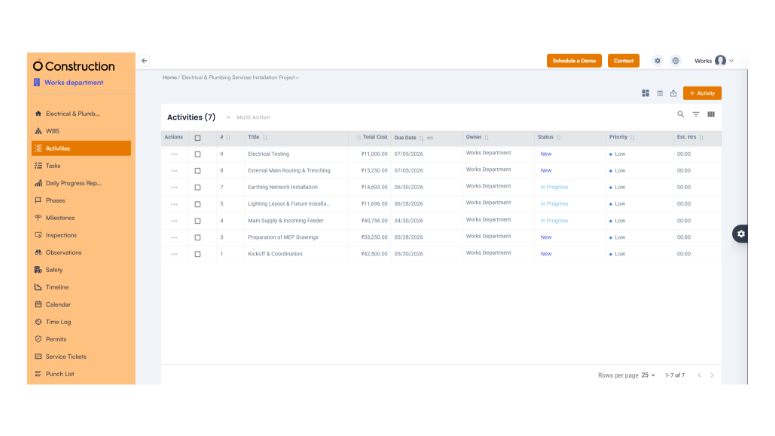
Activity and Task Management

  • Duplicate entry bug resolved and 500 errors removed for smoother task creation and listing.
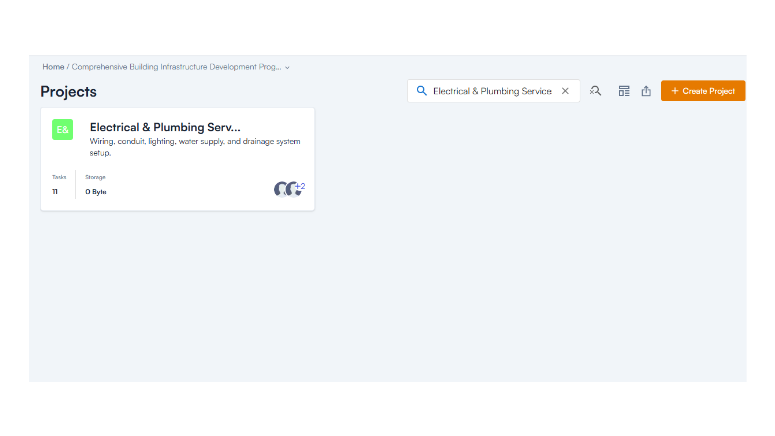
Project Search

  • New search feature added: Users can now quickly locate projects from the Project Card view.
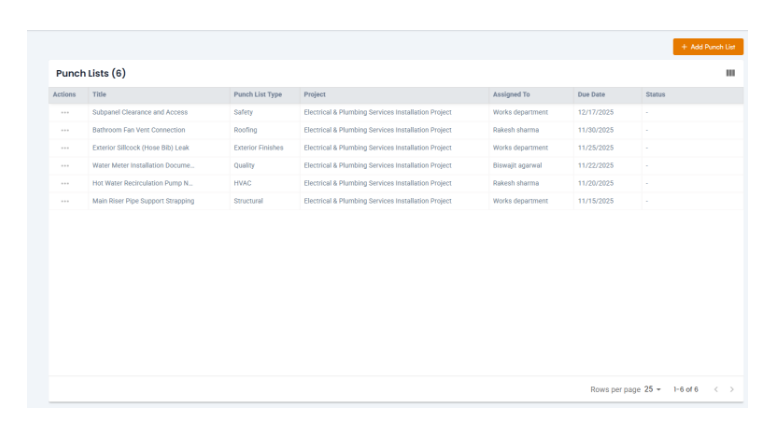
Punch List Management

  • Creation issues fixed: Punch lists now function flawlessly, ensuring complete task tracking.
Release Update – 02/09: Module Enhancements

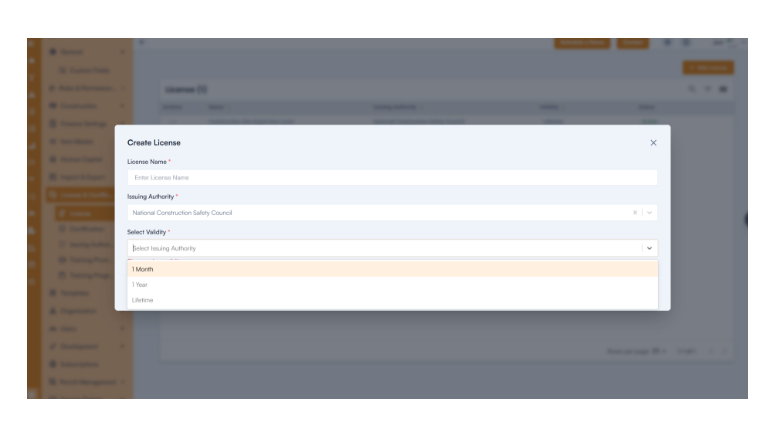
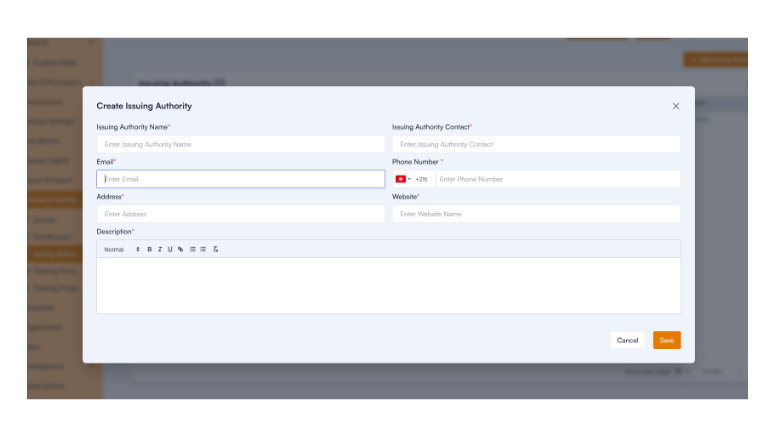
This update brings major improvements to the Dependencies & Actuals, Client Management, Custom Fields, and License & Certification modules.

Client Operations

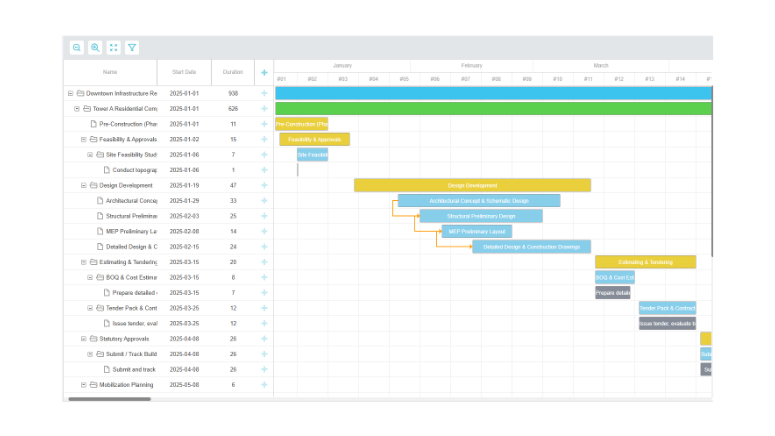
  • Accurate project timelines: Effective Start and End Dates now reflect correctly.
License & Certification

  • Full functionality restored: Users can now create certifications, issuing authorities, and training programs seamlessly.
Release Update – 01/09: WBS & Budget Fixes

Budgeting Improvements

  • Budget control: Line item totals are capped at the allocated budget to prevent overspending.
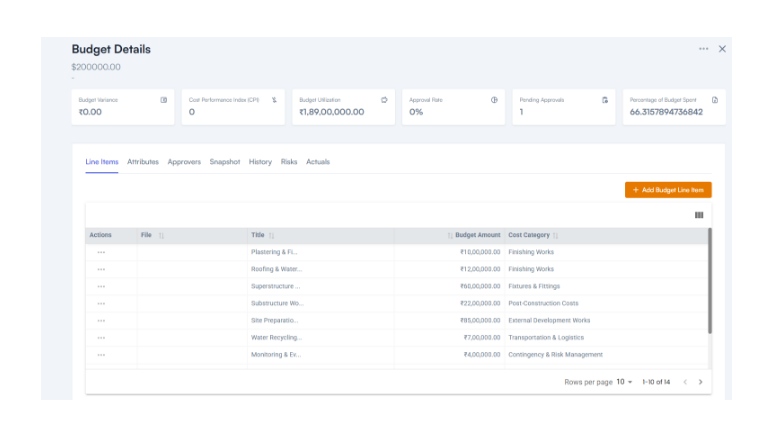
  • File access fixed: Budget files download correctly.
  • Consistent formats: Warning prompts, currency symbols, and dashboards now display properly.

Release Update – 28/08: Bug Fixes and Improvements

This update enhances usability across Shifts, Item Management, and Asset Management modules.

Shifts Module

  • Entire input fields are now clickable for faster data entry.
  • Mandatory field validation ensures complete, error-free records.
  • Standardized time formats improve clarity.

Item & Industry Management

  • Only active industries are shown in dropdowns for better accuracy.
  • Link multiple categories to a single industry.
  • Item hierarchies now display correctly, improving workflow visibility.

Asset Management

  • Accurate card names and field labels improve usability.
  • Enhanced navigation helps users find details faster.

Change Management

  • We now accept decimal values for cost and time estimates.
  • Toast messages now display accurate feedback.

Vendor & Procurement

  • Fixed default currency issues.
  • Tax rules are enforced consistently.
  • Item names now display correctly in edit mode.

Release Update – 30/07: Introducing New Features

We’ve added powerful new modules to make construction management more efficient and compliant.

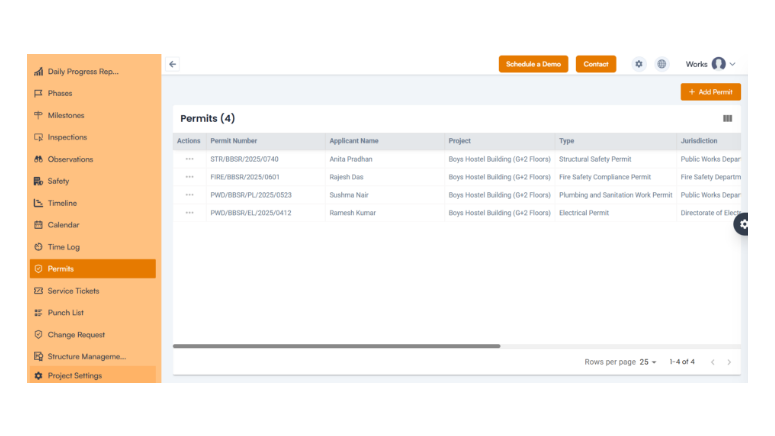
  • Permit Management

Manage and track permits from request to approval—all within the system—to prevent delays and maintain compliance.
  • Service Management:

Track vendor services, maintenance requests, and operational tasks with complete visibility.
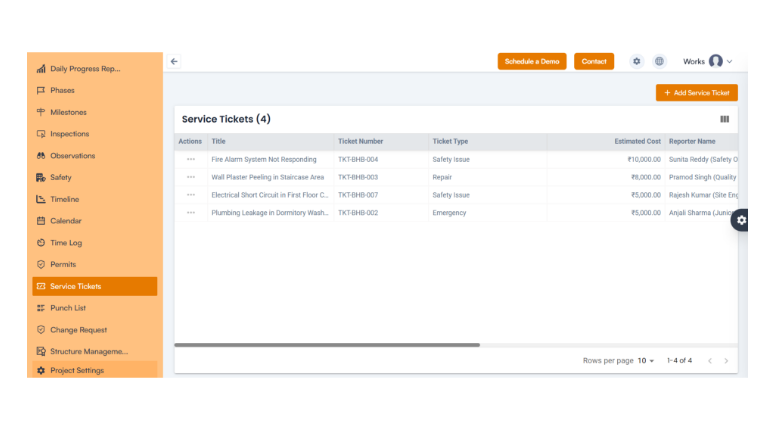
  • Punch List:

Record, assign, and monitor incomplete tasks and complete all project deliverables before closure.
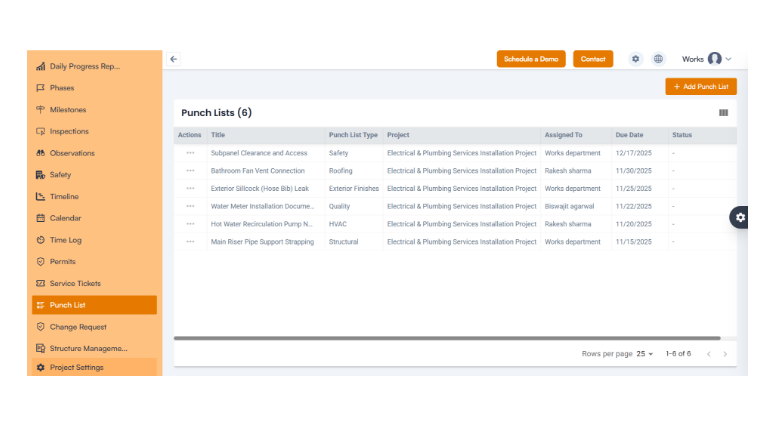
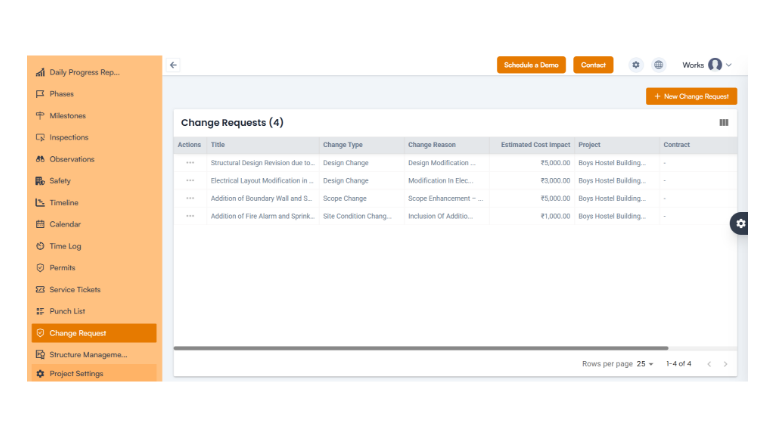
  • Change Request

Easily manage change submissions, approvals, and tracking to stay on schedule while adapting to modifications.
  • Subscription by Feature: Preview future plan-based features through the Moon Plan, allowing proactive planning for upgrades.

Conclusion

At OConstruction, we are continuously improving our platform to deliver a smoother, faster, and more reliable construction project management experience. These updates strengthen operational efficiency, enhance collaboration, and ensure precision across all modules.
Stay tuned for upcoming OConstruction release notes and discover how we’re redefining construction project management—one update at a time.

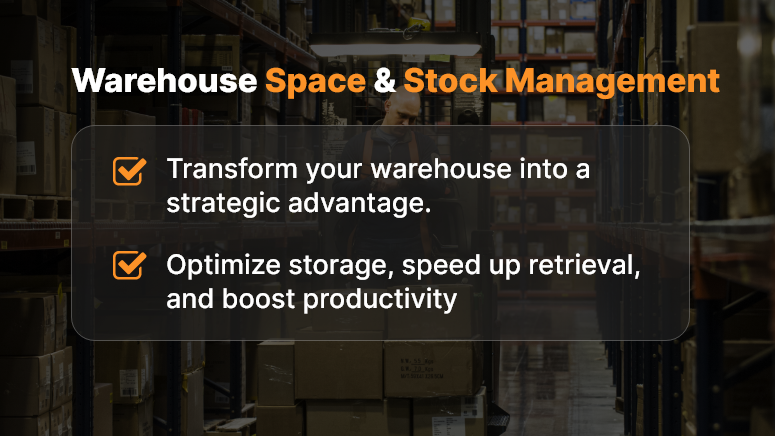
Warehouse Space Management: Optimize Storage and Retrieval of Materials

In today’s fast-moving industries, warehouse space management is more than just organizing storage — it’s a strategic pillar of operational efficiency.

In construction, manufacturing, logistics, and retail, warehouse optimization defines how smoothly materials flow, how quickly projects are completed, and how profitably operations run.

A poorly managed warehouse leads to idle inventory, blocked capital, and project delays. In contrast, an optimized warehouse ensures seamless material movement, better storage efficiency, and faster retrieval — saving time, cost, and space.

This guide explores proven strategies, technologies, and KPIs that help you transform your warehouse into a smart, data-driven, and high-performance asset.

The Strategic Importance of Warehouse Space Management

Optimizing your warehouse isn’t only about neat storage — it’s about maximizing space utilization, reducing handling time, and improving visibility across every stock item.

Common Challenges in Warehouse Optimization

  • Underutilized or overcrowded storage areas
    • Long picking and retrieval times
  • Overstocking or stockouts of key materials
  • Poor real-time inventory control
  • Safety and accessibility issues

Benefits of Optimized Warehouse Space

  • Lower carrying costs
  • Faster material retrieval
  • Improved order accuracy
  • Higher safety and compliance standards

When you apply effective warehouse space management, every square foot adds value to your operations.

Warehouse-space-&-stock-management

Assessing Your Current Warehouse Layout

Before improving space utilization, analyze your existing warehouse layout and workflow.

Key Areas to Audit

  • Space Utilization Rate: Aim for 85–90% utilization for optimal flow.
  • Material Flow: Track movement from receiving → storage → dispatch.
  • Travel Time: Measure time spent on picking and replenishment.
  • Bottlenecks: Identify areas of congestion or delay.
  • Safety & Accessibility: Ensure aisles and zones follow ergonomic standards.

A detailed audit every 6–12 months keeps warehouse performance aligned with changing demand.

Space Optimization Techniques for Modern Warehouses

  • Vertical Storage Solutions

Use vertical racking, mezzanine floors, and automated carousels to maximize vertical space without costly expansion.

  • Smart Zoning

Organize zones by:

    • Frequency of use (fast-moving goods near dispatch)
    • Material type (hazardous, fragile, or heavy)
    • Temperature requirements (cold or climate-controlled areas)
  • Cross-Docking Operations

Cross-docking allows materials to move directly from inbound to outbound without storage delays — improving inventory turnover and reducing costs.

  • FIFO and LIFO Methods

Apply FIFO (First In, First Out) for perishable goods and LIFO (Last In, First Out) when retrieval speed matters more than rotation.

  • Slotting Optimization

Use analytics to assign optimal storage locations based on item size, frequency, and handling needs. This boosts retrieval speed and labor efficiency.

Advanced Stock Management Strategies

The core of effective warehouse space management lies in accurate, real-time inventory control.

  • Real-Time Inventory Tracking

Use barcodes, RFID, or IoT sensors to maintain live inventory visibility and avoid over-ordering.

  • ABC Analysis
    • A Items: High value, strict monitoring
    • B Items: Moderate value, regular tracking
    • C Items: Low value, automated handling
  • Safety Stock & Reorder Points

Set dynamic reorder levels based on lead time and usage to avoid stockouts without overstocking.

  • WMS and ERP Integration

Integrate your Warehouse Management System (WMS) with ERP tools to achieve end-to-end visibility across procurement, dispatch, and billing.

Leveraging Technology: Building a Smart Warehouse

Modern smart warehouses rely on automation, data, and AI for better decision-making.

  • Warehouse Management System (WMS)

A WMS automates space allocation, picking routes, and inventory tracking while improving accuracy and reducing human error.

  • Internet of Things (IoT)

IoT devices track temperature, shelf weight, and equipment usage, enabling proactive maintenance and better space management.

  • Robotics & Automation

AGVs, conveyors, and robotic pickers improve retrieval times and minimize labor costs.

  • Predictive Analytics & AI

AI tools use demand patterns to forecast inventory needs, reducing waste and improving inventory turnover ratios.

Space Utilization, Safety & Compliance

Optimized warehouse space management must balance efficiency with safety.

Key Safety Measures

  • Maintain minimum 3.5 ft aisles
  • Use anti-slip flooring and rated shelves
  • Label load capacities
  • Install alarms and fire safety systems
  • Conduct regular drills and audits

Compliance with ISO 45001 and OSHA ensures safety and minimizes liability.

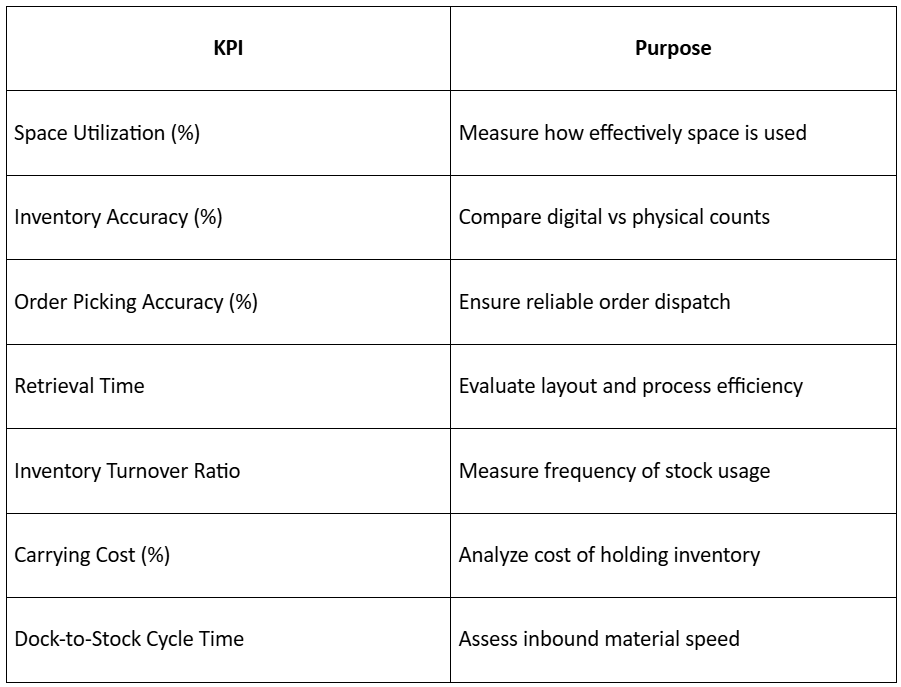
Key Warehouse Performance Metrics (KPIs)

Tracking KPIs helps maintain consistent improvement in warehouse optimization.

Warehouse-space-optimization

Training & Workforce Empowerment

A smart system only works with well-trained staff.

Train teams to:

  • Use WMS and scanning devices
  • Follow safety procedures
  • Suggest layout improvements
  • Adopt a Kaizen culture for continuous improvement

An empowered workforce sustains warehouse efficiency long-term.

The Future of Warehouse Space Management

Future-ready warehouses will feature AI-driven optimization, digital twins, and autonomous drones for auditing and tracking.

Next-gen smart warehouses will:

  • Predict demand with AI
  • Use robotic fleets for fast picking
  • Operate with green, energy-efficient systems
  • Integrate blockchain for transparent supply chains

Early adopters will achieve faster fulfillment, lower costs, and near-perfect accuracy.

Conclusion: From Storage to Strategic Efficiency

Warehouse space management is no longer a support task — it’s a strategic growth driver.

By combining layout optimization, real-time visibility, and data-driven decisions, businesses can reduce waste, boost productivity, and enhance profitability.

An optimized warehouse doesn’t just store — it powers performance, precision, and progress.

FAQs

Q1. What is warehouse space management?

Warehouse space management involves organizing and optimizing storage areas, layouts, and inventory systems to improve efficiency and reduce costs.

Q2. How does a WMS help in warehouse optimization?

A Warehouse Management System (WMS) automates tracking, space allocation, and stock movement, ensuring higher accuracy and better visibility.

Q3. Why is inventory turnover important?

High inventory turnover means materials move quickly, improving cash flow and reducing holding costs.

Q4. What technologies are used in smart warehouses?

Smart warehouses use IoT sensors, robotics, AI-driven analytics, and digital twins to enhance productivity and precision.

Logistics Optimization: Plan Deliveries to Ensure Timely Procurement

In every construction or infrastructure project, timing is everything. A single material delay can halt work, inflate costs, and disrupt downstream schedules. That’s where logistics optimization comes in — a data-driven process that ensures materials arrive exactly when needed, neither too early (clogging storage space) nor too late (stalling progress).

For modern construction teams, logistics optimization isn’t just about moving goods — it’s about coordinating procurement, transport, warehousing, and delivery schedules in perfect sync with the project plan.

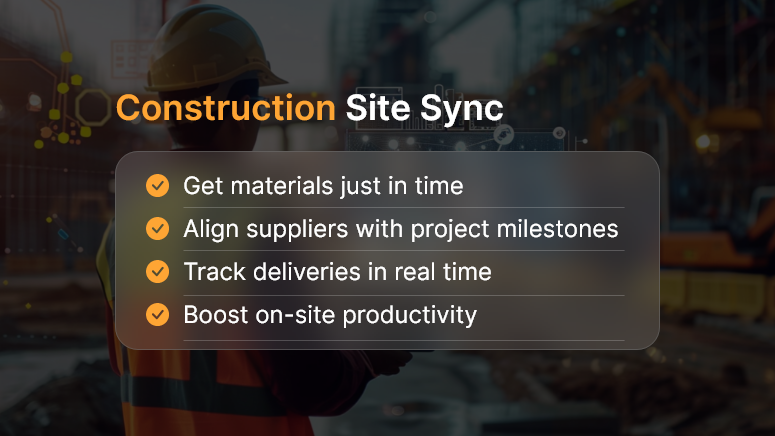
Construction Site Sync

What Is Logistics Optimization?

Logistics optimization is the strategic process of planning, executing, and refining material delivery schedules to align perfectly with project milestones. It uses real-time data from procurement, suppliers, and project sites to predict demand, plan transport routes, and coordinate warehouse releases efficiently.

Key Components

  • Demand Forecasting: Predicting what materials are needed and when.
  • Route Planning: Determining the fastest, most cost-effective routes for delivery.
  • Warehouse Scheduling: Managing dispatch and storage to prevent overstocking.
  • Supplier Coordination: Synchronizing supplier timelines with project deadlines.

Why Construction Projects Need Logistics Optimization

Unlike manufacturing or retail, construction logistics face unique challenges — variable site conditions, weather risks, and fluctuating resource availability. Optimized logistics allow you to:

  • Avoid Material Shortages: Ensure every material is available before work begins.
  • Reduce Idle Time: Keep equipment and labor productive without delays.
  • Save Storage Costs: Deliver materials just in time to avoid warehousing overhead.
  • Enhance Accountability: Track material movement across suppliers and contractors.
  • Improve Sustainability: Optimize delivery frequency and reduce fuel consumption.

The Role of Technology in Logistics Optimization

Today, digital platforms like OConstruction or Orangescrum play a crucial role in synchronizing field operations with supply chain workflows.

1. Real-Time Tracking

GPS-enabled tracking provides instant visibility of trucks, materials, and delivery status.

2. Automated Alerts

Teams receive notifications if deliveries are delayed, rerouted, or rescheduled.

3. Integrated Scheduling

The project Gantt chart directly links with supplier schedules, ensuring every delivery aligns with on-site activity.

4. Predictive Insights

AI-based forecasting tools predict material demand, helping planners avoid both shortages and surplus.

5. Collaboration Dashboards

Stakeholders — contractors, vendors, and logistics partners — collaborate in one workspace, reducing miscommunication.

How to Implement Logistics Optimization

Step 1: Map Your Supply Chain

Document all suppliers, warehouses, and delivery points. Identify bottlenecks or dependencies that frequently cause delays.

Step 2: Digitize Material Planning

Use project management software to create a material requirement plan (MRP) linked to project tasks and milestones.

Step 3: Set Up Smart Scheduling

Adopt just-in-time delivery models, ensuring materials arrive only when the site is ready to use them.

Step 4: Integrate Data Systems

Connect procurement, inventory, and transportation systems under one digital platform.

Step 5: Monitor and Improve

Use analytics dashboards to track performance metrics like delivery lead times, transport utilization, and delay frequency.

Benefits of Optimized Logistics

Benefit Impact
Reduced Delays Seamless coordination between suppliers and project timelines.
Lower Costs Less idle labor, lower fuel and storage expenses.
Improved Quality Materials handled and stored properly before use.
Enhanced Safety Minimized on-site clutter and equipment congestion.
Greater Transparency Real-time visibility into supply chain activities.

Common Challenges in Logistics Optimization

Despite its advantages, several issues can still arise:

  • Unpredictable Delays: Weather, strikes, or vehicle breakdowns.
  • Supplier Non-Compliance: Vendors failing to follow just-in-time schedules.
  • Lack of Integration: Disconnected systems across procurement, transport, and projects.
  • Manual Tracking: Human error in data entry or delivery documentation.

The solution lies in automation and integration — ensuring all stakeholders work on a single, real-time data platform.

Best Practices for Construction Logistics Optimization

  • Adopt Just-In-Time (JIT) Procurement: Align deliveries with activity schedules.
  • Use Predictive Analytics: Anticipate material needs and delivery delays.
  • Establish Clear SLAs with Suppliers: Define delivery times, penalties, and escalation paths.
  • Centralize Communication: Keep everyone informed using digital collaboration tools.
  • Review and Adjust Weekly: Logistics is dynamic; continuous improvement keeps it efficient.

How OConstruction Simplifies Logistics Planning

Platforms like OConstruction and Orangescrum are designed to remove the guesswork from material logistics.

  • Integrated Material Scheduling: Link every delivery with project milestones.
  • Vendor Coordination: Invite suppliers to track and confirm deliveries directly.
  • Analytics & Dashboards: Get insights into delivery performance and cost efficiency.
  • Real-Time Alerts: Receive instant notifications for delays or dispatch issues.

With these tools, you can achieve end-to-end logistics visibility, ensuring your projects run on schedule and under budget.

Conclusion

Logistics optimization isn’t just a backend process — it’s a strategic advantage. By aligning material flow with project timelines, companies can eliminate waste, reduce delays, and increase profitability.

In a fast-moving world of tight margins and complex projects, mastering logistics optimization is the key to operational excellence.

FAQs on Logistics Optimization

1. What does logistics optimization mean in construction?

It means planning and managing material deliveries so they arrive exactly when needed, avoiding delays and excess storage.

2. How does logistics optimization improve project efficiency?

It ensures that labor, equipment, and materials are available in sync, reducing idle time and costs.

3. What tools help with logistics optimization?

Tools like OConstruction and Orangescrum provide scheduling, tracking, and analytics dashboards.

4. How does real-time tracking support logistics?

It gives visibility of delivery status, location, and estimated arrival times.

5. What is Just-In-Time (JIT) delivery?

It’s a logistics strategy that ensures materials arrive right before they are needed for use.

6. Can logistics optimization reduce costs?

Yes — by minimizing storage, fuel, and downtime costs.

7. How does AI improve logistics planning?

AI predicts material demand and identifies potential delivery risks before they occur.

8. What are common causes of delivery delays?

Supplier issues, route inefficiencies, poor weather, and manual tracking errors.

9. How often should logistics data be reviewed?

Ideally, weekly, to adapt to changing site conditions and project timelines.

10. What’s the biggest advantage of digital logistics systems?

End-to-end visibility and collaboration between all project stakeholders.

Lessons Learned from Failed Construction Projects and How to Avoid Them

Construction projects are ambitious, high-stakes undertakings that require precise coordination across people, processes, and resources. Yet, even the best-laid plans can falter — resulting in cost overruns, delays, disputes, or outright project failure. While failures are painful, they also provide invaluable lessons that can shape how future projects are planned and executed.

In this blog, we’ll explore the key lessons learned from failed construction projects and provide actionable strategies to avoid repeating these mistakes.

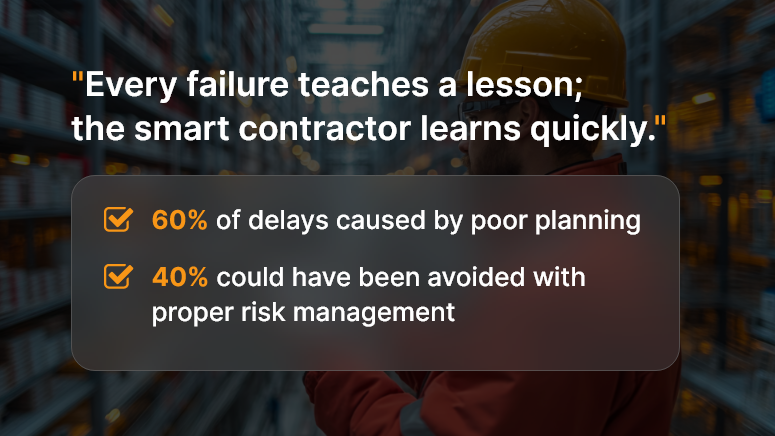
Every failure teaches a lesson

1. Poor Project Planning and Scope Definition

Lesson Learned:

One of the most common reasons for project failure is unclear scope or inadequate planning at the outset. When requirements are vague or stakeholders are not aligned, the project suffers from scope creep, rework, and escalating costs.

How to Avoid It:

  • Develop a clear project charter outlining objectives, deliverables, and success criteria.
  • Use a Work Breakdown Structure (WBS) to break down activities into manageable tasks.
  • Involve all key stakeholders during scope definition to ensure alignment.
  • Validate assumptions early with feasibility studies and risk assessments.

2. Ineffective Communication

Lesson Learned:

Breakdowns in communication — whether between owners, contractors, architects, or subcontractors — often lead to misunderstandings, errors, and delays. Many failed projects reveal that critical information was not shared on time, or decisions were not clearly documented.

How to Avoid It:

  • Implement a centralized communication platform or Common Data Environment (CDE).
  • Standardize documentation formats for RFIs, submittals, and approvals.
  • Establish a communication matrix that defines who gets what information and when.
  • Conduct regular progress meetings and distribute meeting minutes promptly.

3. Unrealistic Scheduling and Deadlines

Lesson Learned:

Projects often fail when schedules are too ambitious or do not account for contingencies. Unrealistic deadlines create a domino effect — overworked crews, compromised quality, and increased safety risks.

How to Avoid It:

  • Use tools like Critical Path Method (CPM) to create realistic schedules.
  • Factor in potential risks like weather delays, supply chain disruptions, or labor shortages.
  • Build time buffers for complex or high-risk activities.
  • Continuously monitor progress against milestones and update the schedule dynamically.

4. Insufficient Risk Management

Lesson Learned:

Unexpected challenges — ranging from design errors and regulatory changes to financial crises—can derail projects that lack a robust risk management plan. Many failed projects ignored warning signs until it was too late.

How to Avoid It:

  • Identify risks early during the planning phase and categorize them (financial, technical, environmental, contractual).
  • Develop risk response strategies: avoid, mitigate, transfer, or accept.
  • Assign a risk owner for each critical risk.
  • Maintain a live risk register and review it regularly during project meetings.

5. Financial Mismanagement

Lesson Learned:

Budget overruns are one of the biggest red flags in failed projects. Common causes include poor cost estimation, lack of transparency, and uncontrolled scope changes.

How to Avoid It:

  • Use detailed cost estimation techniques (bottom-up or activity-based costing).
  • Implement real-time cost tracking systems integrated with the project schedule.
  • Allocate a contingency budget of 5–10% to absorb unexpected expenses.
  • Regularly review financial reports and adjust forecasts as needed.

6. Lack of Quality Control

Lesson Learned:

In failed projects, quality issues often surface due to rushed timelines, inadequate inspections, or poor workmanship. These errors not only increase costs but also compromise safety and reputation.

How to Avoid It:

  • Establish a Quality Management Plan (QMP) before execution begins.
  • Conduct frequent inspections, audits, and testing at each project phase.
  • Train workers on quality standards and procedures.
  • Use digital tools for punch lists and defect tracking to close gaps faster.

7. Ignoring Human Resources and Workforce Management

Lesson Learned:

Labor shortages, unskilled workers, or poor workforce coordination can severely impact productivity. Several failed projects cite workforce mismanagement as a key factor in missed deadlines.

How to Avoid It:

  • Forecast labor requirements accurately using resource management tools.
  • Provide continuous training and certification for site workers.
  • Balance workloads to prevent fatigue and maintain morale.
  • Foster collaboration by clearly defining roles, responsibilities, and accountability.

8. Resistance to Technology Adoption

Lesson Learned:

Many construction projects still rely heavily on paper-based processes and outdated systems. This results in errors, delays, and a lack of real-time visibility. Projects that resist digital transformation risk falling behind.

How to Avoid It:

  • Adopt construction project management software for scheduling, budgeting, and communication.
  • Use Building Information Modeling (BIM) for clash detection and design coordination.
  • Implement mobile apps for on-site reporting, safety checklists, and daily logs.
  • Leverage drones, IoT sensors, and AI for progress monitoring and predictive insights.

9. Weak Stakeholder Engagement

Lesson Learned:

Ignoring the concerns of clients, communities, or regulators often results in disputes, protests, or costly project shutdowns. Failed projects highlight that stakeholder management is just as important as technical execution.

How to Avoid It:

  • Map all stakeholders and assess their level of influence and interest.
  • Engage stakeholders early and keep them updated with transparent communication.
  • Establish grievance redressal mechanisms for local communities.
  • Align project objectives with client and end-user expectations.

10. Failure to Capture and Apply Lessons Learned

Lesson Learned:

Ironically, one of the biggest lessons from failed projects is that teams often don’t document lessons learned. This leads to the same mistakes being repeated across multiple projects.

How to Avoid It:

  • Conduct post-project reviews and document lessons learned.
  • Share findings across teams and departments.
  • Maintain a knowledge repository accessible to all stakeholders.
  • Integrate lessons learned into future planning, training, and process improvements.

Conclusion

Construction projects fail not just because of external challenges but often due to avoidable internal missteps — poor planning, weak communication, and inadequate risk management. The good news? Every failure is an opportunity to improve. By learning from past mistakes and adopting proactive strategies, construction firms can reduce risks, protect margins, and deliver projects on time and within budget.

FAQs

1. Why do construction projects fail most often?

Construction projects typically fail due to poor planning, weak communication, unrealistic schedules, financial mismanagement, or a lack of proper risk controls.

2. How can scope creep be avoided in construction projects?

Scope creep can be minimized by clearly defining project scope at the outset, documenting all requirements, and implementing a strict change management process for any modifications.

3. What role does communication play in construction project success?

Effective communication ensures that all stakeholders stay aligned, decisions are documented, and critical information flows without delay. Poor communication often results in rework, disputes, and costly mistakes.

4. How do unrealistic schedules contribute to project failure?

Unrealistic deadlines pressure teams to cut corners, compromise safety, and overlook quality. They also increase stress on workers, leading to mistakes and burnout.

5. What are the best practices for construction risk management?

Identify potential risks early, categorize them (financial, technical, environmental), maintain a risk register, and assign clear responsibilities for monitoring and mitigation.

6. How can contractors avoid budget overruns?

Accurate cost estimation, real-time expense tracking, contingency reserves, and regular financial reviews are essential to prevent budget overruns.

7. Why is quality control so critical in construction projects?

Quality lapses not only lead to costly rework but also compromise safety, compliance, and reputation. Regular inspections and a strong Quality Management Plan (QMP) ensure long-term durability.

8. How can technology prevent construction project failures?

Digital project management tools, BIM (Building Information Modeling), mobile apps, and drones provide real-time insights, reduce errors, and improve collaboration between teams.

9. What’s the importance of stakeholder management in construction?

Active stakeholder engagement ensures transparency, reduces disputes, and aligns project goals with client and community expectations — ultimately preventing resistance and delays.

10. How can companies ensure they learn from past project failures?

By conducting post-project reviews, documenting lessons learned, sharing them across teams, and embedding improvements into future processes, companies build a culture of continuous learning.

Why the Construction Industry Is Going Fully Paperless

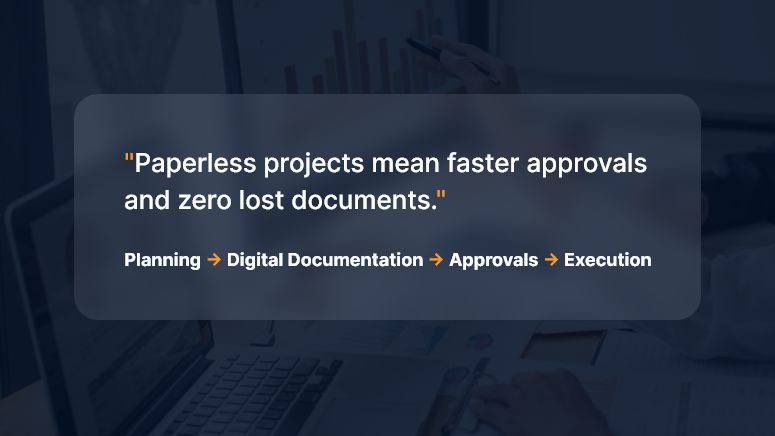
Paper used to be the jobsite’s lifeblood — drawings in tubes, clipboards in trucks, binders in site cabins. Today, leading contractors, owners, and subs are ditching paper for good—not as a gimmick, but because digital-first delivery is now faster, safer, cheaper, and far easier to control. This deep dive explains the “why,” the “what,” and the “how” of going fully paperless, with practical steps you can start using on your next project.

The Big Why: What Paperless Actually Solves

1) Version chaos → Single source of truth

Paper drawings and printed schedules become outdated the moment someone hits “print.” A paperless setup creates a living project record—everyone sees the latest drawings, RFIs, submittals, and changes in one place.

2) Cost and time leakage → Measurable productivity

Printing, couriering, rework due to outdated plans, manual data entry from site forms—all of it adds hidden cost. Digital workflows automate handoffs and push tasks to the next responsible person immediately.

3) Risk and claims → Traceable audit trail

When decisions are captured digitally (with timestamps, versions, and approvals), you build a defensible record that reduces disputes and accelerates claims resolution.

4) Safety and quality → Real-time feedback loops

Inspections, punch lists, and permits move from weekly paperwork to same-day digital checks with photo evidence and geolocation.

5) Environmental impact → Lower footprint

Less paper, ink, transport, and storage—plus safer archiving for decades.

What “Fully Paperless” Looks Like (End-to-End)

A modern, paperless construction stack typically includes:

  • Common Data Environment (CDE): The project’s source of truth for documents, models, and communications.
  • Mobile field apps: For drawings, RFIs, daily logs, safety checks, timesheets, and punch lists—even offline.
  • Digital drawings & models: 2D sheets with hyperlinked callouts and 3D/BIM models for clash detection and quantity takeoff.
  • Workflow automation: RFI → Submittal → Review → Distribution → Change Order, all with rules, SLAs, and auto-routing.
  • E-signatures & forms: Legally binding approvals without printing.
  • QR/NFC tagging: Equipment, rooms, and assets tagged for instant access to specs and history.
  • Photo & drone capture: Progress, safety, and as-built verification with timestamps and locations.
  • IoT sensors: Concrete curing, temperature, humidity, vibration—feeding the CDE.
  • Integrations: ERP, accounting, scheduling, and vendor portals—so data moves, not people.
  • Standards & naming: ISO-style conventions for files, revisions, and metadata to keep things findable for years.

High-Impact Workflows to Digitize First

Drawings & Revisions

  • Publish controlled sets; link details, RFIs, and changes.
  • Enforce “latest only” access; archive prior sets automatically.

RFIs & Submittals

  • Structured forms, mandatory fields, attachments, and due dates.
  • Auto-route to the right reviewer; escalate overdue items.

Change Management

  • Scope change → digital estimate → client e-sign → automatic budget/schedule update.
  • Side-by-side cost deltas and revision cloud links.

Inspections & QA/QC

  • Checklist templates, photo markup, geotags.
  • Punch items auto-assign to trades; close-out tracked by status.

Safety Permits & Meetings

  • Toolbox talks recorded on mobile; attendance with signatures.
  • Permit-to-work and JSA forms are issued and closed digitally.

Timesheets & Daily Logs

  • Crew hours captured on devices; coded to WBS/Cost Codes.
  • Weather, deliveries, equipment usage, and blockers in one daily entry.

Closeout & Handover

  • O&M manuals, warranties, as-builts, and asset registers compiled from the live CDE.
  • Room-by-room QR codes hand the owner a digital twin of documentation.

The Measurable Business Case

Direct savings

  • Printing & courier costs
  • Admin hours re-keying data
  • Rework from building off old drawings

Indirect gains

  • Faster approvals → shorter schedules
  • Stronger claim positions → fewer write-offs
  • Better safety & quality → fewer incidents and callbacks

Simple ROI example

  • Annual printing/courier spend: ₹8,00,000
  • Admin re-entry time saved: 800 hours × ₹600/hr = ₹4,80,000
  • Rework avoided: even a modest ₹6,00,000

Estimated Year-1 impact: ₹19,80,000 saved versus software + rollout of, say, ₹12,00,000 → ROI ≈ 65% in the first year, with higher returns in Year-2 once adoption stabilizes.

(Adjust inputs to your region and volumes—the logic holds.)

Governance: Keep It Clean, Or It Gets Messy Fast

Going paperless is less about tools and more about rules:

  • Naming conventions: Project–Discipline–Area–Type–Revision.
  • Metadata policy: Status (Issued for Construction, Draft, For Review), discipline codes, and revision history are mandatory.
  • Permissions: Role-based access; external collaborators are isolated to what they need.
  • Retention & archive: Define what’s retained (and for how long), and how it’s exported at project close.
  • Owner requirements: Bake handover deliverables into contracts: format, folder structure, model LOD, and warranty data.

Change Management: Bring People With You

  • Executive sponsorship: Make “digital only” a visible leadership priority.
  • Pilot → scale: Start with one project or region; prove the value; iterate.
  • Field-first design: Optimize for foremen and supers on mobile—even offline.
  • Training that sticks: 30-minute task-based sessions (“Raise an RFI from a photo”), short videos, on-cart guides.
  • Incentives: KPIs that count only digital artifacts (no paper exceptions).
  • Champions: One “digital champion” per discipline per site.

Security & Compliance

  • Access control: SSO, MFA, and least-privilege roles.
  • Data residency & backups: Know where your project data lives; automate immutable backups.
  • E-signature legality: Use providers compliant with applicable e-signature laws in your region.
  • Incident response: Document who to call and how to isolate a breach.
  • Vendor due diligence: Review uptime SLAs, encryption, certifications, and export options.

A Practical 30-60-90 Day Plan

Days 0–30: Foundation

  • Select or rationalize your CDE and mobile toolkit.
  • Define naming, permissions, and metadata standards.
  • Digitize drawings, RFIs, submittals; set up e-signatures.
  • Train champions and run sandbox exercises.

Days 31–60: Field Rollout

  • Move daily logs, inspections, timesheets, and punch lists into mobile forms.
  • Turn on auto-routing and deadlines for RFIs/submittals.
  • Establish “latest drawing only” enforcement.
  • Begin weekly adoption dashboards.

Days 61–90: Integrations & Scale

  • Connect accounting/ERP and schedule data for cost and plan alignment.
  • Implement QR/NFC asset tagging in one pilot area.
  • Standardize closeout package structure.
  • Publish lessons learned and lock playbooks.

Key Metrics to Track

  • RFI cycle time (avg days from submit to answer)
  • Submittal on-time rate (%)
  • Rework rate (% of labor/material costs)
  • Field app adoption (% crews submitting digitally)
  • Drawing revision compliance (% interactions on the latest set)
  • Punch close time (avg days to close)
  • Paper cost eliminated (₹ and pages)
  • Schedule variance caused by approvals (days saved)

Common Pitfalls (and How to Avoid Them)

  • “Lift and shift” thinking: Don’t scan forms and call it digital—redesign them to capture structured data.
  • Too many tools: Consolidate. Fewer systems → higher adoption.
  • No offline plan: Choose apps that cache drawings and forms for low-signal sites.
  • Weak standards: Without naming and metadata discipline, your CDE becomes another file dump.
  • Ignoring the owner: Clarify handover requirements early; otherwise, you’ll redo closeout at the end.

Paperless on Different Project Types

  • Residential & mid-rise: Focus on drawings, punch, and QA checklists; keep it simple and mobile-first.
  • Industrial & infrastructure: Add model coordination, sensor data, and rigorous change controls.
  • Fit-outs & fast-track: Automate submittals and approvals; e-signatures are the schedule saver.
  • Public works: Emphasize traceability, accessibility standards, and long-term archiving.

Your First Five Moves (If You Do Nothing Else)

  • Pick a CDE and make it the only official place for drawings.
  • Enforce digital RFIs/submittals with due dates and auto-routing.
  • Put daily logs, inspections, and punch lists on mobile—no paper backup.
  • Turn on e-signatures for change orders and approvals.
  • Publish a one-page “Digital Rules of the Road” and train every foreman.

FAQs

Q1. Are e-signatures legally valid for construction contracts and change orders?

Yes, in most jurisdictions, e-signatures are recognized if captured through compliant providers and your contracts allow them. Align with your legal counsel and client preferences early.

Q2. What if my sites have poor connectivity?

Choose apps with offline mode that cache drawings and forms and sync later. Set a daily sync routine (e.g., before toolbox talks or after shift).

Q3. How do I bring my subcontractors along?

Keep access scoped and simple—trade-specific dashboards, required training, and clear “digital only” clauses in bid and award packages.

Q4. How do I ensure people use the latest drawings?

Disable access to superseded sets, post revision alerts, and require that all field links open the “current” drawing alias inside the CDE.

Q5. What about long-term storage and handover?

Define a standard closeout structure (as-builts, O&M, warranties, asset data). Export both human-readable PDFs and machine-readable data (CSV/COBie) as required by the owner.

The Dos and Don’ts of Client Communication in Construction

In the construction industry, communication is more than just exchanging information — it’s the foundation for trust, collaboration, and project success. Whether you’re building residential homes, commercial complexes, or infrastructure projects, how you communicate with clients can make or break the relationship.

Poor communication can lead to cost overruns, project delays, and disputes, while clear and proactive communication fosters transparency, trust, and smoother project delivery. In this blog, we’ll cover the dos and don’ts of client communication in construction, giving you practical strategies to strengthen relationships and deliver projects with confidence.

Why Communication Matters in Construction

Unlike many other industries, construction involves:

  • High financial stakes: Projects represent significant investments for clients.
  • Multiple stakeholders: Architects, engineers, contractors, and subcontractors need to stay aligned.
  • Uncertainty & risks: Weather conditions, supply chain delays, and design changes are common.
  • Long timelines: Communication lapses over months (or years) can cause major misunderstandings.

Strong client communication is therefore not just good practice — it’s essential to managing risk, avoiding disputes, and ensuring client satisfaction.

Clear communication saves time

The Dos of Client Communication

1. Do Set Clear Expectations Early

At the project kickoff, align with your client on timelines, budgets, milestones, and communication protocols. Share a project roadmap and clarify who the client’s primary point of contact will be.

Example: Provide a project calendar that highlights key milestones such as foundation completion, structural work, and finishing stages.

2. Do Listen Actively

Construction clients may not always articulate their needs in technical terms. Listen carefully, ask clarifying questions, and restate what you’ve heard to ensure alignment.

Tip: Use phrases like, “So you’d like the living room to have more natural light — does that mean adding a skylight or larger windows?”

3. Do Use Simple Language

Avoid overloading clients with jargon like “M25 concrete mix” or “cantilevered beam.” Instead, explain in plain English and use visuals (drawings, photos, or 3D models) to make complex concepts easy to grasp.

4. Do Provide Regular Updates

Clients get nervous when they don’t hear from you. Even if everything is on track, schedule weekly or biweekly updates with progress photos and site notes.

Best practice: Create a standard project update template that covers completed tasks, current progress, upcoming milestones, and any issues.

5. Do Document Everything

Verbal instructions can cause disputes later. Always follow up with written documentation—whether it’s a change order, cost adjustment, or design decision. Store these in a central repository accessible to the client.

6. Do Be Transparent About Challenges

Delays, budget overruns, and unforeseen site issues are part of construction. Instead of hiding problems, be upfront with clients. Share the issue, its impact, and proposed solutions. Transparency builds trust, even during setbacks.

7. Do Ask for Feedback Regularly

At each milestone (e.g., foundation, structural work, finishing), ask clients for feedback. This avoids late-stage surprises and ensures their vision is being met.

The Don’ts of Client Communication

1. Don’t Overpromise

Promising an unrealistic completion date or underestimating costs may win approval initially, but it creates disappointment later. Be realistic about timelines and budgets to set achievable expectations.

2. Don’t Hide Problems

Avoid the temptation to delay sharing bad news. Hidden issues (like material shortages or failed inspections) only escalate when ignored. Clients appreciate honesty and proactive problem-solving.

3. Don’t Assume Clients Understand Technicalities

Never assume your client can interpret technical drawings or specifications. Break things down, provide visual aids, and confirm understanding.

4. Don’t Communicate Inconsistently

Random updates and sporadic meetings create confusion. Stick to a structured communication schedule and avoid going silent for long stretches.

5. Don’t Get Defensive in Disputes

When a client raises concerns, don’t react emotionally or defensively. Instead, acknowledge their perspective and provide constructive solutions.

6. Don’t Rely on Informal Channels Alone

While WhatsApp or site chats are convenient, important approvals and change requests should never live only in informal messages. Always back them up with documented agreements.

Best Practices for Smooth Communication

  • Leverage Technology: Use project management tools (like Procore, Buildertrend, or Orangescrum) to share updates, files, and progress reports in one place.
  • Centralize Documentation: Store contracts, designs, and reports in shared folders accessible to clients.
  • Use Visual Updates: Photos, progress dashboards, and 3D models make updates clear and engaging.
  • Schedule Site Walkthroughs: Invite clients to see progress firsthand at key milestones.
  • Train Teams: Ensure all site supervisors and project managers know how to communicate professionally with clients.

Conclusion

Client communication in construction is not just about sharing updates — it’s about building trust, managing expectations, and ensuring successful project delivery.

By following the dos — like setting expectations, listening actively, documenting everything, and being transparent—and avoiding the don’ts — like overpromising, hiding issues, or relying only on informal chats — you can strengthen relationships, reduce risks, and deliver projects more smoothly.

In construction, great communication is as critical as great craftsmanship.

FAQs

1. Why is client communication important in construction?

Construction projects involve high costs, long timelines, and multiple stakeholders. Poor communication can lead to delays, cost overruns, and disputes.

2. How often should clients be updated on construction projects?

Weekly or biweekly updates work best. During critical phases, more frequent updates may be necessary.

3. What’s the best way to deliver bad news to a client?

Be transparent and proactive. Explain the issue, its impact, and provide clear solutions or alternatives.

4. Should communication be formal or informal?

Both have their place. Formal communication (emails, reports, contracts) is essential for documentation. Informal chats (calls, site visits) help build rapport.

5. Which tools help with construction communication?

Tools like Procore, Buildertrend, Orangescrum, and even shared Google Drive or Slack channels can centralize communication and improve transparency.

Category: Construction Academy

Subcategory: Budgeting and Planning

Subcategory: Construction Phase

Subcategory: Design Coordination

Subcategory: Estimation Techniques

Subcategory: Initiation and Feasibility

Subcategory: Introduction

Subcategory: Personal Management

Subcategory: Project Close-Out

Subcategory: Project Scheduling

Subcategory: Project Teams

Subcategory: Proposal Management

Subcategory: Total Quality Management

Subcategory: Tracking and Control

Subcategory: Work Breakdown

Category: Help Desk

Subcategory: Client

Subcategory: Construction 101

Subcategory: Contractor Management

Subcategory: Expense

Subcategory: Finance Budget

Subcategory: Inventory Management

Subcategory: My Approvals

Subcategory: Site Management

Subcategory: Vendor Management