Tracking Labor Hours in the Field: Why Accuracy Pays Off

Construction leaders often underestimate the cost of inaccurate time tracking. But small errors add up. According to a recent FMI study, poor labor productivity accounts for over 35% of project losses.

Whether it’s handwritten logs, memory-based entries, or outdated spreadsheets, traditional methods of tracking labor hours are prone to error, fraud, and inefficiency.

In this blog, we’ll explore why labor hour accuracy is critical for project profitability, how it impacts your team’s performance, and how digital platforms like OConstruction can simplify the entire process.

Every Hour Counts on the Field

Business Relevance & Why It Matters

Time is money — especially in construction. When hours aren’t tracked accurately, you’re not just losing billable time. You’re bleeding profits.

Here’s why tracking labor hours accurately matters:

  • Cost Control: Labor is the largest variable cost in construction. Inaccurate logs skew project budgets and reduce margins.
  • Job Site Accountability: Clear time logs increase visibility into who worked where, when, and for how long.
  • Payroll Accuracy: Misreporting hours leads to overpayment or disputes, hurting trust and compliance.

Real-World Pain Points:

  • A plumbing subcontractor misreported hours weekly, leading to $12K in overpayments in just one quarter.
  • A general contractor struggled to assess labor performance across sites due to inconsistent reporting from field supervisors.
  • A site manager spent over 6 hours a week reconciling timesheets manually.

That’s where automation changes the game.

Best Practices, Frameworks, and Actionable Strategies

Do’s and Don’ts for Labor Hour Tracking

Do:

  • Use a digital time tracking app with GPS-based clock-ins to eliminate manual errors.
  • Establish a standard operating procedure for logging hours across crews.
  • Audit time logs weekly to catch inconsistencies early.
  • Integrate tracking with payroll to streamline compensation.

Don’t:

  • Don’t rely on memory or post-job logging — it’s inaccurate and unaccountable.
  • Don’t allow inconsistent formats (Excel, paper, WhatsApp) for time entries.
  • Don’t ignore field feedback when selecting tracking tools.

Quick Wins

  • Geo-fencing clock-ins: Prevents false entries from offsite locations.
  • Photo check-ins: Validates physical presence.
  • Mobile accessibility: Enables real-time logging from any job site.

Framework: Smart Labor Tracking in 5 Steps

  • Centralize time tracking through a single platform like OConstruction.
  • Customize crews, tasks, and job codes for granular tracking.
  • Train field teams on how to use mobile apps for clock-in/out.
  • Monitor logs with real-time dashboards.
  • Analyze data weekly to improve estimates and identify trends.

With OConstruction, you get:

  • Real-time crew tracking by project
  • Mobile time entry with location stamps
  • Auto-generated reports for payroll and analysis
  • Seamless integration with your job cost management

Customer Story/Use Case Example

For example, BuildWell Group, a mid-sized general contracting company, used OConstruction’s mobile time tracking to reduce payroll discrepancies by 94% in just 60 days.

Here’s how:

  • They deployed the mobile app across 6 active sites.
  • Team leads were trained to clock in and log tasks.
  • Weekly reports showed discrepancies and underutilized labor.

As a result, they improved crew efficiency, saved over $15K in admin hours, and gained real-time visibility across projects.

Key Takeaways & Closing Summary

Accurate tracking of labor hours isn’t just an HR concern — it’s a strategic business lever.

From cost control to payroll accuracy to operational visibility, small improvements in how you log and manage field hours create compounding returns.

OConstruction simplifies the complexity with tools built for field crews — easy to use, mobile-friendly, and integrated with your project workflow.

Don’t let poor time tracking eat into your margins.

Modern Field Reporting Techniques with OConstruction

Between illegible handwriting, misplaced clipboards, and delayed handovers, construction teams lose hours each week — and risk costly miscommunication. In today’s fast-paced construction environment, where every minute counts and margins are tight, there’s no room for manual reporting.

Modern field reporting isn’t just a trend; it’s a necessity. With cloud-based tools like OConstruction, teams can record site data in real-time, directly from their mobile devices — and instantly share it with the office.

This blog explores why switching from clipboard to cloud is a game-changer, what it means for field operations, and how to do it right. Whether you’re a project manager, site engineer, or contractor, you’ll learn how to modernize your reporting workflow and boost productivity where it matters most: on the ground.

Business Relevance & Why It Matters

Let’s face it: outdated processes are expensive. Manual field reports lead to data loss, project delays, and misaligned teams. Worse, they leave decision-makers flying blind.

In construction, where timelines are tight and compliance is non-negotiable, modern field reporting creates a competitive edge.

Why companies should care:

  • Data accuracy: Manual entry increases human error. Digital input with predefined fields minimizes it.
  • Speed: Waiting for physical reports to arrive at the office delays critical decisions.
  • Visibility: Real-time reporting empowers leadership with instant site insights.

Who benefits the most:

  • Project Managers get real-time updates to keep the project on track.
  • Safety Officers log incidents and checklists on the go.
  • Supervisors and Engineers document progress with images and notes from the field.

Real-world problem: A subcontractor forgets to submit a daily report. The result? A billing dispute weeks later due to undocumented work.

Digital solution: With OConstruction, daily logs are timestamped, geo-tagged, and securely stored in the cloud, making them accessible and verifiable instantly.

In short, modern field reporting reduces disputes, improves compliance, and accelerates project timelines.

the old way & the modern way

Best Practices, Frameworks, and Actionable Strategies

1. Ditch the Paper, Don’t Ditch the Process

Start by digitizing existing paper forms. You don’t need to reinvent the wheel — just rebuild it digitally.

  • Convert daily logs, safety checklists, and material usage forms into digital templates.
  • Use conditional logic to prompt users for required fields.

2. Choose Mobile-First Tools Built for the Field

Not all software is made for job sites.

  • Pick tools like OConstruction that offer offline mode, photo capture, and voice-to-text.
  • Ensure the app is user-friendly for non-tech-savvy workers.

3. Standardize Your Reporting Templates

Consistency is key.

  • Use standard templates to ensure data is comparable across projects and teams.
  • Pre-fill project names, locations, and tasks to save time and reduce errors.

4. Train Your Field Teams

Adoption depends on ease of use.

  • Run short training sessions or tool walkthroughs during toolbox talks.
  • Encourage supervisors to lead by example and support their crew.

5. Use Real-Time Syncing for Faster Decision-Making

Eliminate the reporting lag.

  • OConstruction automatically syncs data with the cloud, giving office teams immediate visibility.
  • This enables faster responses to delays, RFIs, or safety issues.

6. Visualize Progress with Dashboards & Reports

Make the data work for you.

  • Use OConstruction’s built-in dashboards to monitor KPIs like daily progress, delays, or labor usage.
  • Export reports instantly for clients or compliance audits.

7. Maintain Data Integrity and Audit Trails

Protect your business.

  • Time-stamped logs, location data, and image attachments ensure verifiable reports.
  • Use role-based permissions to control access and maintain data integrity.

Customer Story/Use Case Example

For example, Rivera InfraTech, a mid-sized commercial construction firm, used OConstruction’s mobile field reporting tool to digitize their daily site logs across 12 active job sites.

Before switching, their foremen filled out paper forms that often arrived late or incomplete. This led to disputes with subcontractors and delayed invoicing.

With OConstruction:

  • Daily reports were submitted in real-time with photos.
  • Supervisors were alerted immediately of any safety incidents.
  • Project managers could track progress live from the dashboard.

As a result, Rivera InfraTech reduced reporting time by 60%, cut back disputes by 40%, and improved billing cycle efficiency by 30%.

Key Takeaways & Closing Summary

Modern field reporting is more than just going paperless. It’s about building a faster, more connected, and data-driven construction team.

By shifting from clipboards to the cloud with a solution like OConstruction, companies can:

  • Boost on-site efficiency
  • Improve project visibility
  • Reduce disputes and delays

Whether you’re managing a single site or scaling operations across regions, digital field reporting ensures your team works smarter — not harder.

The future of field operations is mobile, cloud-based, and real-time. Make sure you’re not left behind.

Cut Construction Costs with Smarter Project Management Software

In the construction industry, controlling costs is one of the biggest challenges. Material prices fluctuate, labor overruns happen, and delays on-site can quickly turn into budget disasters. But what if you could reduce these issues with a single tool?

That’s where smart project management software like OConstruction steps in—giving you the visibility, control, and real-time collaboration your construction projects need to stay on time and under budget.

Why Construction Projects Go Over Budget

Before we dive into the solution, let’s look at the most common reasons construction costs spiral out of control:

  • Poor scheduling and miscommunication
  • Inefficient use of labor and equipment
  • Lack of real-time updates on-site
  • Missed deadlines and overtime costs
  • Manual data entry and paperwork delays

All of these are avoidable—with the right tools in place.

How OConstruction Helps You Cut Costs

OConstruction is an all-in-one construction project management software designed specifically to reduce waste, improve accountability, and maximize your project ROI.

Here’s how it helps:

1. Real-Time Budget Tracking

Monitor project costs as they happen. Get instant updates on labor, materials, and subcontractor expenses so you can take immediate action before the budget slips.

2. Smarter Scheduling

Assign tasks, set dependencies, and track milestones all in one place. With automated notifications and calendar views, your team stays aligned-and your timelines stay on track.

3. Field-to-Office Communication

Whether your teams are on-site or in the office, OConstruction keeps everyone connected. Say goodbye to delayed updates or missed approvals that lead to costly errors.

4. Document & Resource Management

No more lost files or outdated spreadsheets. Store drawings, contracts, purchase orders, and daily logs in the cloud-accessible anytime from any device.

5. Subcontractor Coordination

Easily assign and monitor subcontractor tasks, track deliverables, and hold vendors accountable with shared timelines and clear scopes of work.

Real-World Benefits You Can Expect

  • Faster Project Completion
  • Lower Labor Costs
  • Fewer Cost Overruns
  •  Improved Resource Allocation
  • Less Administrative Overhead

Contractors using smart software report savings of up to 20% in overall project costs, simply by improving communication, planning, and tracking.

Start Saving Today with OConstruction.

If you’re still managing construction projects with spreadsheets, whiteboards, and endless WhatsApp groups—it’s time for an upgrade.

OConstruction gives you the tools to run your projects smarter, faster, and more profitably. From the first estimate to final handover, everything stays organized, visible, and efficient.

Start your journey to cost-effective construction today. Visit OConstruction.io

Final Thoughts

Cutting construction costs isn’t just about buying cheaper materials or hiring less labor. It’s about improving how you manage your projects—from planning to execution. With OConstruction, you’re not just saving money—you’re building smarter.

How to Create a Work Breakdown Structure for Your Construction Project

You can’t build a skyscraper without a blueprint. The same goes for your project.

In construction, chaos creeps in when teams lack clarity on tasks, timelines, or ownership. That’s where a Work Breakdown Structure (WBS) comes in. It transforms complex construction projects into structured, manageable, and trackable components.

In this blog, you’ll learn how to create an effective WBS for your project, understand its benefits, and see how tools like OConstruction simplify the process. Whether you’re a construction manager, general contractor, or site engineer, this guide will help you gain better control over timelines, budgets, and deliverables.

What WBS Does for You

Why a WBS Matters in Construction Project Management

Creating a WBS isn’t just a documentation step — it’s a business-critical activity.

Why should construction companies care?

  • Budget Blowouts: Projects without structured task breakdowns often face overspending.
  • Missed Deadlines: Without clear sequencing, timeline slips become inevitable.
  • Miscommunication: Stakeholders get confused about scope and ownership.

Who benefits from a WBS?

  • Construction Managers: Improve scheduling and resource allocation.
  • Project Owners: Gain transparency and progress visibility.
  • Field Engineers: Understand exact deliverables per phase.

Real-World Scenarios

  • A highway construction project failed to divide its drainage phase into separate design, excavation, and laying steps, and delays mounted.
  • A residential builder broke down its project into clear deliverables (foundation, framing, roofing, electrical) and finished 10 days early.

WBS = Risk mitigation + Predictable execution.

How to Build a WBS: Step-by-Step Guide for Construction Projects

A well-defined WBS makes your entire project plan stronger. Here’s how to create one effectively:

1. Define the Final Deliverable

Start by stating what you’re building — e.g., a commercial building, highway, or industrial park. Everything else flows from this.

2. Break the Project into Major Phases

Use phrases like:

  • Pre-Construction: Permits, land acquisition
  • Site Work: Excavation, grading
  • Construction: Foundation, framing, roofing
  • Post-Construction: Cleanup, inspection

3. Divide Phases into Work Packages

Break each phase into smaller tasks called work packages:

  • Example: Under “Framing,” work packages might be “Wall Framing,” “Floor Joists,” “Roof Trusses.”

4. Assign Responsibility & Timeline

Each work package should have:

5. Use OConstruction to Visualize the WBS

OConstruction lets you create a visual WBS tree, attach budgets, assign teams, and set dependencies—all from a single dashboard.

6. Validate the Hierarchy

Make sure:

  • Nothing is left out
  • Tasks aren’t duplicated
  • Each component is essential and measurable

Best Practices for Building a Strong WBS

Do’s

  • Do involve all stakeholders early.
  • Do make tasks mutually exclusive to avoid overlap.
  • Do use consistent naming conventions.
  • Do use numbering to define hierarchy (e.g., 1.0, 1.1, 1.2).

Don’ts

  • Don’t confuse activities with deliverables.
  • Don’t go too granular too early.
  • Don’t skip regular updates.

Quick Wins with OConstruction

  • Auto-generate WBS from templates
  • Drag-and-drop task reordering
  • Built-in Gantt chart integration
  • Real-time cost vs. estimate comparison

Customer Success Example

For example, BuildLogic Inc., a mid-size commercial construction firm, used OConstruction’s WBS module to plan a $5M office park project.

  • They broke down tasks into 4 levels
  • Assigned team leads to each work package
  • Tracked phase-wise budgets in real time

Result: They completed the project 12% under budget and 3 weeks ahead of schedule, thanks to better visibility and cost control.

Key Takeaways

  • A Work Breakdown Structure improves budget tracking, team accountability, and scheduling.
  • It helps construction professionals manage complexity and reduce risk.
  • Tools like OConstruction let you build, visualize, and manage WBS digitally, ensuring smooth execution.

FAQs

Q1. What is a Work Breakdown Structure (WBS) in construction?
A WBS is a hierarchical breakdown of a construction project into smaller, manageable tasks or “work packages” that help teams track progress, budgets, and responsibilities.

Q2. Why is a WBS important in construction project management?
Without a WBS, projects face budget overruns, missed deadlines, and miscommunication. A WBS ensures clarity, accountability, and better resource allocation.

Q3. Who benefits most from using a WBS?
Construction managers, project owners, contractors, and field engineers all benefit by gaining transparency, clearer deliverables, and more predictable outcomes.

Q4. How detailed should a construction WBS be?
It should break projects into manageable phases and work packages, but avoid excessive granularity. Each component should be clear, measurable, and owned by someone.

Q5. What’s the difference between a WBS and a project schedule?
A WBS defines “what” needs to be delivered (scope), while a project schedule defines “when” and “how” tasks will be executed.

Q6. What are common mistakes when creating a WBS?
Mistakes include going too granular, confusing activities with deliverables, leaving gaps in scope, and failing to involve stakeholders early.

Why Construction Projects Go Over Budget – and How to Prevent It

Did you know that 9 out of 10 construction projects exceed their budget? Whether it’s a residential build, commercial infrastructure, or a government contract, blowing past the planned costs has become the norm rather than the exception.

From material price fluctuations to poor planning and lack of real-time tracking, the reasons are many, but the consequences are always the same: delays, disputes, and damaged reputations.

In this blog, we’ll break down why construction projects go over budget, what mistakes to avoid, and how you can prevent cost overruns with digital project management tools like OConstruction.

Business Relevance & Why It Matters

For construction businesses, accurate budgeting isn’t just a financial necessity—it’s a strategic advantage. Budget overruns lead to:

  • Shrinking profit margins
  • Lost client trust
  • Project delays and rework
  • Legal or contractual penalties

Who should care?

  • Project Managers are trying to stay on schedule
  • Finance & Procurement teams are monitoring costs
  • Contractors bidding for new jobs
  • Operations heads scaling multiple projects

Use Case 1: A mid-sized contractor wins a hospital construction tender but underestimates steel prices. Six months in, they’re 18% over budget and forced to renegotiate terms.

Use Case 2: A real estate developer launches five residential towers simultaneously but lacks real-time cost visibility. Cost overruns on two sites derail cash flow for the remaining three.

The takeaway: You can’t eliminate unpredictability in construction, but you can eliminate guesswork, miscommunication, and inefficient tracking.

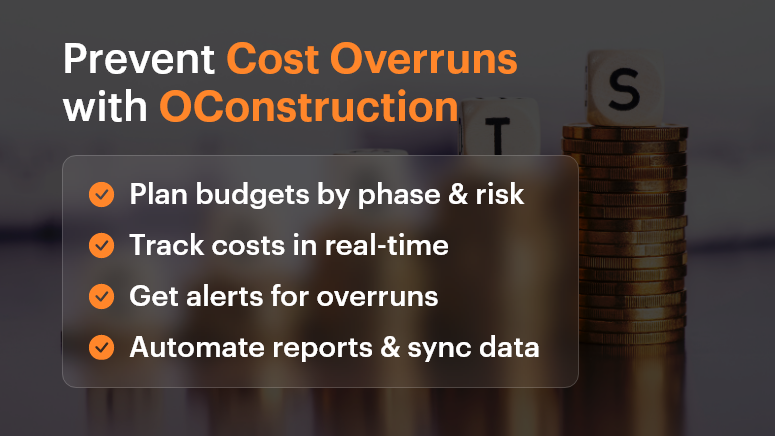
Prevent Cost Overruns with OConstruction

Best Practices, Frameworks, and Actionable Strategies

Do’s and Don’ts of Budget Control

Do: Conduct detailed cost estimation before kickoff

Break down each project phase—design, permits, labor, materials, contingency. Don’t just lump it into one “build” line item.

Don’t: Assume past project budgets will always match future ones

Prices for materials, fuel, labor, and logistics vary. Recheck market conditions and local pricing.

Do: Set up a centralized cost-tracking system

Use OConstruction’s dashboard to assign cost codes, track spending in real time, and compare actual vs. forecast.

Don’t: Rely on spreadsheets or disconnected tools

Manual tracking leads to errors, version control issues, and missed updates.

Quick Wins to Control Costs Early

  • Baseline your budget early. Set realistic expectations with internal stakeholders and clients.
  • Use templates and historical data. Leverage past projects in OConstruction to create smarter forecasts.
  • Account for risks. Add a 5-15% contingency buffer for unknowns.
  • Define a change order process. Make sure scope changes are documented, approved, and re-costed before execution.

A 5-Step Framework to Prevent Construction Cost Overruns

  • Scope Planning

Define deliverables, responsibilities, and phases clearly with all stakeholders. Avoid vague assumptions.

  • Detailed Estimation

Include unit costs, productivity rates, lead times, and inflation where relevant.

  • Digital Budget Tracking

Use OConstruction’s project financials module to track committed costs, invoices, and payments in one place.

  • Issue and Delay Management

Set up automated alerts for schedule slips, budget thresholds, or material delays.

  • Regular Reporting & Forecasting

Generate weekly reports. Adjust projections as needed based on actuals.

Tip: Integrate OConstruction with your accounting or ERP tool for seamless data sync.

Customer Story

For example, Summit Build, a commercial construction firm, used OConstruction’s cost-tracking feature to cut down 12% in preventable overruns within just two quarters.

They were managing three hospital projects and used the platform to:

  • Set real-time alerts when labor costs exceed benchmarks
  • Automate change order documentation and approval workflows
  • Visualize actual vs. forecasted spend in a single dashboard

The result? $750K saved, faster billing cycles, and improved team accountability.

Key Takeaways

Cost overruns are one of the biggest threats to profitability in construction. But they’re not inevitable.

With proper planning, real-time tracking, and digital tools like OConstruction, you can identify risks early, make smarter decisions, and keep your projects on budget and on time.

Start small, implement one strategy at a time, and scale with confidence.

FAQs

Q1. Why do most construction projects go over budget?
Construction projects exceed budgets due to inaccurate cost estimation, rising material prices, poor planning, scope creep, and lack of real-time cost tracking.

Q2. What are the hidden costs in construction projects that teams often miss?
Common hidden costs include permit fees, delays due to weather or labor shortages, design revisions, material wastage, and unplanned change orders.

Q3. How can project managers prevent cost overruns early?
By conducting detailed cost estimation, adding contingency buffers, setting up a change order process, and using digital tools for real-time tracking, project managers can control costs from the start.

Q4. Why are spreadsheets not reliable for construction cost management?
Spreadsheets often lead to errors, version mismatches, and missed updates. A centralized project management software like OConstruction ensures accuracy, transparency, and real-time visibility.

Q5. How does OConstruction help in controlling project costs?
OConstruction provides real-time budget tracking, automated alerts for cost thresholds, change order management, and integration with accounting/ERP tools, helping teams stay on budget.

How to Manage Multiple Construction Projects Without Losing Control

Managing a single project is already a challenge — now multiply that by five, ten, or even twenty. According to a McKinsey report, large construction projects take 20% longer to finish than scheduled and are up to 80% over budget. When managing multiple construction sites, teams, and budgets at once, those risks multiply fast.

In today’s fast-paced construction world, staying in control of multiple projects isn’t just about spreadsheets and site visits anymore. It’s about having the right tools, workflows, and visibility to lead efficiently.

In this blog, we’ll walk you through how to master multi-project construction project management, avoid burnout, and use technology to gain real-time visibility — without losing your sanity.

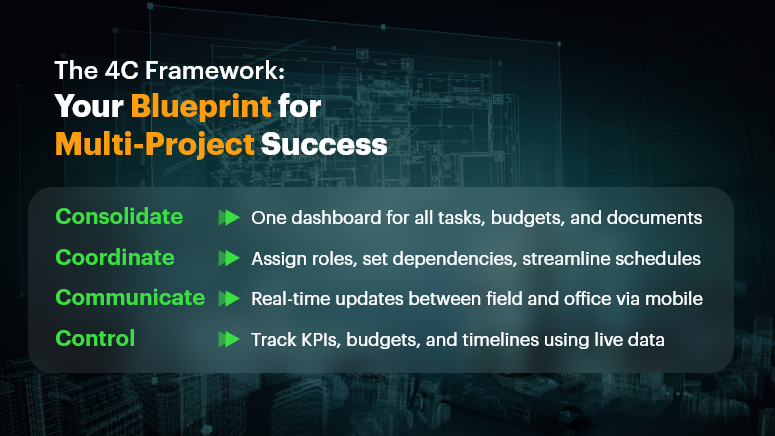
The 4C Framework Your Blueprint for Multi-Project Success

Why Multi-Project Management Matters in Construction

Managing multiple construction projects isn’t just a bigger workload — it’s a completely different operational challenge.

The Business Case

When running multiple sites simultaneously, you’re not just managing tasks — you’re managing people, materials, permits, vendors, inspections, and client expectations across geographies. One missed update or delayed decision can create a domino effect across every other project.

That’s why modern construction businesses — especially small and mid-sized firms — must rethink how they approach construction project management. The days of tracking everything in email threads and whiteboards are over.

Real-World Scenarios

  • A general contractor managing 12 residential sites loses track of which vendor was paid and who’s scheduled next on Site 7.
  • An EPC firm running industrial projects across regions struggles to align budgets with live progress reports from the field.
  • A design-build company tries to juggle stakeholder feedback on multiple projects but ends up reworking key deliverables due to version misalignment.

These aren’t just admin headaches. They impact your bottom line, brand reputation, and employee morale.

The solution? Centralized, real-time construction project management software that gives you clarity and control across everything you manage.

Best Practices to Manage Multiple Construction Projects Successfully

Let’s dive into proven strategies and practical frameworks that will help you gain control, reduce chaos, and make smarter decisions.

Do’s and Don’ts of Multi-Project Construction Management

  • Do use a centralized dashboard.

Managing multiple projects without a unified view is like flying blind. A centralized dashboard allows you to monitor timelines, budgets, milestones, and team progress — all in one place.

  • Don’t rely on manual coordination.

Emails, phone calls, and texts work until they don’t. Relying on manual updates leads to delays, miscommunication, and mistakes that cost money and trust.

  • Do standardize processes across sites.

Templates for reporting, procurement, QA/QC, and daily logs create consistency. This ensures every team follows the same quality and compliance standards.

  • Don’t ignore resource planning.

Overcommitting crews or duplicating material orders can cripple your schedule. Use real-time scheduling tools to balance people and inventory smartly.

Quick Wins to Regain Control

  • Use mobile-first field reporting tools.

Empower your site engineers to log updates, photos, and safety reports from their phones. This reduces paperwork and ensures instant communication.

  • Implement live budget tracking.

Keep track of your budget at all times. Flag overspending instantly. Tools like OConstruction help track estimates vs. actuals in real-time.

  • Set up automatic alerts and reminders.

Never miss a deadline again. From permit renewals to payment approvals, get notified before things slip.

  • Centralize vendor and contractor details.

Keep certifications, rates, and past performance in one place. This helps avoid repeated errors and manage accountability.

Framework: The 4C Model for Multi-Project Success

  • Consolidate – Bring all projects, tasks, schedules, and documents into one platform.
  • Coordinate – Assign responsibilities, dependencies, and workflows across teams.
  • Communicate – Enable instant updates between the office and the field via mobile apps.
  • Control – Use analytics, reports, and dashboards to monitor KPIs and correct courses fast.

This model aligns perfectly with how OConstruction structures its platform — helping teams stay connected, proactive, and accountable.

Customer Example: Real-World Success in Action

For example, FalconBuild Pvt. Ltd., a mid-sized commercial contractor, used OConstruction’s centralized dashboard and mobile reporting tools to manage 9 simultaneous projects across two states. With real-time visibility into site progress, resource allocation, and budget tracking, the team reduced reporting time by 40% and improved on-time project delivery by 30%. Here’s how…

  • Deployed a mobile app for on-site daily logs and inspection checklists
  • Used real-time dashboards to track material use and crew hours
  • Set up auto-notifications for permit expirations and change orders
  • Cut down email chains by 60% with built-in messaging and approvals

Result: More clarity, less chaos, and measurable ROI.

Regain Control, One Project at a Time

Managing multiple construction projects doesn’t have to feel like a high-stakes balancing act. With the right tools and workflows, you can reduce risk, increase productivity, and stay confidently in control.

  • Centralize your project data
  • Standardize your workflows
  • Empower your teams with mobile access
  • Use real-time dashboards to make informed decisions faster

Modern construction project management is about agility, visibility, and control — and that’s exactly what a platform like OConstruction delivers.

FAQs

1. What is multi-project construction management?
Multi-project construction management refers to overseeing several construction projects at once, ensuring timelines, budgets, resources, and teams are coordinated efficiently.

2. Why is managing multiple construction projects so challenging?
Because it involves coordinating tasks, crews, vendors, permits, and budgets across different sites. A small delay or miscommunication in one project can ripple across others.

3. How does construction project management software help with multi-project management?
It centralizes all projects into a single platform, offering real-time dashboards, resource planning, budget tracking, and communication tools that keep teams aligned.

4. What are the risks of managing multiple projects without software?
Common risks include cost overruns, delayed timelines, miscommunication between field and office, duplicate resource allocations, and low client satisfaction.

5. Can small and mid-sized construction companies benefit from multi-project management tools?
Yes. In fact, smaller firms benefit greatly since software reduces manual admin work, prevents mistakes, and helps them scale without needing large management teams.

Category: Construction Academy

Subcategory: Budgeting and Planning

Subcategory: Construction Phase

Subcategory: Design Coordination

Subcategory: Estimation Techniques

Subcategory: Initiation and Feasibility

Subcategory: Introduction

Subcategory: Personal Management

Subcategory: Project Close-Out

Subcategory: Project Scheduling

Subcategory: Project Teams

Subcategory: Proposal Management

Subcategory: Total Quality Management

Subcategory: Tracking and Control

Subcategory: Work Breakdown

Category: Help Desk

Subcategory: Client

Subcategory: Construction 101

Subcategory: Contractor Management

Subcategory: Expense

Subcategory: Finance Budget

Subcategory: Inventory Management

Subcategory: My Approvals

Subcategory: Site Management

Subcategory: Vendor Management