OConstruction Feature Release: Pre-Task Planning, Safety & Site Reporting Enhancements

Construction projects succeed or fail long before work begins on site. Missing pre-task planning, incomplete safety documentation, untracked attendance, and manual reporting often lead to avoidable delays, safety incidents, compliance gaps, and billing disputes. In fast-moving construction environments, relying on paper registers or disconnected tools only increases risk.

To address these challenges, OConstruction introduces a comprehensive update focused on pre-task planning, workforce tracking, safety governance, and automated reporting. This release strengthens on-site discipline while reducing administrative overhead for project teams, safety officers, and management.

The latest OConstruction Pre-Task Planning update ensures that planning, safety, attendance, and compliance data are captured digitally, accurately, and in real time — before issues escalate on site.

Here’s what’s new.

Release Update — Site Planning, Safety & Reporting Enhancements

Pre-Task Plan — Planning Before Execution

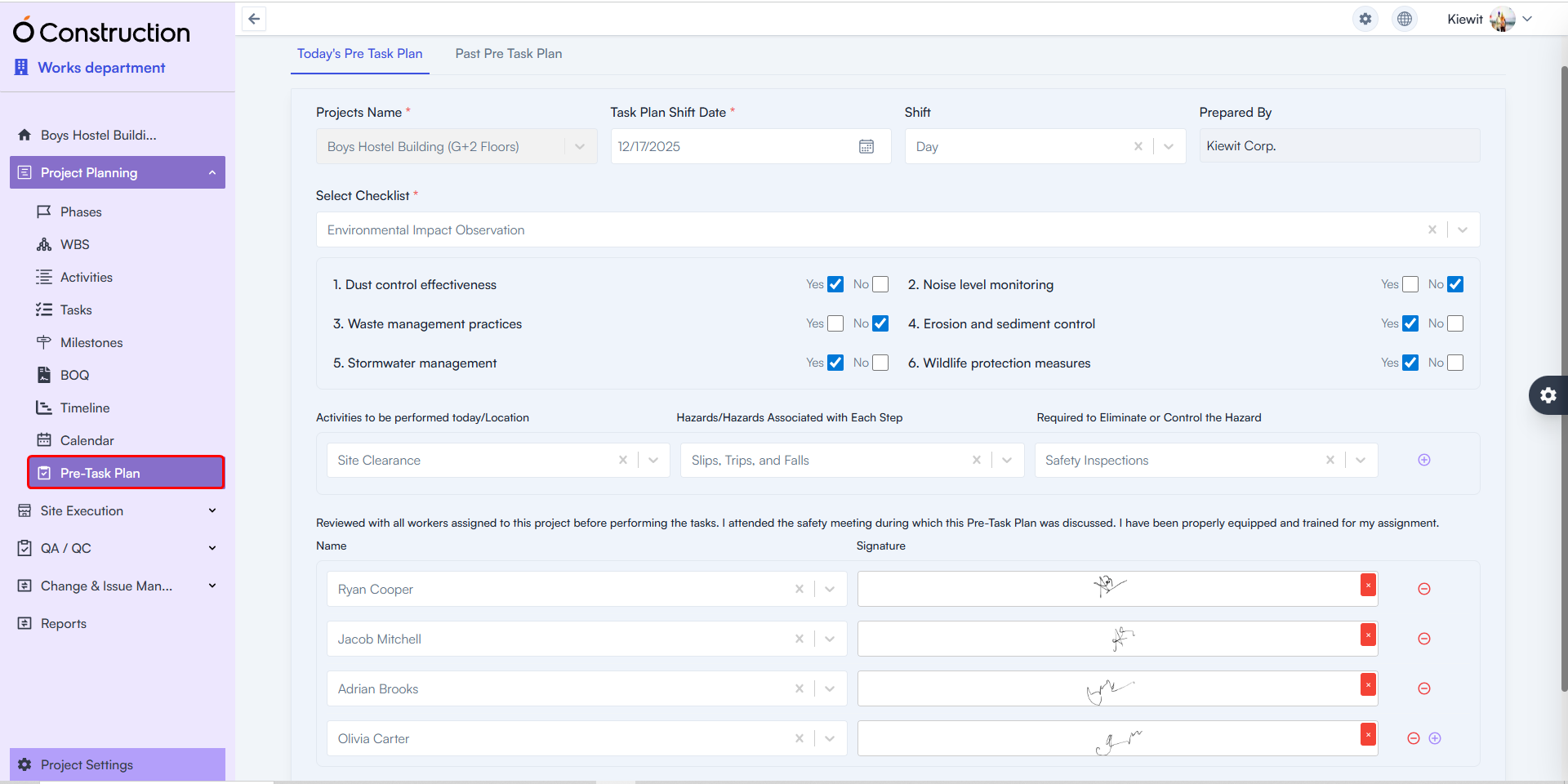
Pre-Task Plan captures all critical planning details before work begins on site.

  • What’s New: Teams can record today’s task plan, review progress on previously planned tasks, and document readiness before execution starts.
  • Included Capabilities:
    • Task checklists
    • Identified hazards
    • Risk mitigation plans
    • Attending project members with digital signatures
  • Benefit: Ensures work begins only after proper planning, risk identification, and team acknowledgment—reducing safety incidents and execution errors.

Pre-Task-Plan

Daily Attendance — Workforce Visibility & Accuracy

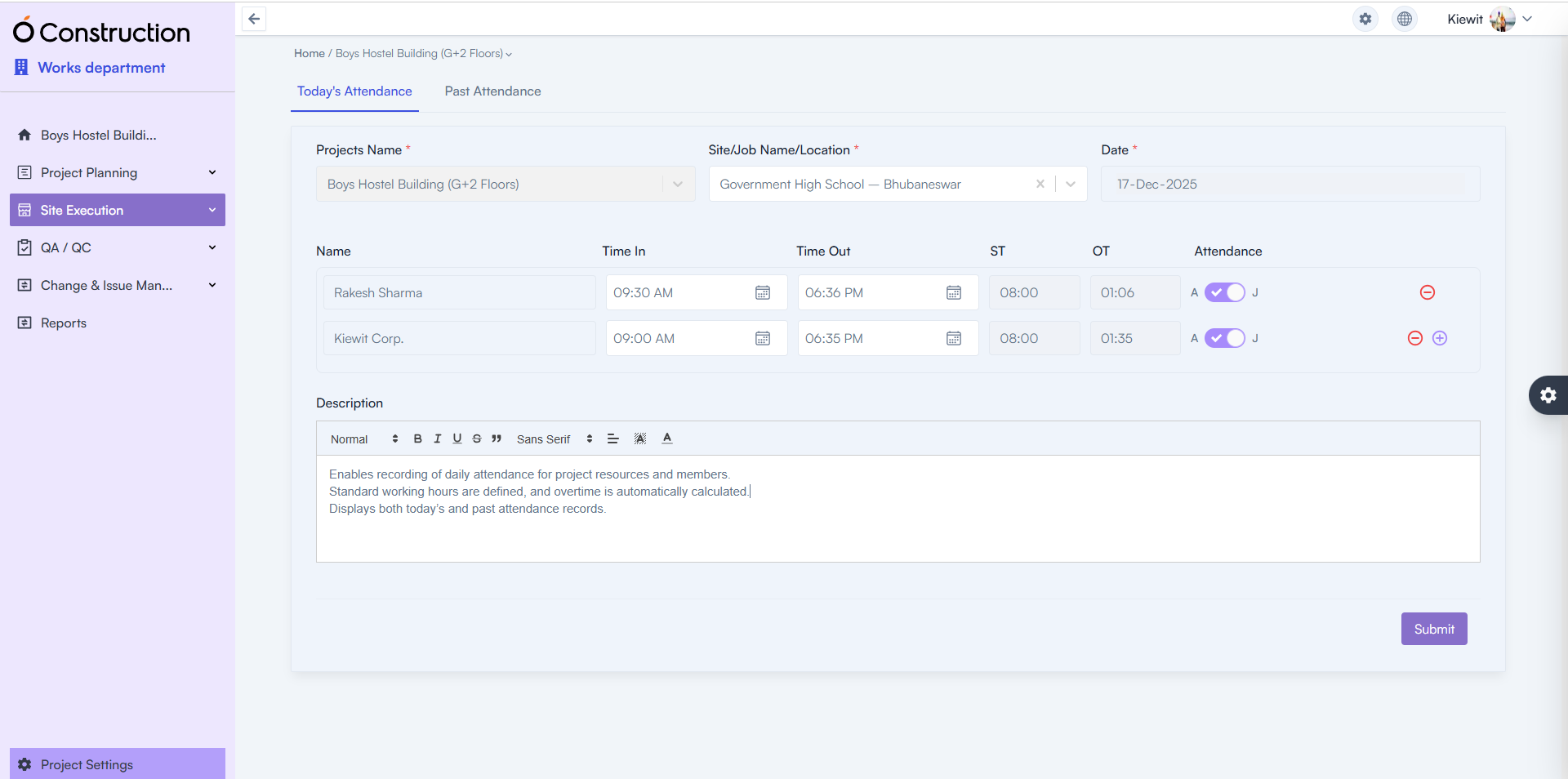
Daily Attendance enables structured attendance tracking for all project resources and members.

  • What’s New: Attendance can be recorded daily with defined standard working hours.
  • Key Enhancements:
    • Automatic overtime calculation
    • Access to both today’s and historical attendance records
  • Benefit: Improves workforce accountability, simplifies payroll inputs, and eliminates manual attendance errors.

Daily Attendance

Safety Meeting — Digital Safety Governance

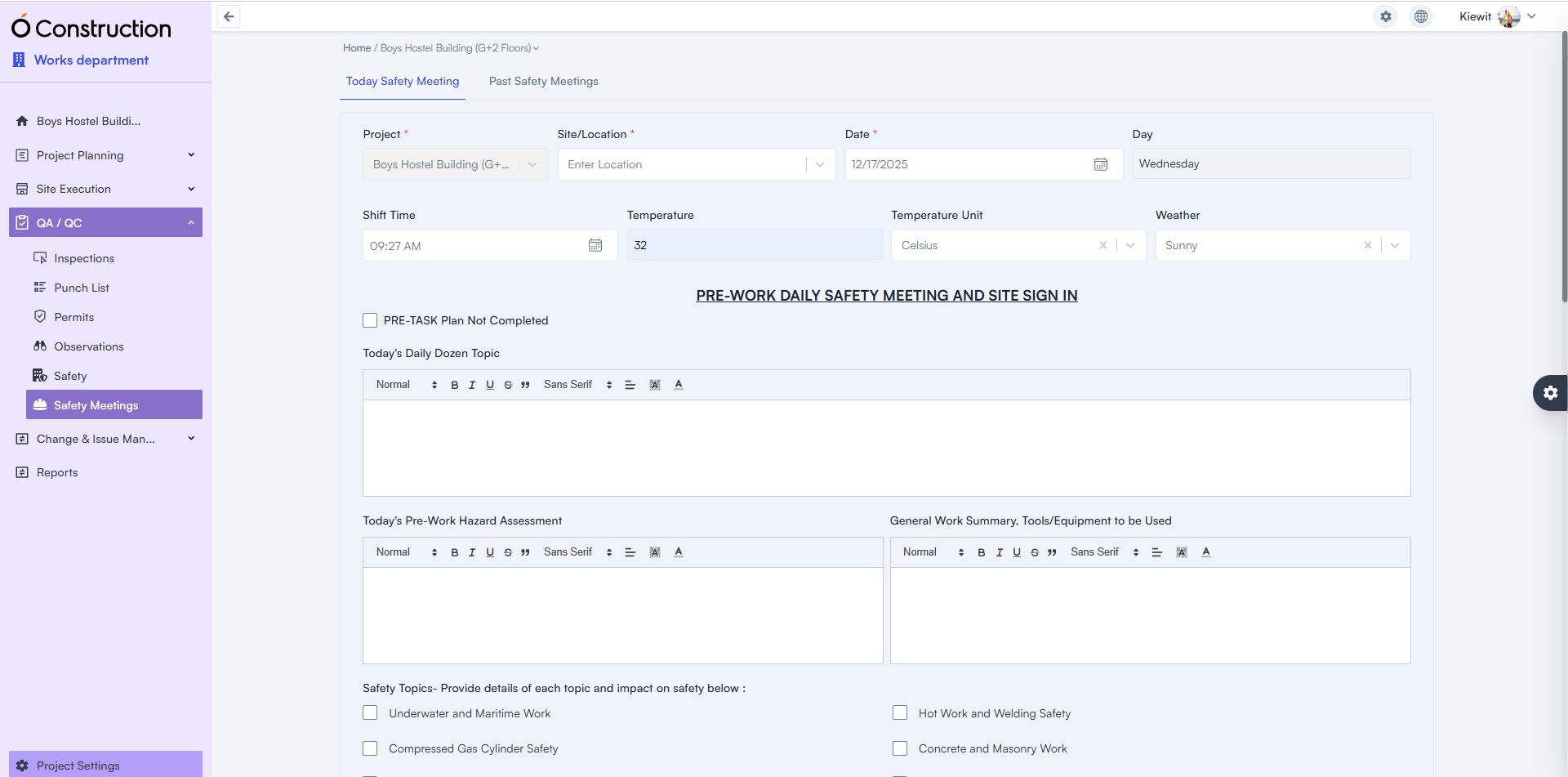
Safety Meeting records both today’s and past safety discussions conducted on site.

  • What’s New: Teams can document safety meetings alongside Pre-Task Plan completion status.
  • Captured Details:
    • Safety topics discussed
    • Shift time
    • Temperature and weather conditions
    • Participant digital signatures
  • Benefit: Creates a verifiable safety audit trail while ensuring regulatory and internal safety compliance.

Safety Meeting

Reports — Automated Compliance & Progress Documentation

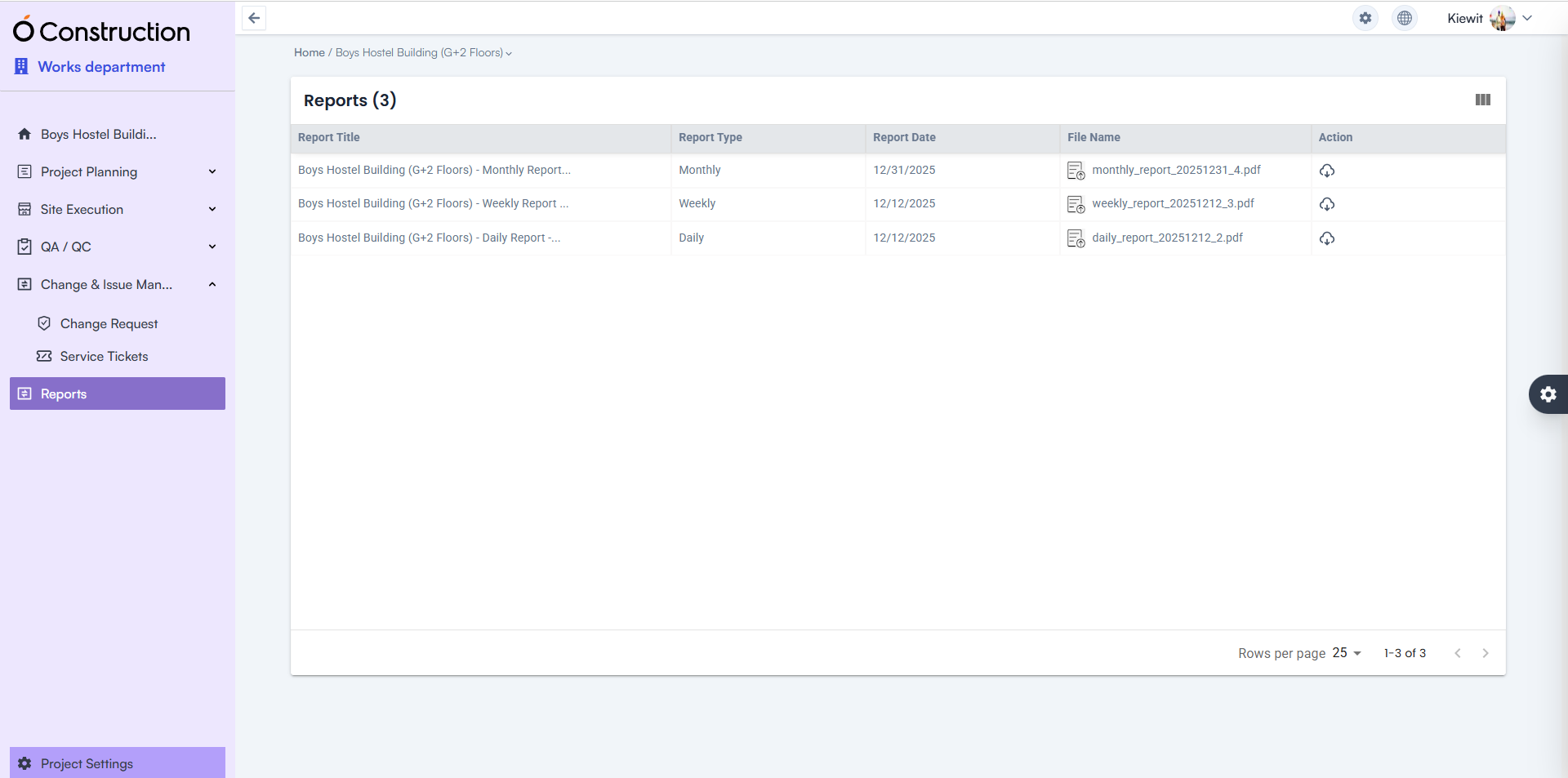
Reports are now automatically generated across multiple operational areas.

  • Available Reports:
    • Pre-Task Plan
    • Daily Attendance
    • Safety Meetings
    • DPR (Daily, Weekly, and Monthly)
  • Benefit: Eliminates manual reporting effort while delivering consistent, audit-ready documentation for management and stakeholders.

Automated-Compliance

BOQ Template — Expanded Structural Flexibility

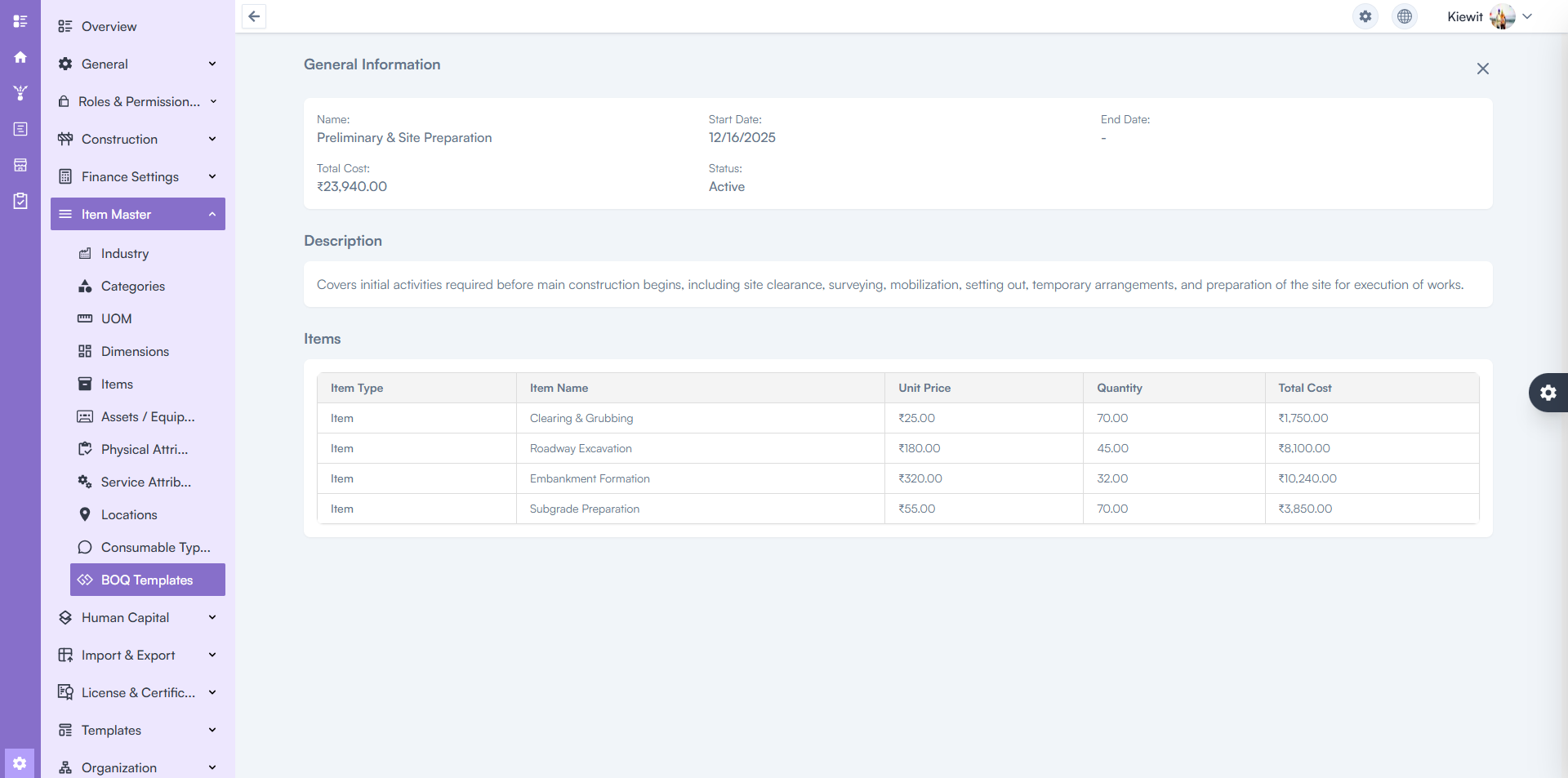
BOQ Templates are now available across all levels of the work structure.

  • What’s New: BOQ templates can be applied at multiple hierarchy levels instead of being restricted.
  • Benefit: Improves cost planning consistency and accelerates BOQ creation across complex project structures.

BOQ Template

Client Issue Fixes & Stability Improvements

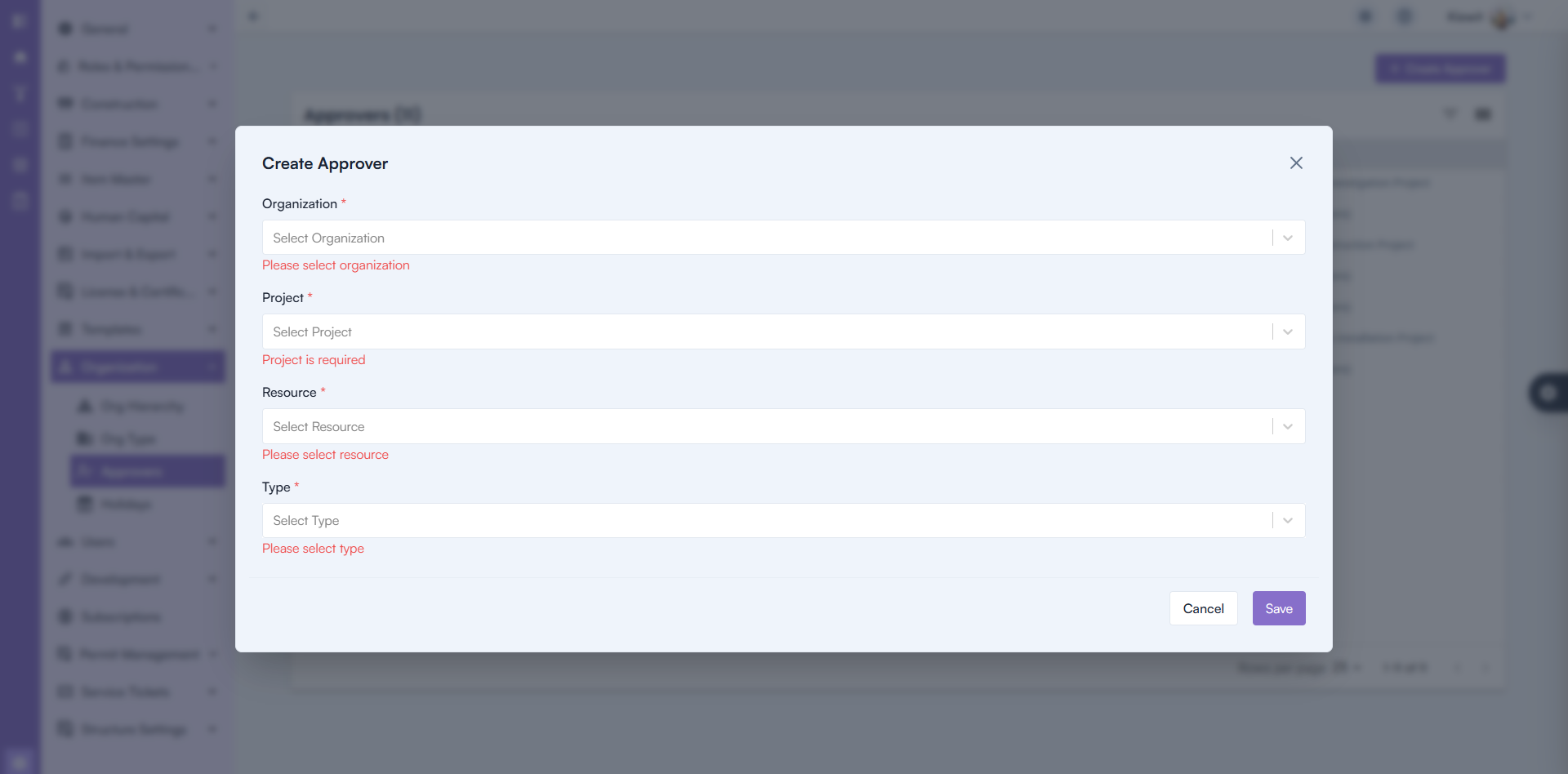
Approver Selection — Corrected Logic & Validation

  • Issue: Approvers were not displayed correctly when selecting a Project during Invoice or Payment creation.
  • Fix: The system now correctly selects approvers based on Organization and Project configuration. Backend validation has also been added to prevent duplicate approver entries.
  • Benefit: Accurate approval workflows and reduced billing delays.

Approver Selection

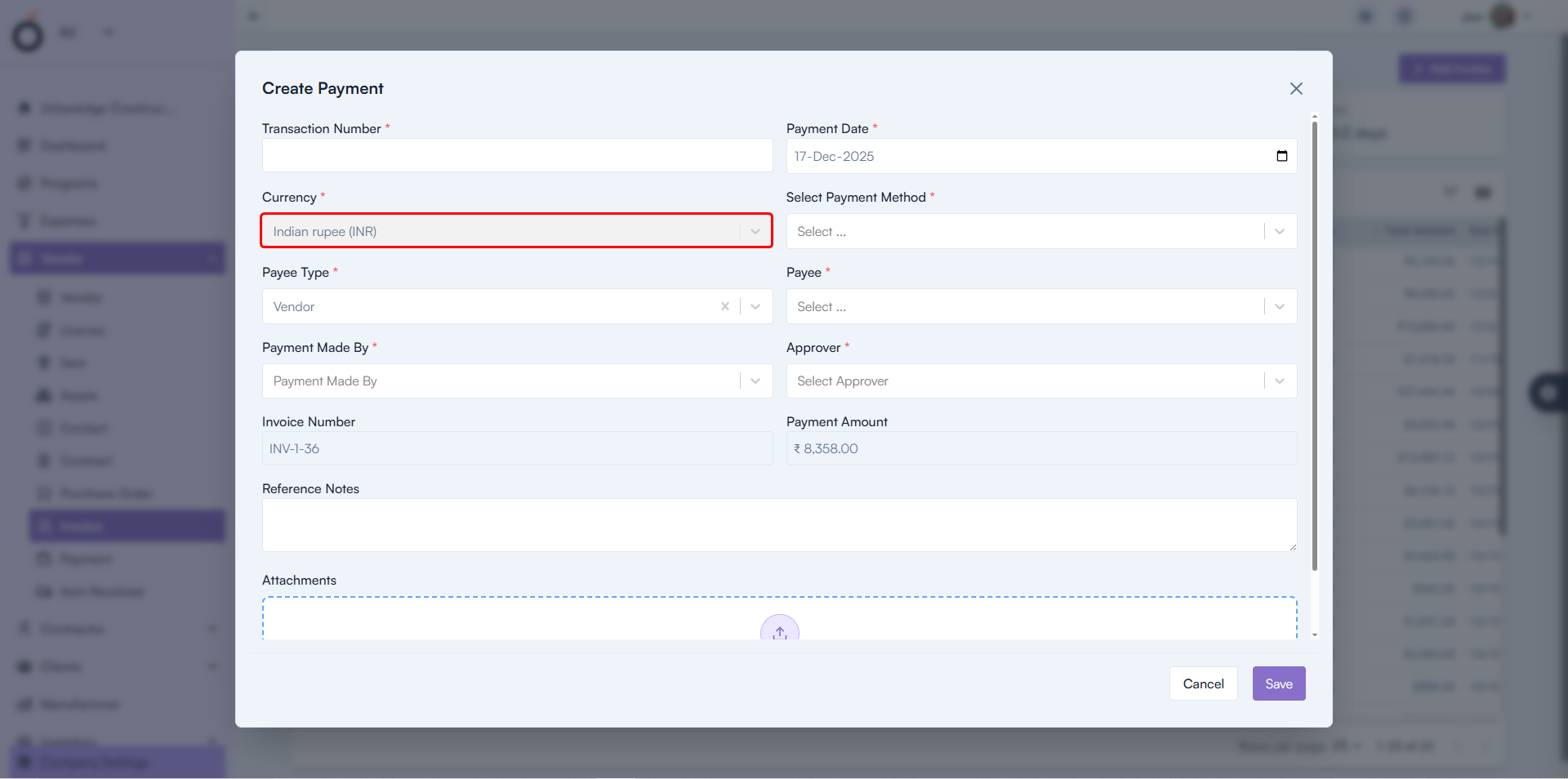
Payment Creation — Currency Retention Fixed

  • Issue: Selected currency was not retained correctly during Payment creation.
  • Fix: Currency selection now persists accurately throughout the process.
  • Benefit: Prevents financial inconsistencies and improves payment accuracy.

Payment Creation

Final Takeaway

This release significantly strengthens pre-task planning, safety governance, workforce tracking, and reporting automation within OConstruction. By digitizing planning and compliance workflows, teams gain better control before work begins — not after issues arise.

With enhanced Pre-Task Planning, automated attendance and safety records, structured reports, and improved financial validations, OConstruction continues to empower construction teams with safer sites, clearer execution, and stronger operational confidence.

BOQ Management in Construction Projects: From Estimation to Execution

In today’s construction industry, cost overruns account for nearly 70% of project failures, and in most cases, the root cause traces back to poor BOQ management in construction projects. Whether it is a residential tower, a highway package, or an EPC contract, even a minor mismatch between estimated quantities and actual execution can trigger budget leakage, rework, disputes, and delayed payments.

However, despite its strategic importance, BOQ management is still handled using Excel sheets, static PDFs, manual measurements, and fragmented site reports. As a result, project managers struggle with inaccurate quantities, delayed DPRs, uncontrolled material usage, and last-minute cost surprises.

This blog explains how BOQ management in construction projects must evolve—from estimation to execution. You will learn why traditional methods fail, what best practices modern construction teams follow, and how OConstruction enables real-time BOQ-driven execution, cost control, and site visibility.

This guide is written for project managers, contractors, EPC firms, QS teams, site engineers, and construction business owners who want predictability, profitability, and control across their projects.
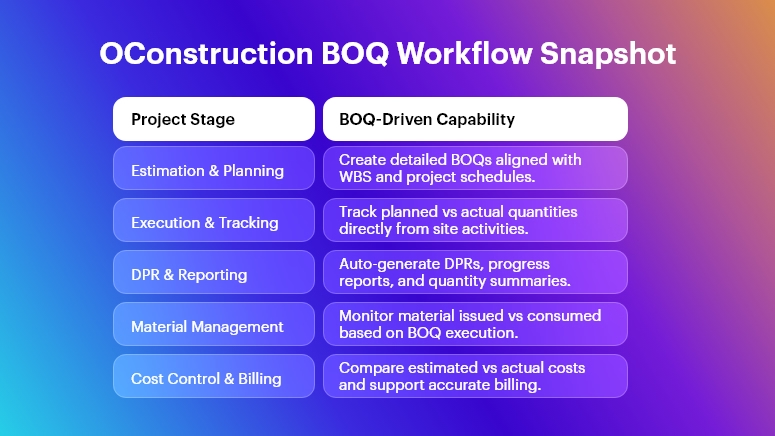
OConstruction BOQ Workflow Snapshot

Why BOQ Management in Construction Projects Matters More Than Ever

BOQ management in construction projects is not just a pre-construction activity—it is the financial backbone of the entire project lifecycle. When BOQs are disconnected from execution, organizations face cascading problems that compound over time.

  • Cost overruns become inevitable because estimated quantities are never reconciled with actual consumption, leading to uncontrolled expenses and shrinking margins.
  • Material wastage increases significantly when procurement decisions are made without real-time BOQ alignment, causing excess ordering or shortages.
  • Rework and disputes escalate due to mismatches between approved BOQs, site execution, and billing quantities.
  • Delayed DPRs and approvals slow down cash flow, especially in EPC and infrastructure projects where progress-linked billing is critical.

Real-World Construction Scenarios

Across different construction segments, BOQ mismanagement creates similar pain points:

  • Real estate projects suffer from cost overruns due to inaccurate item-wise tracking across multiple towers and phases.
  • Infrastructure and highway projects face quantity disputes during interim payment certificates because manual measurements lack traceability.
  • Residential and commercial projects struggle with coordination gaps between planning, site execution, and procurement.
  • EPC companies lose margin visibility when BOQs are managed separately from schedules, DPRs, and cost tracking systems.

Why Traditional Tools Fail on Construction Sites

Despite digital adoption elsewhere, many teams still rely on Excel sheets, WhatsApp updates, manual site registers, and isolated accounting tools. However, these methods fail because:

  • Excel-based BOQs are static, while construction sites are dynamic and change daily.
  • WhatsApp updates lack structure and auditability, making them unreliable for quantity tracking.
  • Manual logs delay reporting, leading to outdated decisions.
  • Disconnected tools break accountability, creating silos between site, planning, procurement, and finance teams.

Therefore, modern BOQ management in construction projects requires an integrated, execution-first digital workflow—and this is exactly where OConstruction delivers value.

Best Practices for BOQ Management in Construction Projects (From Estimation to Execution)

1. Create a BOQ That Is Execution-Ready, Not Just Tender-Ready

An effective BOQ must go beyond tendering and serve as a live control document throughout execution.

  • Break BOQ items down to site-operable levels, ensuring every item maps directly to work packages, tasks, and schedules.
  • Align BOQ structure with WBS, allowing quantities to flow naturally into planning and progress tracking.
  • Standardize item descriptions and units, eliminating ambiguity during site execution and billing.

With OConstruction’s BOQ & Estimate Management, BOQs are structured to integrate seamlessly with tasks, schedules, and DPRs, ensuring consistency from planning to execution.

2. Link BOQ Directly with Project Planning and Scheduling

BOQ management in construction projects fails when quantities exist separately from timelines.

  • Map BOQ items to project schedules, ensuring quantity consumption aligns with planned progress.
  • Track planned vs actual quantities, allowing early identification of slippages or overruns.
  • Use schedule-driven BOQ execution, especially for EPC and infrastructure projects with milestone-based billing.

OConstruction enables BOQ-linked planning and schedule tracking, giving project managers time–quantity–cost visibility in one dashboard.

3. Automate DPRs Using BOQ-Based Execution Data

Daily Progress Reports are the most critical link between site execution and BOQ control.

  • Capture daily quantities directly from site activities, eliminating manual data entry.
  • Auto-generate DPRs based on executed BOQ items, improving accuracy and speed.
  • Ensure DPR data feeds billing and cost reports, reducing reconciliation effort.

With DPR Automation & Daily Logs, OConstruction ensures that BOQ management in construction projects remains accurate, real-time, and auditable.

4. Control Materials Using BOQ-Driven Consumption

Material wastage is one of the biggest profit killers in construction projects.

  • Plan material requirements directly from BOQ quantities, avoiding over-ordering.
  • Track issued vs consumed materials, ensuring alignment with executed quantities.
  • Identify abnormal consumption patterns early, preventing leakage and pilferage.

OConstruction’s Inventory & Purchase Handling integrates material tracking with BOQ execution, ensuring every bag, bar, and batch is accounted for.

5. Monitor Costs in Real Time Against BOQ Budgets

Cost control becomes effective only when BOQ execution data feeds financial monitoring.

  • Track item-wise cost variance, comparing estimated vs actual costs.
  • Monitor committed, incurred, and remaining budgets, ensuring proactive decisions.
  • Enable early corrective actions, rather than post-project damage control.

Using Cost Control & Budget Monitoring, OConstruction transforms BOQ management in construction projects into a profit-protection mechanism.

6. Improve Multi-Site Coordination with Centralized BOQ Visibility

Managing BOQs across multiple sites is extremely complex without a centralized system.

  • Standardize BOQs across projects, enabling consistent execution practices.
  • Enable real-time field-to-office sync, reducing communication delays.
  • Provide leadership with portfolio-level BOQ insights, improving strategic decisions.

OConstruction delivers real-time, centralized BOQ dashboards, ensuring visibility across all construction sites.

7. Avoid Common BOQ Management Mistakes

Construction teams often repeat the same BOQ-related mistakes:

  • Treating BOQs as static documents, instead of live execution controls.
  • Delaying quantity updates, causing inaccurate cost tracking.
  • Relying on manual reconciliations, increasing errors and disputes.
  • Failing to integrate BOQs with DPRs, materials, and schedules.

By digitizing workflows end-to-end, OConstruction eliminates these risks entirely.

Construction Success Story

For example,a mid-sized EPC contractor executing highway and industrial projects, adopted OConstruction’s BOQ & DPR Automation to overcome chronic cost overruns and delayed reporting.

Before OConstruction, their teams relied on Excel BOQs and manual DPRs, leading to mismatched quantities, billing disputes, and delayed management reviews. Within three months of implementation, the transformation was evident.

They achieved 30% faster DPR completion, significantly improved BOQ accuracy, and reduced material wastage by over 20%. Site engineers began capturing quantities digitally, while project managers gained real-time visibility into planned vs actual execution.

Most importantly, leadership could now track project health daily, not monthly—turning BOQ management in construction projects into a competitive advantage.

Why BOQ Management Must Evolve Now

BOQ management in construction projects is no longer optional—it is mission-critical for survival and growth.

  • BOQs must move from static spreadsheets to dynamic execution systems.
  • Real-time integration with DPRs, materials, schedules, and costs is essential.
  • Digital workflows reduce errors, delays, and disputes significantly.
  • OConstruction enables complete visibility from estimation to execution.

Organizations that modernize BOQ management today will deliver projects faster, cheaper, and with higher confidence—while others will continue firefighting.

FAQs

1. What is BOQ management in construction projects?

BOQ management in construction projects involves planning, tracking, and controlling quantities, costs, and execution using BOQs throughout the project lifecycle.

2. Why is BOQ management critical during execution?

Without execution-level BOQ tracking, projects face cost overruns, rework, and billing disputes due to inaccurate quantities.

3. How does digital BOQ management improve project outcomes?

Digital BOQ management improves accuracy, real-time visibility, accountability, and cost control by eliminating manual errors.

4. Can BOQs be linked with DPRs and schedules?

Yes. Modern systems like OConstruction link BOQs directly with DPRs, schedules, and materials for end-to-end control.

5. How does OConstruction help with BOQ management in construction projects?

OConstruction integrates BOQ estimation, execution tracking, DPR automation, cost monitoring, and material management in one platform.

6. Is BOQ management useful for small and mid-sized contractors?

Absolutely. Structured BOQ management helps contractors protect margins and scale operations efficiently.

7. When should BOQ digitization start in a project?

Ideally, BOQ digitization should begin during estimation and continue seamlessly through execution and billing.
Pre-Task Planning (PTP) Best Practices to Reduce Incidents

Construction remains one of the most high-risk industries globally, accounting for a significant share of workplace injuries, fatalities, and costly project delays. Despite advances in equipment and regulations, most construction incidents still occur due to poor planning, unclear task execution, and inadequate hazard identification.

This is precisely where Pre-Task Planning (PTP) in construction becomes indispensable.

Pre-Task Planning is a structured process that ensures every task is clearly understood, risks are identified in advance, controls are defined, and responsibilities are assigned before work begins. When implemented consistently, PTP transforms safety from a reactive activity into a proactive discipline.

In this blog, we explore best practices for Pre-Task Planning (PTP) to reduce incidents, improve workforce accountability, and strengthen overall construction risk management — and how modern platforms like OConstruction make PTP scalable, auditable, and effective across projects.

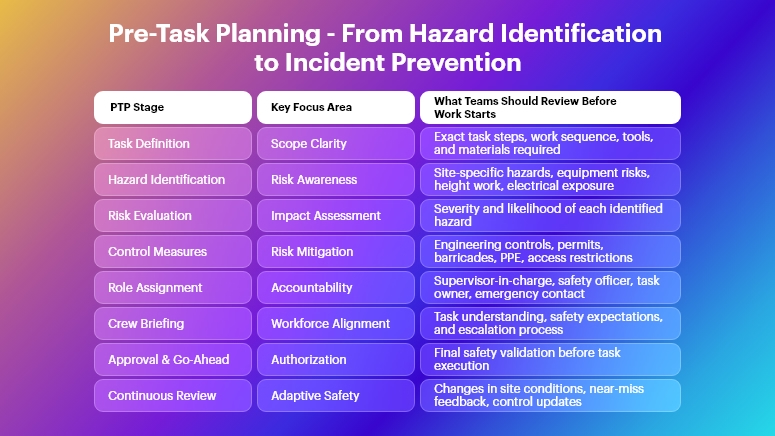
Pre-Task Planning - From Hazard Identification to Incident Prevention

What Is Pre-Task Planning (PTP) in Construction?

Pre-Task Planning (PTP) is a systematic approach where supervisors and crews evaluate a task before execution to determine:

  • What work will be performed
  • What hazards may exist
  • What controls are required
  • Who is responsible for each action

Unlike generic safety talks, PTP is task-specific, site-specific, and time-bound, ensuring that safety planning reflects real-world conditions.

When aligned with digital construction project management software, PTP becomes measurable, repeatable, and enforceable, not just a paper exercise.

Why Pre-Task Planning Reduces Construction Incidents

Effective Pre-Task Planning in construction directly impacts safety performance by:

  • Eliminating ambiguity before work begins
  • Identifying hazards early, not after incidents occur
  • Improving worker awareness and engagement
  • Reducing rework, downtime, and emergency stoppages
  • Ensuring regulatory compliance and audit readiness

Most importantly, PTP ensures that safety decisions are made before exposure, when risks can still be controlled.

Pre-Task Planning (PTP) Best Practices to Reduce Incidents

1. Break Tasks into Clear, Actionable Steps

One of the most common PTP failures is planning at a high level instead of at the task level.

Best practice requires breaking work down into specific steps, such as:

  • Equipment mobilization
  • Material handling
  • Installation activities
  • Testing or commissioning

Each step should be reviewed individually for hazards. This approach significantly improves construction safety planning by preventing overlooked risks hidden within complex tasks.

2. Identify Hazards Specific to the Jobsite Conditions

Hazards are never static. Weather, access routes, manpower, and nearby activities can change daily.

Effective Pre-Task Planning (PTP) in construction must consider:

  • Site congestion and overlapping trades
  • Equipment movement and lifting zones
  • Electrical, height, and confined space risks
  • Environmental conditions such as rain, heat, or poor visibility

By identifying real-time hazards, teams reduce the likelihood of unexpected incidents.

3. Define Control Measures Before Work Starts

Hazard identification alone does not reduce incidents. The value of Pre-Task Planning lies in defining practical control measures, such as:

  • Engineering controls (guardrails, barriers, isolation)
  • Administrative controls (permits, sequencing, access control)
  • PPE requirements aligned with the task

Documenting controls ensures that safety actions are implemented, not assumed.

4. Assign Clear Roles and Responsibilities

Many construction incidents occur because safety responsibilities are unclear or assumed.

A strong PTP process explicitly assigns:

  • Who is responsible for safety supervision
  • Who inspects tools and equipment
  • Who authorizes task execution
  • Who responds if conditions change

Using a construction project management platform like OConstruction, these responsibilities can be digitally tracked and audited.

5. Conduct Daily Pre-Task Meetings with Crew Involvement

Pre-Task Planning should never be a one-way instruction.

Best practices include:

  • Conducting daily PTP meetings before work begins
  • Encouraging workers to voice concerns
  • Verifying understanding, not just attendance

When workers actively participate, PTP becomes a shared responsibility, leading to higher compliance and safer behavior.

6. Use Digital PTP Checklists Instead of Paper Forms

Paper-based PTP forms often fail due to:

  • Incomplete data
  • Poor traceability
  • No real-time visibility for management

Digital PTP tools within construction project management software allow teams to:

This significantly strengthens construction risk management while reducing administrative overhead.

7. Monitor, Review, and Update PTP Continuously

Construction environments evolve rapidly. Therefore, Pre-Task Planning must be dynamic, not static.

Best practice includes:

  • Revisiting PTP when task scope changes
  • Updating controls if hazards increase
  • Recording near-misses and lessons learned

Continuous improvement ensures that PTP remains relevant and effective throughout the project lifecycle.

How OConstruction Enables Effective Pre-Task Planning

OConstruction, a modern construction project management software, enables organizations to operationalize Pre-Task Planning (PTP) in construction by providing:

  • Digital PTP workflows and checklists
  • Centralized task-level risk documentation
  • Real-time visibility for site and safety managers
  • Integration with schedules, resources, and site activities
  • Compliance-ready safety records

By embedding PTP directly into daily construction workflows, OConstruction helps teams reduce incidents, improve accountability, and build a culture of proactive safety.

Key Benefits of Strong Pre-Task Planning

When implemented correctly, Pre-Task Planning best practices deliver measurable outcomes:

  • Reduced accidents and near-misses
  • Lower project delays and stoppages
  • Improved worker confidence and morale
  • Better regulatory compliance
  • Enhanced project predictability and cost control

Safety planning, when digitized and standardized, becomes a competitive advantage, not just a compliance requirement.

Conclusion

In today’s high-risk construction environment, Pre-Task Planning (PTP) is no longer optional. It is a foundational practice that protects workers, safeguards timelines, and preserves project profitability.

By adopting proven PTP best practices and leveraging digital platforms like OConstruction, construction organizations can move beyond reactive safety management and build a predictive, disciplined, and incident-resistant jobsite culture.

The safest projects are not accident-free by chance — they are planned that way before the first task begins.

Frequently Asked Questions (FAQs)

1. What is PTP in construction?

Pre-Task Planning is a structured process where construction teams identify task-specific hazards, controls, and responsibilities before starting work to reduce incidents.

2. How does Pre-Task Planning reduce construction incidents?

PTP reduces incidents by identifying risks early, defining control measures in advance, and ensuring all workers understand the task and associated hazards.

3. Is PTP mandatory for construction projects?

While regulations vary, many safety standards and clients require documented task-level safety planning, making PTP a best practice across projects.

4. How often should PTP be conducted?

PTP should be conducted daily or before any new task, and updated whenever site conditions or task scope changes.

5. Can Pre-Task Planning be digitized?

Yes. Using construction project management software like OConstruction, PTP can be digitized for better consistency, traceability, and compliance.

6. What is the difference between PTP and toolbox talks?

Toolbox talks are general safety discussions, while PTP is task-specific, hazard-focused, and action-oriented.

Top 10 Must-Have Features in a Construction Management Solution

Construction projects today are under more pressure than ever. According to leading industry studies, over 60% of projects run over budget, while nearly 70% experience schedule delays due to miscommunication, inaccurate DPRs, scattered data, and manual updates. These issues don’t just slow work down, they directly impact profitability, cash flow, and client trust. Therefore, choosing the right construction management solution has become a mission-critical decision for project managers, contractors, EPC companies, QS teams, and site engineers.

This blog outlines the Top 10 must-have features you should expect from any modern construction management solution. You will learn how purpose-built tools streamline BOQ management, automate DPR workflows, improve field-to-office visibility, and help teams execute projects with fewer errors, lower costs, and better accountability.

Whether you handle residential, commercial, highway, infrastructure, or industrial construction, this guide explains how a construction management solution elevates your operations and sets your projects up for predictable success.

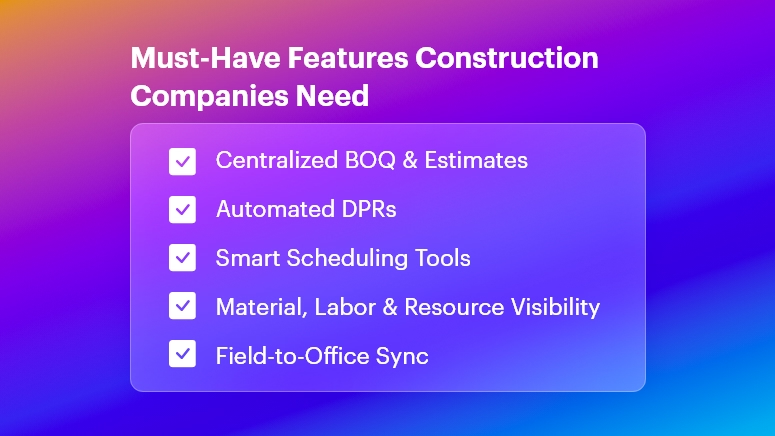
Must-Have Features Construction Companies Need

Why Construction Teams Need a Powerful Construction Management Solution

Construction is complex, fast-changing, and highly interdependent. One small delay — such as a late DPR, missing material, or inaccurate BOQ — can trigger cascading issues across the entire schedule. This is exactly why a robust construction management solution is no longer optional.

Growing Business Pressures in Construction

Modern construction companies face significant operational challenges:

  • Cost overruns caused by inaccurate estimates, fluctuating material prices, and untracked expenses, which lead to escalated budgets and reduced profit margins.
  • Material wastage due to poor tracking and lack of real-time site visibility, resulting in unused inventory, theft, pilferage, or emergency purchases at higher rates.
  • Rework caused by miscommunication or outdated drawings, consuming 10–15% of project costs and unnecessary labor hours.
  • Scattered data stored in Excel sheets, WhatsApp messages, emails, and paper diaries, making it impossible to maintain a single source of truth.
  • Delayed DPR submissions, which leads to inaccurate reporting, billing delays, and poor decision-making.
  • Disconnected tools that fail to sync field activities with office teams, slowing approvals, billing, purchasing, and planning cycles.

These problems occur across all construction segments:

  • Real estate developers struggle with multi-site coordination and contractor monitoring.
  • Infrastructure and road projects face challenges with heavy equipment tracking, material consumption, and schedule slippages.
  • Residential and commercial builders manage high-velocity tasks and subcontractor timelines.
  • EPC companies deal with large-scale BOQs, lengthy approval cycles, and risk of data duplication.

Why Traditional Methods Fail

Manual workflows cannot keep up with the speed of modern construction:

  • Excel sheets break easily, lack version control, and create data silos, making it difficult for teams to stay aligned.
  • WhatsApp messages are unstructured, leading to miscommunication, lost instructions, and zero historical records.
  • Paper-based logs and manual DPRs are prone to errors and delays.
  • Non-integrated tools create blind spots, making cost control and project tracking inefficient.

A modern construction management solution solves these challenges through real-time syncing, digital documentation, automated tracking, and structured workflows. This ensures every stakeholder — from site engineers to project directors — operates with clarity, speed, and accuracy.

Top 10 Must-Have Features in a Construction Management Solution

1. BOQ and Estimate Management

A strong construction management solution must include dynamic BOQ and estimate capabilities.

  • Centralizes all quantities, materials, activities, and rate contracts, ensuring every team member works from a single, version-controlled BOQ.
  • Automates calculations for material requirements, estimated costs, and work packages, reducing manual errors and improving pricing accuracy.
  • Supports multi-level BOQs for EPC, infrastructure, and large commercial projects, enabling granular control over item-level budgeting.

2. DPR Automation and Daily Site Reporting

DPR delays cause downstream issues across billing, planning, and procurement.

  • Automated DPR templates help site engineers submit daily progress in minutes, capturing work done, labor, machinery, and material used.
  • Real-time visibility helps project managers track progress against planned schedules, reducing reporting gaps and manipulation.
  • Photo and document attachments allow accurate verification, improving accountability and reducing disputes.

3. Project Planning and Schedule Tracking

Efficient planning is essential for controlling time, cost, and quality.

  • Built-in Gantt charts and activity sequencing help teams visualize dependencies and set realistic timelines, especially for multi-contractor projects.
  • Real-time schedule tracking highlights delays before they escalate, allowing proactive corrective action.
  • Baseline vs. actual tracking improves forecasting, ensuring leadership always knows where projects stand.

4. Resource, Labor, and Workforce Management

Labor inefficiency is one of the biggest cost drivers in construction.

  • Track labor attendance, productivity, and skill allocation, ensuring optimal workforce utilization across projects.
  • Prevent overstaffing or understaffing, which often leads to productivity loss or unnecessary cost leakage.
  • Generate labor productivity analytics, helping teams benchmark performance across activities and contractors.

5. Material Tracking and Inventory Management

Untracked material is a financial risk.

  • Monitor material requests, issues, transfers, and consumption in real time, eliminating wastage and pilferage.
  • Set reorder levels and automate purchase alerts, ensuring materials arrive before work stops.
  • Track vendor deliveries against PO commitments, reducing discrepancies and billing disputes.

6. Purchase, Vendor, and Procurement Management

Procurement inefficiencies can derail timelines and budgets.

  • Digitize purchase requisitions, approvals, vendor quotes, and POs, enabling faster purchasing cycles.
  • Compare vendor quotations side-by-side, ensuring cost-efficient decisions.
  • Maintain vendor performance metrics, helping businesses negotiate better contracts and avoid unreliable suppliers.

7. Task, Workflow, and Issue Management

Execution requires strong coordination across teams and subcontractors.

  • Assign tasks with deadlines, responsibilities, and dependencies, ensuring daily work clarity.
  • Automated reminders keep everyone aligned, reducing delays due to follow-up gaps.
  • Issue logging helps identify defects, delays, safety observations, and roadblocks, enabling timely resolution.

8. Cost Control and Budget Monitoring

Cost overruns impact margins and client satisfaction.

  • Real-time cost dashboards compare planned budgets with actual spending, helping teams detect leakage early.
  • Track costs across labor, machinery, materials, subcontractors, and overheads, creating transparency and accountability.
  • Predictive forecasting allows leaders to intervene before overruns escalate, improving profitability.

9. Real-Time Field-to-Office Sync

The biggest communication gaps occur when site updates are delayed.

  • Instant syncing of DPRs, materials, approvals, and tasks, removes silos and eliminates outdated information.
  • Project managers, QS teams, and owners receive real-time updates, enabling faster decisions and fewer misunderstandings.
  • Every stakeholder shares the same dashboard, improving coordination across teams and locations.

10. Multi-Site Visibility and Centralized Reporting

Construction businesses often operate across multiple locations.

  • A unified dashboard helps monitor all projects, contractors, and sites in one place, enhancing operational control.
  • Centralized reporting provides insights on productivity, cost, delays, and resource usage, supporting data-driven decision making.
  • Standardized processes ensure consistency, reducing project-level variability and risk.

Best Practices, Frameworks, and Actionable Tips for Implementing a Construction Management Solution

To maximize the impact of a construction management solution, construction teams must adopt structured workflows. Below are actionable, implementation-ready practices.

1. Streamline BOQ and Estimation Processes

  • Always create multi-level BOQs to break down work into granular activities, helping QS teams price accurately and manage variations smoothly.
  • Standardize rate contracts for materials and activities, reducing budget conflicts during execution.
  • Integrate BOQ with material tracking and procurement, ensuring planned materials match actual consumption.

2. Optimize DPR Workflows

  • Use predefined DPR templates to ensure uniform reporting across sites, reducing inconsistencies and missing information.
  • Encourage daily submission deadlines to avoid backlog and maintain freshness of data.
  • Attach photos, location data, and progress notes, improving transparency for remote managers.

3. Strengthen Planning and Scheduling

  • Always create a project baseline before execution begins, allowing teams to measure deviations accurately.
  • Break schedules into weekly and daily execution goals, making them easier to monitor.
  • Use critical-path analysis to identify activities that directly impact project completion dates.

4. Improve Material Management Strategies

  • Track every material issue and return from the store, ensuring consumption accuracy.
  • Monitor supplier reliability by comparing deliveries against POs, identifying chronic delays.
  • Use reorder alerts to avoid work stoppage due to material shortages.

5. Enhance On-Site Coordination and Communication

  • Always use a centralized digital platform instead of WhatsApp for official instructions, ensuring audit trails.
  • Define SOPs for task assignments, approvals, and inspections, removing ambiguity.
  • Document all delays, issues, and dependencies, allowing managers to intervene effectively.

6. Strengthen Cost Control

  • Create cost centers for labor, materials, equipment, and subcontractors, improving financial visibility.
  • Compare planned vs. actual costs weekly, identifying leakage early.
  • Digitize vendor quotes and purchases to prevent price manipulation or duplication.

7. Prevent Rework and Human Errors

  • Maintain version-controlled drawings and documents, preventing outdated plan usage.
  • Use digital checklists and quality workflows, ensuring consistency across teams.
  • Enable issue logging and resolution tracking, reducing repeat mistakes.

8. Improve Multi-Site Coordination

  • Standardize templates for DPRs, BOQs, and approvals across all sites, ensuring uniformity.
  • Monitor cross-project performance metrics, identifying best practices and inefficiencies.
  • Centralize communication and reporting, especially for leadership and regional managers.

Case Study

For example, a mid-sized infrastructure and commercial construction company, adopted OConstruction’s DPR Automation and BOQ Management features to overcome persistent reporting delays and cost miscalculations. Within 90 days, they achieved measurable improvements.

  • DPR completion time dropped by 40%, enabling faster billing cycles.
  • BOQ accuracy improved significantly due to centralized and version-controlled estimates.
  • Material shortages reduced by 30%, thanks to real-time inventory insights.
  • Project managers gained complete visibility into site progress, labor usage, and procurement activities.
  • Rework incidents dropped due to better documentation and daily photo evidence.

Here’s the transformation: What was once a chaotic, paper-driven workflow became a fast, structured, and predictable process powered by a modern construction management solution.

Key Takeaways & Conclusion

Choosing the right construction management solution can dramatically improve project efficiency, financial control, and field visibility. The top 10 features, from BOQ management to DPR automation and cost control, ensure that teams eliminate errors, reduce rework, and improve coordination across sites.

When construction companies adopt these capabilities, they experience:

  • Better planning and predictable execution
  • Higher labor productivity and reduced wastage
  • Accurate, real-time insights for faster decisions
  • Lower cost leakage and improved margins
  • Seamless field-to-office communication

To stay competitive, now is the ideal time to invest in a modern, reliable construction management solution that prepares your organization for future growth.

FAQs

1. What is a construction management solution and why is it essential?

A construction management solution is an integrated platform that helps teams manage BOQs, DPRs, scheduling, materials, and costs. It eliminates manual errors, improves visibility, and streamlines all site-to-office workflows.

2. How does a construction management solution improve DPR accuracy?

It standardizes DPR formats, automates calculations, enables photo attachments, and syncs updates in real time. This ensures accurate reporting, faster approvals, and better decision-making.

3. Can a construction management solution help reduce project delays?

Yes. With features like schedule tracking, task management, automated alerts, and dependency monitoring, teams identify issues early and prevent delays.

4. How does OConstruction support BOQ management?

OConstruction offers multi-level BOQs, centralized rate management, automated quantity calculations, and real-time tracking, ensuring estimated accuracy and cost control.

5. Is a construction management solution suitable for multi-site companies?

Absolutely. It centralizes reporting, standardizes workflows, and gives leadership a real-time consolidated view of all active projects.

6. How does a construction management solution improve cost control?

It tracks planned vs. actual spending, monitors consumption, prevents pilferage, and offers real-time dashboards for financial visibility.

7. Can small construction companies also benefit from a construction management solution?

Yes. Even small contractors gain efficiency by digitizing DPRs, managing materials better, improving labor productivity, and enhancing transparency.

OConstruction Release Notes: What’s New in December 2025

Construction teams rely on stable workflows, accurate data visibility, and smooth user experience to keep projects on schedule. At OConstruction, we continuously refine the platform to eliminate friction and ensure reliable execution across every module.

This December update introduces usability fixes, validation improvements, and better performance across Tasks, WBS, Budget Insights, Workspaces, and Resource Management.

Here’s what’s new in the latest OConstruction Release Notes.

Release Update — 03/12: Performance Fixes & UX Improvements

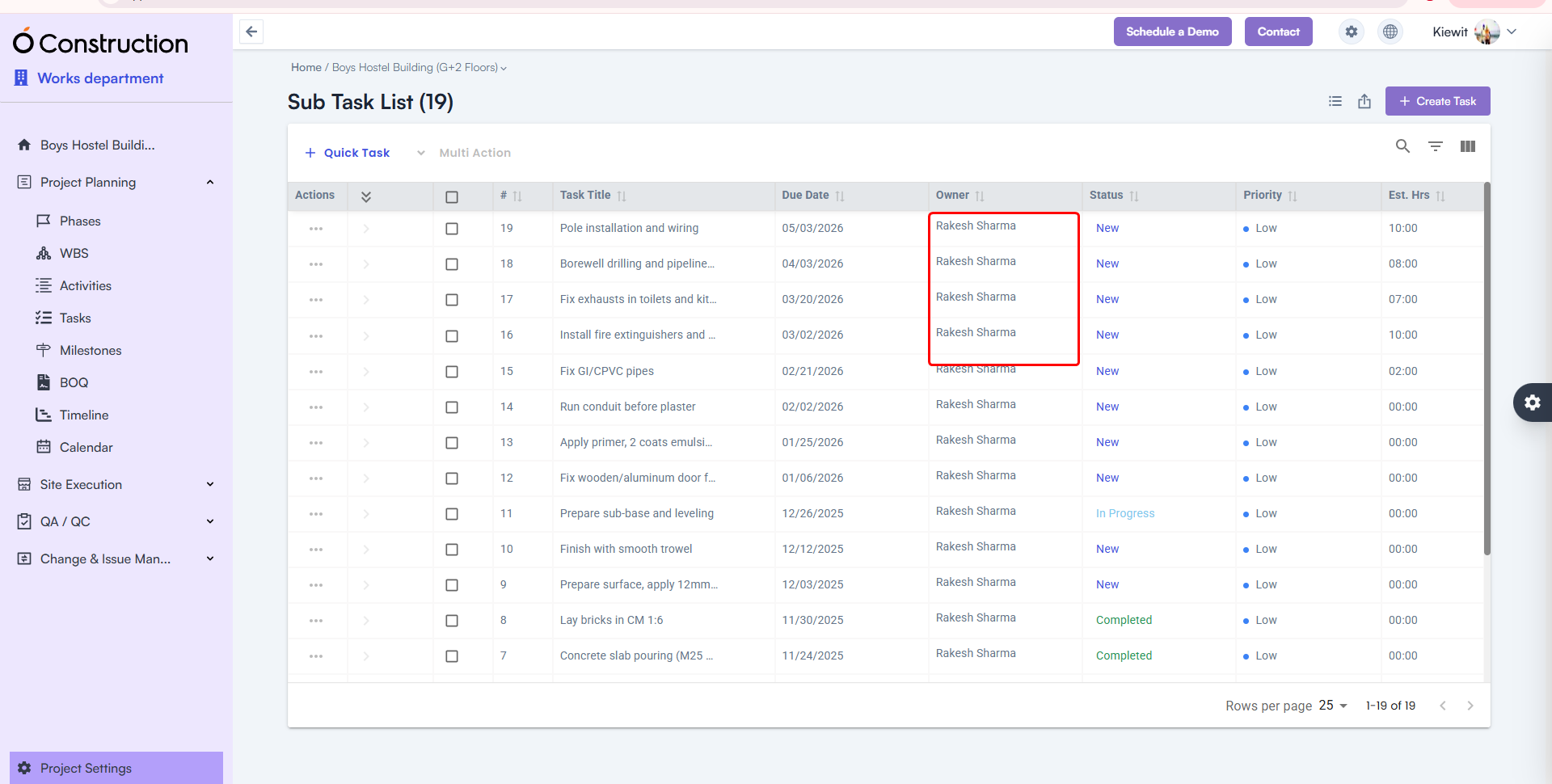
  • Owner Name Visibility in Subtasks — Fixed

After creating a subtask, the Owner Name field occasionally appeared blank.

  • Fix: The correct Owner Name now displays consistently.
  • Benefit: Accurate task accountability and tracking.

Owner Name Visibility in Subtasks

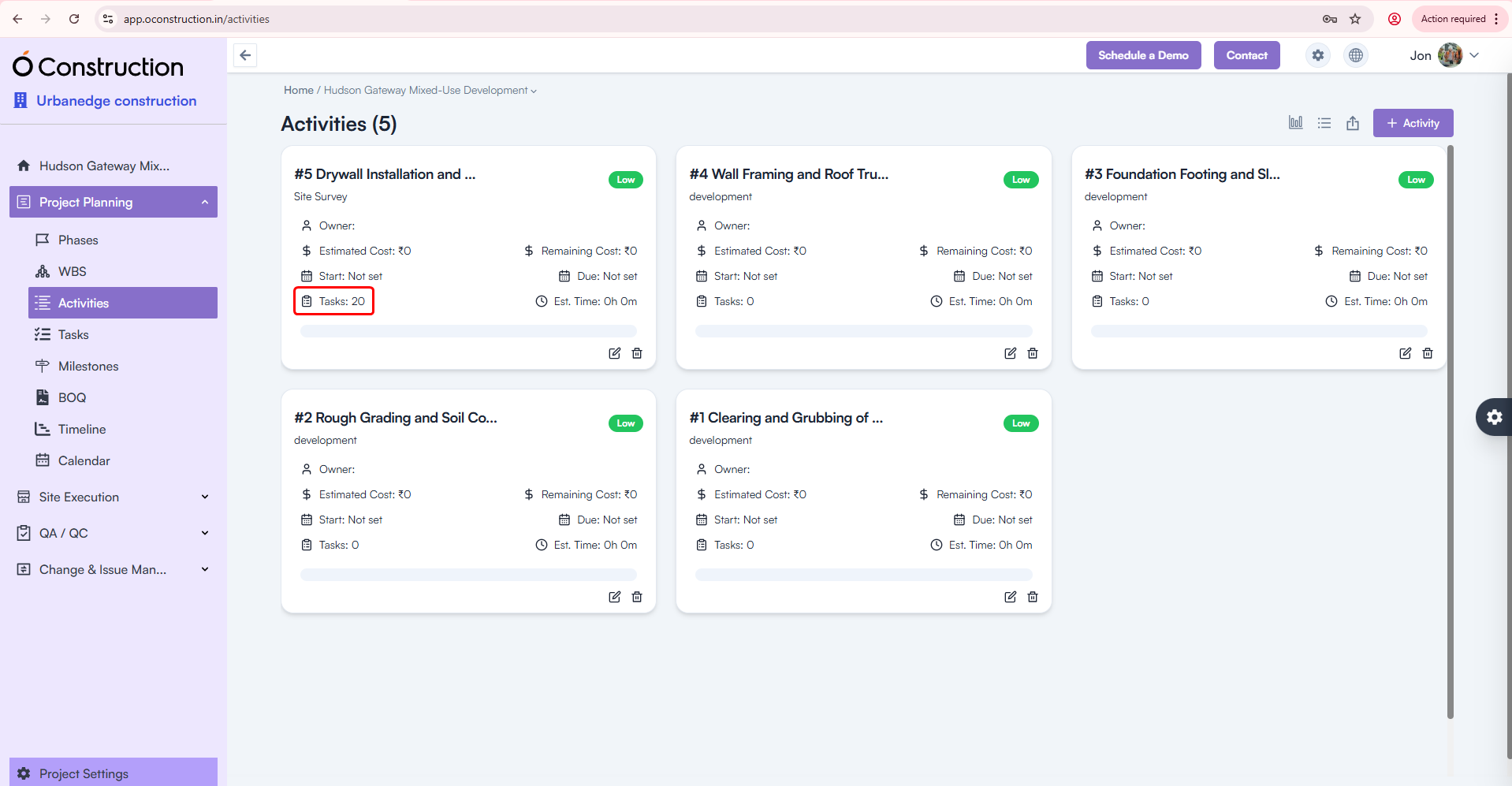
  • Activity Card Task Count — Corrected

Activity Cards were showing the wrong number of tasks linked to them.

  • Fix: Task Count is now fully accurate and automatically updated.
  • Benefit: Clearer progress visibility across activities.

Activity Card Task Count

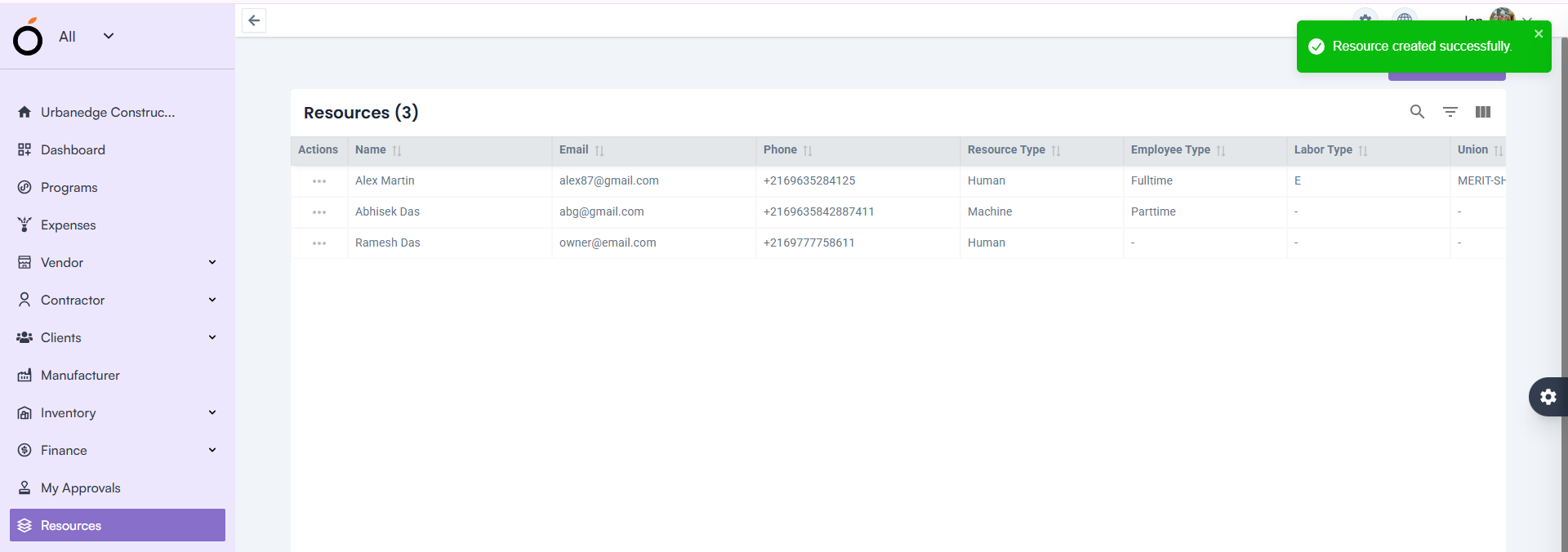
  • Resource Creation — Proper Validation Alerts

Leaving the Email field blank previously showed a generic toast message:

“Something went wrong”

  • Fix: Now users see the correct validation alert.
  • Benefit: Clear communication and faster error resolution.

Resource Creation — Proper Validation Alerts

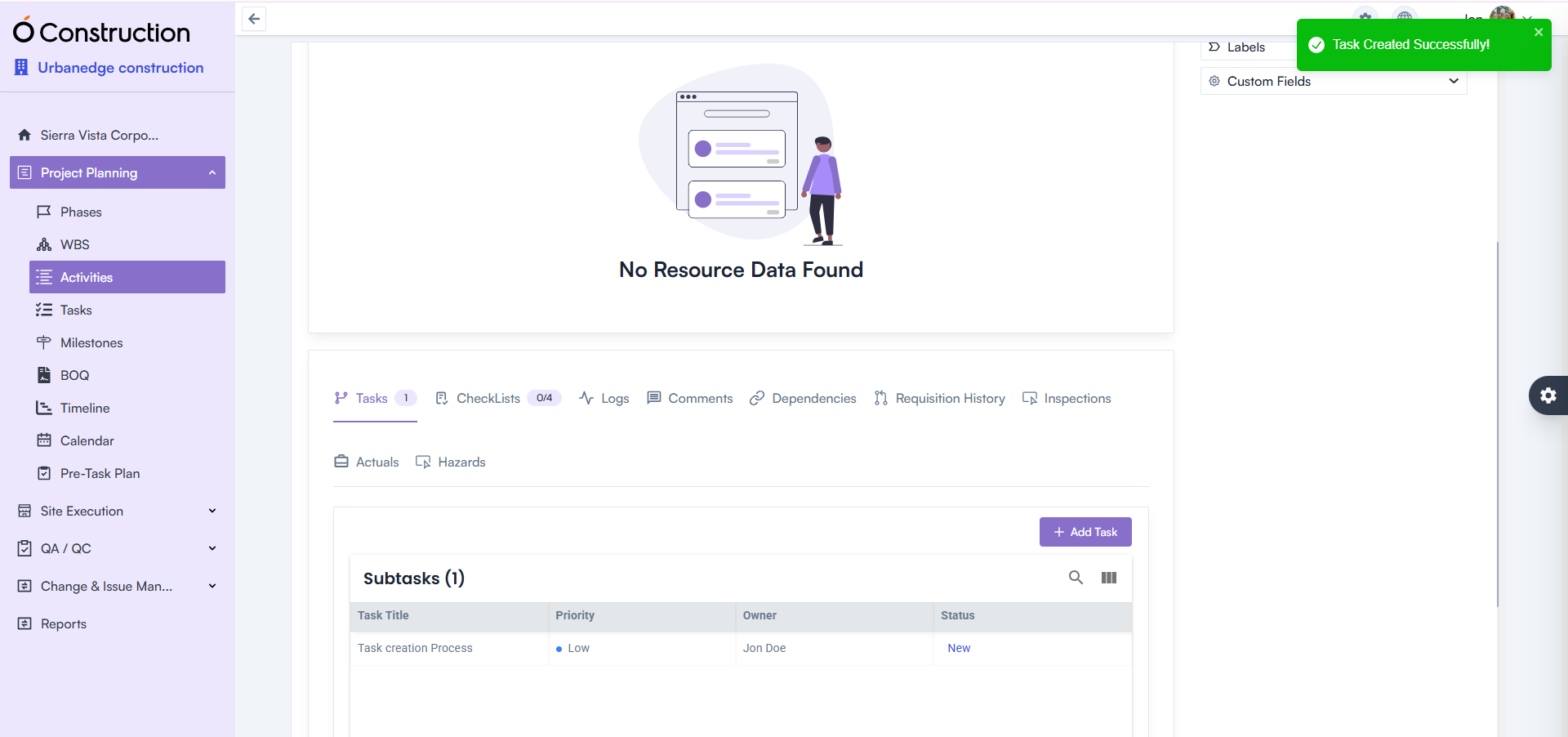
  • Activity Details — Task Creation Error Fixed

Creating tasks under Activity Details incorrectly prompted a 422 error message.

  • Fix: This issue is fully resolved.
  • Benefit: Smoother task addition and execution continuity.

Activity Details — Task Creation Error Fixed

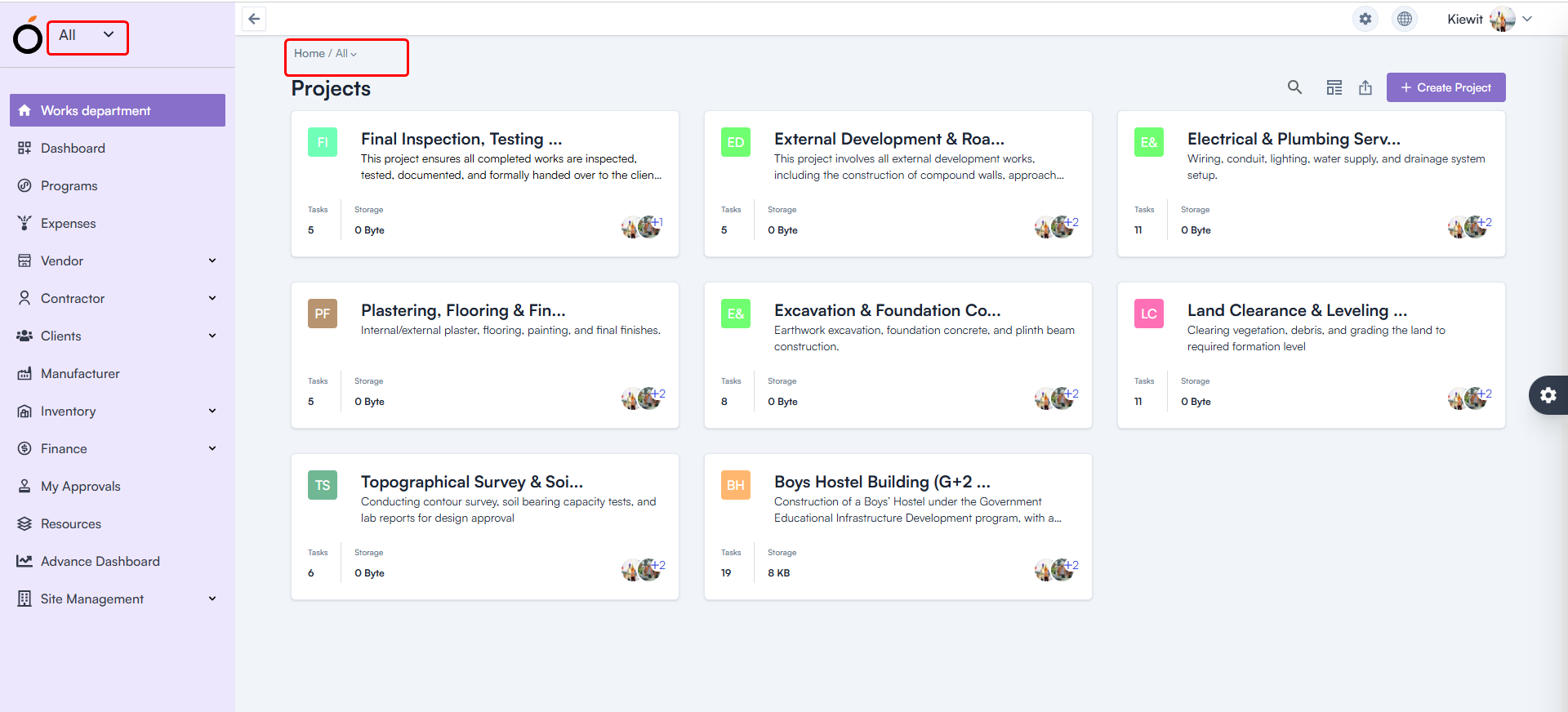
  • Workspace Selection — Default Workspace Fixed

After login, all users were shown “All” as their workspace.

  • Fix: The system now loads the correct workspace based on user permissions.
  • Benefit: Faster access to relevant projects and responsibilities.

Workspace Selection — Default Workspace

  • Budget Insight – Improved Hierarchy Expand/Collapse

Expand/collapse behavior in Hierarchy View was not consistent.

Budget Insight – Improved Hierarchy

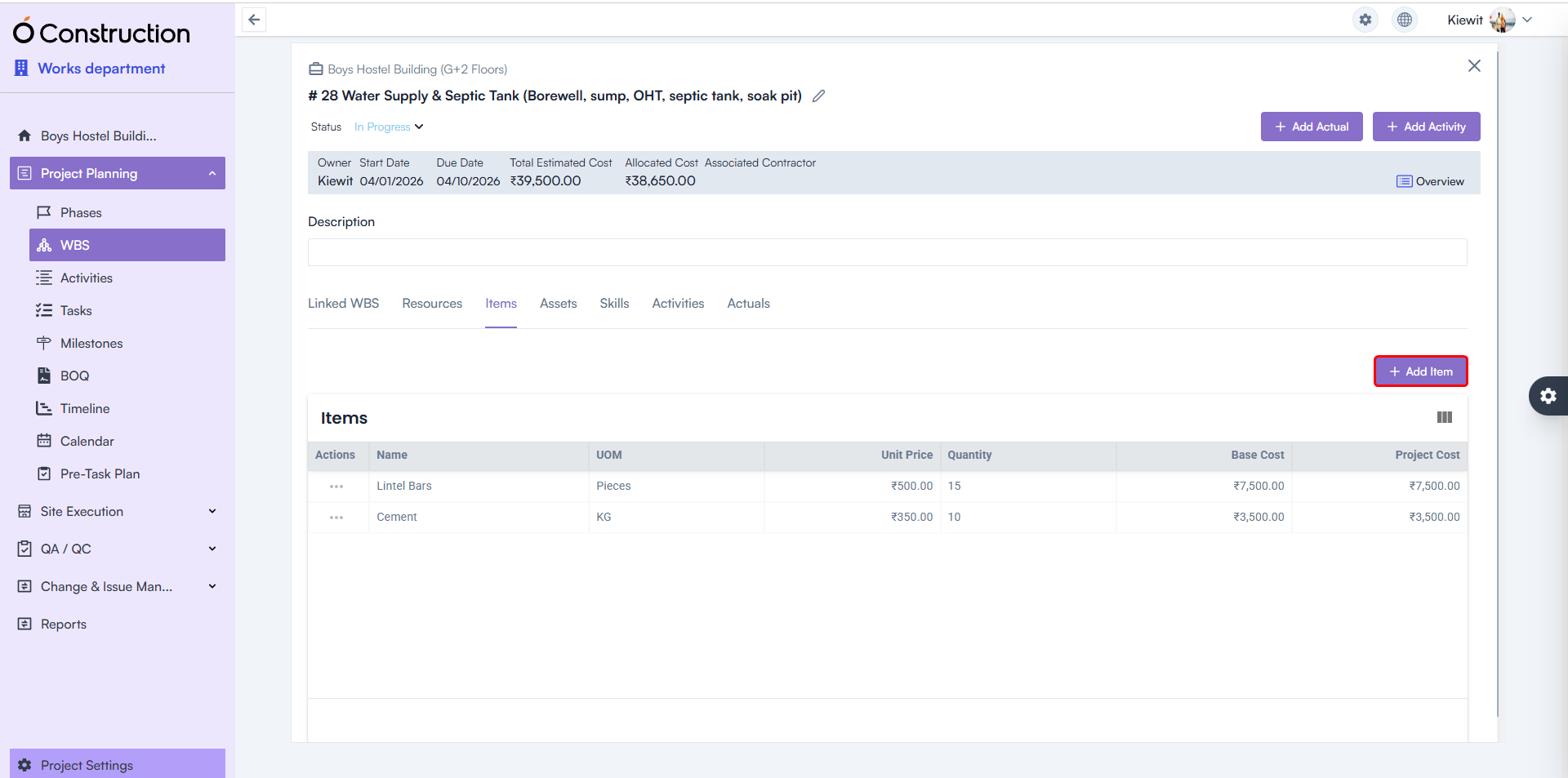
  • WBS Details Page — Item & Asset Adding Enabled

Users previously faced restrictions adding:

  • Items
  • Assets

Fix: Both are now fully functional.
Benefit: Better control over project structure and asset planning.

WBS Details Page — Item & Asset Adding Enabled

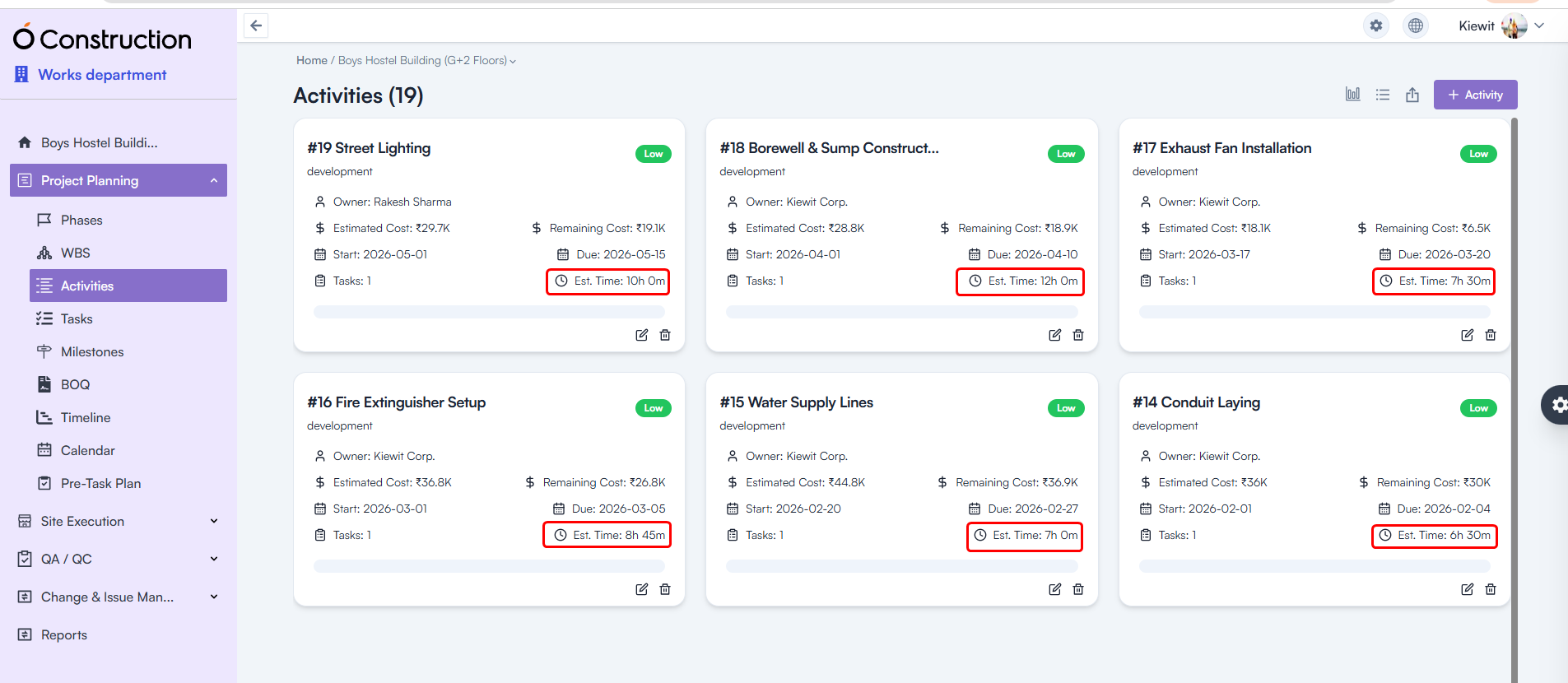
  • Estimated Hours — Calculation Logic Corrected

Estimated Hours for Tasks and Activities were showing incorrect values.

  • Fix: Calculation formulas have been rectified throughout the system.
  • Benefit: More accurate workforce and schedule planning.

Estimated Hours — Calculation Logic Corrected

Final Takeaway

This December edition of OConstruction Release Notes sharpens the user experience with fixes that boost reliability, calculation accuracy, and workflow clarity across the platform.

We’re continuously improving OConstruction to support both field and office teams with smoother project execution, stronger controls, and more confidence in daily operations.

OConstruction Release Notes: What’s Latest in November 2025

Keeping your projects organized, efficient, and error-free continues to be our top priority at OConstruction.

Our latest OConstruction Release Notes for 17 November 2025 include powerful enhancements, workflow improvements, UI refinements, and critical bug fixes — all designed to streamline your construction execution both on-site and in the office.

From improved Checklist creation and DPR advancements to major fixes across BOQ, WBS, Calendar, and Task modules, this update ensures smoother navigation, better performance, and more reliable project tracking.

Let’s walk through everything included in the OConstruction November 2025 Release.

Release Update – 17/11: Feature Enhancements & Bug Fixes

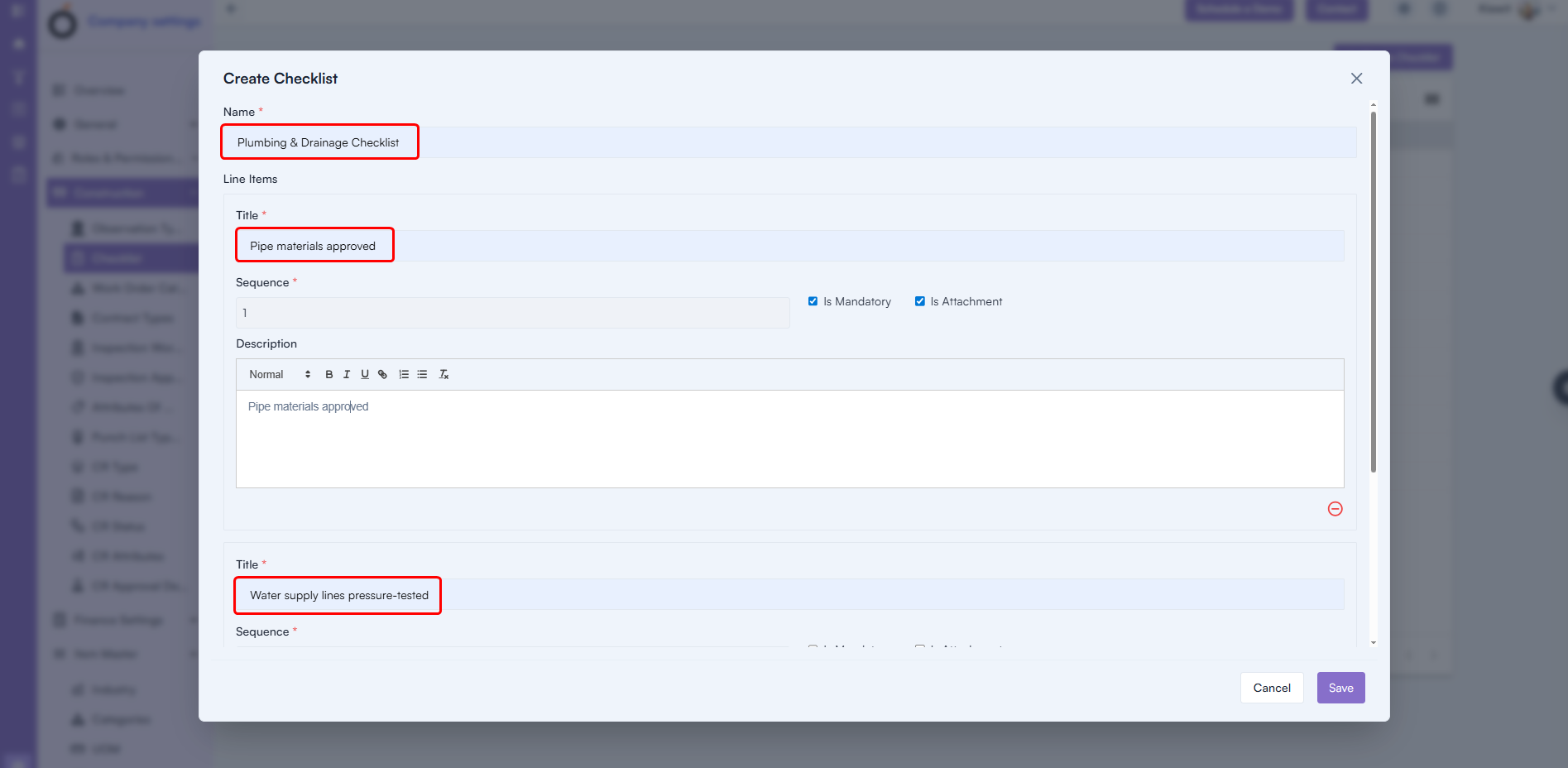
Checklist Creation with Line Items (Enhancement)

You can now create complete checklists with greater detail and flexibility.

What’s New

  • Add Checklist Name
  • Add Multiple Checklist Items
  • Include Sequence Numbers
  • Add Descriptions
  • Add all line items directly using + Add Line Item

Benefit: Faster checklist creation, richer detail, and a more structured QA/QC workflow.

Checklist Creation with Line Items

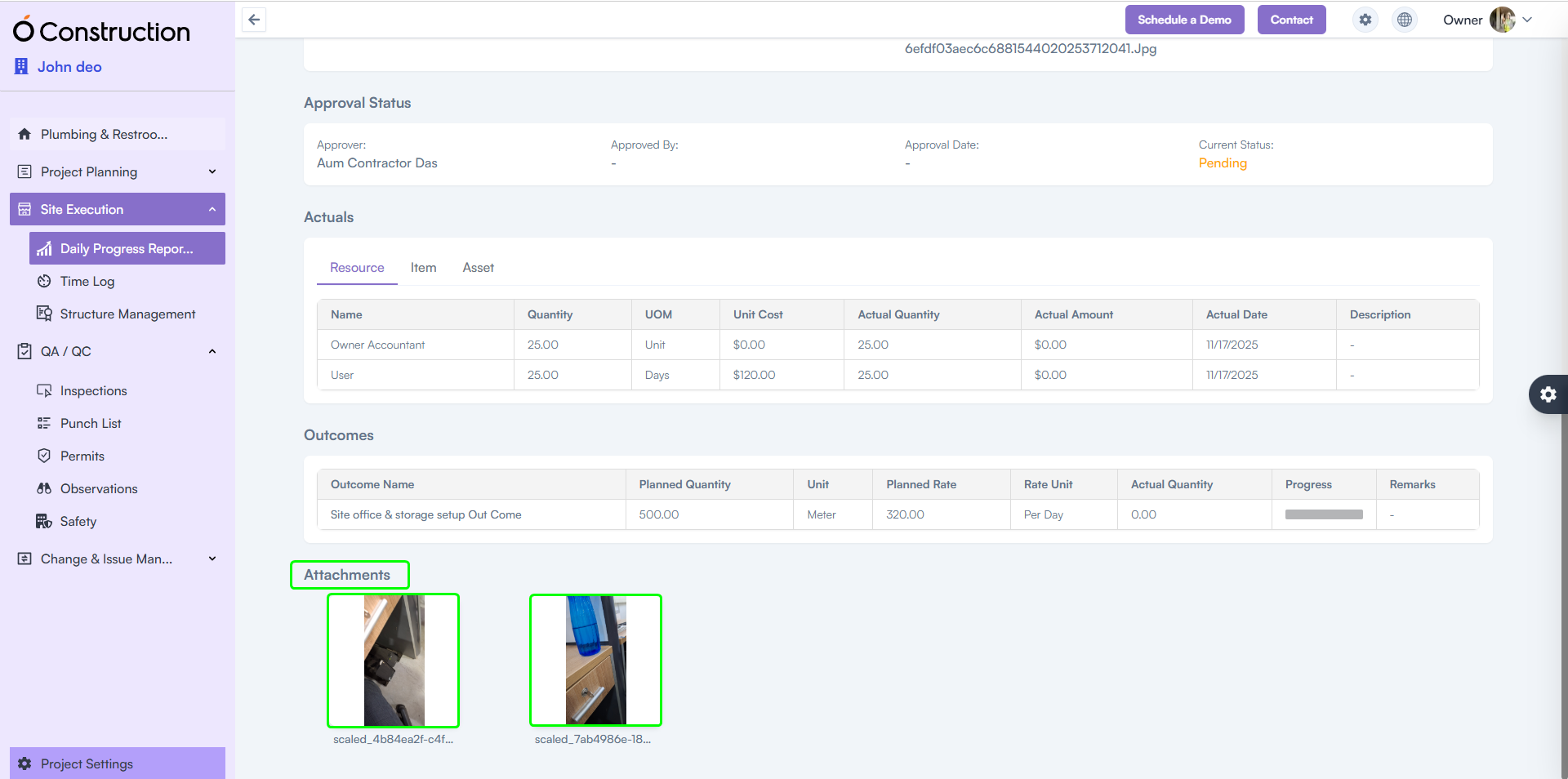
2) DPR Attachments Visible in Frontend (Enhancement)

Attachments uploaded via the mobile app are now perfectly displayed on the web.

Benefit: Smooth, consistent DPR review across devices — ensuring supervisors always see the latest photos, documents, and field evidence.

DPR Attachments Visible in Frontend

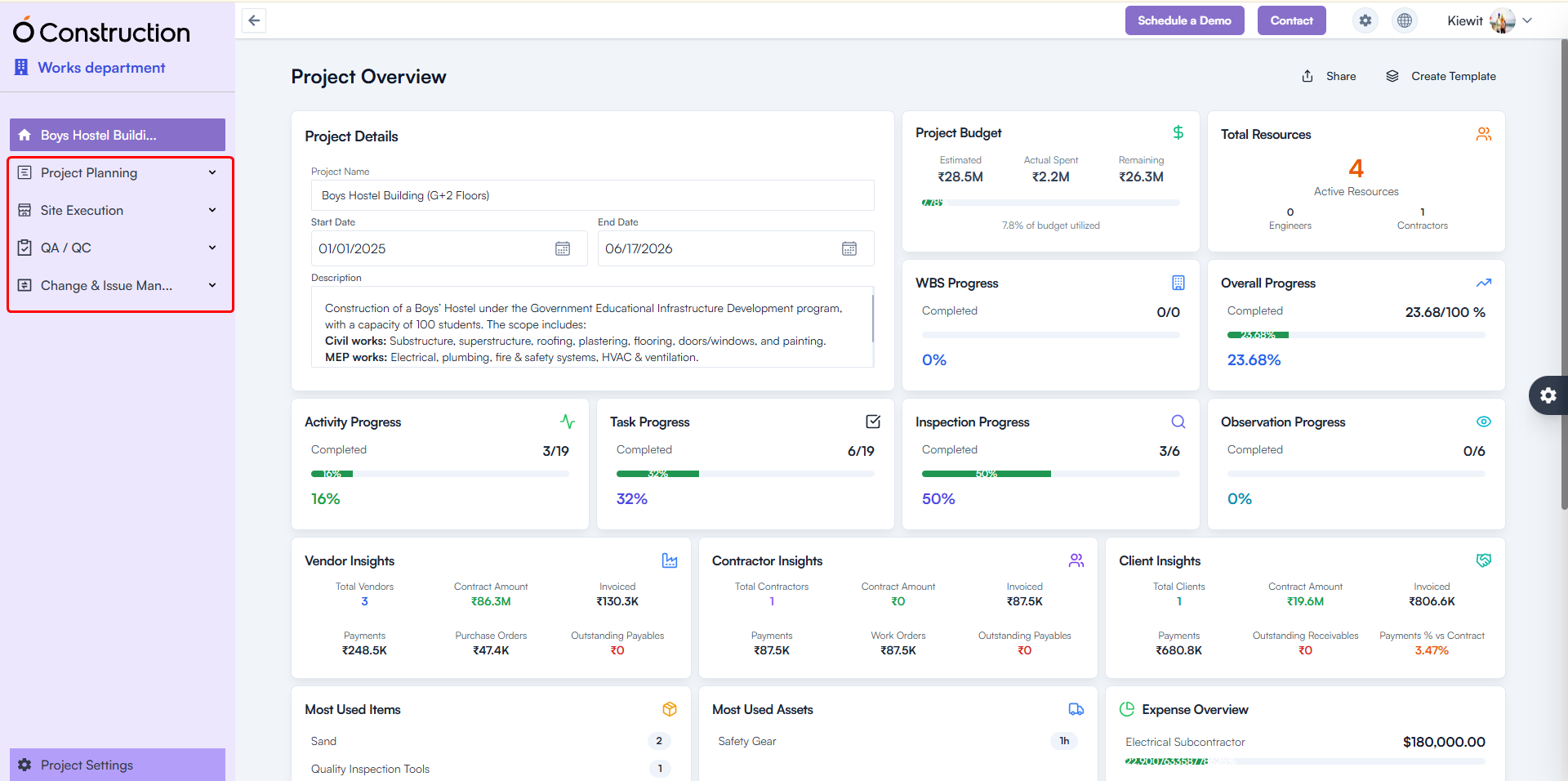
3) Menu Collapse – Improved Grouping for Project Modules (Usability Improvement)

The Project Module menu has been reorganized into clear functional groups for faster navigation.

New Groupings Include:

Project Planning

  • Phases
  • WBS
  • Activities
  • Tasks
  • Milestones
  • BOQ
  • Timeline
  • Calendar

Site Execution

  • Daily Progress Report
  • Time Log
  • Structure Management

QA/QC

  • Inspections
  • Punch List
  • Permits
  • Observations
  • Safety

Change & Issue Management

  • Change Request
  • Service Tickets

Benefit: Cleaner structure, reduced scrolling, and quicker module access.

Menu Collapse – Improved Grouping

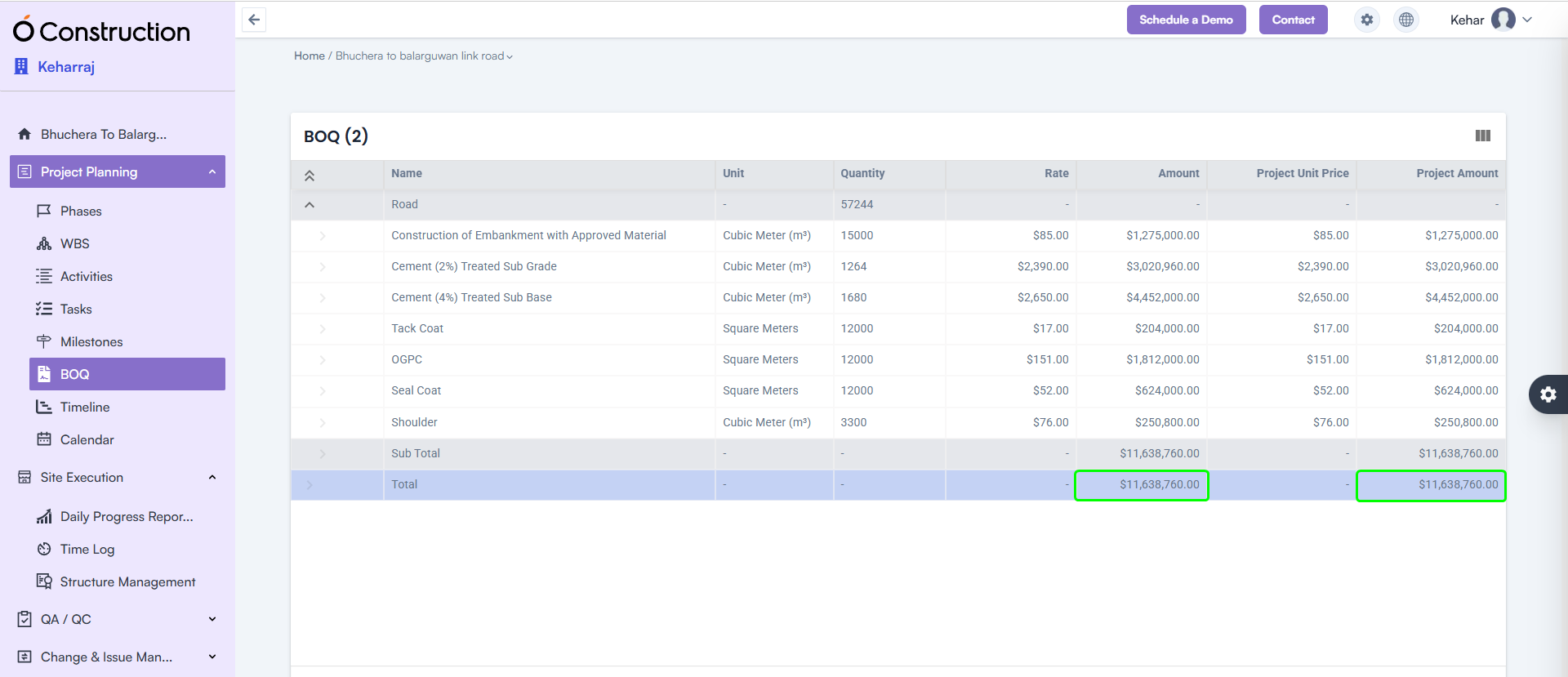
4) BOQ Subtotal & Total Highlight (Enhancement)

The BOQ listing page now clearly displays Subtotal and Total Amount at the bottom of the table.

Benefit: Instantly review cost structure with improved visibility for decision-making.

BOQ Subtotal & Total Highlight

5) Mobile App – DPR File Upload Slowness Resolved (Bug Fix)

The Mobile DPR module has been optimized for faster uploads.

  • File upload speed significantly improved
  • Updated version available on Google Play Store

Benefit: Quick, seamless field reporting even on low-network sites.

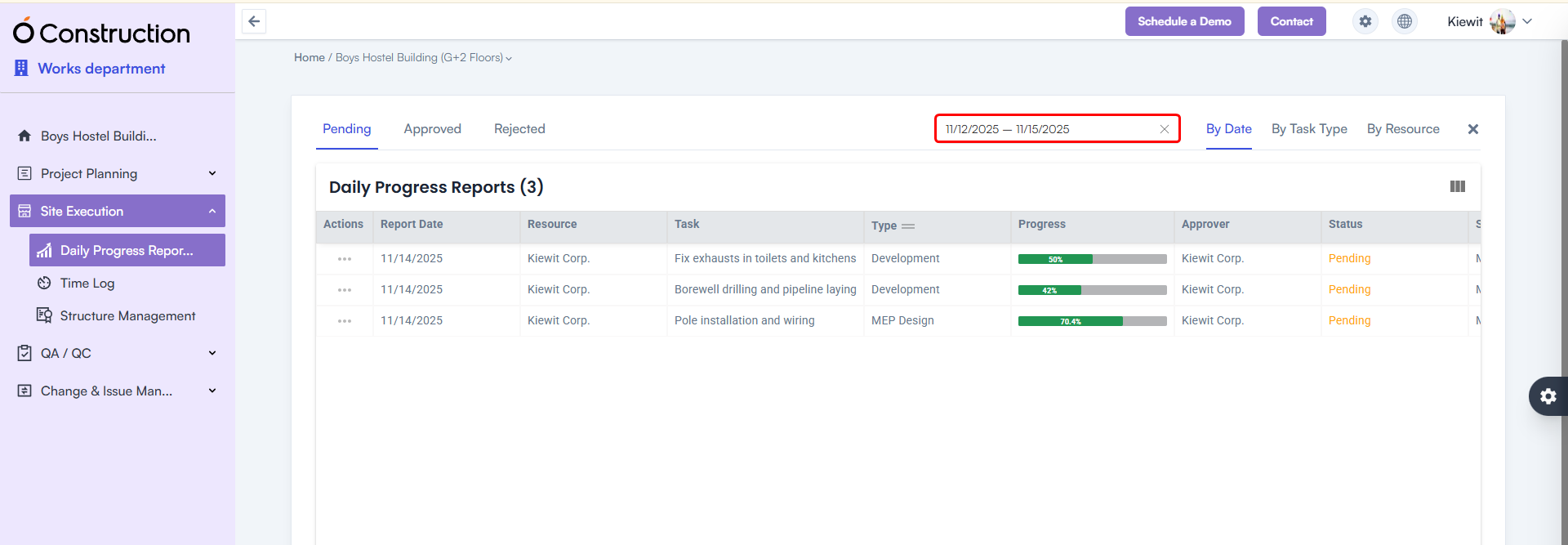
6) DPR Date Range Filter Added (Enhancement)

A Date Range Calendar Filter is now available in the DPR listing page.

Benefit: Easily filter DPRs between any two dates for reviews, audits, or progress analysis.

DPR Date Range Filter Added

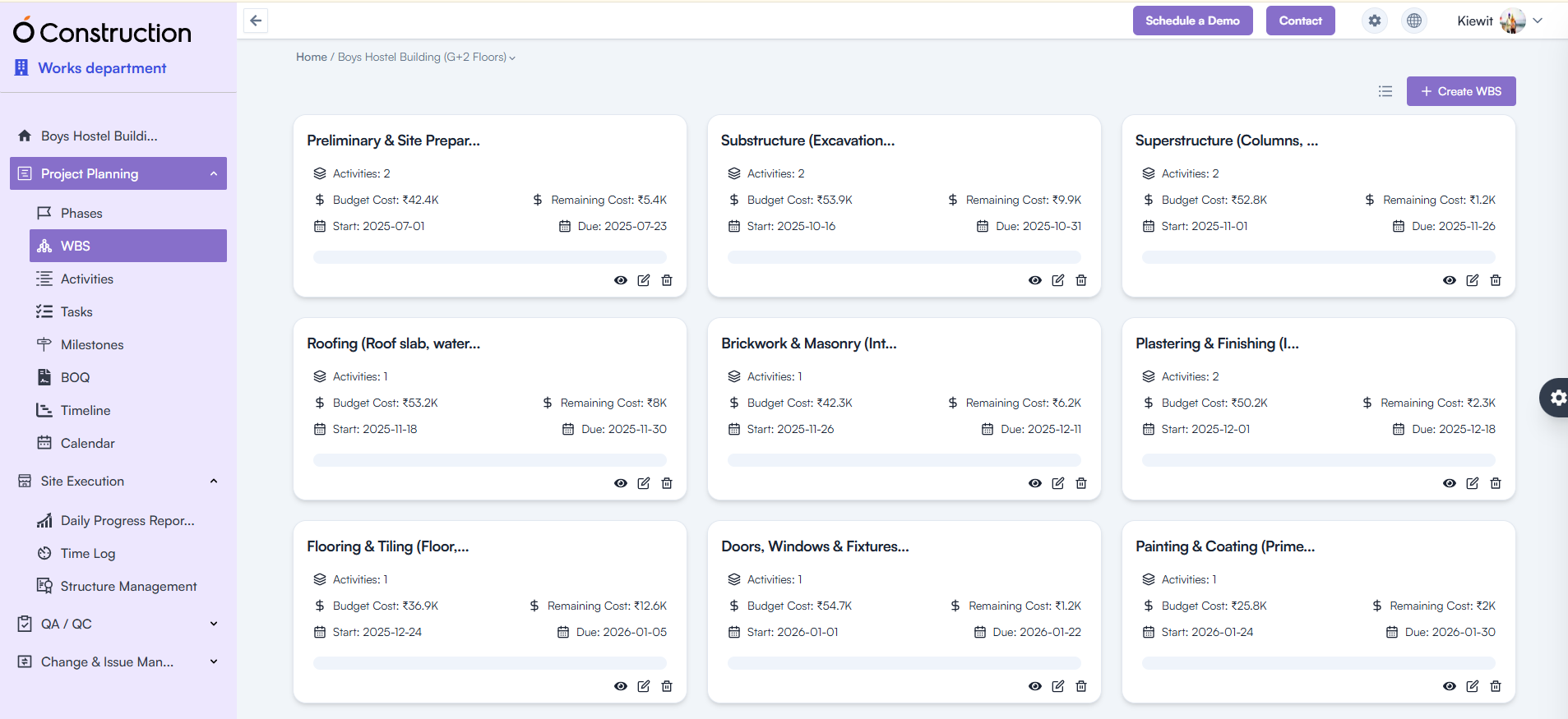
7) WBS / Activity Card Navigation Issue Fixed (Bug Fix)

Previously, clicking Back redirected users to the List View instead of the Card View.

Fix: Navigation now correctly returns to the Card View.
Benefit: A more consistent and intuitive navigation experience.

Activity Card Navigation Issue Fixed

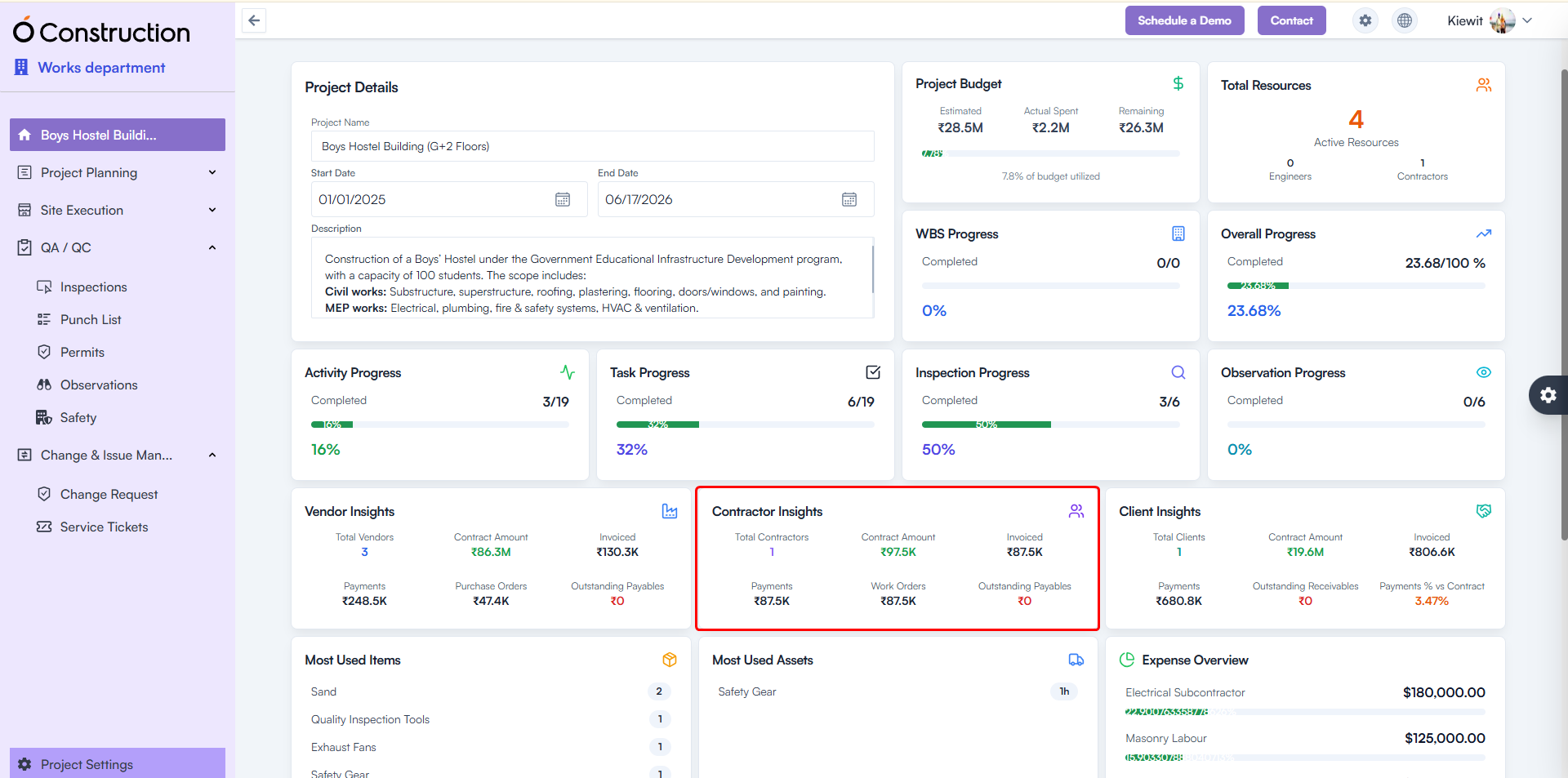
8) Contractor Insights – Incorrect Metrics Fixed (Bug Fix)

Contractor Insights was showing blank or zero results.

Fix: API inconsistencies resolved; correct metrics now display.
Benefit: Accurate contractor performance tracking for better vendor decisions.

Contractor Insights – Incorrect Metrics Fixed

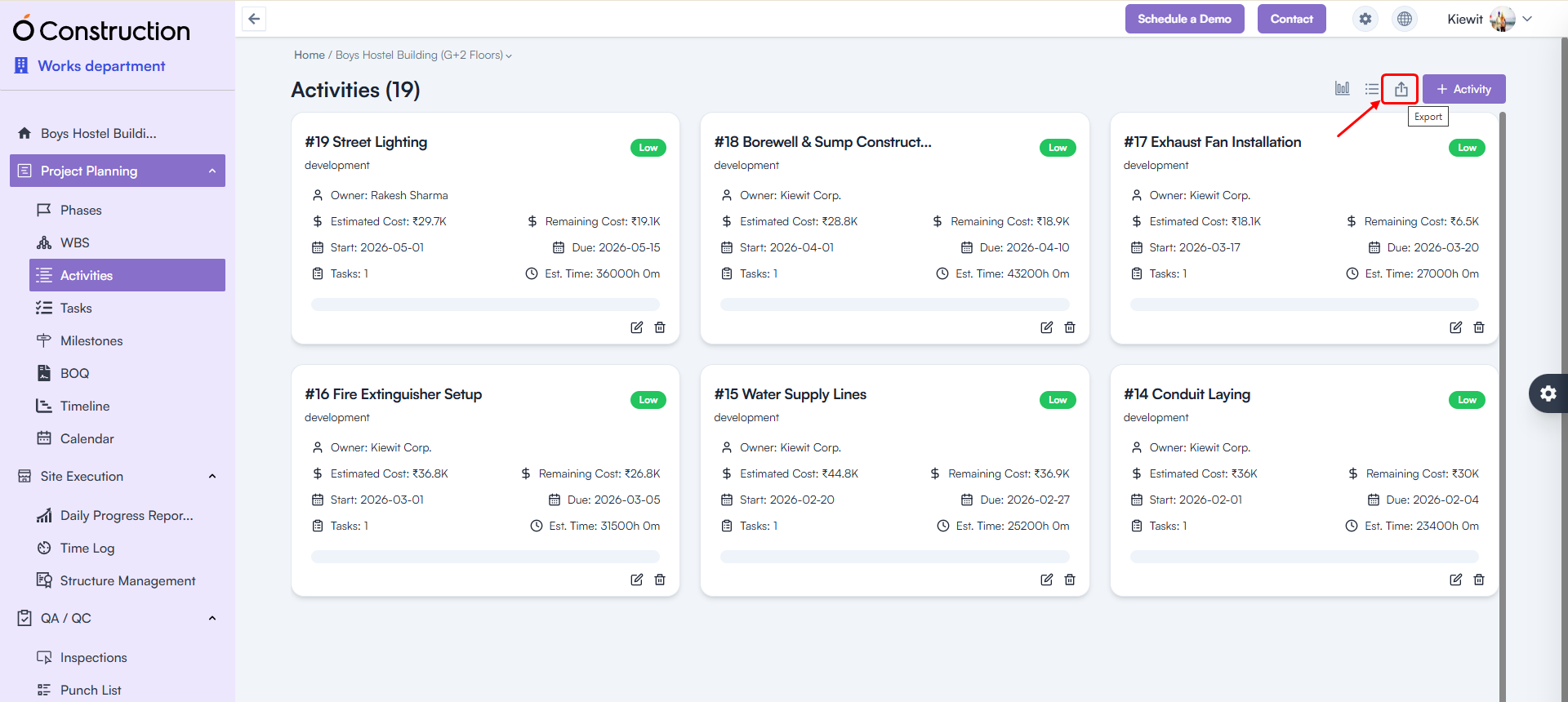
9) Export Issues (500 Error) Fixed (Bug Fix)

Exporting the following modules no longer triggers errors:

  • Phases
  • Activities
  • Tasks
  • Milestones

Benefit: Reliable, error-free data export for reporting and compliance needs.

Export Issues

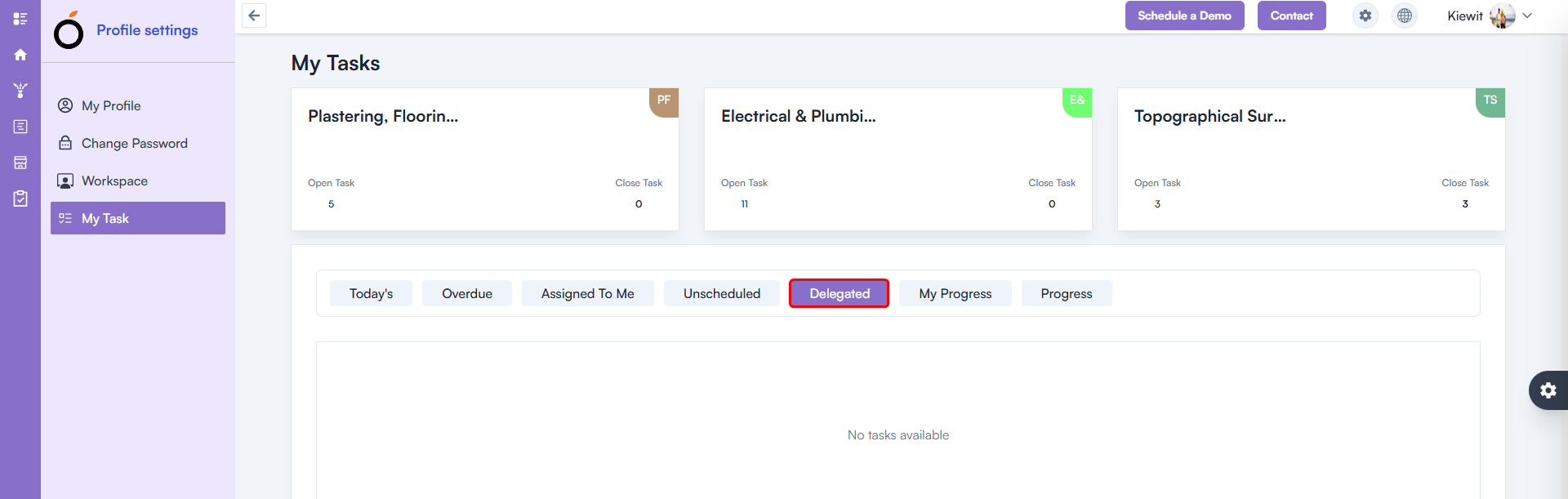
10) Delegated Task – 500 Error Fixed (Bug Fix)

A 500 error occurred in My Tasks → Delegated Task.

Fix: Issue fully resolved.
Benefit: Smooth task tracking and delegation workflows.

Delegated Task – 500 Error Fixed

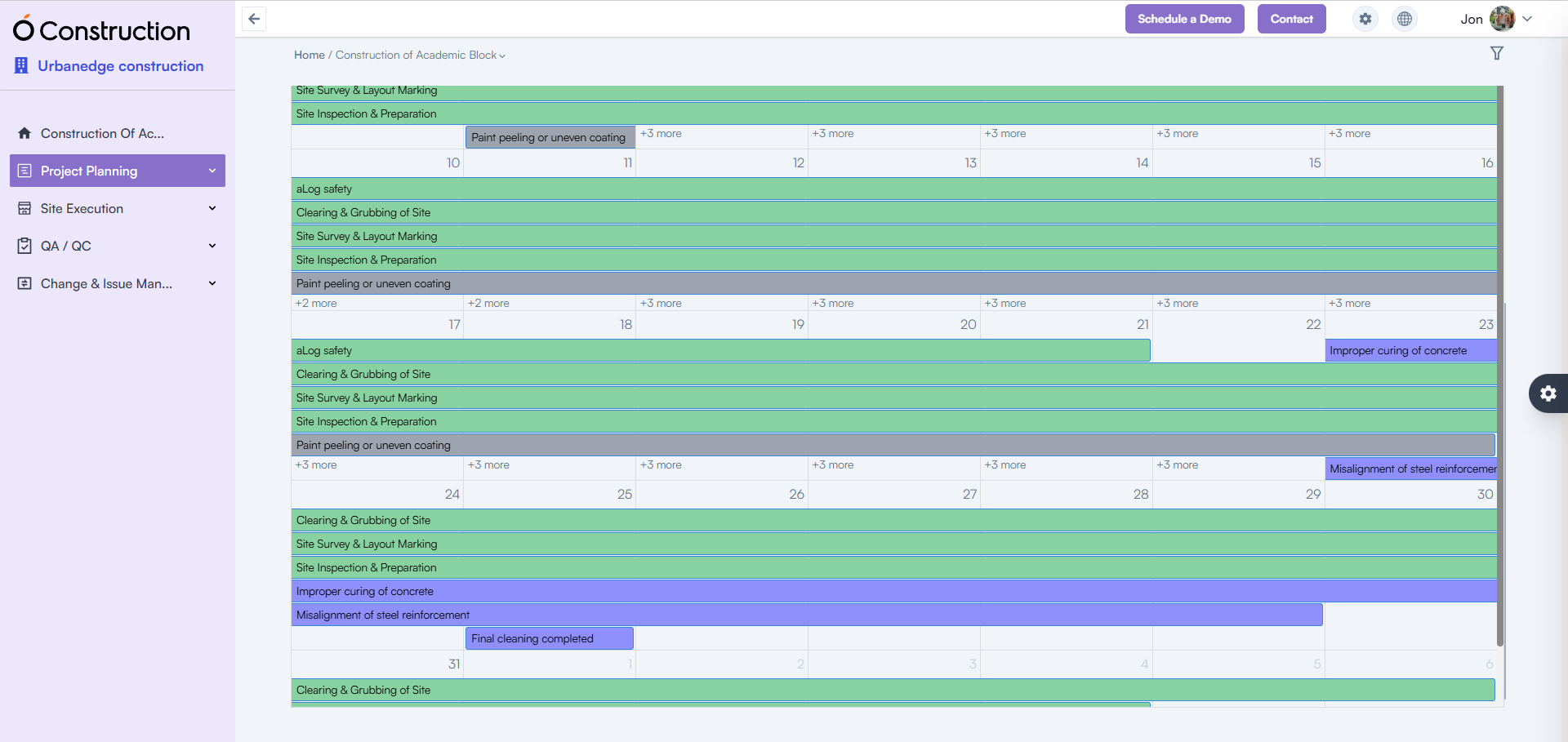
11) Calendar – 500 Error Fixed (Bug Fix)

The Calendar List View previously returned a 500 internal server error.

Fix: Functionality restored and fully stable.
Benefit: Accurate schedule visibility for planning and daily execution.

Calendar – 500 Error Fixed

Conclusion

Every enhancement in these OConstruction Release Notes reflects our mission to improve system stability, on-site productivity, and overall user satisfaction.

From detailed checklists and advanced DPR features to critical BOQ, contractor insights, and navigation fixes — this release ensures faster workflows, stronger compliance tracking, and powerful construction management capabilities.

Stay tuned for more OConstruction Release Notes as we continue to optimize, innovate, and support construction teams worldwide.

Category: Construction Academy

Subcategory: Budgeting and Planning

Subcategory: Construction Phase

Subcategory: Design Coordination

Subcategory: Estimation Techniques

Subcategory: Initiation and Feasibility

Subcategory: Introduction

Subcategory: Personal Management

Subcategory: Project Close-Out

Subcategory: Project Scheduling

Subcategory: Project Teams

Subcategory: Proposal Management

Subcategory: Total Quality Management

Subcategory: Tracking and Control

Subcategory: Work Breakdown

Category: Help Desk

Subcategory: Client

Subcategory: Construction 101

Subcategory: Contractor Management

Subcategory: Expense

Subcategory: Finance Budget

Subcategory: Inventory Management

Subcategory: My Approvals

Subcategory: Site Management

Subcategory: Vendor Management