How Digital Logs Help You Stay Compliant & Audit-Ready?

Did you know that 65% of construction firms fail audits because they lack proper documentation? When regulations tighten, staying audit-ready matters more than ever. That’s where digital logs compliance comes in: structured, timestamped records captured automatically.

With clear logs, teams avoid disputes, speed inspections, and prove compliance in real time. In this post, we’ll explore why digital logs matter now, how contractors and compliance officers benefit most, and which best practices you can adopt — especially using OConstruction’s integrated platform.

You’ll gain detailed insights, actionable steps, and confidence to keep audit-ready documentation at every job site.

Business Relevance & Why It Matters

In today’s regulatory environment, digital logs compliance is critical for construction project managers, compliance officers, and operations executives.

Regulators, owners, or insurers increasingly demand traceable, tamper‑proof records — covering safety checks, material deliveries, and site inspections. When documentation fails, companies risk project delays, penalties, or failed certifications.

For example:

  • A municipal contractor must submit daily safety inspection logs to meet city permit conditions.
  • A commercial builder often needs material delivery timestamps to verify sourcing compliance and avoid disputes.
  • A civil infrastructure firm tracks equipment usage and calibration logs to satisfy environmental and safety regulations.

Without digital records, firms rely on paper or email threads — which can be lost, incomplete, or unverifiable. As a result, they face increased audit costs, rework, and reputational risk.

Conversely, with a unified platform that captures digital logs compliance automatically, construction teams can generate audit-ready reports effortlessly.

Real-time data, streamlined retrieval, and compliance dashboards reduce risk and improve operational clarity.
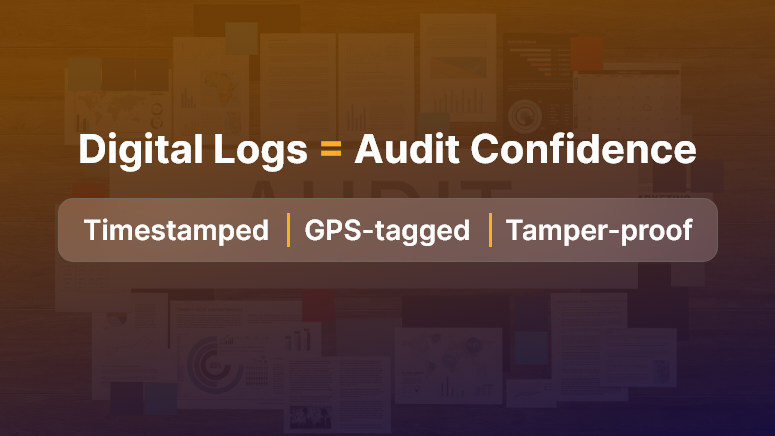
Digital Logs Audit Confidence

Best Practices, Frameworks & Actionable Strategies

1. Do’s and Don’ts for Digital Log Compliance

  • Do capture logs immediately at the source using mobile devices. This ensures accuracy and prevents post-hoc errors.
  • Don’t let teams delay entries or maintain parallel paper logs. Inconsistent records weaken compliance.
  • Do use timestamped, immutable audit logs that record every change and user action.
  • Don’t rely on manual consolidation of emails or spreadsheets — they’re prone to data gaps and version issues.

2. Quick Wins & Best Practices

  • Set standardized log templates: Create consistent forms for safety checks, delivery receipts, and site inspections. Templates guarantee completeness and compliance-ready fields.
  • Enable real‑time validation: Use app prompts to alert users about missing fields or incorrect entries before saving logs. This ensures quality and reduces omissions.
  • Automate audit report exports: Generate daily or weekly compliance summaries that project managers or auditors can review instantly — no manual compilation needed.

3. Step‑by‑Step Framework Using OConstruction

  • Step 1: Define log types required per regulation — e.g., safety check, material shipment, equipment calibration.
  • Step 2: Configure mobile log forms within the OConstruction platform for each log type.
  • Step 3: Require field teams to submit entries at scheduled intervals, with GPS, timestamp, photo, and signature capture.
  • Step 4: Monitor submissions via the compliance dashboard, which flags missing or invalid entries for follow-up.
  • Step 5: Export audit-ready logs or reports with one click, including metadata, entry history, and user details.

This framework ensures consistent digital logs compliance across every site, making regulatory reporting seamless and transparent.

It also ties back to OConstruction’s platform — using mobile forms, dashboards, and exportable records to enforce compliance reliably.

Customer Story/Use Case Example

For example, MetroBuild Contractors, a mid-sized commercial firm, implemented digital logs compliance using OConstruction’s mobile logging and compliance analytics.

Their compliance manager enabled log templates for daily safety checks, equipment use, and material deliveries. As a result:

  • They reduced audit preparation time by 60%
  • They eliminated 95% of missing log incidents across sites
  • They avoided a costly fine because they presented audit-ready reports instantly

Here’s how: MetroBuild field teams logged entries on-site via mobile devices, capturing GPS, timestamps, and photos. The platform flagged any missing entries automatically, prompting supervisors to follow up.

Before audits, MetroBuild generated comprehensive logs with a click — no paper, no manual compilers. This ensured full compliance and built trust with regulators and clients alike.

Key Takeaways & Closing Summary

Digital logs compliance turns chaotic paperwork into structured, audit-ready documentation that protects your projects and your bottom line.

By capturing logs immediately, enforcing data quality, and using a compliance dashboard, you eliminate risk and streamline reporting.

  • You ensure consistent record keeping via standardized templates and timestamped entries.
  • You gain real-time visibility into missing or incomplete logs across all sites.
  • You save audit time and reduce errors with automated exportable reports.

Ultimately, embracing digital logs compliance with an integrated platform like OConstruction empowers project teams to stay audit-ready, reduce compliance risk, and concentrate on building — rather than compiling documents.

FAQs

Q1. What are digital logs in construction compliance?

Digital logs are structured, timestamped, and often immutable records of activities on construction sites. They cover safety checks, material deliveries, equipment usage, inspections, and other regulatory requirements. Unlike paper or email records, digital logs are automatically captured, auditable, and easy to retrieve, helping firms demonstrate compliance quickly and reliably.

Q2. Why are digital logs important for construction firms?

Many firms fail audits because they lack proper documentation. According to industry surveys, 65% of construction firms fail audits due to incomplete or inconsistent records. Digital logs:

  • Provide real-time evidence of compliance.
  • Reduce project delays and fines.
  • Simplify inspections and reporting.
  • Build trust with regulators, owners, and clients.

Q3. How do digital logs make firms audit-ready?

  • Digital logs capture every activity in real time, including:
  • GPS location of the entry to confirm site presence.
  • Timestamps for each action or check.
  • Photos or signatures for verification.

Q4. How do digital logs reduce compliance risks?

By standardizing entries and automatically validating data, digital logs prevent:

  • Missing or incomplete documentation.
  • Post-hoc errors or retroactive corrections.
  • Disputes over regulatory compliance or material deliveries.

Q5. Can digital logs improve operational efficiency?

Yes. Centralized, real-time logs provide project managers and compliance officers with immediate visibility into:

  • Missing or invalid entries.
  • Equipment usage or calibration issues.
  • Safety check compliance.

This allows teams to act proactively, reducing rework, delays, and administrative overhead.

Q6. How should construction teams capture digital logs?

  • Capture entries at the source: Use mobile devices to log activities immediately on-site.
  • Use standardized templates: Forms for safety checks, deliveries, and inspections ensure completeness.
  • Enable real-time validation: Prompt users about missing fields or incorrect entries before submission.
  • Avoid parallel paper logs: Manual records are prone to inconsistencies and can undermine compliance.

Q7. What features make digital logs reliable for audits?

  • Timestamping and immutability: Each entry records time, date, and user action.
  • Metadata tracking: Details like user ID, GPS location, and revision history.
  • Exportable reports: One-click generation of audit-ready reports with full data history.
  • Dashboards for monitoring: Centralized view of all site entries with flags for missing or invalid logs.

Q8. How can technology platforms like OConstruction help with digital logs?

Platforms like OConstruction provide:

  • Mobile forms for immediate data capture.
  • Compliance dashboards for managers to track submissions in real time.
  • Automated alerts for missing entries or data discrepancies.
  • One-click audit-ready report exports, including all metadata and entry history.

Q9. Are there real-life examples of digital logs improving compliance?

Yes. MetroBuild Contractors implemented OConstruction’s mobile logs for:

  • Daily safety inspections.
  • Material delivery tracking.
  • Equipment use and calibration checks.

Results:

  • Audit prep time reduced by 60%.
  • 95% fewer missing log incidents across multiple sites.
  • Avoided costly fines by presenting instant, verifiable audit reports.

Q10. Can digital logs help with regulatory inspections beyond audits?

Absolutely. Logs can serve as proof of:

  • Safety protocol adherence.
  • Material sourcing and delivery compliance.
  • Equipment calibration and maintenance history.

This reduces the risk of failed inspections and strengthens client and regulator trust.

How Construction Companies Are Adapting to Climate Regulations

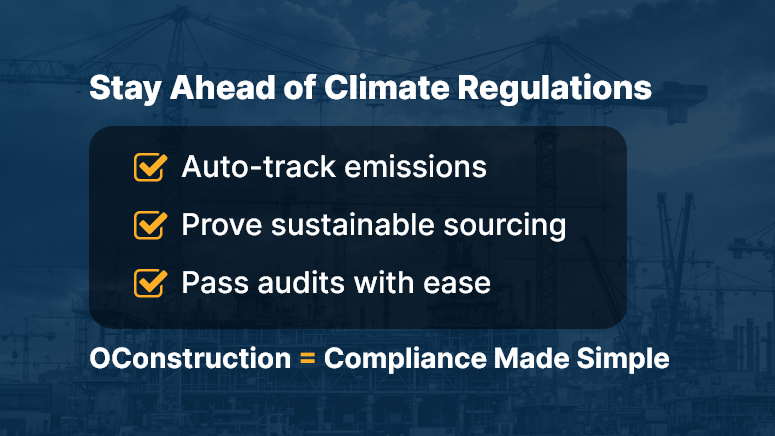
Over the last year, 85% of construction companies reported new challenges due to tightening construction climate regulations — from carbon limits to sustainable material sourcing. These changes matter because non‑compliance now risks fines, project delays, and reputational damage.

Furthermore, clients increasingly demand greener builds. In this article, you’ll learn why adapting to these climate rules is critical, what leads to regulatory missteps, and how OConstruction’s integrated digital platform empowers project leads and sustainability managers to comply efficiently.

You’ll discover actionable strategies and a real‑world example that proves compliance can be a competitive advantage—all while addressing the core focus on construction climate regulations.

Business Relevance & Why It Matters

Today, construction climate regulations drive critical shifts across design, procurement, and site operations. Governments are enforcing stricter emission caps, material sourcing metrics, and waste‑management rules.

When companies fall behind, they face penalties, project stoppages, and loss of client trust. On the other hand, forward‑looking firms gain access to green contracts and cost savings through efficiency.

Contract managers, compliance officers, and project executives benefit most from compliance tools. For instance:

Use Case 1:

A commercial builder must track carbon emissions per project to meet local regulatory thresholds. Without data, meeting compliance becomes guesswork.

Use Case 2:

A public infrastructure firm needs proof of sustainable sourcing for materials. Manual spreadsheets fall short.

Use Case 3:

A residential developer wants to benchmark energy usage across projects. Lack of centralized insight prevents optimization.

Clearly, the pain — manual tracking, fragmented data, regulatory risk — contrasts with the solution: a unified platform that logs emissions, procurement data, and audit proofs. By utilizing OConstruction’s platform, companies ensure construction climate regulations become manageable, actionable, and even profitable.

Best Practices, Frameworks & Actionable Strategies

1. Do’s and Don’ts for Regulatory Adaptation

  • Do implement standardized data entry workflows for reporting emissions, waste, and sustainable materials. This ensures consistent audit documentation.
  • Don’t rely on siloed Excel files. Disparate systems impede traceability and increase regulatory error risk.
  • Do use centralized dashboards showing compliance status by project. This offers real-time visibility to all stakeholders.
  • Don’t delay data updates until month‑end. Late reporting can breach compliance deadlines and lead to penalties.

2. Quick Wins & Best Practices

  • Automate Emissions Tracking

Use integrated meter or IoT inputs to record site‑level energy and fuel usage automatically. It saves time and improves accuracy.

  • Use Material Sourcing Checklists

Pre‑loaded lists of green vendors and sustainable materials help procurement meet regulatory requirements effortlessly.

  • Generate Real‑Time Compliance Reports

Provide on-demand dashboards showing carbon footprints, waste diversion, and regulatory thresholds at both project and corporate levels.

3. Step‑by‑Step Framework Using OConstruction

  • Step 1: Set regulatory parameters per project — local carbon caps, waste diversion rates, sustainable material goals.
  • Step 2: Log procurement details through the platform, tagging each item’s sustainability score.
  • Step 3: Automate field data collection — energy use, transport emissions, waste volumes — through mobile input.
  • Step 4: Platform aggregates data, flags gaps, and alerts stakeholders before thresholds breach.
  • Step 5: Produce audit‑ready compliance reports and share them with regulators or clients instantly.

This framework demonstrates how OConstruction ties each phase of adaptation to the platform’s digital compliance capabilities, enabling transparent and proactive alignment with construction climate regulations.

Customer Story/Use Case Example

For example, GreenBuild Infrastructure, a commercial contractor, adapted swiftly to new construction climate regulations around carbon intensity.

They used OConstruction’s compliance module to set up carbon caps per project and automatically capture energy consumption data via connected sensors.

They also tagged all material orders by sustainability category. As a result:

  • They achieved 20% reduction in carbon emissions across three major sites
  • They passed regulatory audits without a single compliance exception
  • They won a competitive green tender due to transparent reporting capabilities

By centralizing emissions tracking, procurement data, and audit logs, GreenBuild turned regulatory changes into competitive differentiators.

Key Takeaways & Closing Summary

Construction climate regulations no longer represent just external pressure—they offer an opportunity to lead in sustainability and efficiency.

By leveraging a digital platform that automates emissions tracking, centralizes procurement data, and enables audit‑ready compliance, you turn regulatory obligations into strategic strengths.

You gain:

  • Real-time compliance visibility across all projects
  • Streamlined procurement and material tracking aligned with green standards
  • Audit-ready documentation that supports bids, client confidence, and regulatory proof

Ultimately, adapting effectively to construction climate regulations ensures you stay compliant, competitive, and future‑proof.

Tools and Tactics for Workforce Scheduling in Construction

In construction, the difference between on-time delivery and costly overruns often boils down to one key factor: effective workforce scheduling. According to McKinsey, large construction projects typically take 20% longer to finish than scheduled and are up to 80% over budget. One of the silent culprits? Poor scheduling of labor.

With project complexity rising, site coordination becoming more fragmented, and skilled labor harder to find, workforce scheduling in construction is no longer an administrative task — it’s a strategic driver. In this blog, we’ll explore why getting workforce scheduling right is critical, common pitfalls, and modern tools and tactics (including OConstruction) that empower you to schedule smarter, faster, and more effectively.

Right Crew Right Place Right Time

Business Relevance: Why Workforce Scheduling in Construction Matters

Workforce scheduling in construction isn’t just about putting names on a calendar. It directly impacts:

  • Site productivity: Misaligned crews or delayed resources lead to idle time and wasted budgets.
  • Project profitability: Labor is one of the highest costs in construction. Better scheduling leads to higher utilization and less overtime.
  • Client satisfaction: Timely project delivery builds trust and boosts your company’s reputation.

Who Benefits the Most?

  • Project Managers: Gain clear visibility into crew allocation and avoid last-minute reshuffling.
  • Field Supervisors: Know who’s coming when and where — with real-time updates.
  • Contractors/Subcontractors: Improve labor efficiency and avoid resource clashes across projects.

Real-World Use Cases

  • Multi-site operations: Coordinating labor across 3+ sites with different timelines, climates, and contractor availability.
  • Weather delays: Reacting in real-time to reschedule crews due to unforeseen weather conditions.
  • Last-minute changes: Managing no-shows or urgent reassignments without breaking the entire workflow.

Without a streamlined digital approach, these scenarios result in delays, finger-pointing, and increased costs.

Tools, Tactics & Best Practices for Smarter Scheduling

1. Ditch the Spreadsheets

Stop using outdated Excel files and whiteboards. These lead to version control issues, manual errors, and communication gaps.

Do: Use a digital scheduling platform like OConstruction that offers real-time syncing and mobile access.

Don’t: Assume that one master sheet can handle multi-site, multi-crew complexity.

2. Use Role-Based Scheduling

Not all workers have the same skill sets. Role-based scheduling helps assign the right people to the right job.

Do: Categorize by certifications, skills, and availability.

Don’t: Assign workers based on seniority alone without assessing fit.

3. Integrate Resource Availability and Leave Management

Real-time availability prevents double booking and helps accommodate time-off requests without disrupting the timeline.

Do: Sync leave calendars with your scheduling tool.

Don’t: Assume manual updates will catch every conflict.

4. Visual Timelines & Gantt Charts

Construction timelines need visual clarity. Color-coded schedules help teams understand workload, gaps, and overlaps instantly.

Do: Create drag-and-drop crew plans using OConstruction’s Gantt chart.

Don’t: Expect field teams to interpret complicated, text-heavy schedules.

5. Enable Mobile Access

Workforce scheduling in construction is not just for the office. Your field teams need access on the go.

Do: Equip crew leads with mobile apps to view and confirm their daily tasks.

Don’t: Rely on office-to-site phone calls or printed schedules.

6. Real-Time Alerts and Notifications

Let tech do the reminding.

Do: Use auto-alerts for shift changes, location changes, and urgent reassignments.

Don’t: Depend solely on human follow-ups for critical updates.

7. Track Performance and Adjust

Use analytics to understand how your team is performing and what needs to change.

Do: Monitor metrics like workforce utilization, attendance, and task completion rates.

Don’t: Wait until the project closes to review what went wrong.

Customer Use Case

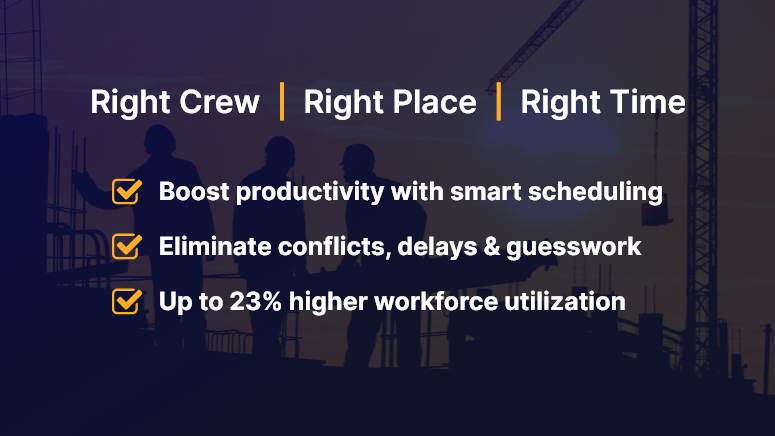
For example, SkyBuild Inc., a mid-sized commercial contractor, used OConstruction’s smart workforce scheduling module to streamline its crew allocation across six active sites. The result? A 23% boost in workforce utilization and a 15% reduction in project delays within just 60 days.

Here’s how: They switched from static spreadsheets to OConstruction’s dynamic scheduling dashboard, integrated labor availability with leave tracking, and empowered site leads with mobile apps for daily scheduling.

Key Takeaways & Summary

Workforce scheduling in construction is the engine behind timely project delivery and team productivity. From reducing idle labor to optimizing crew assignments, smart scheduling pays off across the board.

The best part? With modern platforms like OConstruction, construction leaders can move away from reactive scheduling and adopt a proactive, data-driven approach that scales.

Don’t let outdated methods slow your projects down. Modernize your workforce planning and start seeing the results on-site and on paper.

How to Avoid Vendor Miscommunication in Construction Projects

Vendor miscommunication is one of the leading causes of construction delays, budget blowouts, and missed deadlines. A single overlooked message, misinterpreted spec, or verbal instruction can send your entire schedule off track. In construction, where timing and accuracy are everything, even minor gaps between project teams and vendors can create costly chaos.

In this blog, we’ll show you how to eliminate vendor miscommunication, streamline collaboration, and deliver projects on time — using practical steps and powerful tools like OConstruction.

Why Vendor Miscommunication is a Big Deal

In construction, vendor miscommunication isn’t just a misstep — it’s a business risk. Here’s what’s at stake:

  • Budget overruns: Misunderstood specs or delays from vendors quickly inflate costs.
  • Schedule delays: Inaccurate timelines or status reports stall progress.
  • Safety concerns: Incomplete or unclear updates can lead to on-site hazards.

Who suffers the most?

  • Project managers, who juggle multiple vendors and schedules
  • Procurement teams, trying to coordinate timely deliveries
  • Field supervisors, relying on real-time updates to avoid errors

Real-Life Scenario:

A contractor sends outdated blueprints to a supplier. Materials arrive cut to the wrong specs. The result? A two-week delay and thousands were lost. In another case, a subcontractor misses a verbal update and skips the site — leaving the crew idle.

Avoid Miscommunication Between Project Teams & Vendors

7 Proven Ways to Avoid Vendor Miscommunication

1. Centralize Communication on a Single Platform

Stop scattering project updates across emails, spreadsheets, and chat threads. Use a centralized tool like OConstruction to:

  • Maintain full visibility for all teams
  • Share real-time updates instantly
  • Control document versions and reduce errors

Result: Everyone stays on the same page — literally.

2. Standardize Vendor Onboarding

Don’t assume vendors know how you work.

  • Set expectations clearly from day one
  • Share your preferred communication channels and frequency
  • Use digital forms to gather vendor info and assign roles

Result: Consistency and fewer misunderstandings from day one.

3. Use Communication Templates

Templates eliminate ambiguity. Standardize your:

  • RFIs
  • Daily reports
  • Task checklists
  • Work orders

Result: Clearer instructions, even when team members change.

4. Automate All Activity Logs

Manual tracking is risky. Let your software handle it.

  • Log every file update, task status, and vendor comment
  • Keep a time-stamped trail for accountability
  • Use built-in alerts to catch missing actions

Result: A digital paper trail that protects your project.

5. Create Vendor Dashboards

Give vendors limited but meaningful access:

  • Assigned tasks and their status
  • Document versions
  • Shared calendars and deadlines

Result: Increased transparency and less back-and-forth.

6. Avoid Verbal-Only Instructions

Train your team to document everything.

  • Use built-in voice-to-text tools in OConstruction
  • Tag vendors in updates to notify instantly
  • Log site instructions in writing — even after a quick call

Result: No more “but you said…” moments.

7. Schedule Weekly Check-Ins and Log Them

Don’t rely on memory.

  • Host short weekly syncs with vendors
  • Use video or chat, but record and assign follow-ups
  • Keep meeting notes in the same platform

Result: Early issue detection and smoother hand-offs.

Use Case: How a Construction Firm Cut Vendor Miscommunication by 60%

Skyline Contractors, a mid-sized construction company, struggled with frequent vendor issues — missed updates, outdated drawings, and late deliveries.

After switching to OConstruction, they:

  • Gave vendors shared timelines and dashboards
  • Required all updates to be logged digitally
  • Used version control to avoid spec errors

The result? A 60% drop in vendor-related issues within 90 days. Projects ran faster, and clients noticed the improvement.

Key Takeaways

  • Vendor miscommunication leads to real costs — both financial and operational.
  • You can’t eliminate mistakes with just emails and calls.
  • Modern construction needs real-time, centralized communication.

Here’s what works:

  • Use one platform to manage all vendor communication
  • Standardize your process with onboarding flows and templates
  • Automate task and comment logging to avoid manual slip-ups
  • Keep vendors looped in with dashboards and shared timelines

By combining these habits with a tool like OConstruction, you transform communication chaos into clarity — and that clarity drives project success.

What to Include in Your Construction Daily Logs and Why They Matter?

Construction sites are bustling hubs of activity — crews moving, machines running, materials arriving. Amid this flurry, details get lost. And when disputes arise, missing data becomes expensive.

Construction daily logs are your safety net — and your strategic edge. They’re not just paperwork; they’re your timeline, proof, and project compass.

In this blog, we’ll break down exactly what to include in construction daily logs, why it’s crucial for operational success, and how digital tools like OConstruction’s project platform can make the process seamless and future-proof. If you’re in construction management, site supervision, or back-office coordination, this guide is for you.

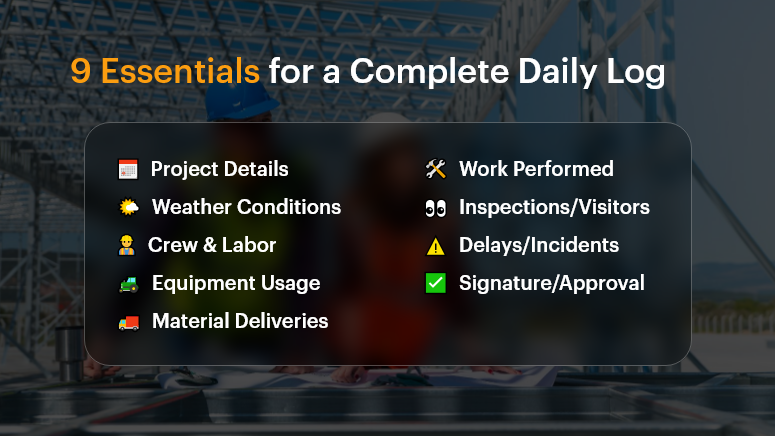
9 Essentials for a Complete Daily Log

Why Construction Daily Logs Matter More Than Ever

The Business Case: Compliance, Clarity, and Control
In construction, the gap between what was planned and what actually happened can cost millions. That’s where construction daily logs step in. They help businesses:

  • Document everything – from crew activities to delivery delays
  • Defend against legal claims and change orders
  • Keep all stakeholders aligned in real time

According to a McKinsey & Co. report, poor communication and lack of documentation are key contributors to construction project failures, costing the industry over $1.6 trillion annually.

Who Benefits?

  • Project Managers: Track daily progress, weather delays, labor use
  • Site Supervisors: Record field issues as they happen
  • Owners/Clients: Gain transparency and confidence
  • Finance Teams: Back up change orders and cost escalations

Real-World Pain Points

  • Delayed inspections due to incomplete logs
  • Contract disputes where verbal agreements lacked documentation
  • Missed deadlines from misaligned subcontractor schedules

With a digital platform like OConstruction, daily logs become structured, searchable, and sharable — helping you get ahead of problems before they escalate.

What to Include in a Construction Daily Log (and How to Do It Right)

A complete, consistent daily log captures the pulse of your project. Here’s what it should include and best practices to follow.

Project Details

  • Include date, job number, and project name.
  • Helps with sorting and future reference.

Weather Conditions

  • Note temperature, precipitation, and conditions (e.g., muddy, windy).
  • Critical for explaining delays or safety hazards.

Crew & Labor Report

  • Who was onsite, for how long, and what tasks were completed.
  • Include subcontractors and headcounts.

Equipment Usage

  • Record machinery used, breakdowns, idle time.
  • Justifies rental costs or performance dips.

Material Deliveries

  • What materials arrived, in what quantity, and when.
  • Helps validate invoices and progress payments.

Work Performed

  • Summarize tasks completed, started, or delayed.
  • Add images or notes for extra clarity.

Inspections & Visitors

  • Document any client visits, compliance checks, or city inspector walkthroughs.
  • Shows your team is audit-ready.

Delays, Disruptions, or Incidents

  • Capture safety events, delays, or weather interruptions.
  • Include photos and staff comments.

Signature or Approval

  • Digital sign-off by the site supervisor or PM.
  • Adds accountability and trust.

Best Practices for Better Logs

Do:

  • Use mobile access to update logs from the field in real time
  • Add photos or video clips for visual proof
  • Standardize with log templates to ensure consistency
  • Time-stamp entries to avoid future disputes
  • Store logs in a central cloud repository for team access

Don’t:

  • Rely on handwritten notes that can be lost or unreadable
  • Leave out weather or crew details — they’re critical in legal claims
  • Delay logging until the end of the week (or worse, end of project)
  • Assume someone else is tracking it — assign clear ownership

Framework: The OConstruction Way

Using OConstruction, your daily log workflow becomes a repeatable, digital-first process:

  • Log Template: Auto-filled with project basics
  • Onsite Capture: Site supervisors log entries via mobile or tablet
  • Smart Suggestions: AI suggests recurring activities based on history
  • Real-Time Sync: Logs sync with the central dashboard instantly
  • Audit Trail: Version history and sign-offs ensure accuracy and compliance
  • Report Generation: One-click PDF exports for clients or inspectors

Use Case: From Paper Chaos to Digital Clarity

For example, BuildCore Solutions, a mid-size general contractor, used OConstruction’s Daily Log module to replace paper forms on 5 active sites.

Within two months, they reduced documentation errors by 65%, improved subcontractor coordination, and had digital evidence to support 3 weather-related change orders — avoiding $150K in potential losses.

“Having all our site logs in one place — searchable, timestamped, and backed by photos — gave us control we never had before,” says their Project Lead.

Top 10 KPIs Every Construction Project Manager Should Track

Missed deadlines. Budget overruns. Communication breakdowns. In construction, the smallest misstep can have massive consequences. Yet many project managers still rely on gut instinct over real-time insights.

That’s where KPIs — Key Performance Indicators — step in.

In today’s high-stakes construction environment, tracking the right KPIs is the difference between a project that thrives and one that drains resources. With tools like OConstruction’s project management platform, construction managers now have access to real-time metrics that simplify decision-making and maximize results.

In this blog, we’ll walk you through the top 10 construction KPI you should be tracking, why they matter, and how an integrated digital platform like OConstruction makes it easy to stay on top of them.

Why Tracking Construction KPI Is a Game-Changer

Tracking KPIs isn’t just a reporting exercise — it’s a blueprint for project control, accountability, and predictable outcomes.

Here’s why it matters:

  • Budget Blowouts Are Common: According to McKinsey, large construction projects often take 20% longer to finish and run up to 80% over budget.
  • On-Site Visibility Is Limited: Without live data, managers can’t adjust to changes or delays quickly.
  • Multiple Stakeholders: Owners, contractors, and subcontractors all need to be aligned — KPIs help everyone stay on the same page.

Use Case 1: Residential Developer

A mid-sized developer building 50 homes needed better cost tracking. Using KPI dashboards in OConstruction, they identified delays in procurement early and reallocated budgets before overruns occurred.

Use Case 2: Commercial Contractor

A firm managing office fit-outs improved crew productivity by tracking labor efficiency metrics across multiple job sites.
The result? Faster decisions. Less risk. Greater ROI.

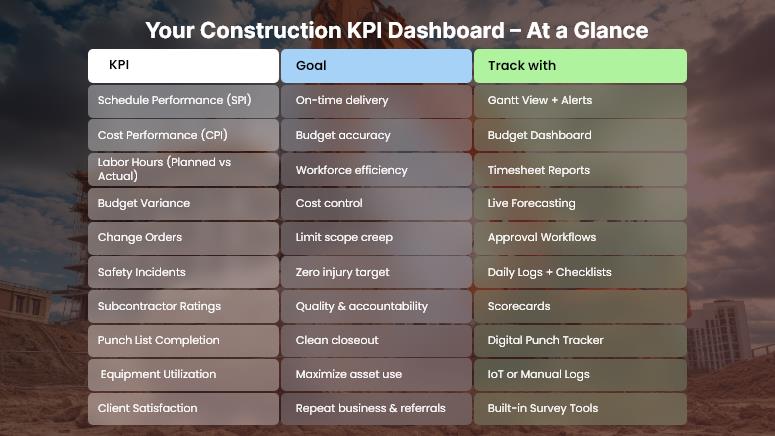
Your Construction KPI Dashboard – At a Glance

10 Must-Track KPIs for Construction Project Success

Here’s a breakdown of the top 10 construction KPI project managers should track, along with best practices for monitoring and improving them using tools like OConstruction.

1. Schedule Performance Index (SPI)

  • What it is: Ratio of work performed vs. work scheduled.
  • Why it matters: Spot delays and adjust timelines early.
  • Tip: Use real-time Gantt chart tracking to visualize slippages.

2. Cost Performance Index (CPI)

  • What it is: Ratio of earned value vs. actual cost.
  • Why it matters: Reveals if you’re getting value from your budget.
  • Tip: Link costs directly to your schedule to catch overruns.

3. Planned vs. Actual Hours

  • What it is: Comparison of estimated labor hours to hours spent.
  • Why it matters: Monitors team efficiency.
  • Tip: Use timesheet integrations for accurate reporting.

4. Budget Variance

  • What it is: Difference between projected and actual costs.
  • Why it matters: Tracks whether you’re staying within budget.
  • Tip: Set automated budget alerts inside your dashboard.

5. Change Order Frequency

  • What it is: The Number of scope or design changes during a project.
  • Why it matters: High volume signals planning issues or poor documentation.
  • Tip: Tie change orders to approval workflows.

6. Safety Incident Rate

  • What it is: Number of safety incidents per man-hours worked.
  • Why it matters: Safety affects cost, morale, and legal risk.
  • Tip: Use mobile checklists and daily logs to improve safety compliance.

7. Subcontractor Performance

  • What it is: Quality, timeliness, and cost adherence of subcontractors.
  • Why it matters: Poor performance derails timelines.
  • Tip: Use scorecards and feedback loops in your platform.

8. Punch List Completion Rate

  • What it is: Percentage of punch list items completed before project close.
  • Why it matters: Affects project delivery and client satisfaction.
  • Tip: Track punch lists digitally and assign owners to each task.

9. Equipment Utilization Rate

  • What it is: Percentage of time equipment is in use vs. available.
  • Why it matters: Idle equipment = wasted cost.
  • Tip: Track usage via IoT integration or manual entry.

10. Client Satisfaction Score

  • What it is: Feedback on how well expectations were met.
  • Why it matters: Drives referrals and repeat business.
  • Tip: Send post-project surveys directly from the platform.

Use Case Example: Suburban Commercial Builder

For example, BuildCore Group, a regional commercial builder, used OConstruction’s KPI dashboard to monitor project health in real-time. By tracking schedule performance, budget variance, and equipment utilization, they were able to complete a $2M office complex two weeks early and 5% under budget.

Here’s how:

  • Set SPI and CPI alerts
  • Linked material delivery to schedule milestones
  • Used subcontractor scorecards to ensure timely execution

Key Takeaways

  • KPIs help construction managers shift from reactive to proactive decision-making.
  • The right construction KPI ensures visibility across labor, cost, safety, schedule, and quality.
  • Tools like OConstruction make tracking, automating, and improving these KPIs easier than ever.

If you’re not tracking KPIs, you’re not managing projects — you’re guessing.

FAQs

Q1. What are KPIs in construction project management?
KPIs (Key Performance Indicators) are measurable metrics that help project managers track progress, costs, safety, and performance to ensure projects stay on time and within budget.

Q2. Why should construction managers track KPIs?
Tracking KPIs reduces budget overruns, improves schedule control, increases accountability, and ensures all stakeholders work toward the same goals.

Q3. Which KPIs are most important for construction projects?
Some critical KPIs include Schedule Performance Index (SPI), Cost Performance Index (CPI), budget variance, labor efficiency, subcontractor performance, safety incident rate, and client satisfaction.

Q4. How do KPIs help prevent project delays and cost overruns?
By comparing planned vs. actual performance, KPIs highlight issues early—such as labor inefficiency, equipment underuse, or cost overruns—so managers can take corrective action quickly.

Q5. Are KPIs only useful for large projects?
No. KPIs are valuable for all construction projects, from small residential builds to large infrastructure projects. The scale may differ, but the insights apply everywhere.

Category: Construction Academy

Subcategory: Budgeting and Planning

Subcategory: Construction Phase

Subcategory: Design Coordination

Subcategory: Estimation Techniques

Subcategory: Initiation and Feasibility

Subcategory: Introduction

Subcategory: Personal Management

Subcategory: Project Close-Out

Subcategory: Project Scheduling

Subcategory: Project Teams

Subcategory: Proposal Management

Subcategory: Total Quality Management

Subcategory: Tracking and Control

Subcategory: Work Breakdown

Category: Help Desk

Subcategory: Client

Subcategory: Construction 101

Subcategory: Contractor Management

Subcategory: Expense

Subcategory: Finance Budget

Subcategory: Inventory Management

Subcategory: My Approvals

Subcategory: Site Management

Subcategory: Vendor Management