Linking WBS, CPM, and Budget

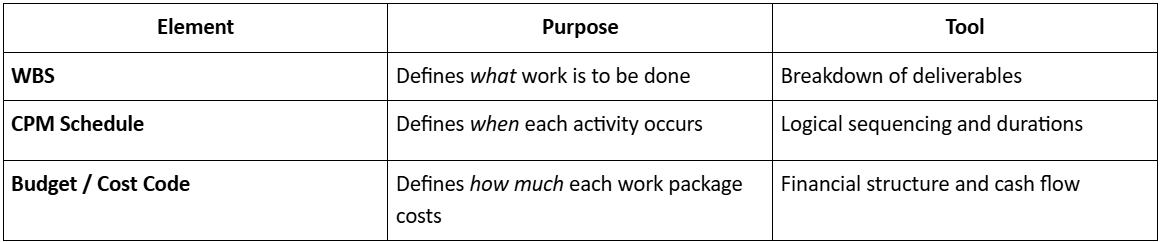
Effective project control begins when scope, time, and cost are connected through a common structure — the Work Breakdown Structure (WBS).

1. The Integration Triad

Linking WBS, CPM, and Budget

2. Linking Process

  1. Each WBS element is assigned a unique code.
  2. Activities in the CPM network are mapped to corresponding WBS items.
  3. Each WBS item is associated with a budget line item (cost code).
  4. The result: a unified control framework for time–cost tracking.

Example:

Linking Process

This integration enables automatic generation of:

  • Cost-loaded schedules
  • Earned Value reports
  • Forecasts and performance dashboards
“Control begins when WBS, schedule, and budget speak the same language.”

Schedule Updates and Monitoring Techniques

Effective scheduling doesn’t end with planning — it depends on continuous monitoring and timely updates.

1. Schedule Updating

  • Update progress regularly (weekly or biweekly).
  • Record % completion for each activity.
  • Adjust actual start/finish dates.
  • Incorporate approved change orders.

Baseline vs. Current Schedule:

Compare to detect variance and evaluate project health.

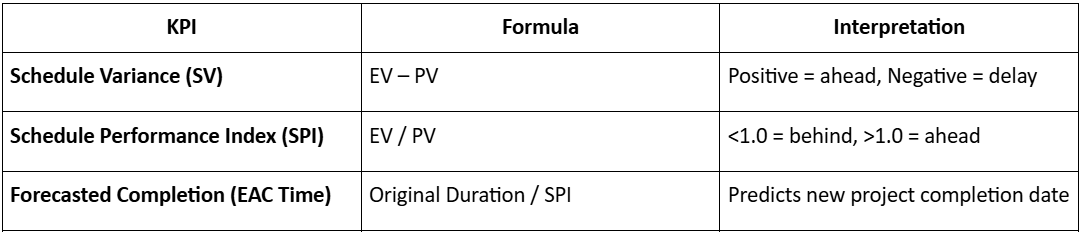
2. Key Performance Indicators (KPIs)

Key Performance Indicators

3. Monitoring Tools

  • Gantt Charts – Visual schedule overview.
  • S-Curves – Cumulative progress vs. cost/time.
  • Dashboards – Real-time updates (in Orangescrum or Primavera).
  • Milestone Trend Analysis (MTA) – Tracks shifting milestones over updates.

4. Corrective Actions

  • Reschedule delayed tasks with float optimization.
  • Apply crashing (add resources) or fast-tracking (parallel activities).
  • Re-baseline only after major scope changes.
  • Communicate deviations early to stakeholders.
“Updating the schedule isn’t paperwork — it’s project control.”

Module Summary

  • Planning defines project scope and logic; scheduling gives it a time frame.
  • CPM identifies critical activities; PERT manages uncertainty.
  • Network coding ensures traceability and reporting efficiency.
  • Resource and cost loading integrates manpower and money into time.

Schedule monitoring transforms static plans into dynamic control tools.

Resource Allocation and Cost Loading

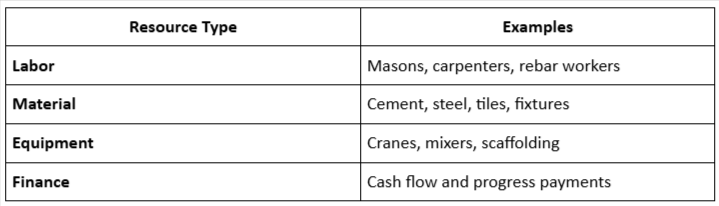
Scheduling is not complete without integrating resources (manpower, materials, equipment) and costs.

1. Resource Allocation

Assign resources to each activity to ensure feasibility and productivity.

Resource Allocation

Techniques:

  • Resource Histogram: A Visual display of resource usage over time.
  • Resource Leveling: Adjust start times to resolve over-allocation.
  • Resource Smoothing: Optimize usage without changing the project duration.

2. Cost Loading

Assign monetary value to activities so that the schedule progress reflects the actual financial status.

Steps:

  • Assign cost to each WBS item.
  • Link activity cost to corresponding schedule tasks.
  • Generate S-curves showing cumulative cost vs. time.
  • Integrate with Earned Value Analysis (EVA) to measure performance.

Formula:

EV = (Percent Complete) × (Budgeted Cost)

“A schedule without resource and cost integration is only half a plan.”

Developing and Coding Project Networks

A network diagram represents the logical sequence of project activities.

It forms the backbone of modern scheduling tools like Primavera, MS Project, and Orangescrum Work Planner.

1. Types of Network Diagrams

  • Activity-on-Arrow (AOA) – Older format; uses arrows to represent activities.
  • Activity-on-Node (AON) – Commonly used today; activities represented by boxes (nodes) linked by arrows.

Example (AON Format):

Start → Foundation → Columns → Slabs → Finishes → Handover

2. Activity Coding

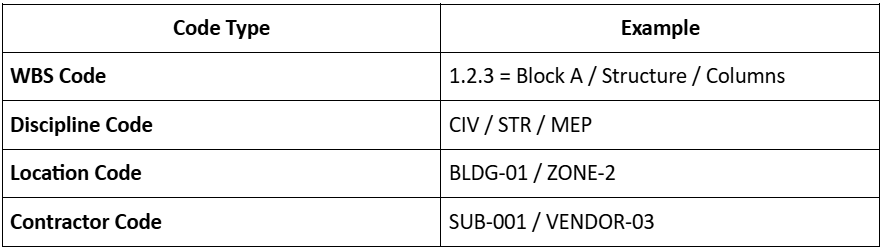
Activity coding helps organize, filter, and analyze schedule data efficiently.

Coding Categories:

Developing and Coding Project Networks

Best Practices:

  • Maintain consistent naming conventions.
  • Align activity codes with WBS and cost codes.
  • Use logical dependencies (Finish–Start, Start–Start, etc.).
  • Include milestones for tracking approvals, procurement, and inspections.
“A well-coded network turns thousands of activities into a manageable model.”

CPM (Critical Path Method) and PERT

1. Critical Path Method (CPM)

CPM is a deterministic scheduling technique that identifies the longest path of dependent activities through the project, determining the shortest possible completion time.

Steps in CPM:

  • List project activities.
  • Identify dependencies (which task follows which).
  • Estimate activity durations.
  • Draw a network diagram.
  • Compute the earliest and latest start/finish times.
  • Identify the Critical Path (activities with zero float).

Key Terms:

  • Float (Slack): Time by which an activity can be delayed without affecting project completion.
  • Critical Path: Sequence of tasks that determines project duration.
  • Crash Duration: Minimum time by increasing resources.

Example:

If the critical path is A–C–E–G = 120 days, any delay in these activities delays the project itself.

“Managing the critical path means managing the project’s heartbeat.”

2. Program Evaluation and Review Technique (PERT)

PERT is a probabilistic model used when activity durations are uncertain.
It estimates the expected time using three scenarios:

TE = (O + 4M + P) / 6

Where:

  • O = Optimistic time
  • M = Most likely time
  • P = Pessimistic time

Example:

For an activity with O = 4, M = 6, P = 10 days:

TE = (4 + 4×6 + 10) / 6 = 6.33 days

When to Use:

  • R&D or design-heavy projects.
  • Early-stage planning where data is limited.
  • Risk-based scheduling in EPC projects.

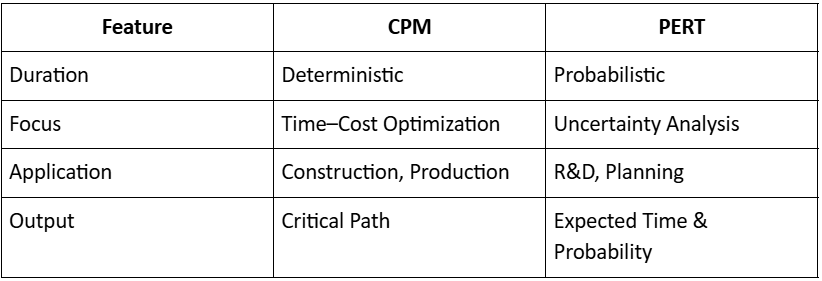
Comparison:
PERT vs CPM comparison

When to Use:

  • R&D or design-heavy projects.
  • Early-stage planning where data is limited.
  • Risk-based scheduling in EPC projects.

Comparison:

Principles of Planning and Scheduling

Planning defines what needs to be done; scheduling determines when and by whom it should be done.

1. Planning

Planning involves:

  • Defining objectives and deliverables
  • Breaking down the scope using WBS
  • Identifying activities and dependencies
  • Setting milestones and performance benchmarks

2. Scheduling

Scheduling transforms the plan into a time-based roadmap for execution.
It assigns:

  • Start and finish dates
  • Sequence and duration of activities
  • Resource requirements

3. Importance in Construction

  • Establishes accountability and the sequence of operations.
  • Helps detect critical delays early.
  • Enables coordination among multiple contractors and vendors.
  • Forms the basis for cost forecasting and cash flow planning.
“A project without a schedule is like a building without a foundation.”

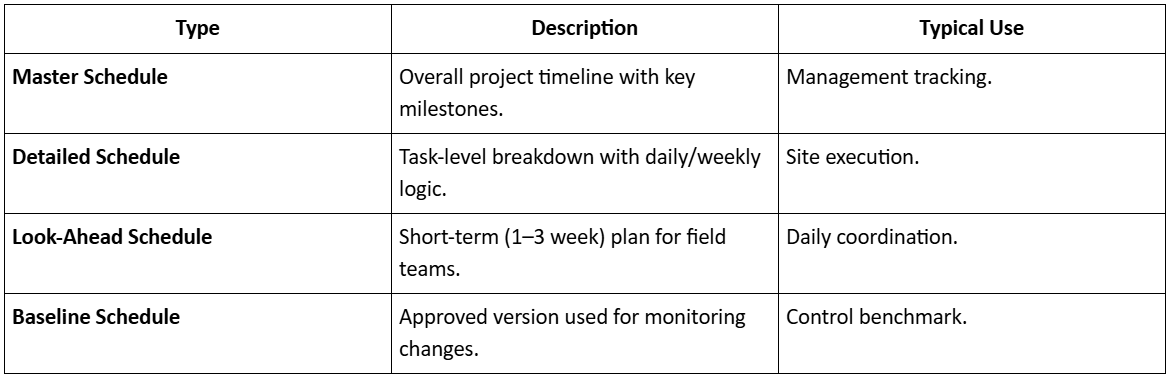
4. Types of Schedules

Principles of Planning and Scheduling

Category: Construction Academy

Subcategory: Budgeting and Planning

Subcategory: Construction Phase

Subcategory: Design Coordination

Subcategory: Estimation Techniques

Subcategory: Initiation and Feasibility

Subcategory: Introduction

Subcategory: Personal Management

Subcategory: Project Close-Out

Subcategory: Project Scheduling

Subcategory: Project Teams

Subcategory: Proposal Management

Subcategory: Total Quality Management

Subcategory: Tracking and Control

Subcategory: Work Breakdown

Category: Help Desk

Subcategory: Client

Subcategory: Construction 101

Subcategory: Contractor Management

Subcategory: Expense

Subcategory: Finance Budget

Subcategory: Inventory Management

Subcategory: My Approvals

Subcategory: Site Management

Subcategory: Vendor Management