How to Improve Vendor Communication in Construction Projects

In construction, even one unclear message can create chaos. From material mix-ups to missed deadlines, poor vendor communication is one of the top causes of delays and cost overruns. According to the Project Management Institute, 56% of project failures happen due to bad communication.

That’s a huge problem — but it’s also avoidable.

In this post, we’ll show you exactly how to improve vendor communication across your construction projects. You’ll learn common mistakes, quick wins, and how a digital platform like OConstruction keeps everyone on the same page — from contractors to suppliers.

Why Vendor Communication Matters More Than Ever

Construction projects involve lots of moving parts: internal teams, subcontractors, material vendors, inspectors, and clients. And everyone needs accurate, timely updates — or things fall apart.

When vendor communication breaks down:

  • Materials arrive late or at the wrong site
  • Subcontractors miss crucial changes
  • Deadlines slip, and clients lose confidence
  • You waste money fixing problems that didn’t need to happen

So, why should you care?

Better vendor communication means smoother workflows, fewer mistakes, and more predictable outcomes. It also protects your time and budget.

Real Construction Challenges You Can Avoid

  • Late steel delivery because the supplier didn’t get the updated schedule
  • Wrong insulation was installed because the vendor used an outdated drawing
  • Unapproved materials shipped due to misaligned RFQs

With the right communication tools in place, these headaches disappear.

And with OConstruction, you’re not just sending updates — you’re building a system that tracks, confirms, and logs every vendor interaction in one place.
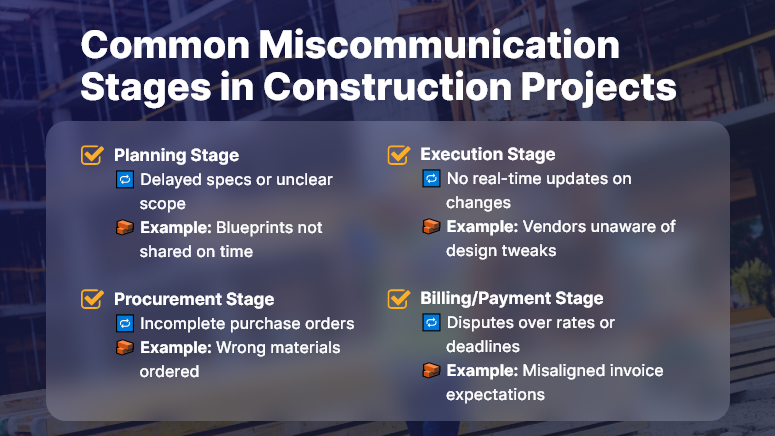
Common Miscommunication Stages in Construction Projects

Best Practices to Improve Vendor Communication

Here’s how to get it right — and keep projects moving without confusion.

Centralize All Conversations

  • Stop juggling emails, texts, and calls. Use one place for all communication with vendors.
  • With OConstruction, you can create shared task threads, tag vendors, and store every file in the cloud — so no one’s ever left out.

Standardize Workflows

Every vendor request should follow a consistent process. Use templates for:

  • RFQs
  • Change orders
  • Delivery instructions

This removes guesswork and ensures clear expectations across the board.

Give Role-Based Access

  • Not everyone needs everything. But vendors do need access to key documents, schedules, and status updates.
  • OConstruction lets you control what each vendor can see — ensuring clarity and data security.

Automate Notifications

  • Schedule changes? Approvals? Due dates?
  • Set up auto-notifications inside your construction platform. Vendors get real-time alerts, reducing the chance they’ll miss critical updates.

Track Every Change

  • Verbal updates fade. Written logs last.
  • Use digital records with timestamps to track who said what — and when.
  • This creates accountability and prevents finger-pointing later.

Don’t Leave Vendors Out of the Loop

  • You might think your internal team has it handled. But vendors are partners — and they need to be part of the conversation.
  • Make sure they know about updates as they happen, not after.

Don’t Assume They Read Every Email

  • Emails get buried. Attachments get missed.
  • Use built-in task comments, tagging, and push notifications to make sure vendors see what you send.

OConstruction Makes It Easy

With OConstruction, you can:

  • Set up shared vendor workspaces
  • Create task threads with comments
  • Use version-controlled documents
  • Automate alerts and due date reminders
  • Provide mobile access for field and vendor use

Everything happens in one place — reducing noise, avoiding confusion, and saving time.

Customer Story: Clear Communication That Delivered Results

For example, Hardline BuildCo, a regional construction firm, used OConstruction’s vendor access tools to streamline coordination with 8 suppliers and 10 subcontractors.

Before using the platform, they struggled with delayed materials and missed delivery windows — costing them thousands each month.

After switching:

  • On-time deliveries increased by 60%
  • Vendor-related errors dropped by 70%
  • Project managers gained back 10+ hours a week

With OConstruction, we finally had visibility and structure in our vendor communication,” said the company’s Senior PM.

Key Takeaways

  • Vendor communication is essential to project success — yet often overlooked
  • Poor communication leads to delays, rework, and missed deadlines

Using tools like OConstruction, you can:

  • Centralize updates
  • Track every interaction
  • Standardize workflows
  • Keep vendors aligned in real time

Clear communication isn’t just a productivity booster — it’s a risk reducer. By proactively keeping vendors in the loop and using digital tools to document every step, you minimize costly errors and maximize efficiency. With the right systems in place, your vendor relationships become stronger, your timelines more predictable, and your projects more profitable.

What to Include in Your Construction Daily Logs and Why They Matter?

Construction sites are bustling hubs of activity — crews moving, machines running, materials arriving. Amid this flurry, details get lost. And when disputes arise, missing data becomes expensive.

Construction daily logs are your safety net — and your strategic edge. They’re not just paperwork; they’re your timeline, proof, and project compass.

In this blog, we’ll break down exactly what to include in construction daily logs, why it’s crucial for operational success, and how digital tools like OConstruction’s project platform can make the process seamless and future-proof. If you’re in construction management, site supervision, or back-office coordination, this guide is for you.

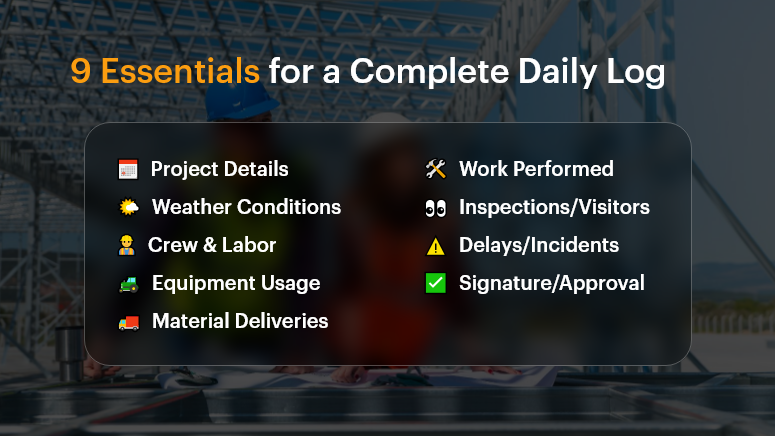
9 Essentials for a Complete Daily Log

Why Construction Daily Logs Matter More Than Ever

The Business Case: Compliance, Clarity, and Control
In construction, the gap between what was planned and what actually happened can cost millions. That’s where construction daily logs step in. They help businesses:

  • Document everything – from crew activities to delivery delays
  • Defend against legal claims and change orders
  • Keep all stakeholders aligned in real time

According to a McKinsey & Co. report, poor communication and lack of documentation are key contributors to construction project failures, costing the industry over $1.6 trillion annually.

Who Benefits?

  • Project Managers: Track daily progress, weather delays, labor use
  • Site Supervisors: Record field issues as they happen
  • Owners/Clients: Gain transparency and confidence
  • Finance Teams: Back up change orders and cost escalations

Real-World Pain Points

  • Delayed inspections due to incomplete logs
  • Contract disputes where verbal agreements lacked documentation
  • Missed deadlines from misaligned subcontractor schedules

With a digital platform like OConstruction, daily logs become structured, searchable, and sharable — helping you get ahead of problems before they escalate.

What to Include in a Construction Daily Log (and How to Do It Right)

A complete, consistent daily log captures the pulse of your project. Here’s what it should include and best practices to follow.

Project Details

  • Include date, job number, and project name.
  • Helps with sorting and future reference.

Weather Conditions

  • Note temperature, precipitation, and conditions (e.g., muddy, windy).
  • Critical for explaining delays or safety hazards.

Crew & Labor Report

  • Who was onsite, for how long, and what tasks were completed.
  • Include subcontractors and headcounts.

Equipment Usage

  • Record machinery used, breakdowns, idle time.
  • Justifies rental costs or performance dips.

Material Deliveries

  • What materials arrived, in what quantity, and when.
  • Helps validate invoices and progress payments.

Work Performed

  • Summarize tasks completed, started, or delayed.
  • Add images or notes for extra clarity.

Inspections & Visitors

  • Document any client visits, compliance checks, or city inspector walkthroughs.
  • Shows your team is audit-ready.

Delays, Disruptions, or Incidents

  • Capture safety events, delays, or weather interruptions.
  • Include photos and staff comments.

Signature or Approval

  • Digital sign-off by the site supervisor or PM.
  • Adds accountability and trust.

Best Practices for Better Logs

Do:

  • Use mobile access to update logs from the field in real time
  • Add photos or video clips for visual proof
  • Standardize with log templates to ensure consistency
  • Time-stamp entries to avoid future disputes
  • Store logs in a central cloud repository for team access

Don’t:

  • Rely on handwritten notes that can be lost or unreadable
  • Leave out weather or crew details — they’re critical in legal claims
  • Delay logging until the end of the week (or worse, end of project)
  • Assume someone else is tracking it — assign clear ownership

Framework: The OConstruction Way

Using OConstruction, your daily log workflow becomes a repeatable, digital-first process:

  • Log Template: Auto-filled with project basics
  • Onsite Capture: Site supervisors log entries via mobile or tablet
  • Smart Suggestions: AI suggests recurring activities based on history
  • Real-Time Sync: Logs sync with the central dashboard instantly
  • Audit Trail: Version history and sign-offs ensure accuracy and compliance
  • Report Generation: One-click PDF exports for clients or inspectors

Use Case: From Paper Chaos to Digital Clarity

For example, BuildCore Solutions, a mid-size general contractor, used OConstruction’s Daily Log module to replace paper forms on 5 active sites.

Within two months, they reduced documentation errors by 65%, improved subcontractor coordination, and had digital evidence to support 3 weather-related change orders — avoiding $150K in potential losses.

“Having all our site logs in one place — searchable, timestamped, and backed by photos — gave us control we never had before,” says their Project Lead.

Cut Construction Costs with Smarter Project Management Software

In the construction industry, controlling costs is one of the biggest challenges. Material prices fluctuate, labor overruns happen, and delays on-site can quickly turn into budget disasters. But what if you could reduce these issues with a single tool?

That’s where smart project management software like OConstruction steps in—giving you the visibility, control, and real-time collaboration your construction projects need to stay on time and under budget.

Why Construction Projects Go Over Budget

Before we dive into the solution, let’s look at the most common reasons construction costs spiral out of control:

  • Poor scheduling and miscommunication
  • Inefficient use of labor and equipment
  • Lack of real-time updates on-site
  • Missed deadlines and overtime costs
  • Manual data entry and paperwork delays

All of these are avoidable—with the right tools in place.

How OConstruction Helps You Cut Costs

OConstruction is an all-in-one construction project management software designed specifically to reduce waste, improve accountability, and maximize your project ROI.

Here’s how it helps:

1. Real-Time Budget Tracking

Monitor project costs as they happen. Get instant updates on labor, materials, and subcontractor expenses so you can take immediate action before the budget slips.

2. Smarter Scheduling

Assign tasks, set dependencies, and track milestones all in one place. With automated notifications and calendar views, your team stays aligned-and your timelines stay on track.

3. Field-to-Office Communication

Whether your teams are on-site or in the office, OConstruction keeps everyone connected. Say goodbye to delayed updates or missed approvals that lead to costly errors.

4. Document & Resource Management

No more lost files or outdated spreadsheets. Store drawings, contracts, purchase orders, and daily logs in the cloud-accessible anytime from any device.

5. Subcontractor Coordination

Easily assign and monitor subcontractor tasks, track deliverables, and hold vendors accountable with shared timelines and clear scopes of work.

Real-World Benefits You Can Expect

  • Faster Project Completion
  • Lower Labor Costs
  • Fewer Cost Overruns
  •  Improved Resource Allocation
  • Less Administrative Overhead

Contractors using smart software report savings of up to 20% in overall project costs, simply by improving communication, planning, and tracking.

Start Saving Today with OConstruction.

If you’re still managing construction projects with spreadsheets, whiteboards, and endless WhatsApp groups—it’s time for an upgrade.

OConstruction gives you the tools to run your projects smarter, faster, and more profitably. From the first estimate to final handover, everything stays organized, visible, and efficient.

Start your journey to cost-effective construction today. Visit OConstruction.io

Final Thoughts

Cutting construction costs isn’t just about buying cheaper materials or hiring less labor. It’s about improving how you manage your projects—from planning to execution. With OConstruction, you’re not just saving money—you’re building smarter.

Top 10 KPIs Every Construction Project Manager Should Track

Missed deadlines. Budget overruns. Communication breakdowns. In construction, the smallest misstep can have massive consequences. Yet many project managers still rely on gut instinct over real-time insights.

That’s where KPIs — Key Performance Indicators — step in.

In today’s high-stakes construction environment, tracking the right KPIs is the difference between a project that thrives and one that drains resources. With tools like OConstruction’s project management platform, construction managers now have access to real-time metrics that simplify decision-making and maximize results.

In this blog, we’ll walk you through the top 10 construction KPI you should be tracking, why they matter, and how an integrated digital platform like OConstruction makes it easy to stay on top of them.

Why Tracking Construction KPI Is a Game-Changer

Tracking KPIs isn’t just a reporting exercise — it’s a blueprint for project control, accountability, and predictable outcomes.

Here’s why it matters:

  • Budget Blowouts Are Common: According to McKinsey, large construction projects often take 20% longer to finish and run up to 80% over budget.
  • On-Site Visibility Is Limited: Without live data, managers can’t adjust to changes or delays quickly.
  • Multiple Stakeholders: Owners, contractors, and subcontractors all need to be aligned — KPIs help everyone stay on the same page.

Use Case 1: Residential Developer

A mid-sized developer building 50 homes needed better cost tracking. Using KPI dashboards in OConstruction, they identified delays in procurement early and reallocated budgets before overruns occurred.

Use Case 2: Commercial Contractor

A firm managing office fit-outs improved crew productivity by tracking labor efficiency metrics across multiple job sites.
The result? Faster decisions. Less risk. Greater ROI.

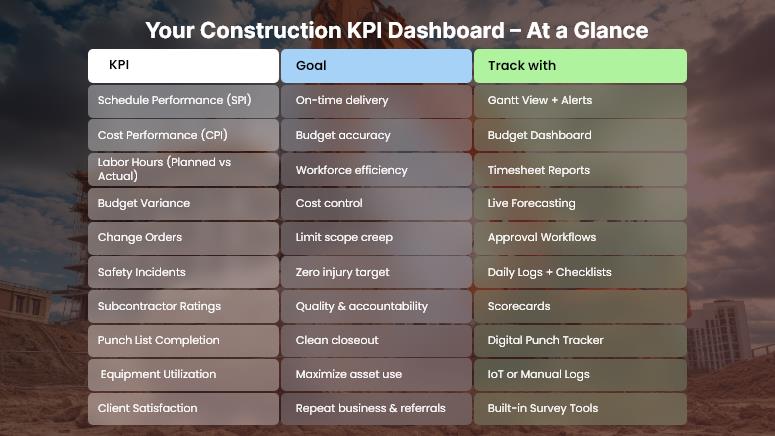
Your Construction KPI Dashboard – At a Glance

10 Must-Track KPIs for Construction Project Success

Here’s a breakdown of the top 10 construction KPI project managers should track, along with best practices for monitoring and improving them using tools like OConstruction.

1. Schedule Performance Index (SPI)

  • What it is: Ratio of work performed vs. work scheduled.
  • Why it matters: Spot delays and adjust timelines early.
  • Tip: Use real-time Gantt chart tracking to visualize slippages.

2. Cost Performance Index (CPI)

  • What it is: Ratio of earned value vs. actual cost.
  • Why it matters: Reveals if you’re getting value from your budget.
  • Tip: Link costs directly to your schedule to catch overruns.

3. Planned vs. Actual Hours

  • What it is: Comparison of estimated labor hours to hours spent.
  • Why it matters: Monitors team efficiency.
  • Tip: Use timesheet integrations for accurate reporting.

4. Budget Variance

  • What it is: Difference between projected and actual costs.
  • Why it matters: Tracks whether you’re staying within budget.
  • Tip: Set automated budget alerts inside your dashboard.

5. Change Order Frequency

  • What it is: The Number of scope or design changes during a project.
  • Why it matters: High volume signals planning issues or poor documentation.
  • Tip: Tie change orders to approval workflows.

6. Safety Incident Rate

  • What it is: Number of safety incidents per man-hours worked.
  • Why it matters: Safety affects cost, morale, and legal risk.
  • Tip: Use mobile checklists and daily logs to improve safety compliance.

7. Subcontractor Performance

  • What it is: Quality, timeliness, and cost adherence of subcontractors.
  • Why it matters: Poor performance derails timelines.
  • Tip: Use scorecards and feedback loops in your platform.

8. Punch List Completion Rate

  • What it is: Percentage of punch list items completed before project close.
  • Why it matters: Affects project delivery and client satisfaction.
  • Tip: Track punch lists digitally and assign owners to each task.

9. Equipment Utilization Rate

  • What it is: Percentage of time equipment is in use vs. available.
  • Why it matters: Idle equipment = wasted cost.
  • Tip: Track usage via IoT integration or manual entry.

10. Client Satisfaction Score

  • What it is: Feedback on how well expectations were met.
  • Why it matters: Drives referrals and repeat business.
  • Tip: Send post-project surveys directly from the platform.

Use Case Example: Suburban Commercial Builder

For example, BuildCore Group, a regional commercial builder, used OConstruction’s KPI dashboard to monitor project health in real-time. By tracking schedule performance, budget variance, and equipment utilization, they were able to complete a $2M office complex two weeks early and 5% under budget.

Here’s how:

  • Set SPI and CPI alerts
  • Linked material delivery to schedule milestones
  • Used subcontractor scorecards to ensure timely execution

Key Takeaways

  • KPIs help construction managers shift from reactive to proactive decision-making.
  • The right construction KPI ensures visibility across labor, cost, safety, schedule, and quality.
  • Tools like OConstruction make tracking, automating, and improving these KPIs easier than ever.

If you’re not tracking KPIs, you’re not managing projects — you’re guessing.

FAQs

Q1. What are KPIs in construction project management?
KPIs (Key Performance Indicators) are measurable metrics that help project managers track progress, costs, safety, and performance to ensure projects stay on time and within budget.

Q2. Why should construction managers track KPIs?
Tracking KPIs reduces budget overruns, improves schedule control, increases accountability, and ensures all stakeholders work toward the same goals.

Q3. Which KPIs are most important for construction projects?
Some critical KPIs include Schedule Performance Index (SPI), Cost Performance Index (CPI), budget variance, labor efficiency, subcontractor performance, safety incident rate, and client satisfaction.

Q4. How do KPIs help prevent project delays and cost overruns?
By comparing planned vs. actual performance, KPIs highlight issues early—such as labor inefficiency, equipment underuse, or cost overruns—so managers can take corrective action quickly.

Q5. Are KPIs only useful for large projects?
No. KPIs are valuable for all construction projects, from small residential builds to large infrastructure projects. The scale may differ, but the insights apply everywhere.

How to Create a Work Breakdown Structure for Your Construction Project

You can’t build a skyscraper without a blueprint. The same goes for your project.

In construction, chaos creeps in when teams lack clarity on tasks, timelines, or ownership. That’s where a Work Breakdown Structure (WBS) comes in. It transforms complex construction projects into structured, manageable, and trackable components.

In this blog, you’ll learn how to create an effective WBS for your project, understand its benefits, and see how tools like OConstruction simplify the process. Whether you’re a construction manager, general contractor, or site engineer, this guide will help you gain better control over timelines, budgets, and deliverables.

What WBS Does for You

Why a WBS Matters in Construction Project Management

Creating a WBS isn’t just a documentation step — it’s a business-critical activity.

Why should construction companies care?

  • Budget Blowouts: Projects without structured task breakdowns often face overspending.
  • Missed Deadlines: Without clear sequencing, timeline slips become inevitable.
  • Miscommunication: Stakeholders get confused about scope and ownership.

Who benefits from a WBS?

  • Construction Managers: Improve scheduling and resource allocation.
  • Project Owners: Gain transparency and progress visibility.
  • Field Engineers: Understand exact deliverables per phase.

Real-World Scenarios

  • A highway construction project failed to divide its drainage phase into separate design, excavation, and laying steps, and delays mounted.
  • A residential builder broke down its project into clear deliverables (foundation, framing, roofing, electrical) and finished 10 days early.

WBS = Risk mitigation + Predictable execution.

How to Build a WBS: Step-by-Step Guide for Construction Projects

A well-defined WBS makes your entire project plan stronger. Here’s how to create one effectively:

1. Define the Final Deliverable

Start by stating what you’re building — e.g., a commercial building, highway, or industrial park. Everything else flows from this.

2. Break the Project into Major Phases

Use phrases like:

  • Pre-Construction: Permits, land acquisition
  • Site Work: Excavation, grading
  • Construction: Foundation, framing, roofing
  • Post-Construction: Cleanup, inspection

3. Divide Phases into Work Packages

Break each phase into smaller tasks called work packages:

  • Example: Under “Framing,” work packages might be “Wall Framing,” “Floor Joists,” “Roof Trusses.”

4. Assign Responsibility & Timeline

Each work package should have:

5. Use OConstruction to Visualize the WBS

OConstruction lets you create a visual WBS tree, attach budgets, assign teams, and set dependencies—all from a single dashboard.

6. Validate the Hierarchy

Make sure:

  • Nothing is left out
  • Tasks aren’t duplicated
  • Each component is essential and measurable

Best Practices for Building a Strong WBS

Do’s

  • Do involve all stakeholders early.
  • Do make tasks mutually exclusive to avoid overlap.
  • Do use consistent naming conventions.
  • Do use numbering to define hierarchy (e.g., 1.0, 1.1, 1.2).

Don’ts

  • Don’t confuse activities with deliverables.
  • Don’t go too granular too early.
  • Don’t skip regular updates.

Quick Wins with OConstruction

  • Auto-generate WBS from templates
  • Drag-and-drop task reordering
  • Built-in Gantt chart integration
  • Real-time cost vs. estimate comparison

Customer Success Example

For example, BuildLogic Inc., a mid-size commercial construction firm, used OConstruction’s WBS module to plan a $5M office park project.

  • They broke down tasks into 4 levels
  • Assigned team leads to each work package
  • Tracked phase-wise budgets in real time

Result: They completed the project 12% under budget and 3 weeks ahead of schedule, thanks to better visibility and cost control.

Key Takeaways

  • A Work Breakdown Structure improves budget tracking, team accountability, and scheduling.
  • It helps construction professionals manage complexity and reduce risk.
  • Tools like OConstruction let you build, visualize, and manage WBS digitally, ensuring smooth execution.

FAQs

Q1. What is a Work Breakdown Structure (WBS) in construction?
A WBS is a hierarchical breakdown of a construction project into smaller, manageable tasks or “work packages” that help teams track progress, budgets, and responsibilities.

Q2. Why is a WBS important in construction project management?
Without a WBS, projects face budget overruns, missed deadlines, and miscommunication. A WBS ensures clarity, accountability, and better resource allocation.

Q3. Who benefits most from using a WBS?
Construction managers, project owners, contractors, and field engineers all benefit by gaining transparency, clearer deliverables, and more predictable outcomes.

Q4. How detailed should a construction WBS be?
It should break projects into manageable phases and work packages, but avoid excessive granularity. Each component should be clear, measurable, and owned by someone.

Q5. What’s the difference between a WBS and a project schedule?
A WBS defines “what” needs to be delivered (scope), while a project schedule defines “when” and “how” tasks will be executed.

Q6. What are common mistakes when creating a WBS?
Mistakes include going too granular, confusing activities with deliverables, leaving gaps in scope, and failing to involve stakeholders early.

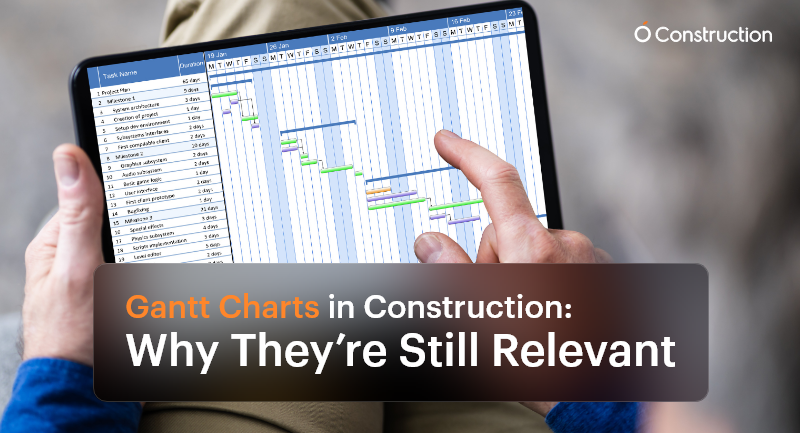
Gantt Charts in Construction: Why They’re Still Relevant

Despite the surge of advanced AI-driven scheduling tools and live dashboards, Gantt charts in construction remain a cornerstone of project management. Why? Because construction is more intricate, deadline-driven, and team-dependent than ever before.

Every team needs a visual and reliable roadmap that brings clarity to the chaos, from project managers and subcontractors to site supervisors and procurement officers. This is where Gantt charts continue to shine.

Why Gantt Charts Still Matter in Construction

Construction is not just about bricks and concrete—it’s about precision planning, coordination, and communication. A single scheduling misstep can cause ripple effects that delay inspections, exceed budgets, or stall final delivery.
Here’s how Gantt charts in construction offer critical value:

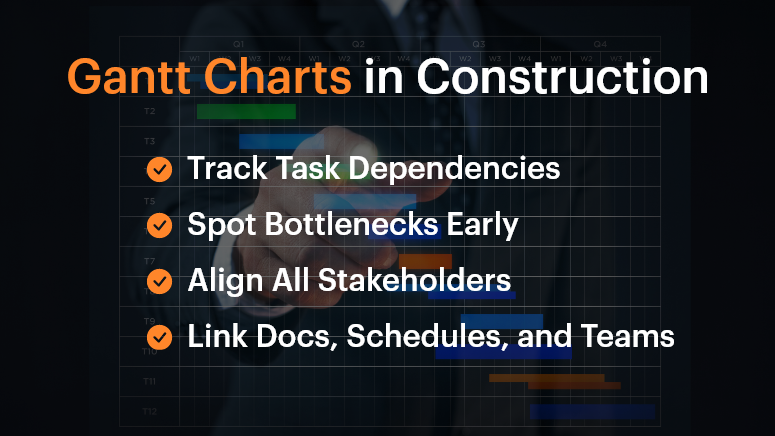
Gantt Charts in Construction

1. Track Dependencies Across Subcontractors

In a construction project, workstreams are tightly connected. Plumbing must be completed before walls are closed. Electrical systems may need to be coordinated with HVAC layouts.

Gantt charts help teams visualize and manage these dependencies—if Task A is delayed, you immediately see how Task B is affected. This preemptive visibility is vital for planning contingencies.

2. Identify Project Bottlenecks Early

As the chart progresses, you can pinpoint lagging tasks before they become full-blown roadblocks. For example, a delayed steel delivery in the foundation phase will affect structural framing and roofing. Gantt charts enable you to identify those early warning signs and make adjustments in real-time.

3. Keep All Stakeholders Aligned

When different teams—from architects to subcontractors—work off the same chart, everyone understands what’s happening and when. This unified view reduces miscommunication and avoids scope creep.

Who Benefits Most from Gantt Charts?

Project Managers

They oversee everything from timelines to team coordination. Gantt charts help them:

  • Visualize overlapping tasks
  • Track milestones
  • Adjust schedules on the fly

Site Supervisors

Working in the field, they need clear, day-to-day task breakdowns. Gantt charts:

  • Show what needs to happen today, tomorrow, or next week
  • Improve coordination between field teams

Procurement Teams

Timing material delivery is critical. Gantt charts let them:

  • Schedule deliveries aligned with task progress
  • Avoid storage or material wastage

Real-World Example: Coordinating Complex Trades

Imagine a multi-story commercial project with concurrent plumbing, HVAC, and electrical work. Gantt charts allow managers to sequence tasks precisely so that the plumbing team completes their install before HVAC ducts are installed, avoiding rework or clashes.

Without this planning, teams step on each other’s toes, leading to delays, friction, and budget overshoots.

Best Practices for Using Gantt Charts in Construction

DOs:

  • Use Dependencies Wisely: Link tasks based on logical, real-world sequences. If one activity slips, the dependent tasks should automatically adjust.
  • Break Down Phases: Don’t lump the entire project into a single line. Divide it into logical segments: design, permitting, site prep, foundation, structure, MEP, interiors, inspections, and handover.
  • Update Frequently: Treat your Gantt chart as a live document. Weekly or daily updates ensure it reflects the real-time site status, not just the plan.

DON’T:

  • Overcomplicate It: Don’t try to document every micro-task. Focus on deliverables and milestones to keep things clean and readable.
  • Use Static Formats: Avoid spreadsheets or printed charts. They become outdated quickly. Use digital, interactive platforms.
  • Work in Isolation: Don’t keep the chart limited to a few managers. Make sure it’s accessible and collaborative for the entire team.

What OConstruction’s Gantt Chart Feature Brings to the Table

OConstruction amplifies the power of Gantt charts with purpose-built features for modern construction workflows:

  • Drag-and-Drop Scheduling: Adjust tasks easily to reflect real-world changes on site.
  • Color-Coded Status: Visual cues show task health—green for done, yellow for pending, red for delays.
  • Real-Time Syncing: Updates from field engineers or subcontractors automatically update the chart.
  • Forecasting: Identify tasks at risk of delay with trend analysis and alert mechanisms.
  • Integrated Documents: Link each task with blueprints, contracts, or RFIs for quick reference.

A Simple Framework to Build Gantt Charts

Here’s how to get started:

  • List Major Phases: Design, site clearance, structural work, MEP, finishing, and handover.
  • Break Into Tasks: Under each phase, define key deliverables (e.g., concrete pour, steel delivery, plumbing inspection).
  • Assign Durations and Owners: Estimate how long each task takes and who’s responsible.
  • Map Dependencies: Connect the tasks that rely on one another.
  • Collaborate: Share with teams and adjust based on their feedback.
  • Publish and Track: Keep the chart open and updated throughout the build.

Customer Story

Build Rite Constructions, a mid-size commercial builder, implemented OConstruction’s Gantt chart feature across five simultaneous projects. The result?

  • 28% reduction in schedule overruns
  • Improved vendor coordination
  • Fewer site clashes between trades
  • Real-time timeline visibility for both on-site teams and HQ

Their secret? They used Gantt charts not just for planning, but for active coordination and adjustment.

Final Thoughts

Gantt charts in construction aren’t just old-school charts—they’re dynamic tools that drive clarity and performance. In today’s fast-moving, multi-stakeholder projects, they provide the structure teams need to stay on track.

With modern tools like OConstruction, Gantt charts become a live, interactive command center for your entire project.

Don’t manage construction chaos. Plan around it—with a Gantt chart that evolves as your project does.

FAQs

Q1. Why are Gantt charts still relevant in modern construction projects?
Because construction involves multiple dependencies, trades, and deadlines, Gantt charts provide a clear visual roadmap that keeps teams aligned, prevents delays, and ensures milestones are met.

Q2. Who benefits most from using Gantt charts in construction?
Project managers, site supervisors, and procurement teams all gain clarity. Gantt charts help managers track milestones, field teams see day-to-day priorities, and procurement plan material deliveries on time.

Q3. How do Gantt charts help with task dependencies?
They make dependencies visible—so if one task slips (like plumbing installation), you immediately see how it impacts the next (like HVAC or electrical work), allowing you to plan contingencies early.

Q4. Can Gantt charts prevent delays and bottlenecks?
Yes. By highlighting lagging tasks in real-time, Gantt charts allow managers to act before issues snowball into schedule overruns.

Q5. What’s the biggest mistake teams make with Gantt charts?
Overcomplicating them. Trying to track every micro-task makes charts unreadable. The focus should be on phases, deliverables, and milestones.

Q6. Why are digital Gantt charts better than spreadsheets or paper charts?
Printed or static charts become outdated quickly. Digital Gantt charts update in real time, are accessible to all stakeholders, and integrate directly with project data.

Category: Construction Academy

Subcategory: Budgeting and Planning

Subcategory: Construction Phase

Subcategory: Design Coordination

Subcategory: Estimation Techniques

Subcategory: Initiation and Feasibility

Subcategory: Introduction

Subcategory: Personal Management

Subcategory: Project Close-Out

Subcategory: Project Scheduling

Subcategory: Project Teams

Subcategory: Proposal Management

Subcategory: Total Quality Management

Subcategory: Tracking and Control

Subcategory: Work Breakdown

Category: Help Desk

Subcategory: Client

Subcategory: Construction 101

Subcategory: Contractor Management

Subcategory: Expense

Subcategory: Finance Budget

Subcategory: Inventory Management

Subcategory: My Approvals

Subcategory: Site Management

Subcategory: Vendor Management