OConstruction Release Notes: What’s New in December 2025

Construction teams rely on stable workflows, accurate data visibility, and smooth user experience to keep projects on schedule. At OConstruction, we continuously refine the platform to eliminate friction and ensure reliable execution across every module.

This December update introduces usability fixes, validation improvements, and better performance across Tasks, WBS, Budget Insights, Workspaces, and Resource Management.

Here’s what’s new in the latest OConstruction Release Notes.

Release Update — 03/12: Performance Fixes & UX Improvements

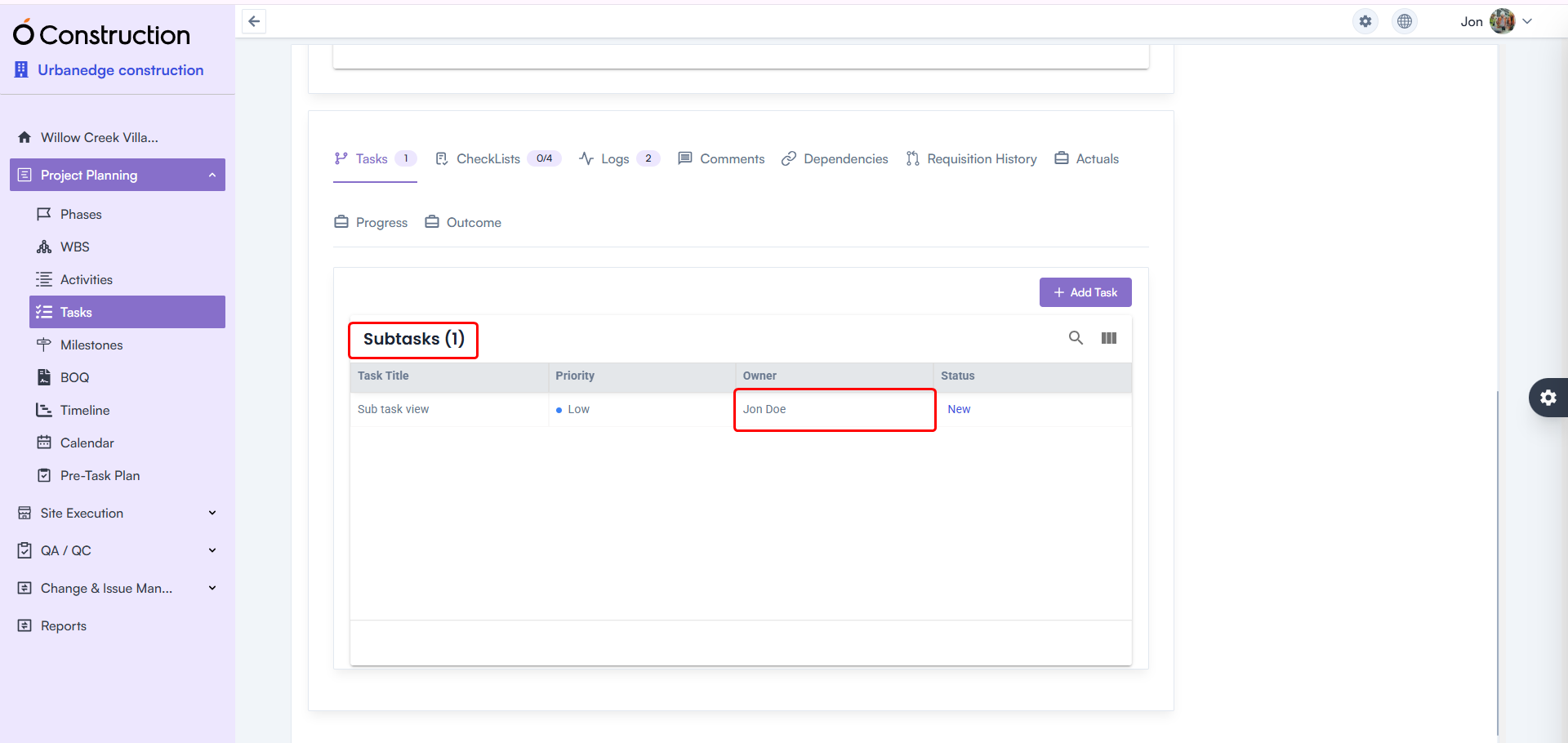
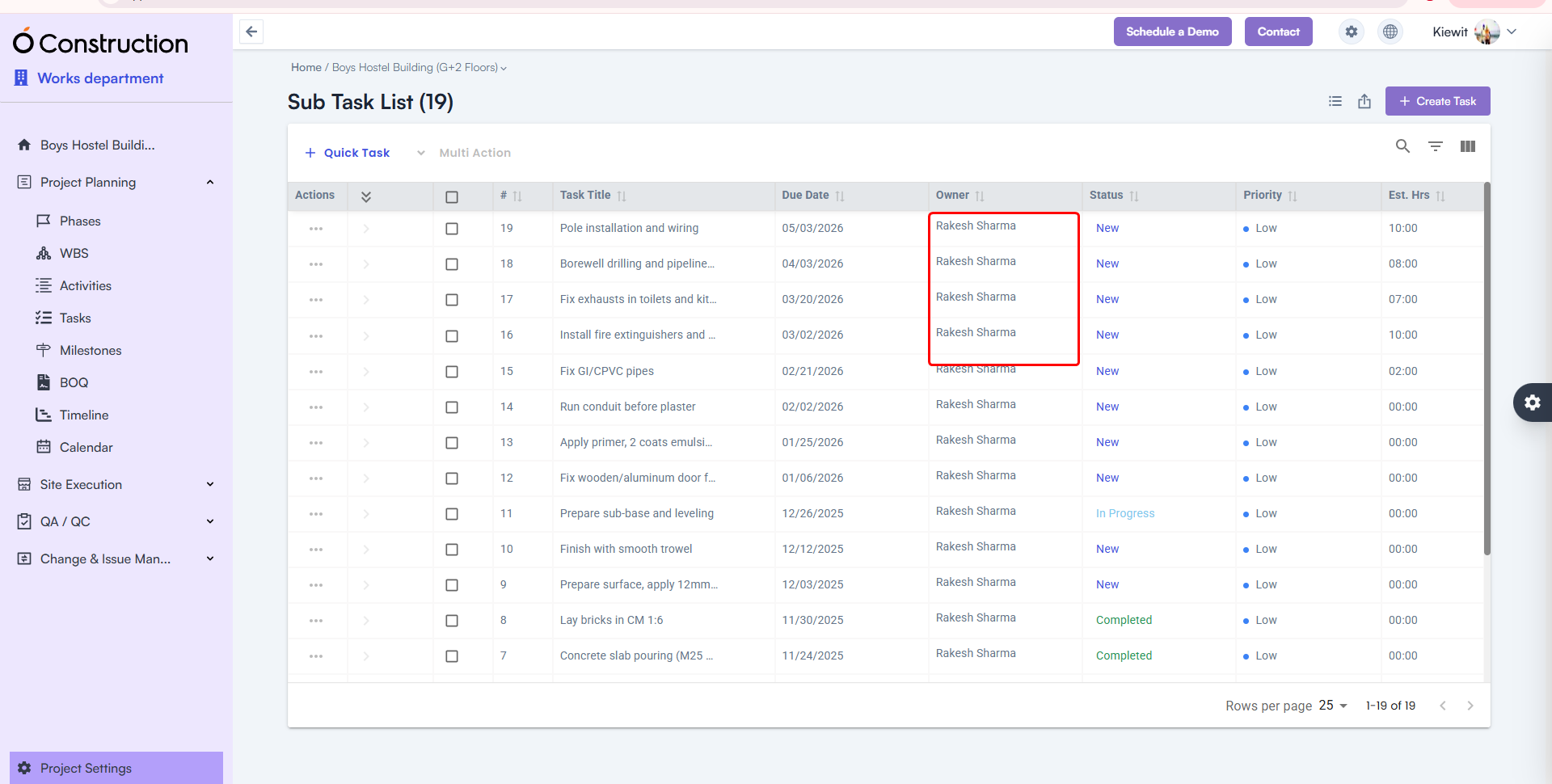
  • Owner Name Visibility in Subtasks — Fixed

After creating a subtask, the Owner Name field occasionally appeared blank.

  • Fix: The correct Owner Name now displays consistently.
  • Benefit: Accurate task accountability and tracking.

Owner Name Visibility in Subtasks

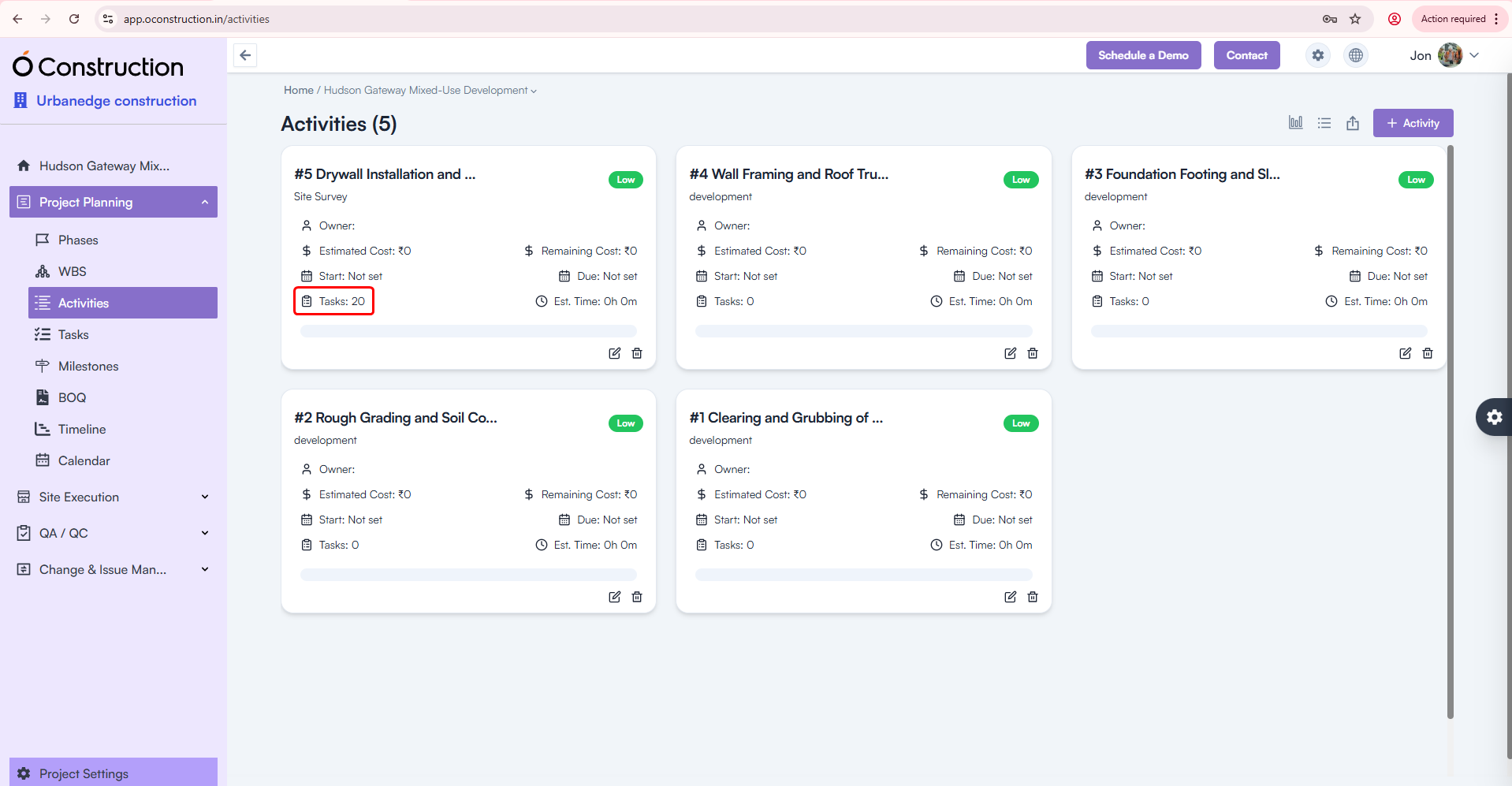
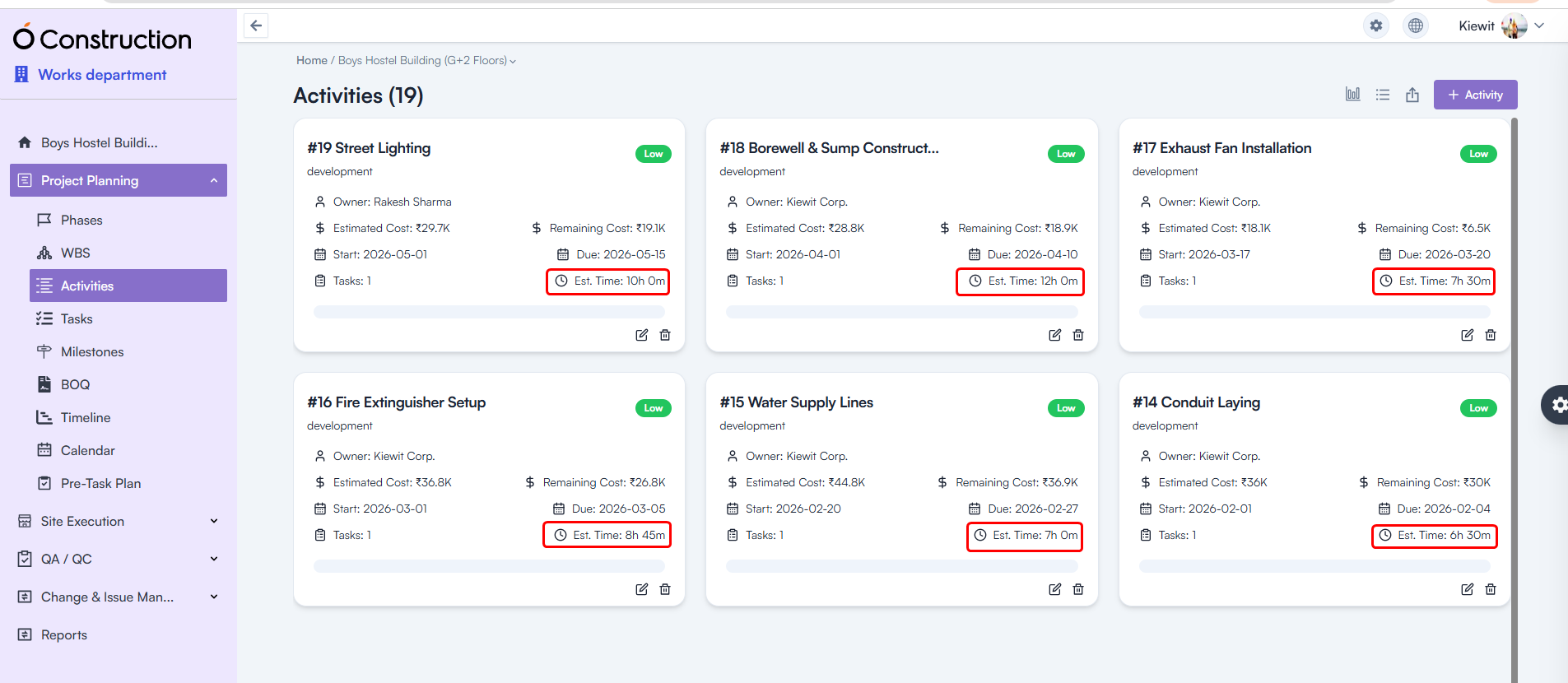
  • Activity Card Task Count — Corrected

Activity Cards were showing the wrong number of tasks linked to them.

  • Fix: Task Count is now fully accurate and automatically updated.
  • Benefit: Clearer progress visibility across activities.

Activity Card Task Count

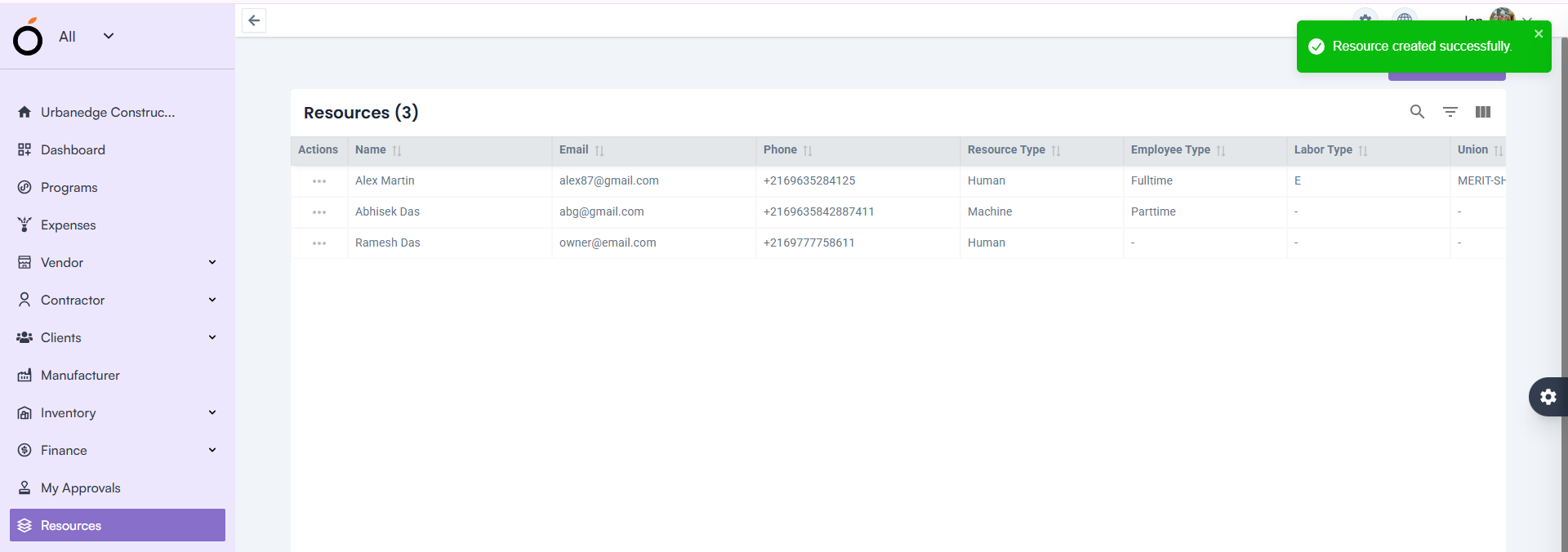
  • Resource Creation — Proper Validation Alerts

Leaving the Email field blank previously showed a generic toast message:

“Something went wrong”

  • Fix: Now users see the correct validation alert.
  • Benefit: Clear communication and faster error resolution.

Resource Creation — Proper Validation Alerts

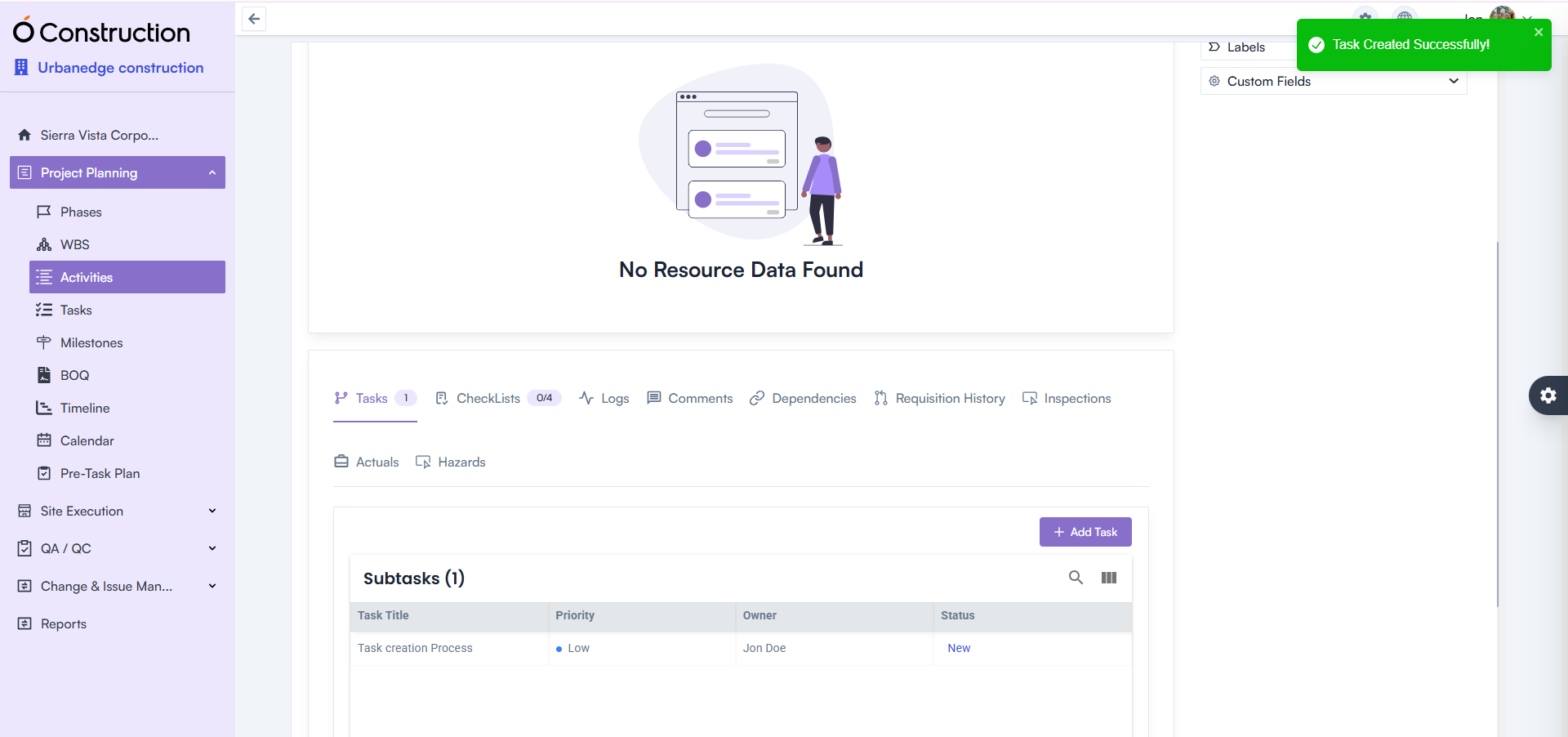
  • Activity Details — Task Creation Error Fixed

Creating tasks under Activity Details incorrectly prompted a 422 error message.

  • Fix: This issue is fully resolved.
  • Benefit: Smoother task addition and execution continuity.

Activity Details — Task Creation Error Fixed

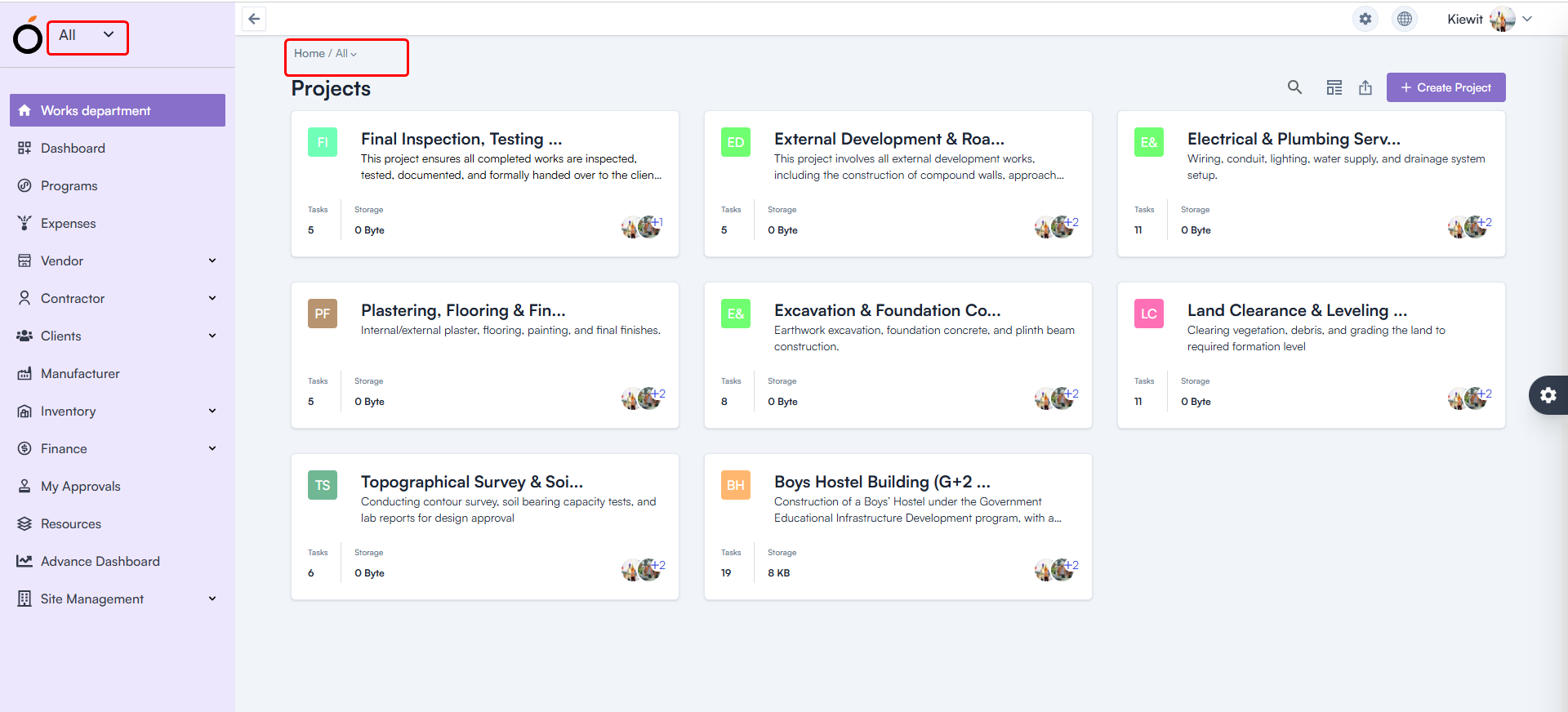
  • Workspace Selection — Default Workspace Fixed

After login, all users were shown “All” as their workspace.

  • Fix: The system now loads the correct workspace based on user permissions.
  • Benefit: Faster access to relevant projects and responsibilities.

Workspace Selection — Default Workspace

  • Budget Insight – Improved Hierarchy Expand/Collapse

Expand/collapse behavior in Hierarchy View was not consistent.

Budget Insight – Improved Hierarchy

  • WBS Details Page — Item & Asset Adding Enabled

Users previously faced restrictions adding:

  • Items
  • Assets

Fix: Both are now fully functional.
Benefit: Better control over project structure and asset planning.

WBS Details Page — Item & Asset Adding Enabled

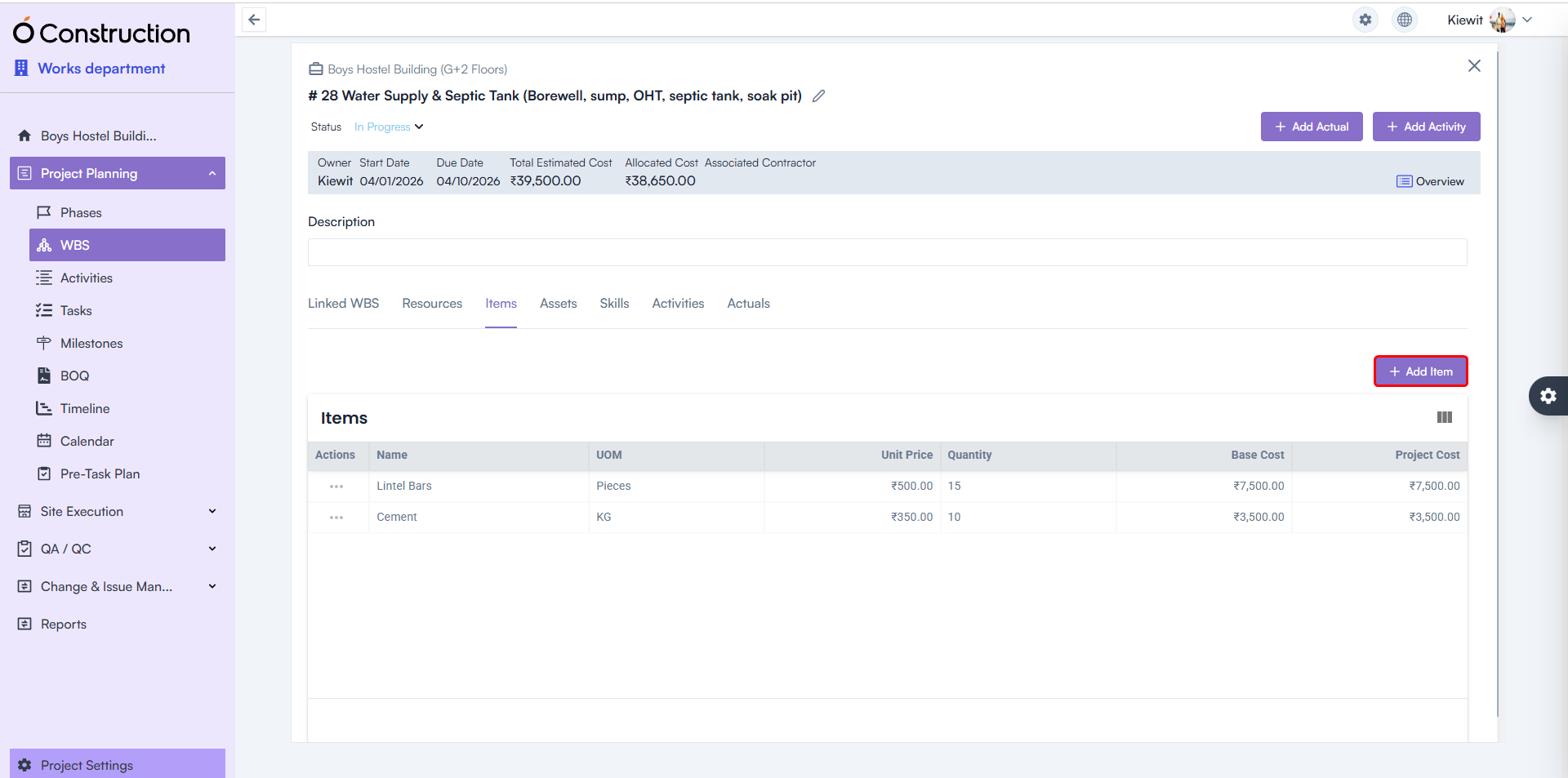
  • Estimated Hours — Calculation Logic Corrected

Estimated Hours for Tasks and Activities were showing incorrect values.

  • Fix: Calculation formulas have been rectified throughout the system.
  • Benefit: More accurate workforce and schedule planning.

Estimated Hours — Calculation Logic Corrected

Final Takeaway

This December edition of OConstruction Release Notes sharpens the user experience with fixes that boost reliability, calculation accuracy, and workflow clarity across the platform.

We’re continuously improving OConstruction to support both field and office teams with smoother project execution, stronger controls, and more confidence in daily operations.

OConstruction Release Notes: What’s New in November 2025

Managing construction projects requires accuracy, clarity, and seamless workflows — and we continuously refine OConstruction to support that. This November, we’re rolling out another round of OConstruction Release Notes – important improvements focused on reliability, faster reporting, better visibility, and error-free execution across modules such as Punchlist, WBS Dependencies, Parameters, Finance, Structure Settings, and more.

Whether you work onsite or at the office, this update ensures a smoother, cleaner, and more dependable experience across OConstruction.

Let’s walk through what’s new.

Release Update – 21/11: Stability Fixes & UI Improvements

1) Due Date Display Fix – Budget Insights (Bug Fix)

The Due Date field in Budget Insights was appearing blank.

  • Fix: The issue has been resolved — Due Dates now display correctly.
  • Benefit: Clearer budget forecasting and accurate timeline visibility.

Due Date Display Fix – Budget Insights

2) Owner Name Display in Subtasks (Bug Fix)

Owner names in Subtasks were previously shown as blank.

  • Fix: Correct owner names now display as expected.
  • Benefit: Better task tracking and clearer accountability.

Owner Name Display in Subtasks

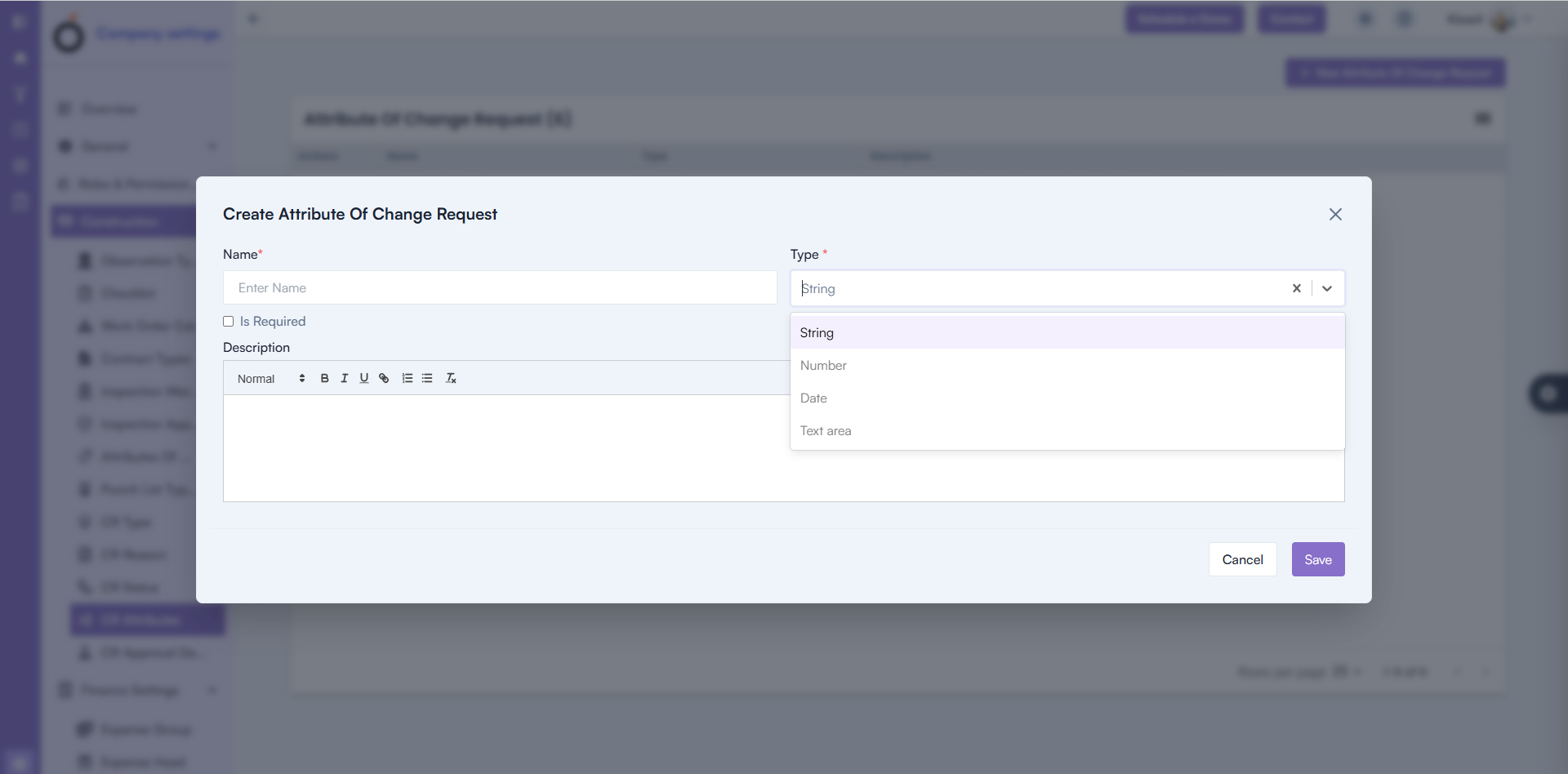
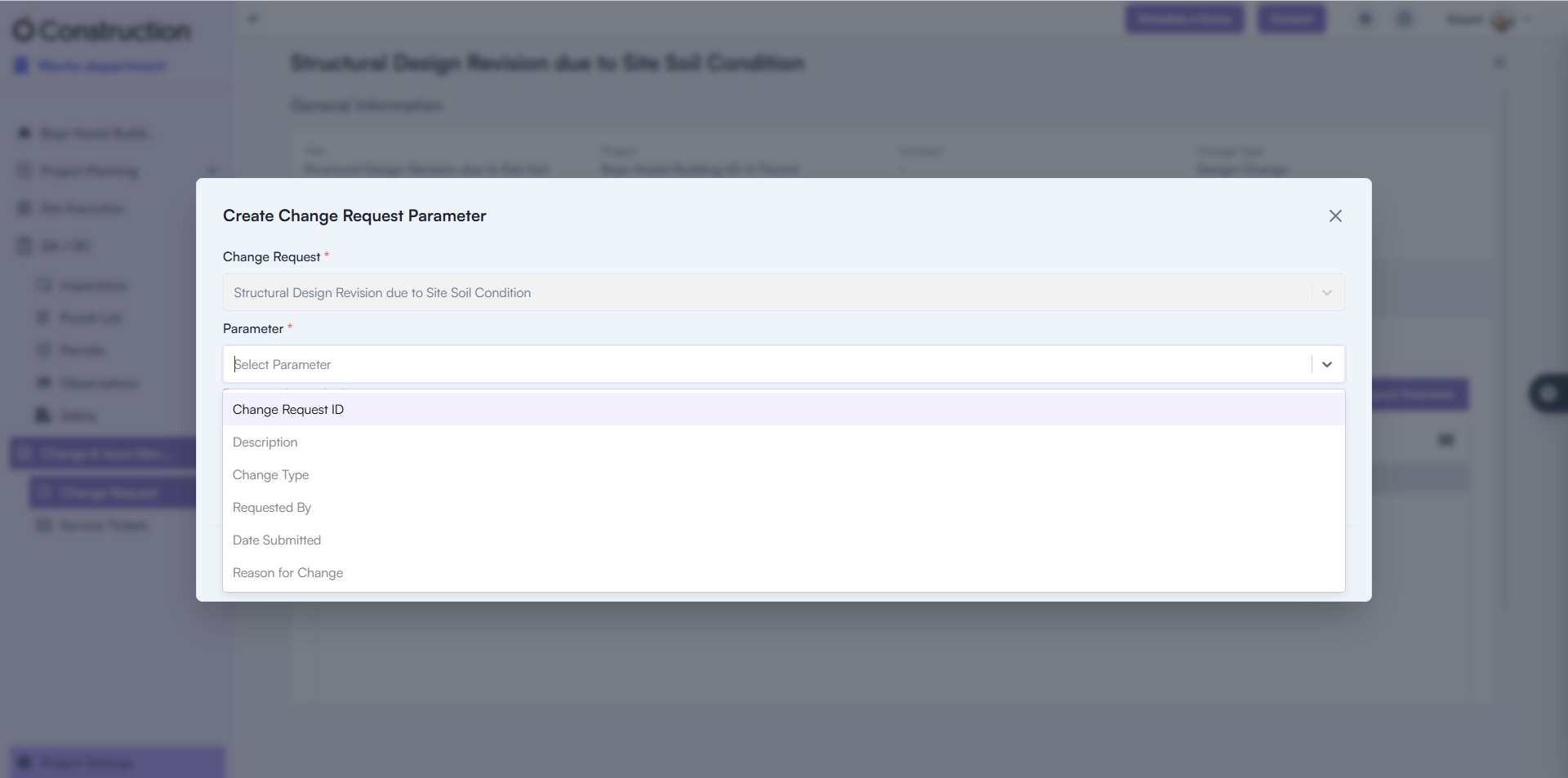
3) Change Request Parameter Creation (Bug Fix)

Users were unable to add new Change Request Parameters.

  • Fix: Creation functionality is now fully restored.
  • Benefit: Faster change request setup with uninterrupted workflows.

Change Request Parameter Creation

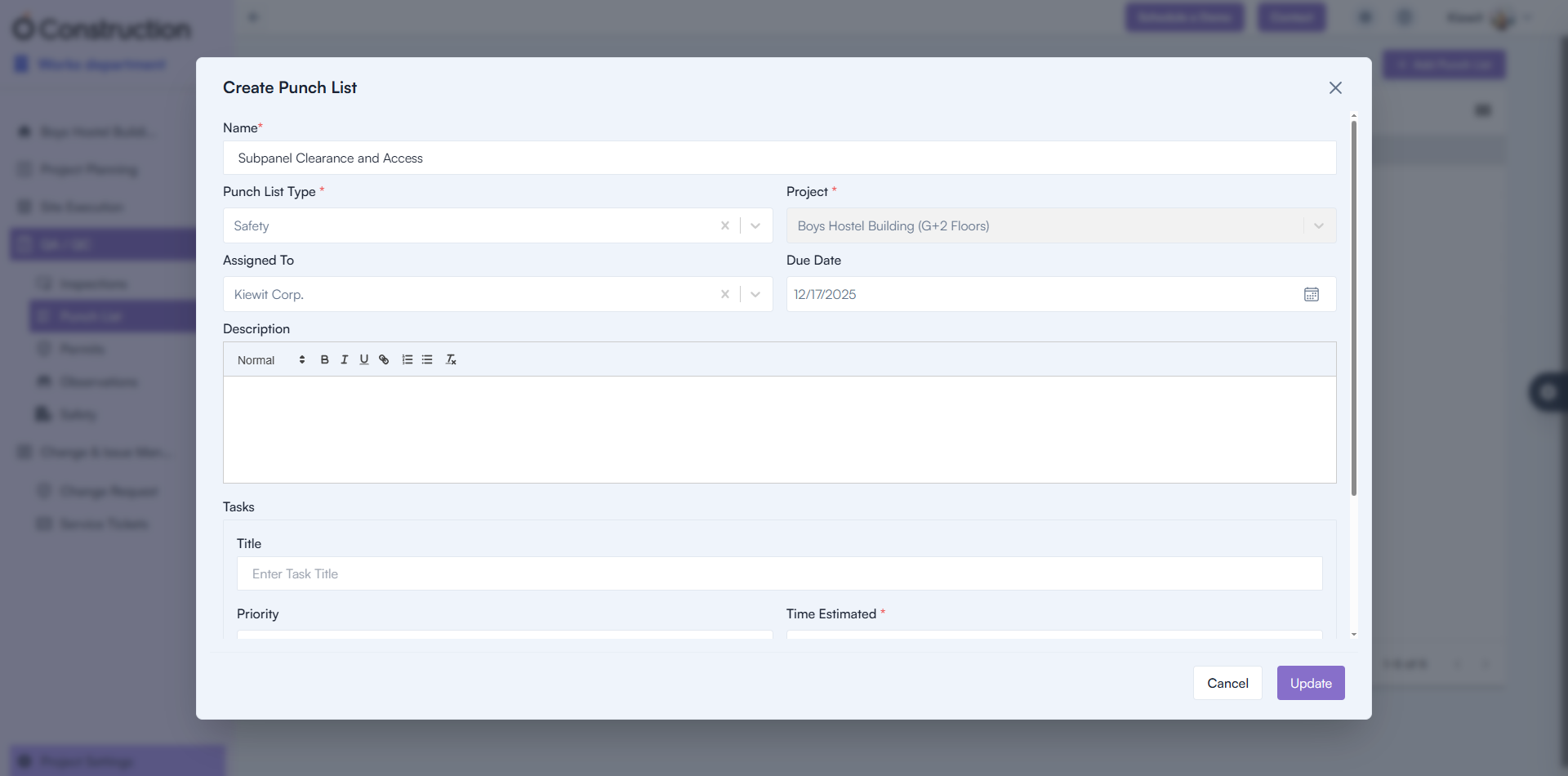
4) Punchlist Creation Failure (Bug Fix)

Punchlist creation attempts were failing.

Punchlist Creation Failure

5) Parameter Name Visibility (Bug Fix)

Parameter names were appearing blank in the UI.

  • Fix: Names now display correctly.
  • Benefit: Improved clarity when configuring parameters.

Parameter Name Visibility

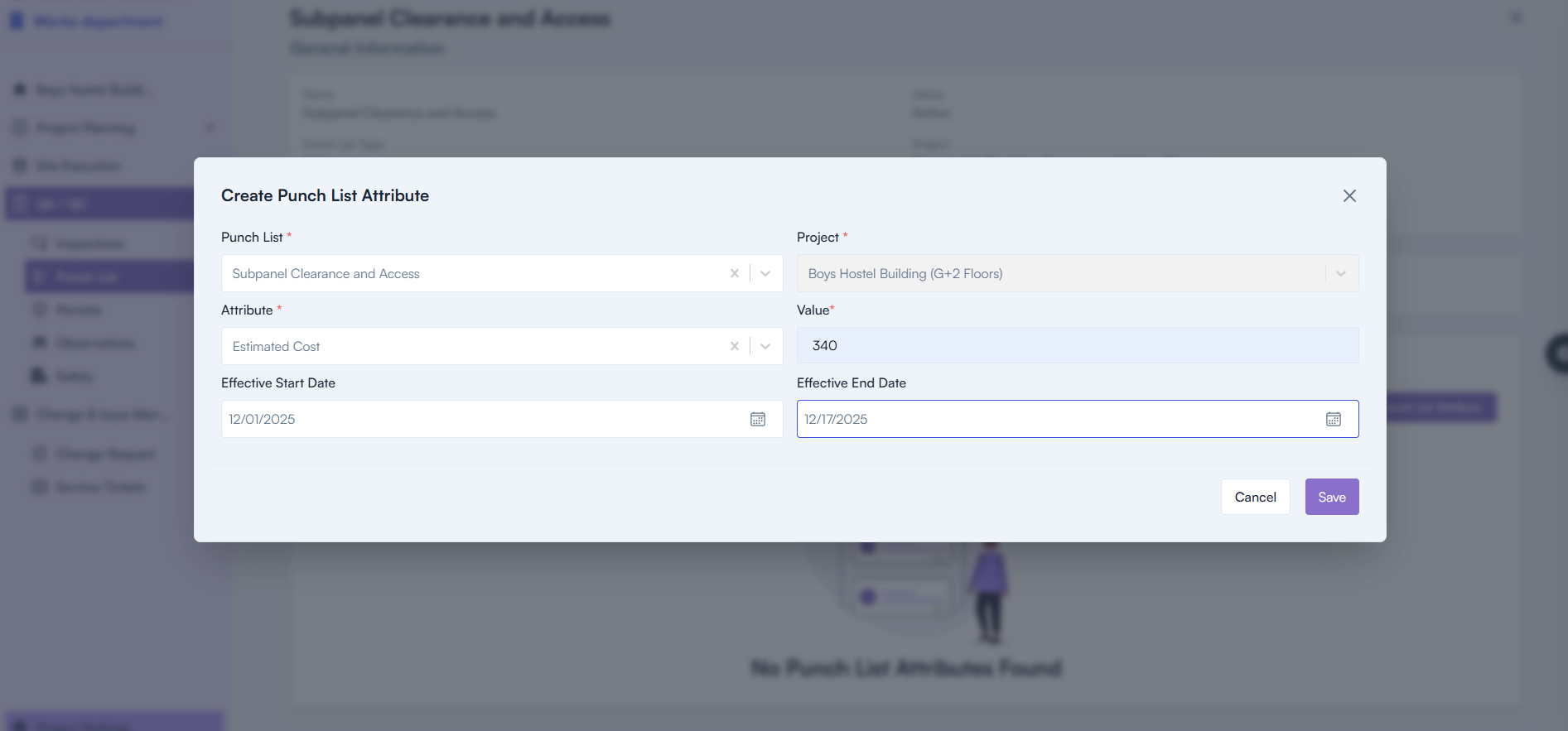
6) Attribute Display in Parameters Tab (Bug Fix)

Attributes were not appearing properly inside the Parameters tab.

  • Fix: Correct attribute values now render accurately.
  • Benefit: More complete configuration experience.

Attribute Display in Parameters Tab

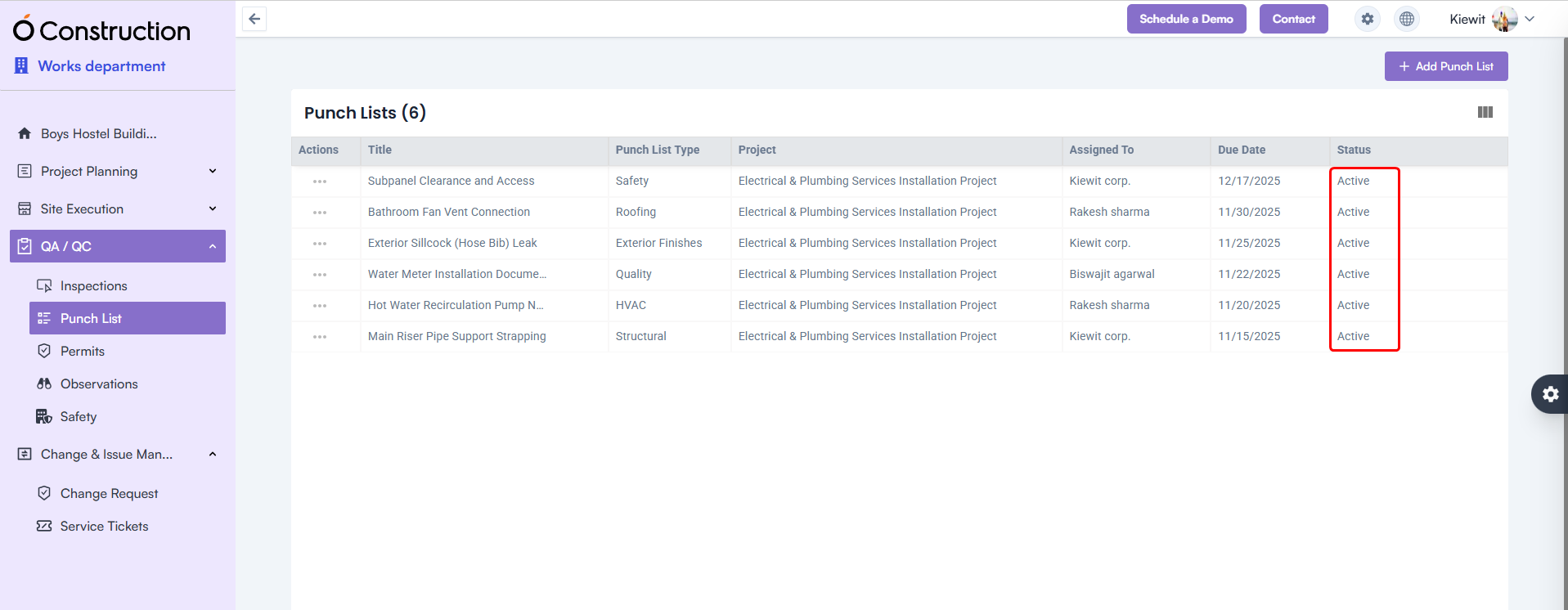
7) Punchlist Status Display (Bug Fix)

Punchlist Status display was blank.

Punchlist Status Display

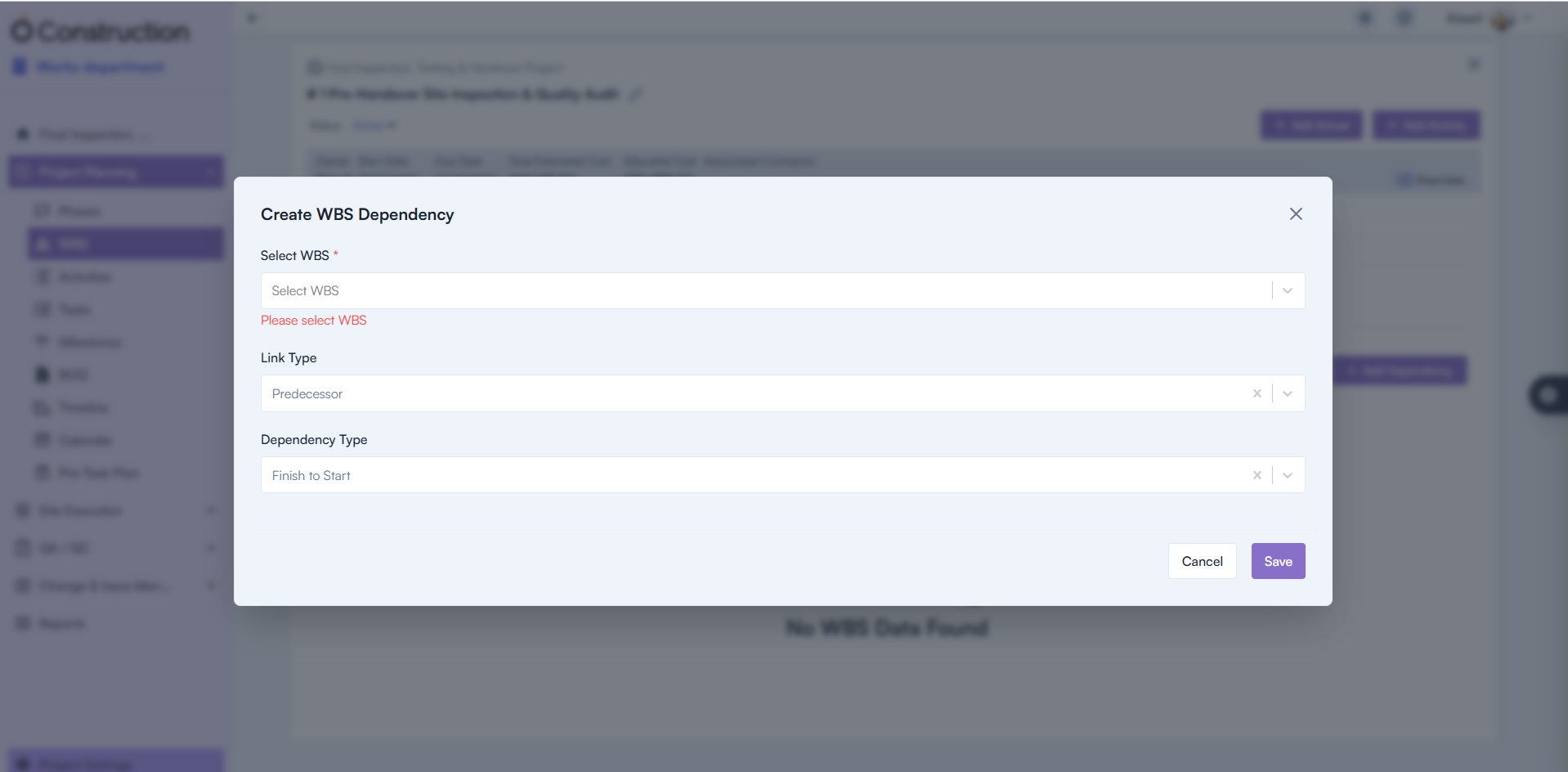
8) Mandatory Field Validation – WBS Dependency (Bug Fix)

Missing mandatory warnings caused confusion during dependency setup.

  • Fix: Proper validation alerts now appear.
  • Benefit: Improved accuracy and setup clarity.

Mandatory Field Validation – WBS Dependency

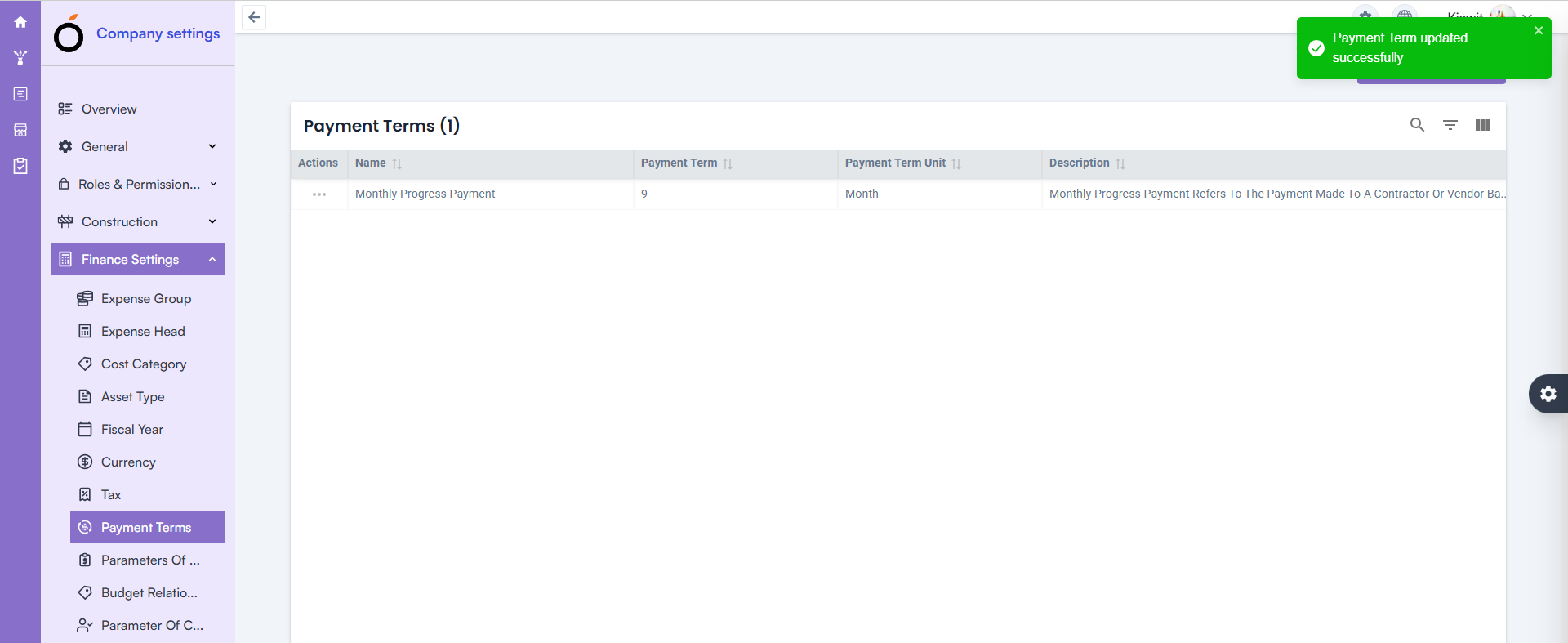
09) Finance Inline Edit Update – Payment Terms (Bug Fix)

Updating Payment Terms via inline edit was not working.

  • Fix: Inline editing now functions smoothly.
  • Benefit: Faster financial configuration with fewer steps.

Finance Inline Edit Update – Payment Terms

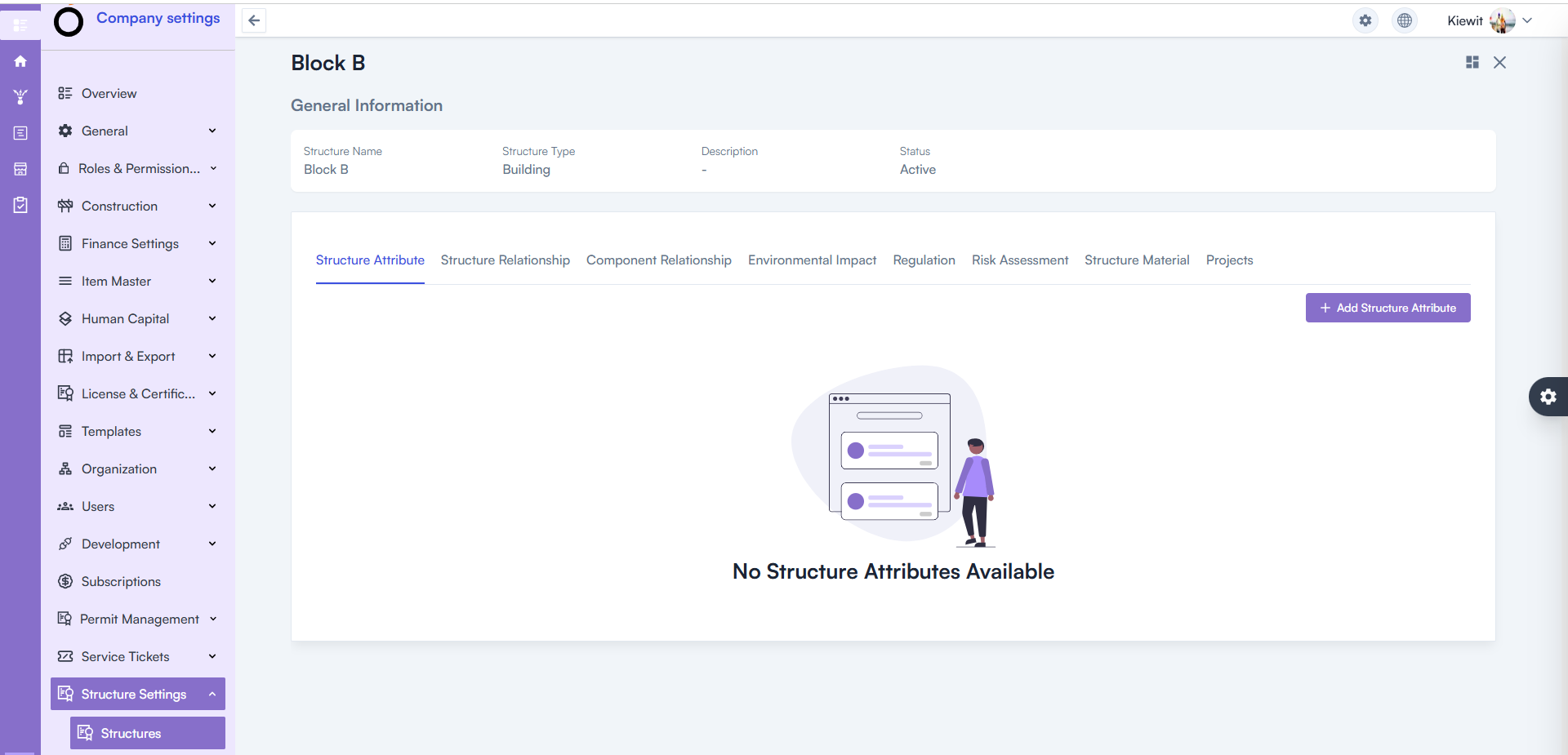
10) Structure Details Page – 500 Error Resolved (Bug Fix)

Opening the Structure Details Page triggered a 500 Internal Server Error.

  • Fix: Backend issues resolved and page loads correctly.
  • Benefit: Stable access to project structure data.

Structure Details Page – 500 Error Resolved

Conclusion

This round of OConstruction Release Notes brings meaningful fixes that enhance reliability, improve clarity, and reduce disruptions across your workflows.

From Punchlist and Parameters improvements to Project Visibility, Finance enhancements, and WBS validation upgrades — every fix supports smoother execution and greater confidence in reporting.

Stay tuned — more improvements and feature releases are on the way as we continue strengthening OConstruction for construction teams worldwide.

OConstruction Release Notes: What’s Latest in November 2025

Keeping your projects organized, efficient, and error-free continues to be our top priority at OConstruction.

Our latest OConstruction Release Notes for 17 November 2025 include powerful enhancements, workflow improvements, UI refinements, and critical bug fixes — all designed to streamline your construction execution both on-site and in the office.

From improved Checklist creation and DPR advancements to major fixes across BOQ, WBS, Calendar, and Task modules, this update ensures smoother navigation, better performance, and more reliable project tracking.

Let’s walk through everything included in the OConstruction November 2025 Release.

Release Update – 17/11: Feature Enhancements & Bug Fixes

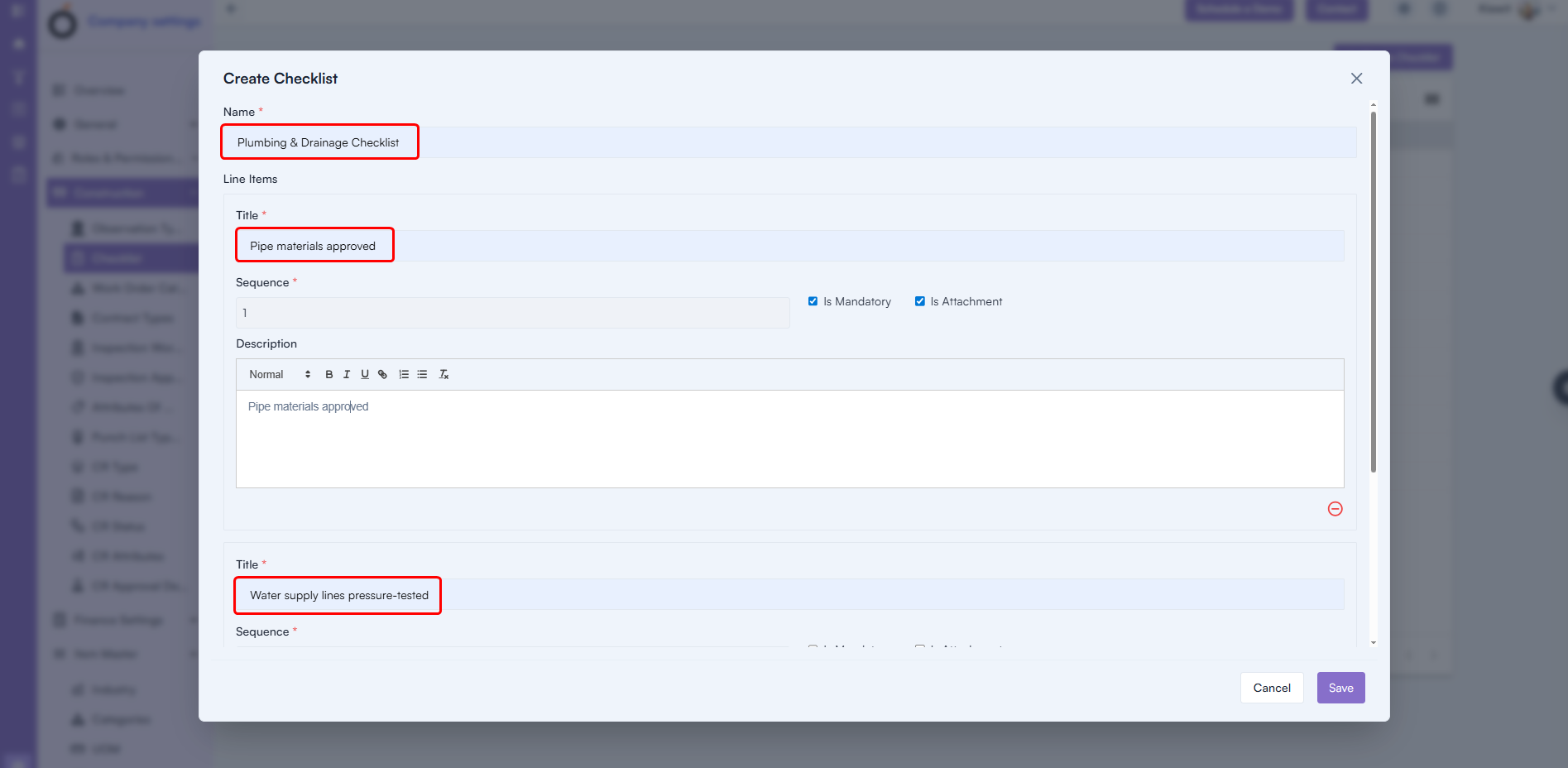
Checklist Creation with Line Items (Enhancement)

You can now create complete checklists with greater detail and flexibility.

What’s New

  • Add Checklist Name
  • Add Multiple Checklist Items
  • Include Sequence Numbers
  • Add Descriptions
  • Add all line items directly using + Add Line Item

Benefit: Faster checklist creation, richer detail, and a more structured QA/QC workflow.

Checklist Creation with Line Items

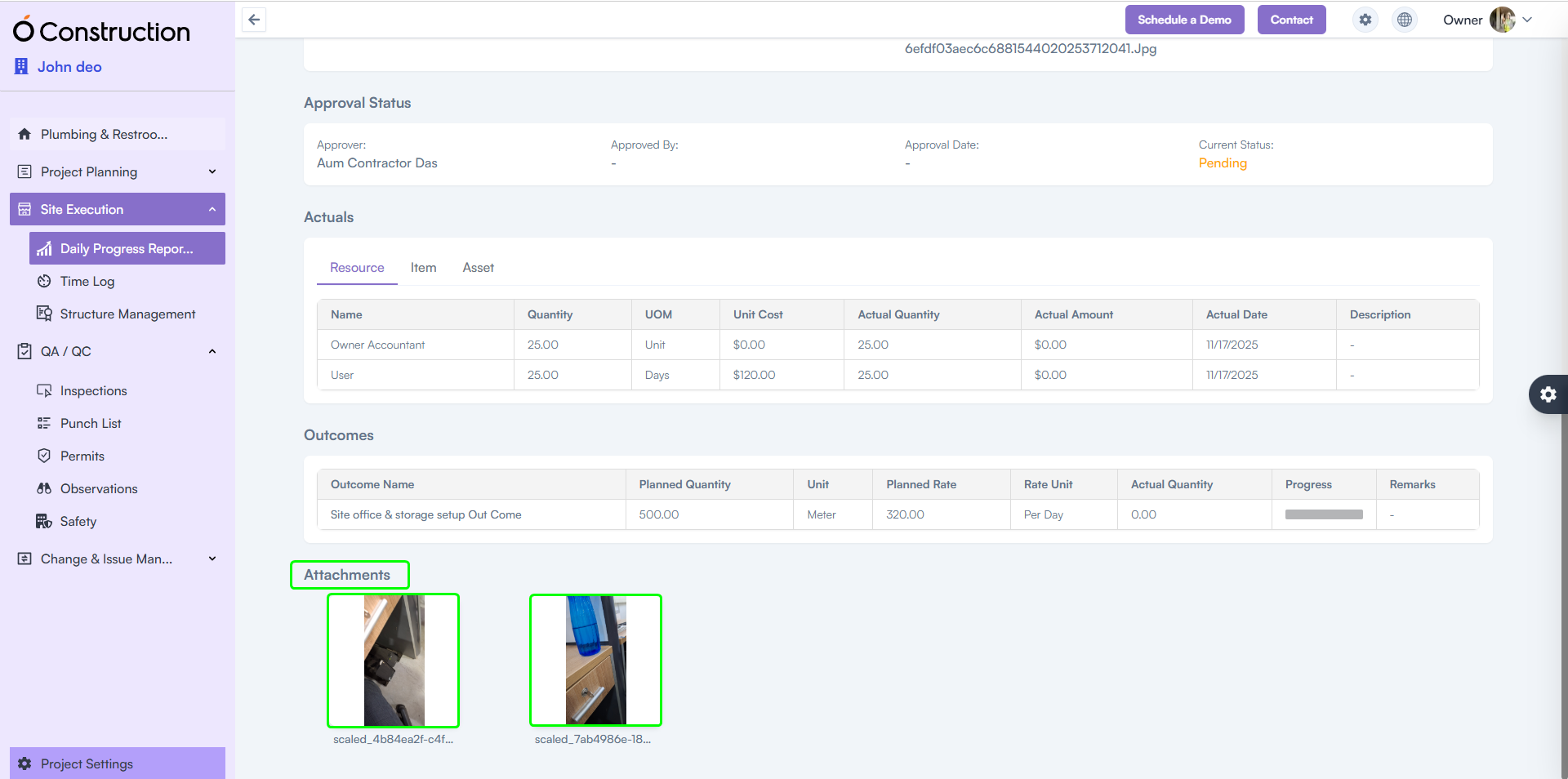
2) DPR Attachments Visible in Frontend (Enhancement)

Attachments uploaded via the mobile app are now perfectly displayed on the web.

Benefit: Smooth, consistent DPR review across devices — ensuring supervisors always see the latest photos, documents, and field evidence.

DPR Attachments Visible in Frontend

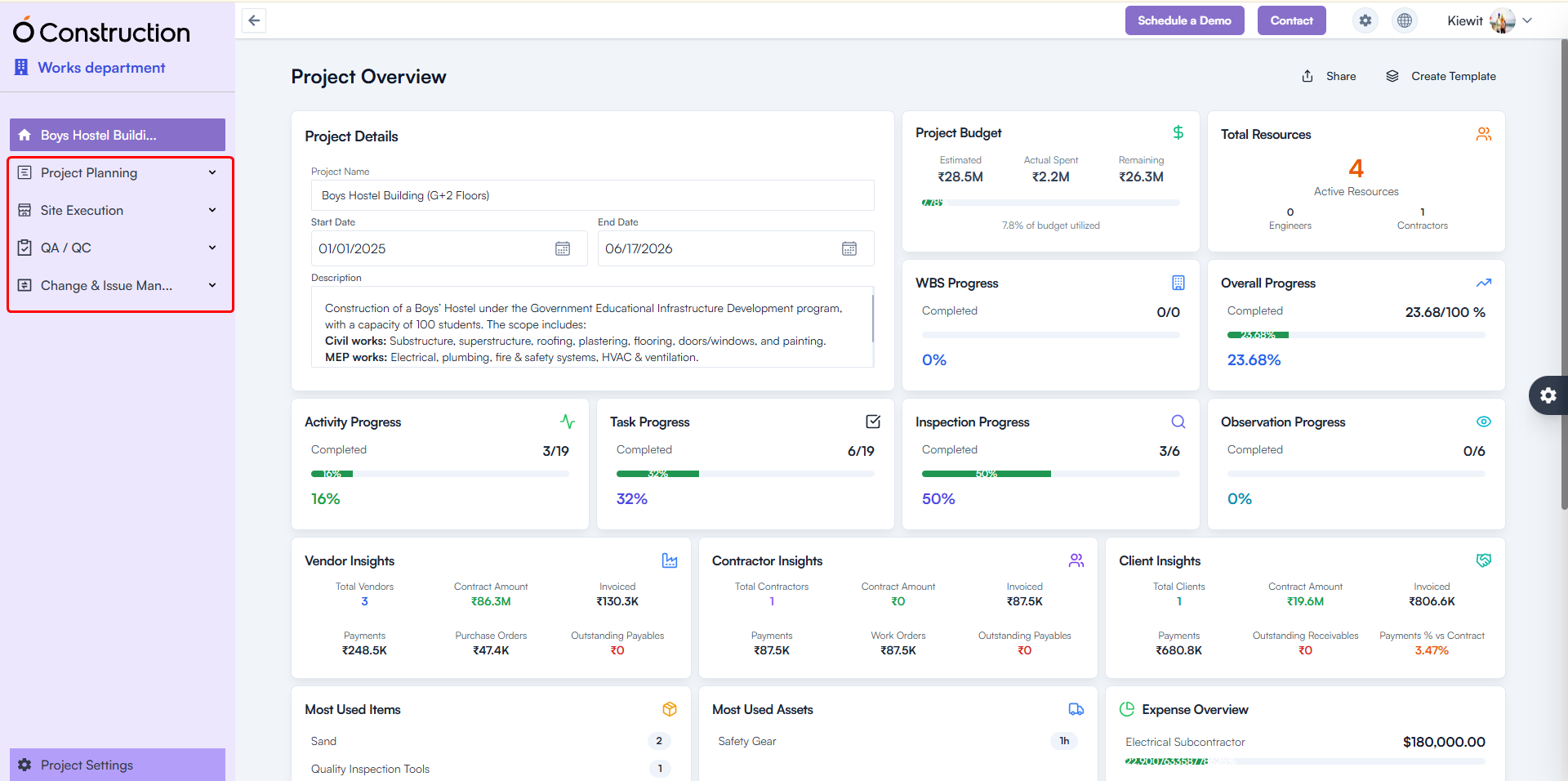
3) Menu Collapse – Improved Grouping for Project Modules (Usability Improvement)

The Project Module menu has been reorganized into clear functional groups for faster navigation.

New Groupings Include:

Project Planning

  • Phases
  • WBS
  • Activities
  • Tasks
  • Milestones
  • BOQ
  • Timeline
  • Calendar

Site Execution

  • Daily Progress Report
  • Time Log
  • Structure Management

QA/QC

  • Inspections
  • Punch List
  • Permits
  • Observations
  • Safety

Change & Issue Management

  • Change Request
  • Service Tickets

Benefit: Cleaner structure, reduced scrolling, and quicker module access.

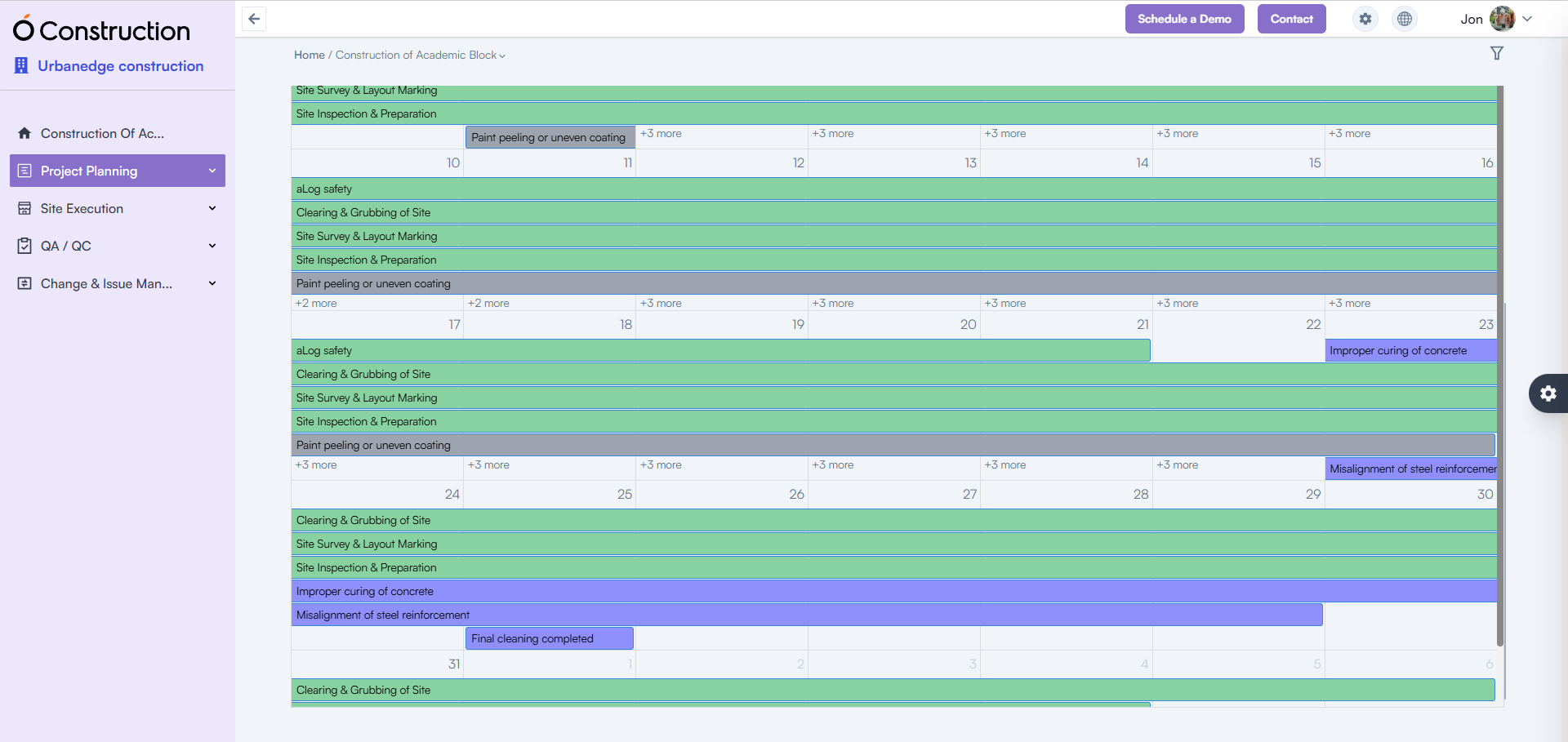
Menu Collapse – Improved Grouping

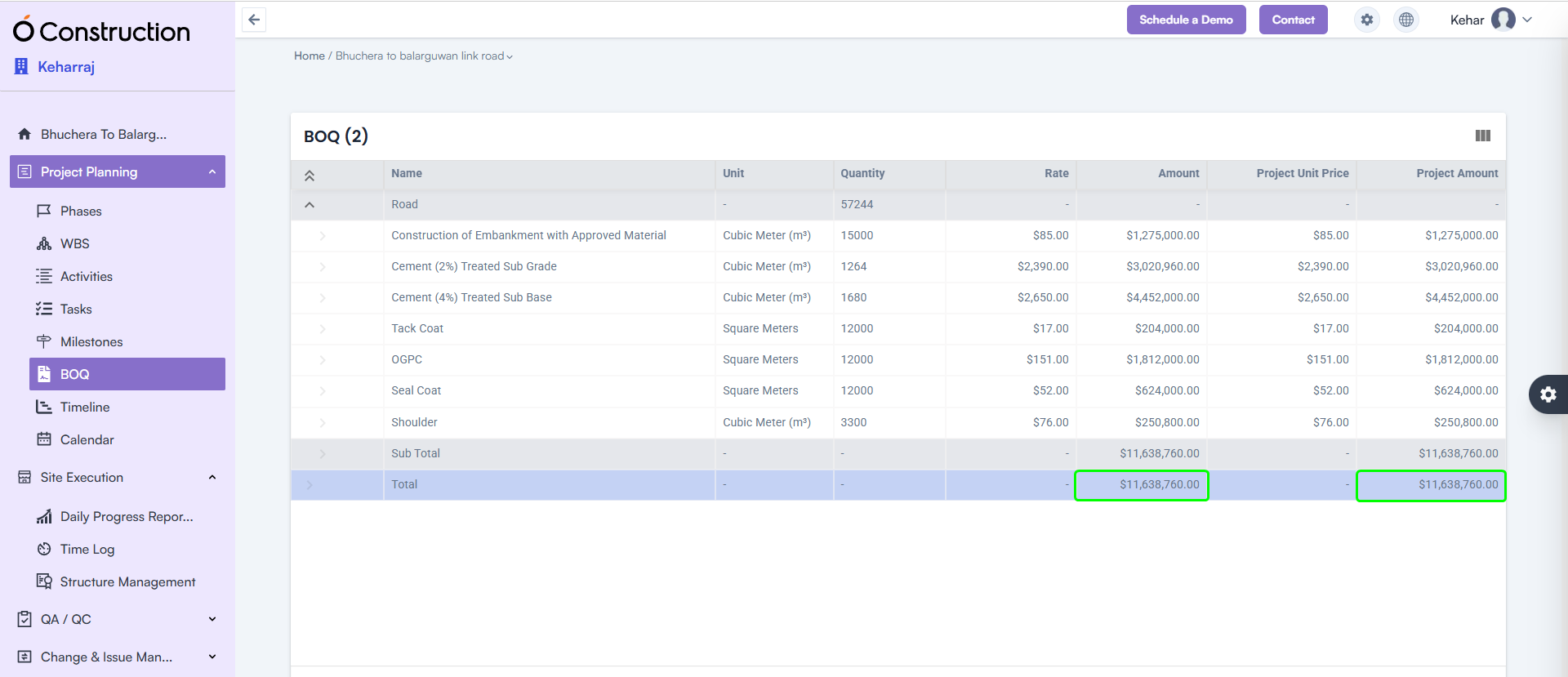
4) BOQ Subtotal & Total Highlight (Enhancement)

The BOQ listing page now clearly displays Subtotal and Total Amount at the bottom of the table.

Benefit: Instantly review cost structure with improved visibility for decision-making.

BOQ Subtotal & Total Highlight

5) Mobile App – DPR File Upload Slowness Resolved (Bug Fix)

The Mobile DPR module has been optimized for faster uploads.

  • File upload speed significantly improved
  • Updated version available on Google Play Store

Benefit: Quick, seamless field reporting even on low-network sites.

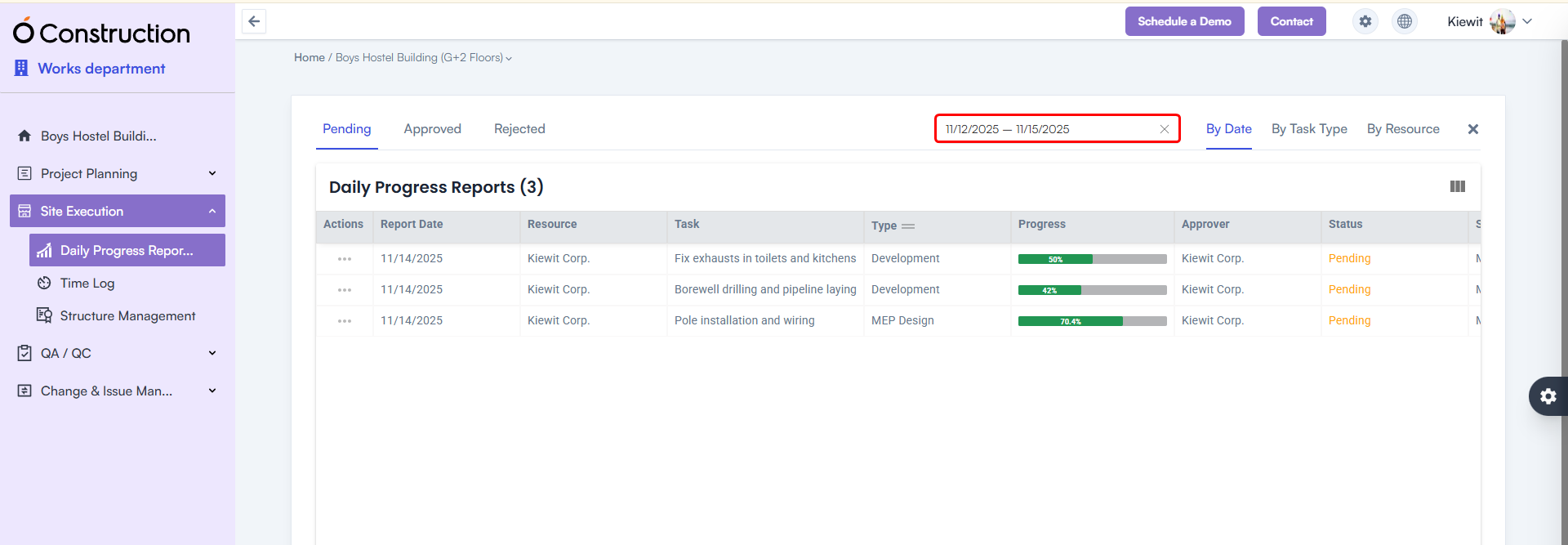
6) DPR Date Range Filter Added (Enhancement)

A Date Range Calendar Filter is now available in the DPR listing page.

Benefit: Easily filter DPRs between any two dates for reviews, audits, or progress analysis.

DPR Date Range Filter Added

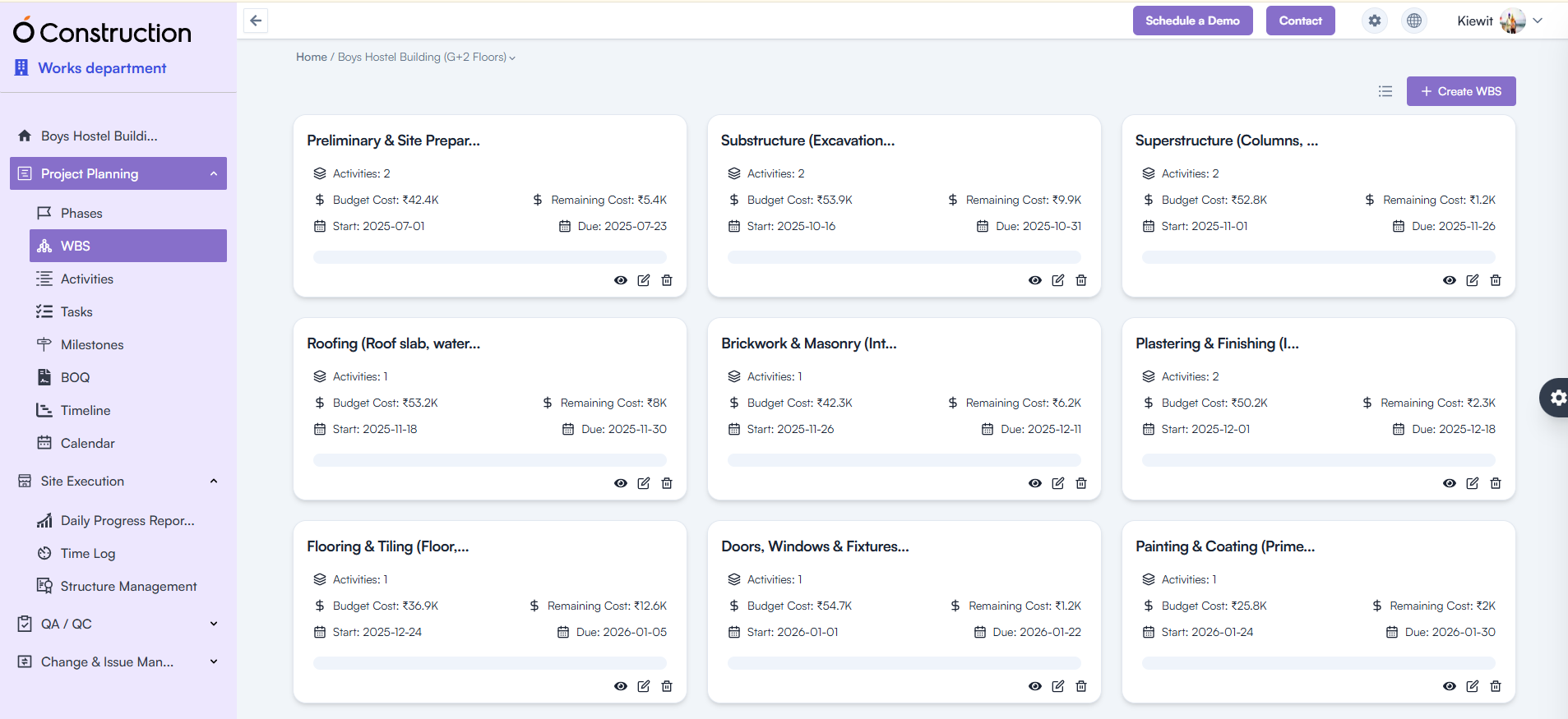
7) WBS / Activity Card Navigation Issue Fixed (Bug Fix)

Previously, clicking Back redirected users to the List View instead of the Card View.

Fix: Navigation now correctly returns to the Card View.
Benefit: A more consistent and intuitive navigation experience.

Activity Card Navigation Issue Fixed

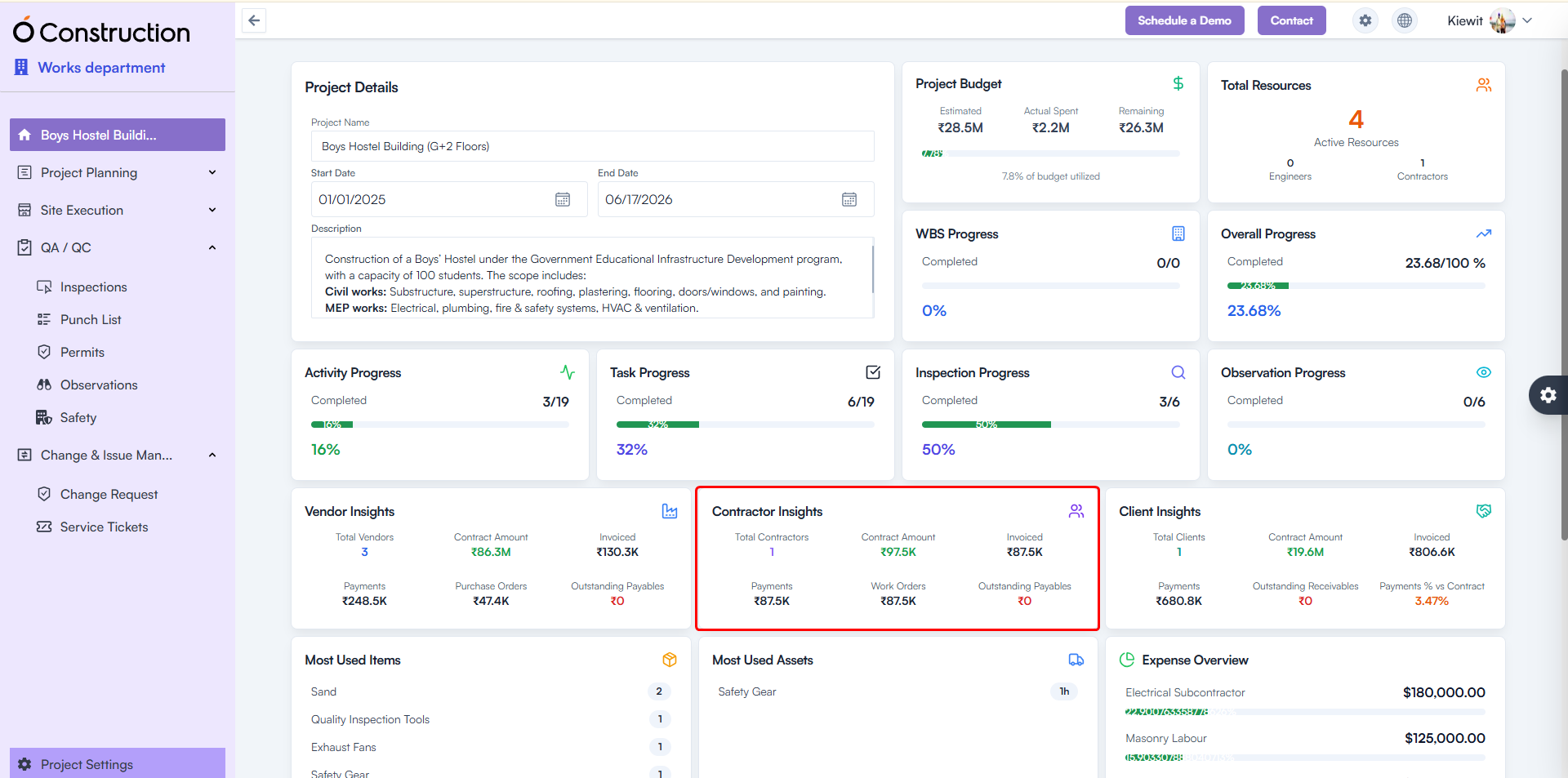
8) Contractor Insights – Incorrect Metrics Fixed (Bug Fix)

Contractor Insights was showing blank or zero results.

Fix: API inconsistencies resolved; correct metrics now display.
Benefit: Accurate contractor performance tracking for better vendor decisions.

Contractor Insights – Incorrect Metrics Fixed

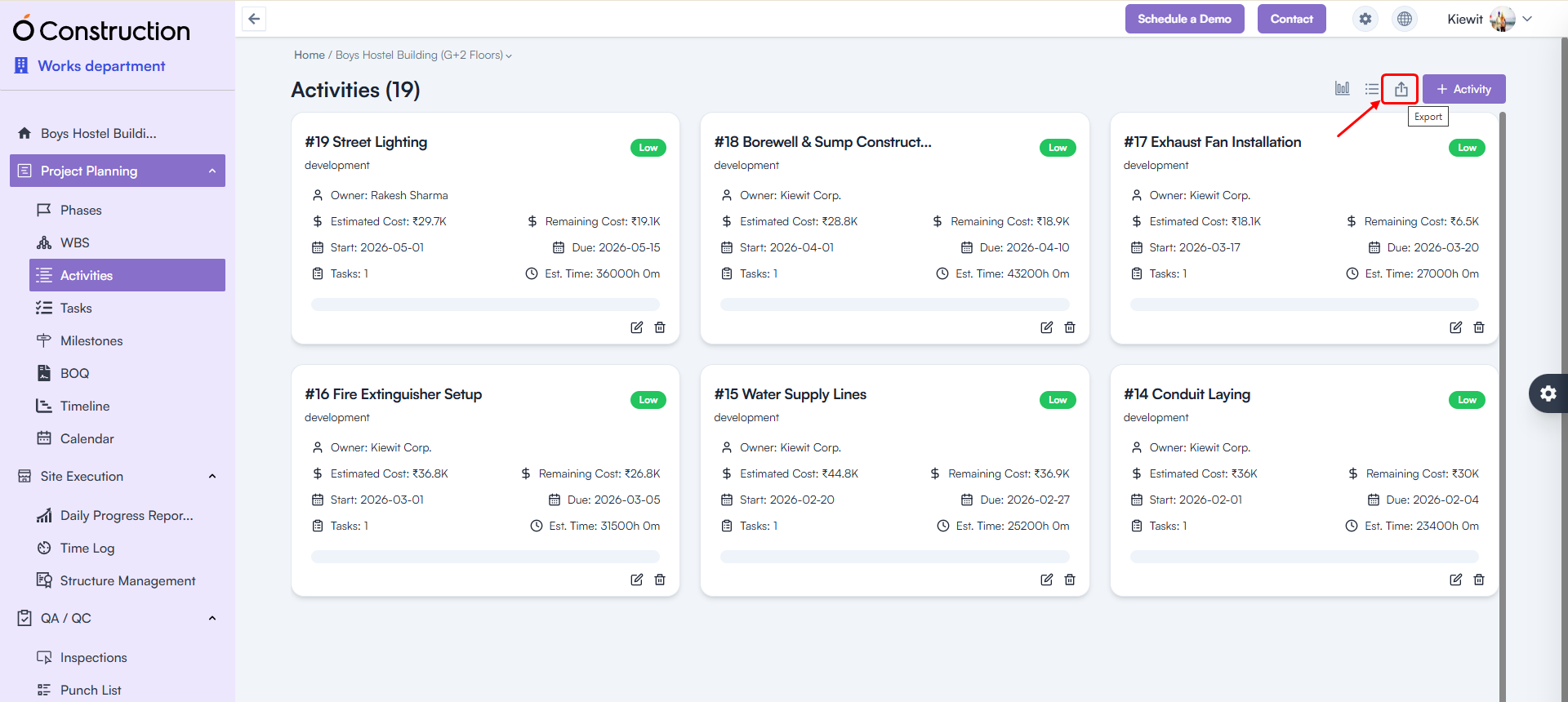
9) Export Issues (500 Error) Fixed (Bug Fix)

Exporting the following modules no longer triggers errors:

  • Phases
  • Activities
  • Tasks
  • Milestones

Benefit: Reliable, error-free data export for reporting and compliance needs.

Export Issues

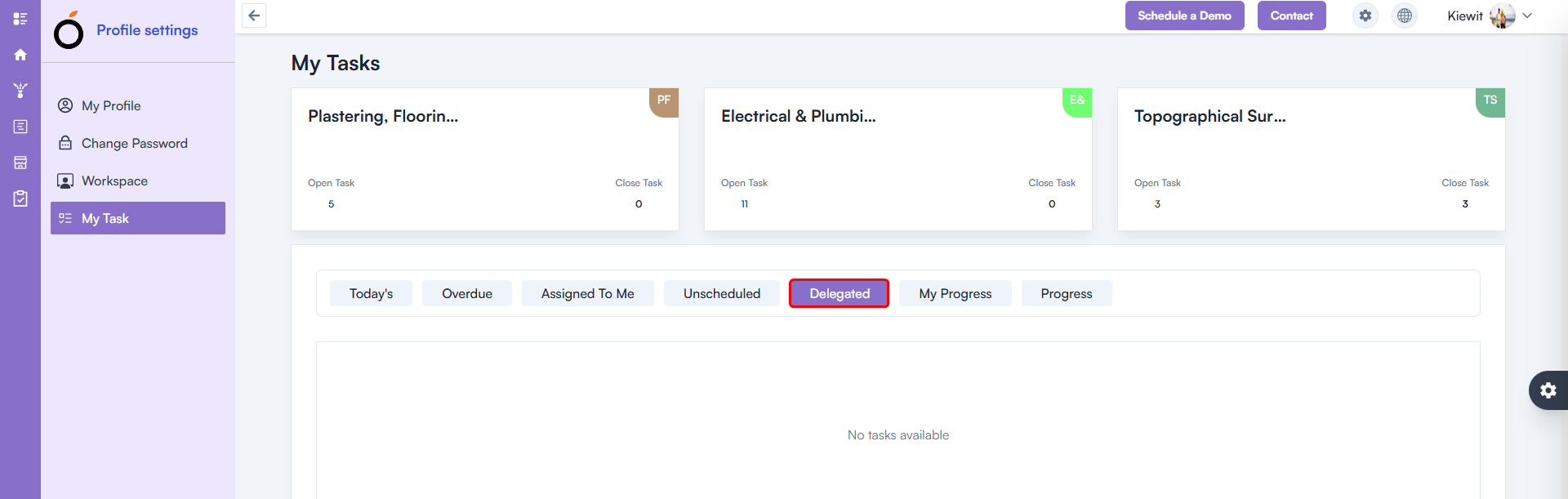
10) Delegated Task – 500 Error Fixed (Bug Fix)

A 500 error occurred in My Tasks → Delegated Task.

Fix: Issue fully resolved.
Benefit: Smooth task tracking and delegation workflows.

Delegated Task – 500 Error Fixed

11) Calendar – 500 Error Fixed (Bug Fix)

The Calendar List View previously returned a 500 internal server error.

Fix: Functionality restored and fully stable.
Benefit: Accurate schedule visibility for planning and daily execution.

Calendar – 500 Error Fixed

Conclusion

Every enhancement in these OConstruction Release Notes reflects our mission to improve system stability, on-site productivity, and overall user satisfaction.

From detailed checklists and advanced DPR features to critical BOQ, contractor insights, and navigation fixes — this release ensures faster workflows, stronger compliance tracking, and powerful construction management capabilities.

Stay tuned for more OConstruction Release Notes as we continue to optimize, innovate, and support construction teams worldwide.

Top 10 Pre-Task Planning Best Practices to Reduce Incidents

Construction remains one of the most high-risk industries globally. Studies show that almost 70% of incidents occur due to poor planning and unassessed risks on site. Work changes daily, conditions vary every hour, and unexpected hazards emerge constantly. In such dynamic environments, Pre-Task Planning Best Practices are critical to ensure that every activity is executed safely, accurately, and without delays.

Traditional site operations often depend on manual logs, verbal instructions, and scattered communication, which easily lead to misinterpretation, rework, cost leakage, and safety violations. This blog will help you understand why and how implementing Pre-Task Planning Best Practices strengthens operational control and ensures smoother execution from planning to handover.

Whether you are a project manager, contractor, EPC company, builder, or site engineer, investing in systematic Pre-Task Processes ensures better outcomes—fewer incidents, higher productivity, and improved accountability.

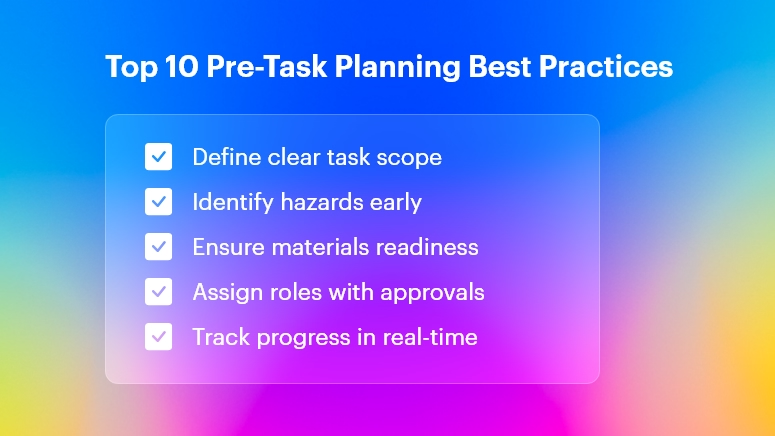
Top 10 Pre-Task Planning Best Practices

Why Pre-Task Planning Best Practices are Essential in Construction

Construction companies today operate under tight deadlines, competitive budgets, and strict compliance requirements. Yet, execution challenges keep growing due to:

  • Fragmented communication among field and office teams
  • Inaccurate DPRs and BOQs
  • Material mismanagement and wastage
  • Manual task planning with Excel sheets & WhatsApp
  • Low visibility into on-ground realities
  • High rework due to scope deviations
  • Labor inefficiencies and idle time

Across infrastructure projects, roads & highways, commercial & residential buildings, and EPC environments, these inefficiencies lead to:

  • On average, 30% cost overruns
  • Nearly 25% productivity loss
  • Rework accounting for 5–15% of project costs
  • Delays of several weeks or months

The core reason: Teams jump into execution without proper planning, hazard identification, or consensus on the task workflow.

Manual Processes Increase Errors and Safety Risks

Depending on paper-based updates, untracked task assignments, and disconnected systems often result in:

  • No clarity on who does what
  • Risky improvisation on site
  • Last-minute changes with no documented trace
  • Lack of accountability

This is where digital Pre-Task Planning workflows change the game.

Top 10 Pre-Task Planning Best Practices to Reduce Incidents

Below are the most critical Pre-Task Planning Best Practices construction teams should deploy daily. Each recommendation is fully actionable and proven to drive safer, smarter site execution.

1. Start Every Task with a Clear Scope Definition

  • Define the exact work boundary, required manpower, tools, materials, and dependencies to avoid guesswork.
  • When the team aligns on expectations, execution becomes faster and safer, reducing rework.

Use OConstruction to assign tasks with scope clarity, resource mapping, and activity checklists.

2. Involve Supervisors, Safety Officers & Skilled Workers in Planning

  • Workers who actually perform the task know the real risks and execution gaps better than anyone else.
  • Teams that co-plan tasks own accountability, ensuring better compliance.

OConstruction enables collaborative communication between all stakeholders in real-time.

3. Identify Hazards and Controls Before Work Begins

  • Conduct ASHA (Activity-Specific Hazard Assessment) to spot risk factors like working at height, lifting, and energy exposure.
  • Define preventive and emergency controls before actual execution.

OConstruction lets you store and standardize hazard control checklists across sites.

4. Confirm Material, Tools & Equipment Availability

  • Missing materials lead to unsafe improvisation, shortcuts, and delays.
  • Ensure all inventory, machinery, and consumables are available before work.

OConstruction provides real-time material tracking and purchase workflows.

5. Assign Roles with Clear Communication & Approval Flow

  • Accountability minimizes errors — everyone must know their tasks and authority limits.
  • Pre-approved workflows ensure no unauthorized work triggers hazards.

OConstruction’s task assignments, approvals & flow-based controls enforce discipline.

6. Digitize Daily Logs and DPRs for Real-time Monitoring

  • Paper DPRs delay decisions and hide critical issues like delays or unsafe changes.
  • Digital updates let the office team act immediately before risks escalate.

With OConstruction’s DPR Automation, sites achieve 100% accuracy and zero delays in reporting.

7. Track Work Progress Continuously Against Baseline

  • Pre-task plans often fail due to unmonitored deviations.
  • Daily progress checks ensure scheduled logic stays intact, preventing stacking delays.

OConstruction offers Gantt tracking, baselines & instant variance insights.

8. Conduct Toolbox Talks Before Task Execution

  • Safety and task reminders given right before execution have the most impact.
  • Workers stay alert, aligned, and aware of what could go wrong.

Use OConstruction to record toolbox talk attendance and topics for compliance.

9. Stop Work When Conditions Change Unexpectedly

  • Weather, site congestion, structural shifts — conditions change fast.
  • Work must pause until new hazards are assessed and mitigated.

With OConstruction, teams can raise instant alerts and ensure approvals before restarting.

10. Review Lessons Learned and Update Future Tasks

  • Every task provides insights to refine planning templates and processes.
  • A structured feedback loop improves quality, productivity & safety culture over time.

OConstruction standardizes learnings into repeatable digital workflows for all sites.

Bonus: Avoid These Common Mistakes in Pre-Task Planning

  • Skipping hazard analysis when the team feels “experienced.”
  • Relying on verbal task instructions instead of documented workflows
  • Assuming materials will arrive on time without digital tracking
  • Leaving approvals pending during rush-hour operations
  • Failing to capture deviations from plan vs. execution

A well-documented Pre-Task Planning Best Practices checklist solves these errors before they impact outcomes.

Success Story: Real Results with OConstruction

For example, SkyBuild Developers, a mid-sized real estate contractor, adopted OConstruction to streamline Pre-Task Planning along with BOQ, DPR, and schedule tracking.

Earlier, SkyBuild faced:

  • Frequent rework due to unclear task definitions
  • Unreported deviations are causing delays and quality issues
  • Safety incidents from unmanaged hazards

After implementing OConstruction:

  • 20% improvement in worker productivity
  • 30% reduction in rework through proper pre-task controls
  • DPR submission time dropped from hours to minutes
  • Better cost control with accurate material tracking
  • Full visibility across multiple projects

Their execution transformed from reactive firefighting to proactive, safe, and quality-driven delivery.

Key Takeaways

Here’s why investing in Pre-Task Planning Best Practices pays off:

  • Ensures safety-first execution with hazard visibility from day one
  • Improves task clarity and accountability
  • Reduces rework, delays, and cost overruns
  • Enhances material & labor utilization efficiency
  • Drives real-time field–office synchronization

With Pre-Task Planning Best Practices, your teams can take smarter decisions, faster — while protecting lives and profits.

FAQs

Q. What are Pre-Task Planning Best Practices in Construction?

They include structured task definition, hazard identification, approvals, and digital workflows that help reduce incidents and improve compliance.

Q. How do Pre-Task Planning Best Practices reduce safety incidents?

They help identify and control risks before work begins, ensuring safer execution and stronger accountability.

Q. Why should Pre-Task Planning Best Practices be digitized?

Digital tools eliminate delays in communication and ensure real-time updates, approvals, and resource visibility across every task.

Q. How does OConstruction support Pre-Task Planning Best Practices?

It provides task assignments, DPR automation, progress tracking, hazard checklists, and collaboration tools for all teams.

Q. How often should Pre-Task Planning be done?

Daily, before every major site activity, especially when work conditions or schedules change.

Q. Who is responsible for Pre-Task Planning?

Supervisors, engineers, safety officers, and workers — everyone involved in the task must contribute.

Q. Do Pre-Task Planning Best Practices help reduce costs?

Yes. They prevent cost leakage from rework, delays, and material wastage, improving profitability.

10 Benefits of Digitizing Site Inspections & Audits

Construction sites are busy, dynamic environments. Every day brings new risks, compliance needs, quality checks, workforce changes, and operational updates. Site inspections and audits ensure that everything on-site — from safety measures to structural work — remains compliant, defect-free, and on schedule.

But traditional inspection methods slow projects down:

  • Paper-based checklists
  • Manual documentation
  • Delayed reporting
  • Misplaced records
  • Limited real-time visibility

Digital site inspections and audits solve these problems by using mobile devices, cloud storage, automated workflows, and real-time analytics.

This transformation leads to stronger compliance, fewer incidents, and faster project delivery.

Below are the 10 most important benefits for construction teams.

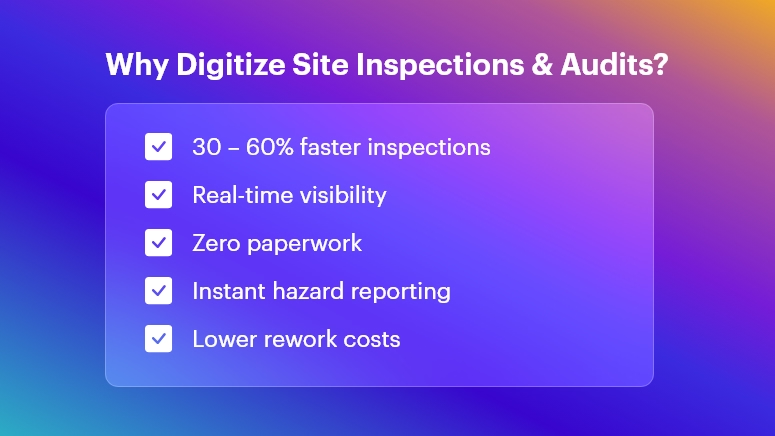
Why Digitize Site Inspections & Audits

Faster Execution with Digital Checklists & Mobile Tools

Digital inspection software allows field engineers to:

  • Capture data using dropdowns, photos, voice notes & auto-filled fields
  • Tag assets and materials instantly
  • Close checklists without revisits

On-site personnel can conduct inspections 30–60% faster because:

  • No physical paperwork
  • No repeated data entry
  • Real-time data sync

Outcome: Faster daily progress tracking and fewer bottlenecks in execution.

Real-Time Site Visibility for Office Teams

With cloud-based inspection dashboards:

  • Supervisors see issues as they happen
  • Progress can be evaluated immediately
  • Remote managers can intervene without physically visiting the site

This prevents delays from late reporting, improving decision-making and productivity.

Outcome: Stronger governance over multi-site operations and subcontractor performance.

Improved Data Accuracy & Standardization

Digital tools enforce structured data capture:

  • Mandatory checkpoints ensure complete inspections
  • GPS/time stamps validate authenticity
  • Errors from handwriting or manual transcription are removed

You get clean, consistent, audit-ready data that supports long-term quality control and project documentation.

Outcome: Higher confidence in information used for compliance and billing.

Stronger Safety Compliance & Hazard Mitigation

Construction safety inspections become more powerful with:

  • Photo-supported reports for hazard evidence
  • Risk scoring for priority classification
  • Instant alerts when a critical issue arises
  • Automated assignment of corrective actions

This boosts proactive safety, reducing accident potential and insurance risks.

Outcome: Safer job sites and better regulatory compliance (OSHA, local codes, etc.).

Centralized Record-Keeping & Accountability

All inspections are stored in a single digital repository:

  • Historical trends for recurring issues
  • Maintenance and repair documentation
  • Instant access during certifications, audits, legal checks

Even if staff changes, the data remains traceable and verifiable.

Outcome: Zero lost documents and complete project lifecycle transparency.

Automated Reporting & Data Analytics

Digital platforms automatically generate:

  • Safety audit summaries
  • Quality defect reports
  • NCR logs with photographic proof
  • Performance dashboards

Analytics help reveal:

Outcome: Better continuous improvement decisions with minimal manual effort.

Stronger Compliance with Standards & Client Requirements

Construction projects must comply with:

  • Safety protocols
  • Building codes
  • Environmental standards
  • Client specifications
  • QA/QC procedures

Digital audits enforce zero skipped checkpoints and automatically maintain compliance documentation.

Outcome: Lower risk of penalties, rework costs, and project delays.

Offline Working for Remote & High-Risk Sites

Tunnel works, rural projects, and high-rise floors often lack stable connectivity.

Digital apps allow:

  • Offline inspections
  • Auto-sync when connected
  • Seamless work continuation

Outcome: Inspections are never delayed due to network limitations.

Integration Across Project Management & Operations

Data can connect with:

  • Project schedules
  • Procurement and inventory systems
  • Asset and equipment management
  • Safety & risk management tools

Example: A failed quality check can immediately trigger a rework task or hold supplier billing.

Outcome: Smooth coordination between field execution and office control systems.

Reduced Costs, Waste & Rework

Digitalization reduces:

  • Paper/printing storage costs
  • Site revisits for missing data
  • Rework from miscommunication
  • Penalties from compliance failures

Plus, recording defects early prevents escalating repair costs.

Outcome: Maximum resource utilization and higher project profitability.

Bonus Benefit: Eco-Friendly Construction Operations

By reducing paper consumption and printing waste:

  • Projects become more sustainable
  • Support for ESG and environmental goals

This is increasingly important for green certifications and stakeholder expectations.

Conclusion

Digitizing site inspections and audits enables construction companies to:

  • Improve safety
  • Ensure quality
  • Reduce compliance risks
  • Deliver projects faster
  • Maintain full operational visibility

It’s not just a technology upgrade — it’s a competitive advantage in an increasingly complex construction environment.

The future of construction inspections is digital, automated, and intelligently connected. Organizations that adopt this transformation now will lead the industry tomorrow.

FAQs

  • What are digital site inspections in construction?

Digital site inspections involve using mobile apps, cloud platforms, and digital forms to capture, store, and analyze inspection data instead of relying on paper-based checklists and manual reporting.

  • How do digital audits improve construction safety compliance?

They provide real-time hazard reporting, automated corrective actions, detailed traceability, and validation features like GPS, photos, and timestamps, helping ensure every safety protocol is followed.

  • What technologies are used for digital site inspections?

Common technologies include mobile inspection apps, cloud data management, QR/NFC tagging, IoT sensors, automated workflows, and integrated dashboards for analytics.

  • Can digital inspection tools work offline on remote job sites?

Yes. Most digital inspection apps allow offline data capture and automatically sync information to the cloud once connectivity is restored.

  • How do digital inspections reduce project delays?

They enable faster reporting, instant approvals, and real-time communication between field and office teams, preventing delays caused by paperwork, errors, or lost documentation.

  • Are digital inspection records accepted for compliance and audits?

Absolutely. Digital records provide better authenticity, traceability, and secure archiving, making them more reliable for regulatory audits and certifications.

  • Can digital inspections track subcontractor performance?

Yes. Analytics can highlight recurring defects, delays, and compliance issues by subcontractors, enabling better quality control and accountability.

  • How do digital audits help reduce rework costs?

Early defect detection, automated alerts, and complete documentation help prevent escalation, reducing costly rework and saving time and materials.

  • What industries besides construction benefit from digitized inspections?

Manufacturing, oil & gas, infrastructure, utilities, mining, facility management, and healthcare also benefit from improved safety, compliance, and operational efficiency.

  • Is it expensive to implement digital inspection tools?

Costs vary by scale, but organizations typically see high ROI through reduced paperwork, faster execution, fewer safety incidents, and better quality control — leading to major long-term savings.

Top 10 Construction Workforce Management Software in 2026

Margins in construction are thin, projects are complex, and labor is your largest controllable cost. Yet many contractors still manage crews with paper timesheets, scattered WhatsApp messages, and Excel files. The result? Time theft, ghost workers, payroll disputes, low productivity, and zero visibility into what actually happens on site each day.

At the same time, experts note that digital tools can dramatically improve labor management in construction, especially in markets like India that employ tens of millions of workers in this sector. Therefore, the conversation has shifted from “Should we digitize?” to “Which platform should we choose?”

This guide will walk you through the top 10 construction workforce management software in 2026, what each does best, and how to decide which one fits your business. If you’re a contractor, project manager, EPC firm, or construction business owner, this overview will help you align field productivity, labor compliance, and real-time reporting with your overall project goals.
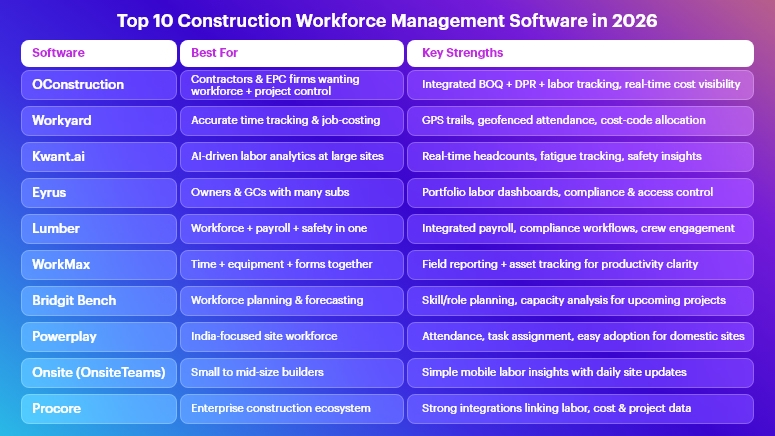
Top 10 Construction Workforce Management Software in 2026

What Is Construction Workforce Management Software?

Construction workforce management software is a specialized digital platform that helps you:

  • Plan, schedule, and allocate crews across multiple projects and sites.
  • Track time, attendance, and location for on-site and field teams — often with GPS, geofencing, or biometric features.
  • Monitor productivity, safety, and compliance, including certifications and fatigue management.
  • Integrate labor data with payroll, cost control, and project performance, so that every labor hour gets correctly billed and costs.

Unlike generic HR or attendance systems, construction workforce management software understands shifting crews, multiple subcontractors, changing job sites, and complex project schedules. This niche focus is what makes these tools so powerful for contractors.

Why Workforce Management Matters Even More in 2026

The direction of the industry is very clear:

  • Labor productivity is under a microscope. Recent research on labor productivity frameworks in construction shows that better measurement and management of workforce performance directly improve project outcomes and margins.
  • Digital tools are now a competitive necessity. Industry experts highlight how digital platforms can enhance labor tracking, documentation, and coordination in large construction markets, reducing chaos and improving organization.
  • AI and connected job sites are emerging. From AI-driven safety analytics to predictive scheduling, tech is quickly evolving to reduce risk and increase predictability on complex sites.

In 2026, contractors that do not adopt construction workforce management software risk:

  • Poor visibility into actual labor costs and productivity.
  • Frequent disputes around overtime, attendance, and subcontractor billing.
  • Compliance and safety gaps due to manual record-keeping.
  • Difficulty scaling from a few projects to a multi-site, multi-city portfolio.

On the other hand, those who embrace construction workforce management software can standardize processes, capture accurate field data, and make decisions based on real-time jobsite intelligence, not guesswork.

How We Evaluated the Top 10 Tools

Before jumping into the list, here’s how this blog evaluates each construction workforce management software platform:

  • Construction-focused: Built primarily for construction and field crews, not just generic HR.
  • Field usability: Mobile apps, offline-friendly workflows, and easy adoption for workers and foremen.
  • Time & attendance accuracy: GPS, geofencing, biometrics, or robust validation to reduce time theft and buddy-punching.
  • Integration & reporting: Ability to connect with payroll, ERP, project management, or cost control systems and generate actionable dashboards.
  • Scalability & compliance: Support for multi-project environments, regional labor rules, and audit-ready records.

With that in place, let’s look at the top 10 construction workforce management software in 2026.

Top 10 Construction Workforce Management Software in 2026

OConstruction

Best for: Contractors and EPC firms who want workforce, BOQ, DPR, and project management in a single platform.

  • Although OConstruction is best known as an end-to-end construction project management software (planning, tracking, BOQ management, DPR automation, cost control, and site execution), it naturally becomes a powerful construction workforce management software when you connect tasks, schedules, and DPRs to actual crews.
  • Integrated project + workforce view: Because planning, scheduling, and site execution live in one system, you can see which team is doing what, where, and against which BOQ item or cost code, instead of jumping between disjointed tools.
    DPR-driven labor visibility: Daily progress reporting captures manpower deployed, activities completed, and site issues, giving you clear traceability from labor hours to delivered quantities and cost impact.
  • Stronger cost control: Linking workforce deployment with budgets and BOQs helps you spot overstaffing, overtime surges, or underutilized teams early, before they hurt margins.

Workyard

Best for: Contractors that need highly accurate GPS time tracking and labor cost allocation.

Workyard offers workforce management software focused on field labor accuracy, with construction-specific scheduling, cost tracking, and GPS-backed time logs.

  • Precise GPS trails & geofenced clock-ins ensure that workers clock in at the correct site, reducing time theft and increasing billing accuracy.
  • Job-costing and cost-code mapping help finance and QS teams understand exactly how labor hours are split across activities, projects, and tasks.
  • Mobile-first experience makes adoption easier for crews and foremen who live on their phones, not in spreadsheets.

Pricing

Starter – $6/mo per user
Pro – $13/mo per user
Enterprise – On request

Kwant.ai

Best for: Large contractors focused on real-time labor insights, safety, and fatigue management.

Kwant.ai positions itself as an end-to-end construction workforce management platform with IoT and AI capabilities.

  • Real-time labor tracking with smart badges or sensors gives live headcounts and attendance by zone, improving emergency readiness and planning.
  • AI-driven scheduling and fatigue monitoring help reduce incidents by identifying teams that may be overworked or deployed incorrectly.
  • Insurance-grade reporting and safety analytics support better risk management and compliance with owners and insurers.

Eyrus

Best for: Owners and general contractors needing portfolio-level labor visibility.

Eyrus is highlighted in industry guides as a leading construction workforce management software for capturing labor productivity, project timelines, and compliance at scale.

  • Access control + workforce data combine to show who is on site, for how long, and under which subcontractor, giving a clear audit trail.
  • Real-time dashboards let project owners see labor trends, productivity shifts, and potential issues before they escalate.
  • Compliance and safety tracking improve oversight of training, certifications, and onboarding for large, complex projects.

Lumber

Best for: Contractors wanting an all-in-one workforce, payroll, and safety solution.

Lumber is an all-in-one construction workforce management platform that connects time tracking, payroll, safety, compliance, and field productivity.

  • Integrated payroll and time tracking reduce errors and manual re-entry, which is critical when handling multiple crews, union rules, or complex pay structures.
  • Safety and compliance workflows enable crews to log toolbox talks, incidents, and checks as part of their day, instead of as an afterthought.
  • Rewards and recognition features help companies keep high-performing workers engaged and reduce turnover on key projects.

WorkMax

Best for: Firms that want time tracking plus equipment and field reporting.

WorkMax is built to bring all field workforce data into one place, combining time tracking, custom forms, asset management, and project visibility.

  • Time Tracking tied to projects and tasks gives accurate labor reporting for billing and performance analysis.
  • Custom forms allow teams to capture safety checklists, daily logs, and inspections digitally, replacing paper or ad-hoc app usage.
  • Asset and equipment visibility alongside labor data helps determine true productivity, especially where heavy equipment is key.

Bridgit Bench

Best for: Medium to large contractors focused on long-term workforce planning and forecasting.

Bridgit Bench is explicitly designed for construction companies to plan, allocate, and forecast workforce needs across projects.

  • Role-based planning lets you see which project managers, engineers, or supervisors are over- or under-allocated, months in advance.
  • What-if scenario planning supports business development by checking whether you actually have capacity for that next big project before you bid.
  • Integration with existing project systems helps ensure your workforce plan aligns with live project schedules and updates.

Powerplay

Best for: Contractors in India and similar markets who need end-to-end site and workforce management.

Powerplay offers a construction app that covers workforce, time tracking, scheduling, site inspections, and more.

  • Construction time tracking and workforce modules help contractors see how many workers are present at each site and what they are assigned to.
  • Communication and coordination tools reduce miscommunication between site engineers, supervisors, and the back office, especially when multiple small projects run in parallel.
  • Local understanding of Indian construction workflows and constraints can make adoption smoother for domestic firms.

OnsiteTeams

Best for: Small to mid-size builders wanting a simple, mobile-first workforce app.

Onsite (sometimes known as OnsiteTeams) is a construction application that focuses on labor activities, productivity, and salaries, via an easy, field-friendly interface.

  • Real-time labor insights help owners see which sites are properly staffed and which are falling behind, even if they are not physically present.
  • Daily reports and site updates improve transparency between management and the site, allowing faster decisions and less rework.
  • Material tracking alongside the workforce provides a more complete picture of site progress than attendance alone.

Procore

Best for: Enterprises seeking a full construction OS with workforce as part of a broader ecosystem.

Procore is widely recognized as an all-in-one construction management platform that covers project management, financials, and field productivity. While not purely a workforce tool, its ecosystem often includes:

  • Labor and time tracking integrations that capture hours worked, link them with cost codes, and push approved data to payroll.
  • Field productivity workflows that combine labor, quantities, and costs, enabling more accurate reporting to owners and internal stakeholders.
  • Strong integration capabilities with niche workforce and HR systems, making it a good hub for large enterprises that use multiple tools.

Honorable mentions: You’ll also see tools like MobiClocks and various time-tracking apps targeting construction-specific attendance and location management; these can be great add-ons or stepping stones for digital transformation.

How to Choose the Right Construction Workforce Management Software

Even with a solid list of the top 10 construction workforce management software in 2026, the “right” platform depends heavily on your context. Consider these factors:

Project scale & geography:

If you run a few local residential sites, you may want a lightweight mobile app that solves attendance and basic reporting. However, if you’re managing dozens of sites across regions, you’ll need enterprise-grade visibility, compliance, and integrations.

Depth of project integration:

Some tools, like OConstruction and Procore, link workforce data directly to schedules, BOQs, budgets, and DPRs, giving you an end-to-end view from crew deployment to cost and progress. Others focus mainly on time & attendance, which is simpler but less powerful.

Compliance, safety, and audit readiness:

If you operate under stringent safety regulations, union rules, or government contracts, prioritize tools with strong audit logs, certification tracking, and safety workflows. Platforms like Kwant.ai, Eyrus, or Lumber can be especially helpful here.

Ease of adoption on site:

A sophisticated system that crews hate will fail. Look for intuitive mobile interfaces, low-friction clock-ins, and clear benefits for supervisors and workers, not just for head office.

Integration with your tech stack:

Check how each construction workforce management software connects with your payroll, ERP, and project management systems. Proper integration prevents double entry, reduces errors, and increases trust in the data.

Key Takeaways

  • Workforce is your highest variable cost, and in 2026, you can no longer afford to manage it through manual logs and fragmented apps.
  • The best construction workforce management software combines accurate time tracking, smart scheduling, safety, and cost visibility into one coherent workflow.
  • Tools like Workyard, Kwant.ai, Eyrus, Lumber, WorkMax, Bridgit Bench, Powerplay, Onsite, and Procore all address different parts of the problem — from GPS attendance to AI scheduling and portfolio-level planning.
  • OConstruction stands out when you want workforce management tightly integrated with BOQ, DPR, planning, and site execution, so that every labor hour is tied back to real deliverables and cost codes.

Ultimately, the winners in 2026 will be the companies that connect workforce data with project performance — and act on those insights quickly.

FAQs

1. Why do I need construction workforce management software if I already use Excel and WhatsApp?

Because spreadsheets and chats don’t give you real-time, auditable, and structured data. Construction workforce management software standardizes attendance, scheduling, approvals, and reporting, which reduces disputes, leakage, and rework.

2. How does construction workforce management software improve productivity?

It improves productivity by making labor deployment visible, measurable, and optimizable. When you see who is working where, on which activities, and at what cost, you can reassign crews, fix bottlenecks, and cut unproductive time much faster.

3. Can I integrate construction workforce management software with my existing payroll system?

Yes, most leading tools offer APIs, exports, or direct integrations with payroll and HR systems so that approved hours flow seamlessly into payroll, reducing manual entry and errors.

4. Will workers resist using apps and digital systems on site?

Some may at first; however, if the chosen construction workforce management software is mobile-friendly and reduces friction (for example, easier clock-ins, fewer paper forms, and faster payments), adoption usually improves rapidly.

5. How does OConstruction fit into a workforce management strategy?

OConstruction links planning, BOQ, DPR, and execution, so workforce data is captured as part of daily project workflows — not in a separate silo. This makes it easier to see how labor usage affects progress, cost, and profitability across sites.

6. Is construction workforce management software only for large enterprises?

Not at all. Many tools on this list have SMB-friendly pricing and modular features, so smaller contractors can start with time tracking and DPR, then gradually expand to analytics, integrations, and advanced planning.

7. How do I get started with construction workforce management software in 2026?

Begin with a pilot on 1–2 representative projects, define clear KPIs (reduction in time theft, fewer payroll disputes, better labor productivity), and then roll out the solution across your portfolio once you see measurable improvements.

Category: Construction Academy

Subcategory: Budgeting and Planning

Subcategory: Construction Phase

Subcategory: Design Coordination

Subcategory: Estimation Techniques

Subcategory: Initiation and Feasibility

Subcategory: Introduction

Subcategory: Personal Management

Subcategory: Project Close-Out

Subcategory: Project Scheduling

Subcategory: Project Teams

Subcategory: Proposal Management

Subcategory: Total Quality Management

Subcategory: Tracking and Control

Subcategory: Work Breakdown

Category: Help Desk

Subcategory: Client

Subcategory: Construction 101

Subcategory: Contractor Management

Subcategory: Expense

Subcategory: Finance Budget

Subcategory: Inventory Management

Subcategory: My Approvals

Subcategory: Site Management

Subcategory: Vendor Management