How AI Is Transforming Construction Project Planning with OConstruction?

Over 70% of construction projects face delays and budget overruns every year. Most issues arise from manual documentation, scattered communication, and slow decision-making. This is why How AI Is Transforming Construction Project Planning has become a critical priority for EPC companies, contractors, and infrastructure developers.

In this guide, you’ll learn how OConstruction’s AI-powered workflows help you automate DPRs, generate accurate BOQs, monitor budgets, optimize schedules, and streamline coordination across sites.
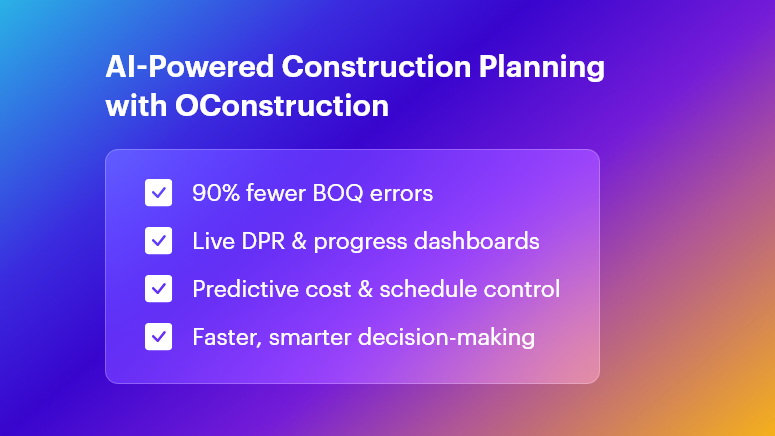
AI-Powered Construction Planning with OConstruction

Why AI Matters in Construction Project Planning

Modern construction projects generate massive data across multiple teams and sites. Traditional tools like Excel, WhatsApp logs, and paper registers create fragmentation and delay.

  • Cost Overruns

A Dodge Data & Analytics report reveals that 52% of firms struggle with cost control, leading to unpredictable budget drift.

  • Material Wastage & Rework

Inaccurate BOQs often cause 10%–15% material waste, increasing project delays.

  • Delayed DPRs

Manual DPRs slow down reporting and decision-making, resulting in bottlenecks across teams.

  • Communication Gaps

Field and office teams frequently work in silos, causing errors in planning and execution.

  • The Solution: AI-Driven Construction Planning

OConstruction brings BOQ management, DPR automation, cost control, and scheduling together — ensuring fast, transparent, and reliable project execution.

How AI Is Transforming Construction Project Planning

  • Automated BOQ & Estimate Management

AI parses drawings and historical data to auto-generate BOQs.

  • Up to 90% fewer manual errors
  • Faster tendering
  • Accurate estimates and reduced wastage

This is one of the strongest examples of How AI Is Transforming Construction Project Planning in real-world workflows.

  • DPR Automation & Real-Time Reporting

With AI-driven DPR automation, teams capture:

  • Site photos
  • Progress data
  • Manpower usage
  • Material consumption

All information syncs instantly, enabling project managers to view live dashboards and make quick decisions.

  • Predictive Scheduling & Resource Allocation

Machine learning analyzes weather, labor availability, and equipment usage to forecast potential delays.

OConstruction helps you:

  • Maintain critical paths
  • Reschedule dynamically
  • Prevent downtime
  • Material & Inventory Optimization

AI tracks material consumption patterns and predicts reorder points. The integrated Inventory & Purchase Handling module ensures:

  • No stockouts
  • No over-purchasing
  • Full traceability across sites
  • AI-Powered Cost Control & Budget Monitoring

AI continuously checks cost variances and sends instant alerts when deviation begins. This allows managers to intervene early and avoid overruns — an essential part of How AI Is Transforming Construction Project Planning.

  • Integrated Task & Workflow Management

AI prioritizes high-impact activities, assigns resources intelligently, and updates progress across all teams in real time. This prevents deadline conflicts and improves productivity.

  • AI for Multi-Site Coordination

EPC companies handling multiple sites gain:

  • Centralized dashboards
  • Performance comparisons
  • Real-time alerts
  • Standardized best practices

This eliminates blind spots in monitoring and makes project oversight significantly easier.

  • AI for Compliance & Error Reduction

OConstruction’s AI cross-checks on-site data with compliance checklists and standards. It reduces rework, improves safety, and strengthens audit tracking.

Case Study: TriStar Infrastructure

TriStar Infrastructure, a highways contractor, implemented OConstruction’s AI-based DPR & Schedule Tracking to solve reporting delays and labor conflicts.

Results in 3 Months

  • 30% reduction in DPR preparation time
  • 25% fewer scheduling conflicts
  • 15% savings in material costs

Previously, progress data took 48 hours to reach managers. With AI automation, updates synced instantly — improving decision-making and daily productivity.

Key Takeaways:

  • Precise BOQs generated by AI reduce errors and accelerate tendering.
  • Real-time DPR automation gives managers instant visibility.
  • Predictive cost control prevents overruns before they escalate.
  • Dynamic scheduling keeps projects aligned with the critical path.
  • AI-powered collaboration ensures field and office teams stay connected at all times.

OConstruction equips your team with a complete AI-powered platform for planning, monitoring, and delivering projects faster and more cost-effectively.

FAQs

1. What is “How AI Is Transforming Construction Project Planning” with OConstruction?

It refers to using AI to automate BOQs, DPRs, scheduling, cost tracking, and multi-site management within OConstruction.

2. How does AI improve BOQ management?

AI analyzes drawings and data to generate accurate BOQs — reducing manual errors by 90%.

3. Can OConstruction give real-time site updates?

Yes. OConstruction’s DPR Automation syncs site updates instantly and displays them in live dashboards.

4. How does AI support cost control?

AI monitors cost variances in real time and raises alerts when budgets drift.

5. Is OConstruction good for multi-site companies?

Definitely. It centralizes all site data, highlights performance gaps, and improves standardization.

6. What happens when teams don’t use AI?

They face delayed reporting, data silos, inaccurate BOQs, material wastage, and reactive decision-making.

7. How long does implementation take?

Most projects go live within 2–4 weeks with training and migration support.
Top Construction Project Management Trends Shaping 2025 for OConstruction

Construction projects still face an average 20% cost overrun and project delays exceeding 30%. These figures translate into millions lost, strained client relations, and exhausted teams. For modern builders, contractors, EPC companies, and site engineers, these challenges matter because every wasted hour and extra Rupee hits the bottom line. In this blog on Top Construction Project Management Trends Shaping 2025, you’ll learn how data-driven workflows, automation, and integrated platforms overcome these pain points.

We’ll explore game-changing trends, practical frameworks, and real-world tips—while showing how OConstruction emerges as your most modern, reliable construction tech partner.

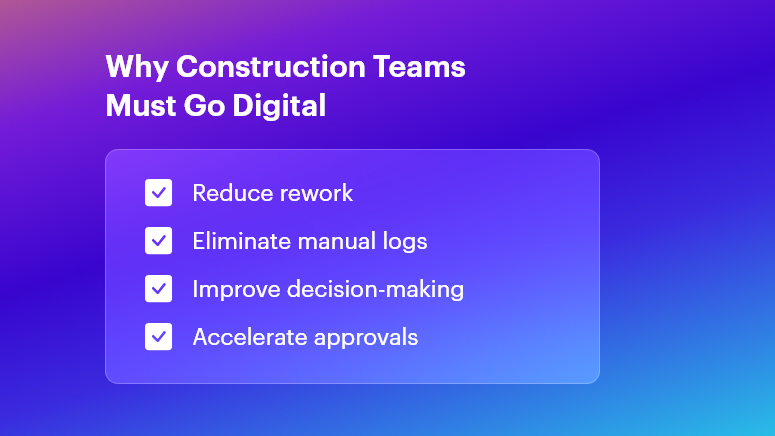
Why Construction Teams Must Go Digital

Why This Matters in Construction (Business Need & Impact)

In real estate, infrastructure, roads, and commercial or residential builds, the stakes are high. Cost overruns often arise from inaccurate BOQs and material wastage. Rework due to miscommunication can burn up to 15% of budgets.

Meanwhile, delayed Daily Progress Reports (DPRs) or fragmented site logs disrupt decision-making. Traditional Excel sheets, scattered WhatsApp messages, and manual logs simply can’t keep pace.

  • Material Wastage & Rework: Without digital BOM tracking, teams frequently over-order cement or steel, leading to stock pile-ups and spoilage.
  • Delayed DPRs & Inaccurate BOQs: Handwritten logs and late submissions cause back-office teams to scramble, delaying invoices and payments.
  • Disconnected Tools & Miscommunication: Multiple software solutions or paper ledgers create silos—resulting in blind spots on labor deployment, equipment usage, and cost variances.

Therefore, modern digital workflows become essential to boost speed, accuracy, and accountability. When OConstruction’s real-time field-to-office sync is in place, project managers and QS teams gain live updates on resource usage, DPR status, and budget health. This unified approach transforms scattered data into actionable insights—eliminating delays and overruns.

Best Practices, Frameworks & Actionable Tips

To excel in 2025, adopt these implementation-ready strategies. Each point shows how OConstruction solves the core challenge:

Integrated Project Planning & Schedule Tracking

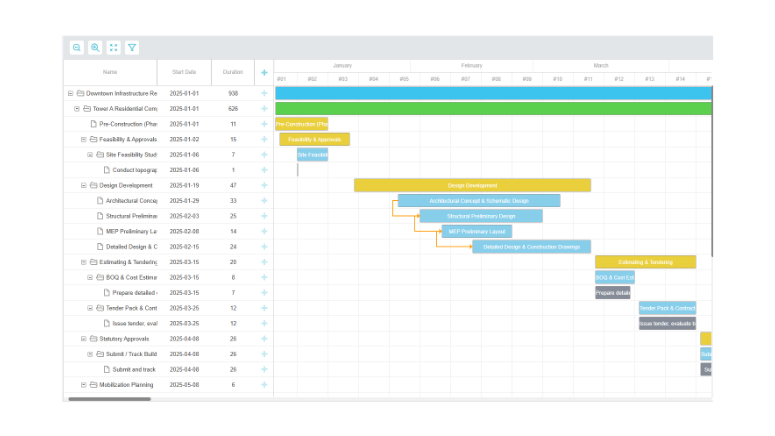
  • Define Milestones Digitally: Use OConstruction’s Gantt-style scheduler to set clear tasks, responsibilities, and deadlines. This visual roadmap minimizes scope creep.
  • Automate Schedule Alerts: Set real-time notifications for critical path tasks. When a concrete pour or material delivery is delayed, stakeholders receive instant alerts — keeping everyone aligned.
  • Conduct Weekly Progress Reviews: Leverage the platform’s dashboards for at-a-glance status checks. Stakeholders join video calls with up-to-date data, not outdated spreadsheets.

BOQ & Estimate Management Best Practices

  • Standardize BOQ Templates: Create central BOQ templates in OConstruction to enforce consistency across projects. This prevents manual entry errors and version conflicts.
  • Link BOQs to Vendor Rates: Integrate vendor catalogs so that material rates auto-populate during estimation. Teams avoid rate mismatches and lost discount opportunities.
  • Track Revisions Transparently: Every BOQ change is logged with timestamps and user IDs. Auditors and managers trace who modified quantities or rates — and why.

DPR Automation & Daily Logs

  • Digital Field Entry: Field engineers fill digital DPR forms on mobile—capturing quantities, photos, and observations. This replaces delayed paper logs.
  • Auto-Generated Reports: Once submitted, DPRs convert into formatted PDF reports, ready for client reviews. No more manual compilation at day’s end.
  • Integrated Photo Documentation: Embed geotagged images directly within DPRs to verify completed work and reduce disputes.

Material & Inventory Management

  • Real-Time Stock Levels: Monitor site inventory — cement, bricks, steel — via barcode scanning. Automatic stock alerts prevent sudden shortages and downtime.
  • Purchase Order Workflows: Route purchase requisitions through approval hierarchies in OConstruction. Procurement teams approve, reject, or revise orders in minutes.
  • Vendor Performance Tracking: Score suppliers on delivery punctuality, quality, and pricing. Use this data to negotiate better terms and bulk discounts.

Cost Control & Budget Monitoring

  • Live Cost Vs. Budget Dashboards: Track actual spend against planned budgets. Visual flags highlight cost overruns at the activity level.
  • Variance Analysis Reports: Generate variance reports that compare estimated vs. actual costs. Then drill down on root causes—labor inefficiencies or rate escalations.
  • Automated Financial Alerts: Notify project accountants when monthly spending crosses pre-set thresholds. Early warnings enable proactive corrective actions.

Multi-Site Coordination & Communication

  • Centralized Task Management: Consolidate tasks for multiple sites under one dashboard. Allocate resources from a shared pool to optimize utilization.
  • Role-Based Access Control: Limit sensitive cost data to managers while granting field crews only the info they need. This secures data and simplifies user training.
  • Unified Messaging Hub: Replace fragmented chat apps with OConstruction’s built-in communication channels, linked to specific tasks or site locations.

Avoiding Common Mistakes

  • Manual Data Entry Reliance: Eliminate this by using mobile forms and barcode scans.
  • Ignoring Document Versioning: Always use a centralized repository with audit trails.
  • Underestimating Training Needs: Allocate time for user onboarding and peer learning sessions when rolling out new tools.

All these best practices are powered by OConstruction’s features for BOQ & Estimate Management, DPR Automation, Schedule Tracking, Inventory Handling, and Cost Control.

By unifying your workflows, you’ll reduce human errors, accelerate approvals, and gain real-time visibility across every site.

Construction Success Story: Mini Case Study

For example, a highway infrastructure firm, adopted OConstruction’s DPR Automation & BOQ Management to overcome delayed daily logs and inaccurate material estimates.

Within three months, they achieved 35% faster DPR completion, 15% reduction in material wastage, and 20% lower rework costs. Here’s the transformation:

  • Before: Field engineers submitted handwritten DPRs with missing photos. BOQs were manually emailed, causing rate mismatches and delayed purchase orders.
  • After: Field crews filled DPRs on mobile; reports auto-generated and routed to managers. BOQs auto-populated vendor rates and revisions logged.
  • Result: Project managers accessed live dashboards, resolved issues on the spot, and closed weekly meetings 50% faster.

Key Takeaways & Closing

  • Embrace Digital Workflows: Manual logs and Excel sheets no longer suffice in 2025’s fast-paced projects.
  • Automate Key Processes: DPRs, BOQs, and inventory scans deliver data accuracy and speed.
  • Centralize Communication: A unified platform reduces miscommunication and ensures accountability.
  • Monitor Costs Live: Early alerts on budget variances prevent overruns before they escalate.
  • Scale Across Sites: Role-based access and shared dashboards streamline multi-site coordination.

By adopting the Top Construction Project Management Trends Shaping 2025 and leveraging OConstruction as your tech partner, project teams can immediately boost productivity and profitability. Embrace the future — digitize your workflows, automate reports, and gain real-time insights.

FAQs

1. What are the Top Construction Project Management Trends Shaping 2025?

The key 2025 trends include automation of DPRs, digital BOQ management, real-time cost monitoring, integrated scheduling, and multi-site coordination—all made easier with unified platforms like OConstruction.

2. How does OConstruction address the Top Construction Project Management Trends Shaping 2025?

OConstruction offers BOQ & Estimate Management, DPR Automation, live cost dashboards, and inventory tracking — all syncing in real time to support the digital-first workflows defined by 2025 trends.

3. Why is digital BOQ management crucial for the Top Construction Project Management Trends Shaping 2025?

Digital BOQs reduce human error, standardize templates, auto-populate vendor rates, and speed up approvals — helping prevent cost overruns and improving accuracy across large-scale projects.

4. Can OConstruction improve DPR accuracy in line with the 2025 trends?

Yes. Mobile DPR forms with photo attachments, geotagging, and auto-generated daily logs minimize manual errors and align with 2025’s shift toward instant, data-driven progress reporting.

5. How do real-time cost dashboards support the Top Construction Project Management Trends Shaping 2025?

Real-time dashboards instantly highlight cost deviations, enabling quick corrective actions before budgets exceed limits — an essential practice for navigating 2025’s tighter project margins.

6. Is multi-site coordination part of the Top Construction Project Management Trends Shaping 2025?

Absolutely. OConstruction’s centralized task boards, role-based access, and collaboration tools help teams manage schedules, resources, and communication seamlessly across multiple project sites.

7. Where can I learn more about implementing these trends?

You can explore OConstruction’s BOQ & Estimate Management, DPR Automation, and Features Overview pages, or check out the latest blog for deeper insights into adopting 2025-ready construction practices.

OConstruction Release Notes: Latest in November

Keeping your construction projects efficient, transparent, and error-free is always our top priority at OConstruction.

Our latest OConstruction Release Notes highlight powerful project management updates, bug fixes, and feature enhancements designed to make your construction workflows smoother than ever.

From resolving invoice and vendor issues to introducing advanced BOQ and DPR functionalities, this release delivers measurable improvements in performance, usability, and project tracking.

Let’s explore what’s new in the OConstruction October–November 2025 Release.

Release Update – 10/11: Major Feature Enhancements

Our November 2025 OConstruction release introduces major feature updates and construction software improvements, designed to enhance productivity and streamline on-site project management.

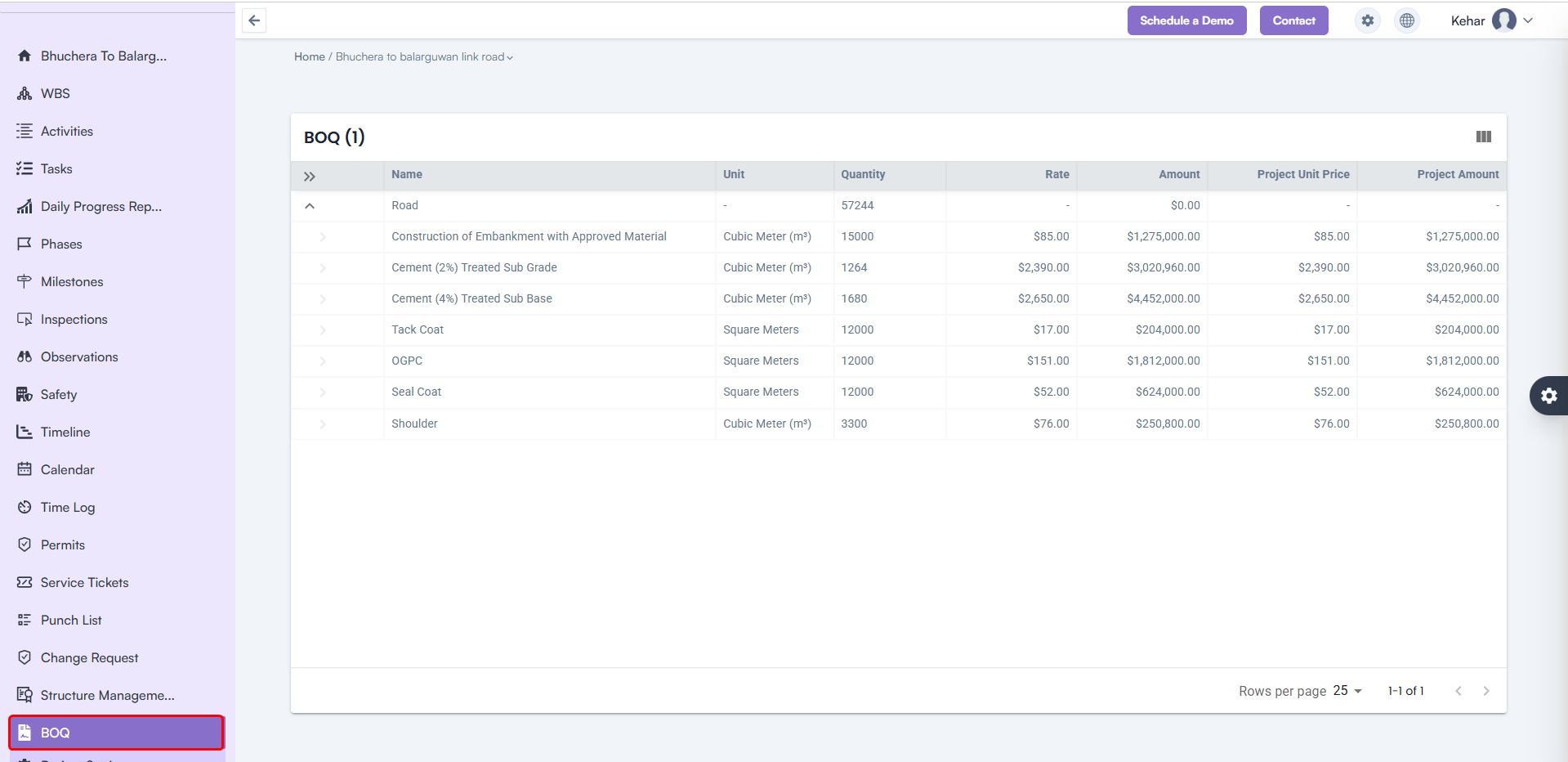
BOQ (Bill of Quantities) View

  • New Feature: Added a comprehensive BOQ View inside the Project Module.
  • Benefit: Gain detailed insights into material quantities, project cost structures, and financial transparency for every project phase.

BOQ (Bill of Quantities) View

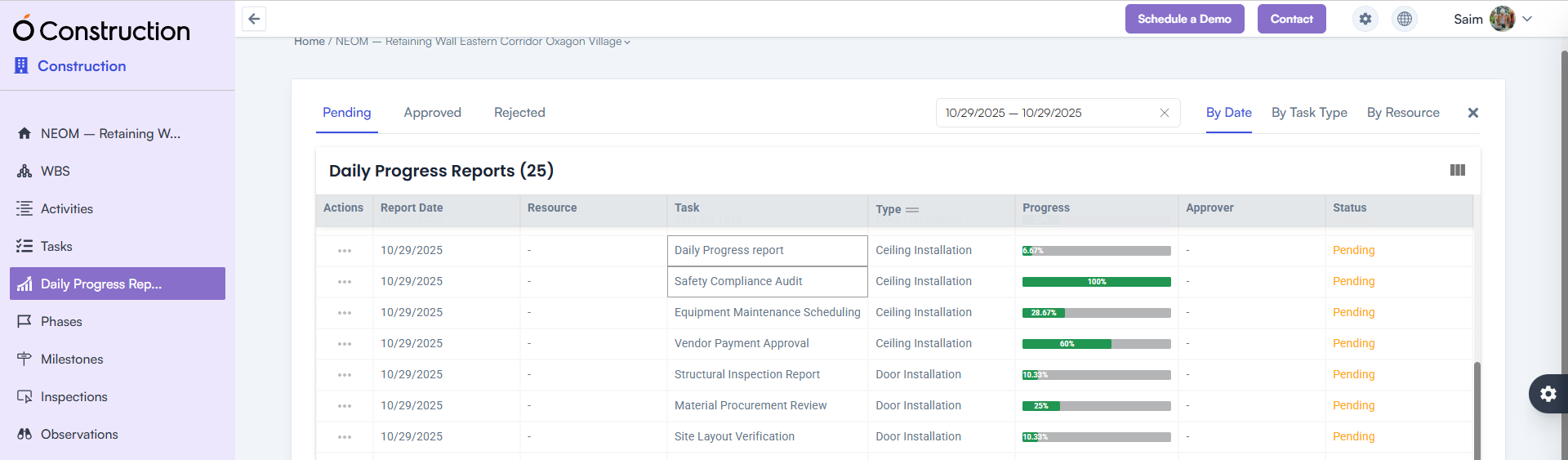
Daily Progress Report (DPR) Module

  • New Feature: Fully functional Daily Progress Report (DPR) module for both web and mobile platforms.
  • Benefit: Track on-site progress, log activities, and monitor daily updates to keep your team aligned.

Daily Progress Report (DPR) Module

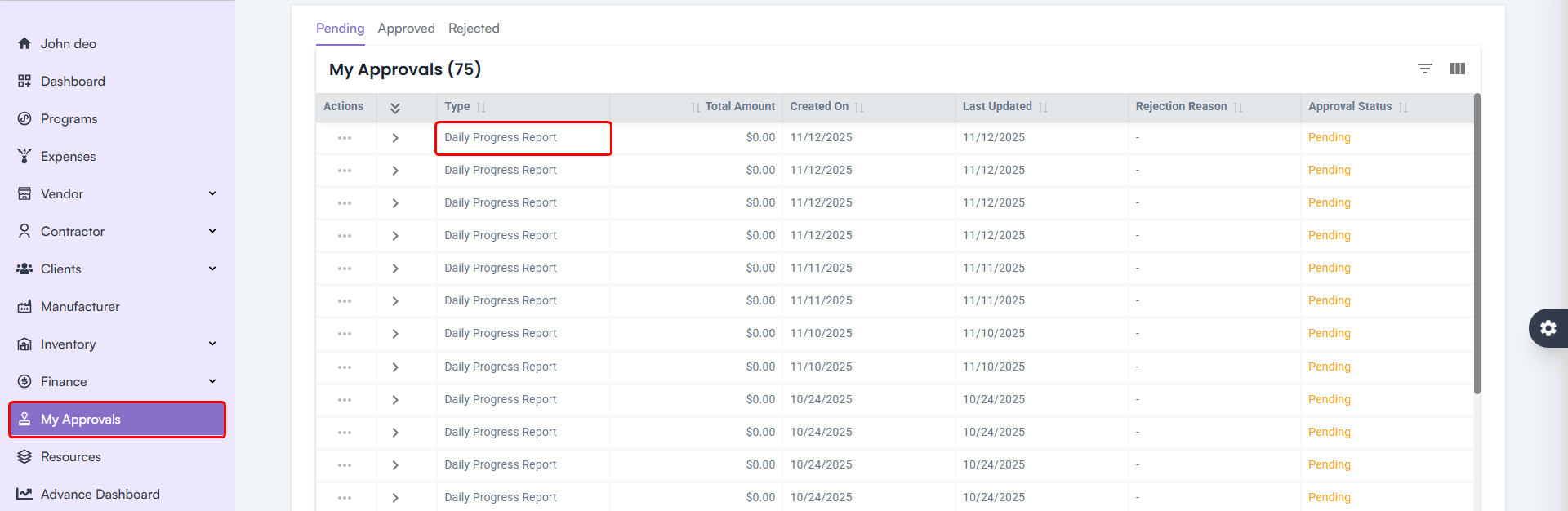
DPR Approval Workflow

  • Enhancement: Introduced a dedicated DPR approval process for validation and accountability.
  • Benefit: Ensures that only approved reports are finalized, improving data reliability and oversight.

DPR Approval Workflow

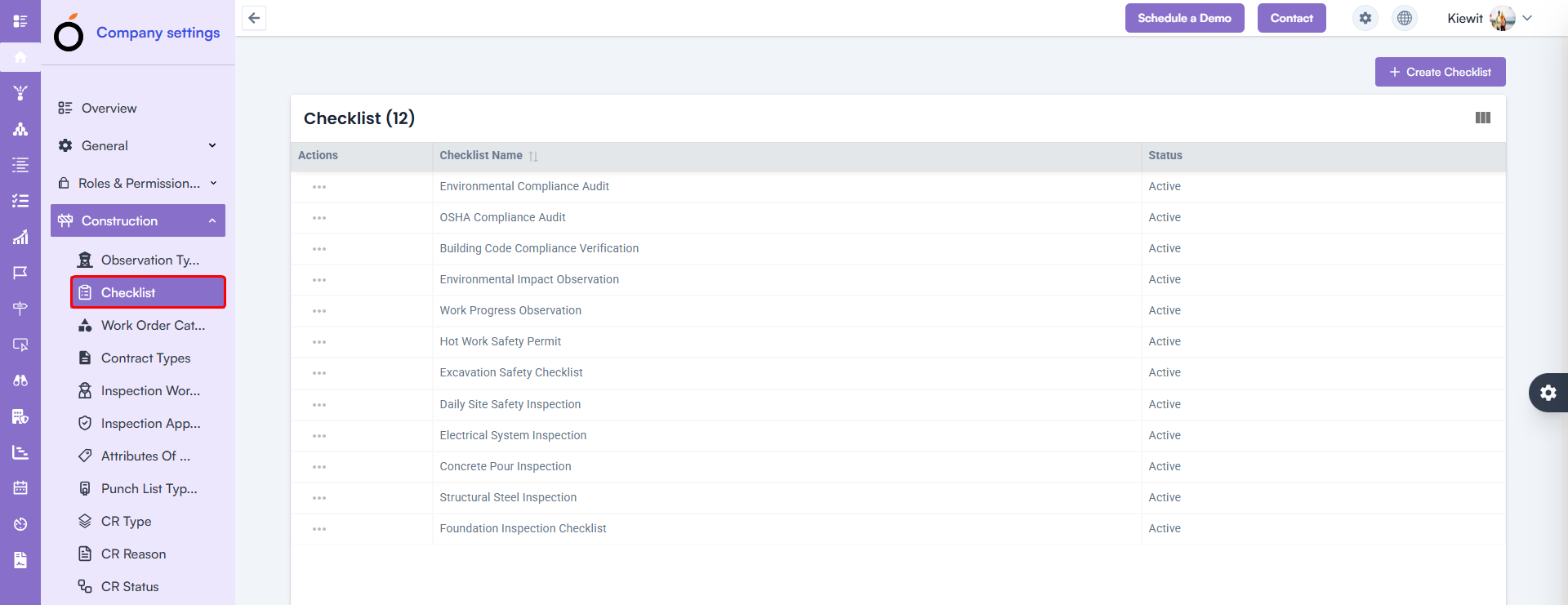
Checklist Module Fix

  • Issue Fixed: Checklist creation errors are now resolved.
  • Benefit: Teams can create and manage safety or inspection checklists smoothly without disruptions.

Checklist Module Fix

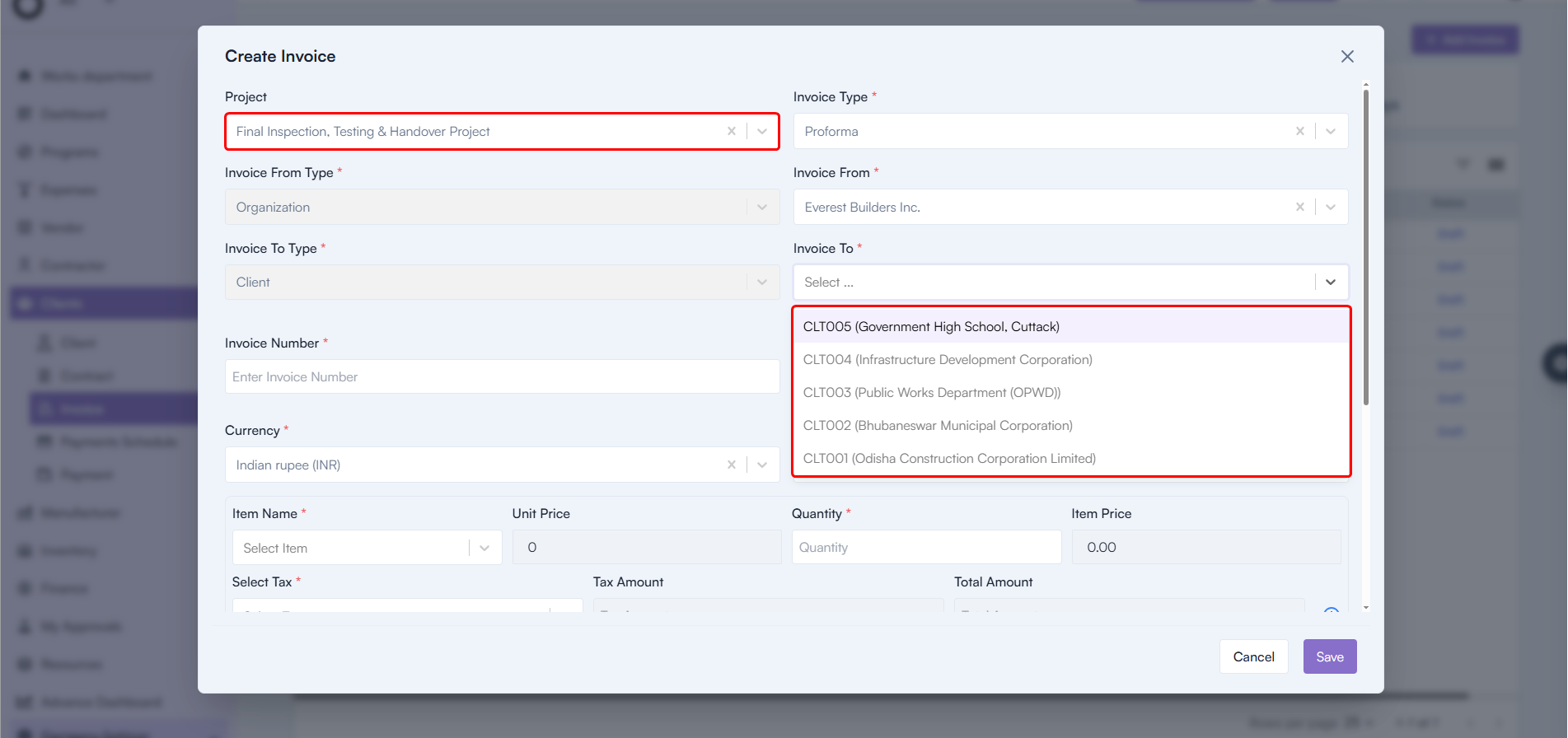
Client Module Enhancements

  • Issue Fixed: Addressed the invoice-related issues within the Client Module.
  • Impact: Billing processes are now more accurate and efficient, reducing errors during client transactions.

Client Module Enhancements

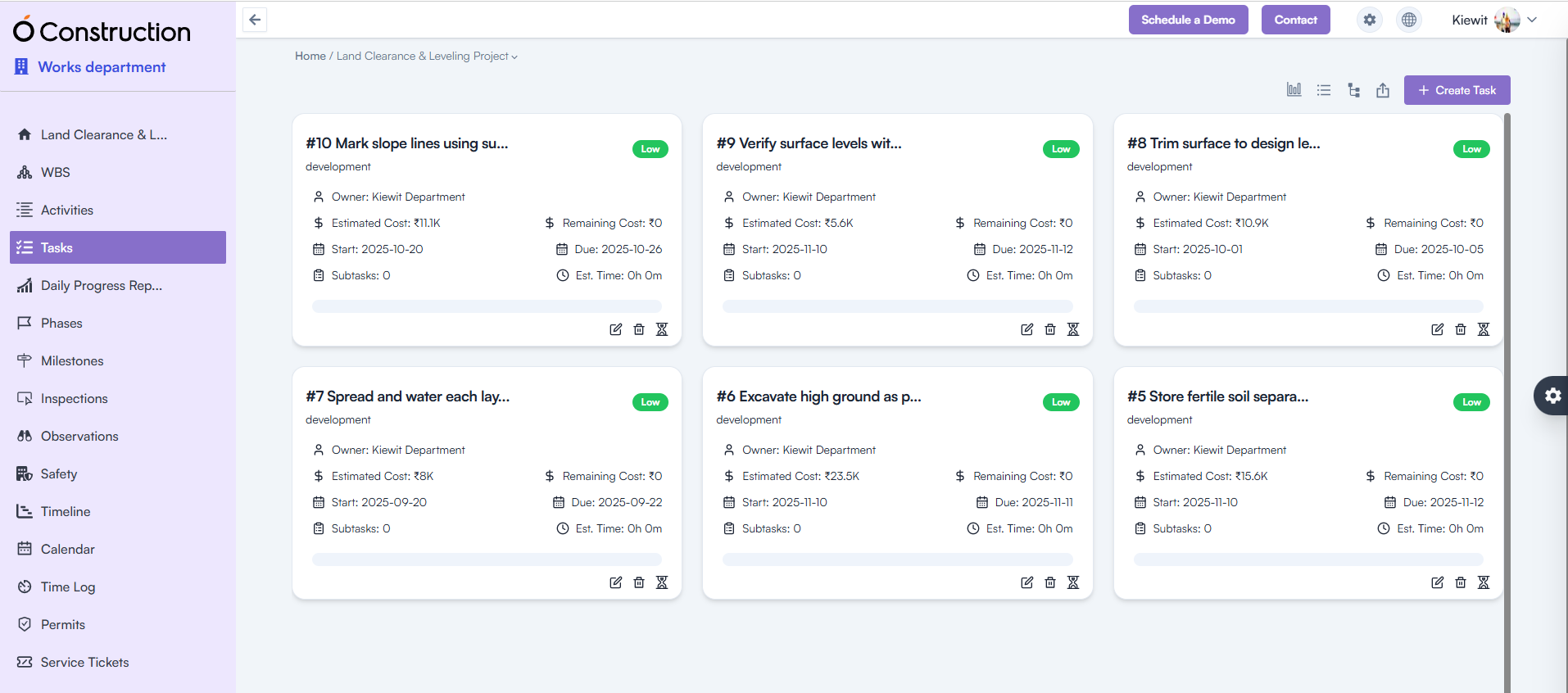
UI and User Experience Improvements

  • Enhancement: Improved layouts and alignments across Tasks, Activities, and WBS Level sections.
  • Benefit: Cleaner design, easier navigation, and more consistent user experience throughout the platform.

UI and User Experience Improvements

Conclusion

Each update in the OConstruction Release Notes reflects our commitment to improving system stability, productivity, and user satisfaction.

From BOQ and DPR module enhancements to vendor and invoice fixes, these improvements ensure your project management is faster, more precise, and fully optimized for on-site and back-office collaboration.

Stay tuned for future OConstruction Release Notes as we continue to innovate and redefine how construction teams plan, execute, and deliver success.

Building Construction Scheduling: Optimize Project Timelines to Reduce Costs and Delays

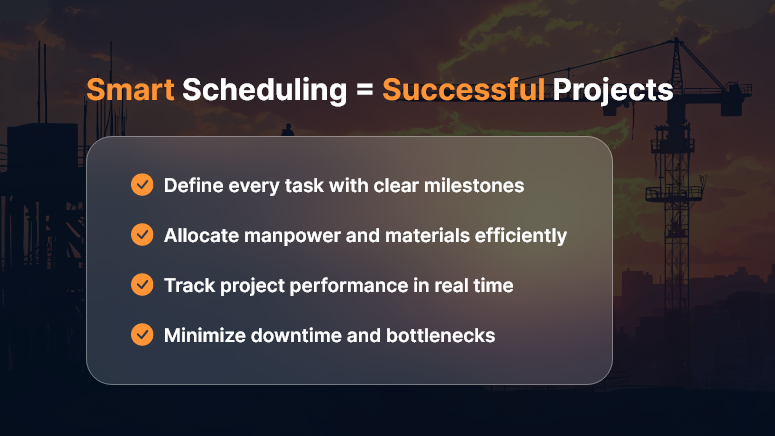
In construction, time is money — quite literally. A small delay in concrete curing or material delivery can cascade into weeks of lost productivity and inflated costs. That’s where building construction scheduling comes in — your blueprint for keeping projects on track, within budget, and aligned with client expectations.

But scheduling isn’t just about dates on a calendar. It’s about creating a dynamic, data-driven plan that adapts to real-world changes while maintaining overall control.

What is Building Construction Scheduling?

Building construction scheduling is the process of defining, sequencing, and managing all project activities to ensure timely completion. It involves identifying critical tasks, dependencies, milestones, and resource allocation to maintain a balanced workflow.

Think of it as the project’s GPS — showing you where you’re headed, predicting potential bottlenecks, and helping you make informed course corrections before delays hit.

Building-Construction-Scheduling

The Real Cost of Poor Scheduling

When construction schedules go wrong, the impact is immediate and costly:

  • Budget overruns from idle labor and equipment rentals
  • Missed deadlines leading to penalties or strained client relations
  • Resource conflicts that slow progress across sites
  • Safety issues from rushed work or overlapping tasks

A solid construction schedule isn’t just good project management — it’s a profit-protection strategy.

Key Elements of Effective Construction Scheduling

To optimize your project timeline, your schedule should include these core elements:

1. Work Breakdown Structure (WBS)

Break your project into manageable chunks — foundation, framing, electrical, plumbing, finishing, etc. Each task should have clear ownership and deliverables.

2. Task Dependencies

Understand what needs to happen first. Pouring the slab comes before framing; inspection before drywall. Mapping dependencies prevents rework and chaos.

3. Resource Allocation

Assign the right people, machinery, and materials to each phase. This ensures optimal productivity without overloading teams.

4. Critical Path Method (CPM)

Identify the longest sequence of dependent tasks that determine the total project duration. Monitoring this critical path helps you predict and prevent delays before they snowball.

5. Real-Time Tracking

Use modern scheduling tools to update progress instantly, manage changes, and communicate across stakeholders. Real-time visibility ensures every decision is data-backed.

Top Techniques for Better Construction Scheduling

1. Leverage Technology

Ditch spreadsheets. Modern construction scheduling software provides interactive Gantt charts, resource tracking, and progress dashboards that make updates seamless and transparent.

2. Prioritize Communication

Scheduling is only effective when everyone follows it. Use collaboration platforms to align contractors, subcontractors, and suppliers on one timeline.

3. Build in Buffers

Unpredictable weather, material delays, or inspection hold-ups happen. Adding buffer time to critical tasks ensures flexibility without panic.

4. Monitor and Adjust

Regularly review progress vs. the baseline schedule. If the foundation stage slips, adjust downstream activities early — don’t wait for the project to derail.

5. Track Performance Metrics

Monitor schedule variance, earned value, and resource utilization to maintain performance visibility throughout the project lifecycle.

Benefits of Optimized Construction Scheduling

When done right, building construction scheduling delivers measurable business results:

  • Reduced project costs through efficient resource use
  • Fewer delays and disputes due to clear timelines and accountability
  • Improved client satisfaction from predictable delivery
  • Better cash flow management with milestone-based billing
  • Increased safety and productivity from structured workflows

A well-structured schedule isn’t just a document — it’s a strategic asset that drives profitability and trust.

Best Tools for Construction Scheduling

To make scheduling easier and smarter, consider tools like:

  • OConstruction Scheduler – purpose-built for project managers to plan, track, and optimize timelines in real time.
  • Primavera P6 – great for large infrastructure projects.
  • Microsoft Project – classic Gantt-based scheduling with resource tracking.
  • Orangescrum – flexible task and time management for agile teams.

Choose a platform that matches your project complexity and collaboration needs.

Common Mistakes to Avoid

Even experienced project managers fall into these traps:

  • Ignoring task dependencies or changing them without impact analysis
  • Failing to update schedules after every phase change
  • Over-committing resources to multiple overlapping tasks
  • Underestimating risk factors like weather or approval delays
  • Neglecting to communicate changes with all stakeholders

Avoid these, and you’ll already be ahead of most competitors.

Conclusion: Schedule Smart, Build Smarter

In today’s competitive environment, construction scheduling is no longer optional — it’s essential. A well-defined, actively managed schedule keeps your projects on time, on budget, and on scope.

Invest in robust scheduling tools, empower your teams with real-time visibility, and turn project planning into a strategic advantage. Because in construction, the best builders aren’t just those who build fast — they’re the ones who build on time, every time.

Key Takeaways

  • Plan early: Start scheduling during the design phase.
  • Stay flexible: Adapt to change while protecting milestones.
  • Use technology: Automate tracking and reporting.
  • Monitor progress: Keep everyone accountable.
  • Review lessons: Improve with every project.

FAQs

1. What is the main purpose of construction scheduling?

To ensure that all activities in a construction project are planned, sequenced, and executed on time to avoid delays and cost overruns.

2. What tools are best for construction scheduling?

Tools like OConstruction are popular for managing schedules, dependencies, and progress.

3. How often should a construction schedule be updated?

Ideally weekly, or after every major milestone, to reflect real-time progress and adjustments.

4. What’s the difference between CPM and Gantt charts?

CPM identifies critical tasks affecting total project time, while Gantt charts visualize timelines and dependencies.

5. Can scheduling help reduce project costs?

Yes. Efficient scheduling minimizes idle time, prevents rework, and ensures optimal resource utilization — directly lowering overall costs.

Supplier & Inventory Optimization: Balance Procurement While Minimizing Delays

In project-driven industries like construction, manufacturing, and engineering, the balance between procurement efficiency and inventory availability defines project success.

Delays in material delivery can halt operations, while overstocking drains cash flow and storage space.

This is where Supplier & Inventory Optimization plays a pivotal role — thereby ensuring you have the right materials, in the right quantity, at the right time, from the most reliable sources.

What Is Supplier & Inventory Optimization?

Supplier & Inventory Optimization is the strategic coordination between procurement teams, vendors, and warehouse operations to minimize delays, reduce costs, and enhance supply chain resilience.

It involves continuously analyzing supplier performance, material consumption patterns, and inventory levels to make data-driven decisions on when and how much to procure.

Simply put — it’s about striking the perfect balance between “not enough stock” and “too much stock.”

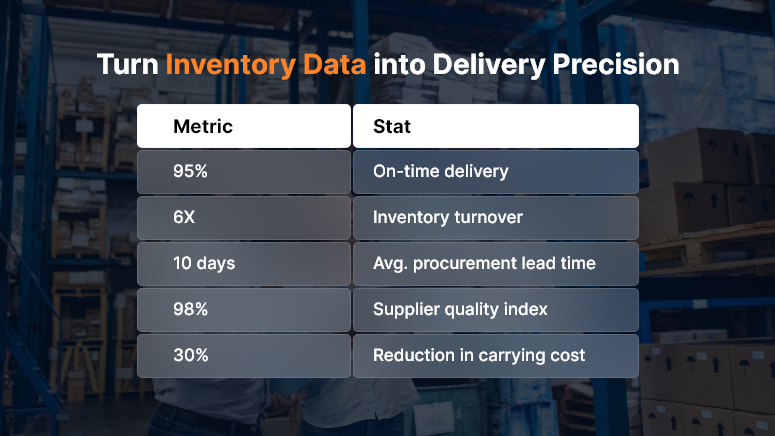
Turn Inventory Data into Delivery Precision

Why Balancing Procurement and Inventory Is Crucial

A well-optimized supplier and inventory ecosystem brings measurable business impact:

  • Fewer Project Delays: To begin with, materials arrive exactly when needed — neither too early nor too late — thereby preventing scheduling bottlenecks and ensuring on-time progress.
  • Lower Carrying Costs: Additionally, avoid locking up capital in idle inventory, which in turn helps reduce unnecessary storage expenses and optimize working capital.
  • Improved Cash Flow: Moreover, real-time tracking prevents over-purchasing, leading to better liquidity and smarter financial planning across projects.
  • Reduced Downtime: As a result, smart reordering mechanisms ensure zero stock-outs, allowing teams to maintain consistent productivity without interruptions.
  • Reliable Supplier Network: Finally, vendors are continually evaluated based on KPIs like delivery rate, quality, and responsiveness — therefore fostering a dependable and performance-driven supplier ecosystem.

When executed properly, these improvements ripple across the project lifecycle — boosting productivity, on-time delivery, and profitability.

Key Components of Supplier & Inventory Optimization

1. Demand Forecasting

Use historical project data and consumption trends to predict upcoming material requirements. Forecasting avoids last-minute purchases and ensures procurement aligns with actual project schedules.

2. Supplier Evaluation & Rating

Evaluate vendors based on parameters such as:

  • Delivery timeliness
  • Material quality
  • Responsiveness to change orders
  • Cost competitiveness
  • Compliance and certifications

Modern systems like OConstruction automate vendor scorecards and help identify high-performance suppliers.

3. Just-In-Time (JIT) Procurement

Adopt JIT principles to procure materials closer to the usage date, reducing warehouse load and carrying costs. For example, in EPC or infrastructure projects, steel or cement deliveries can be scheduled phase-wise instead of bulk orders.

4. Safety Stock & Buffer Strategy

Maintain minimal safety stock for critical materials with long lead times. This ensures work continuity in case of transportation disruptions, supplier delays, or quality rejections.

5. Integrated Procurement Scheduling

Synchronize procurement timelines with project Gantt charts and resource plans. When procurement, inventory, and project scheduling work in tandem, delays reduce drastically.

6. Inventory Visibility & Automation

Use digital inventory systems to track:

  • Current stock levels
  • Reserved quantities for projects
  • Reorder thresholds
  • Supplier lead times

Dashboards offer real-time insights, enabling proactive replenishment decisions.

How Technology Streamlines Supplier & Inventory Optimization

Modern SaaS tools like OConstruction are revolutionizing how project-based businesses manage procurement.

Key benefits include:

  • Automated Reorder Triggers: To start with, get instant alerts whenever materials hit their minimum stock levels, ensuring timely replenishment and uninterrupted project progress.
  • Supplier Portals: Moreover, enable vendors to upload invoices, shipment details, and certifications online — thereby improving transparency and reducing manual follow-ups.
  • Material Tracking: In addition, Barcode or QR code integration ensures accurate stock movement logs, allowing teams to trace every material from procurement to usage.
  • Real-Time Analytics: Furthermore, track supplier performance, lead times, and fulfillment metrics in real time, helping you identify bottlenecks and optimize sourcing strategies.
  • Budget Integration: Finally, ensure every purchase order aligns with financial constraints and project budgets — therefore maintaining cost control and financial discipline throughout the project lifecycle.

These platforms bring transparency, accountability, and agility across the procurement lifecycle.

Strategies to Minimize Procurement Delays

  • Multi-Vendor Sourcing: To begin with, don’t rely on a single supplier — instead, build redundancy for critical items to ensure uninterrupted material availability.
  • Pre-Qualification: Next, approve vendors based on compliance, quality history, and delivery capacity before project initiation, thereby reducing risks from unreliable sources.
  • Digital PO Tracking: Furthermore, implement systems to monitor every purchase order’s lifecycle — from approval to delivery — so that nothing slips through the cracks.
  • Collaborative Forecasting: In addition, share project timelines and demand forecasts with suppliers to help them plan production and logistics more effectively.
  • Contractual SLAs: Finally, include penalties for late delivery as well as bonuses for early or on-time supply, ensuring accountability and driving consistent supplier performance.

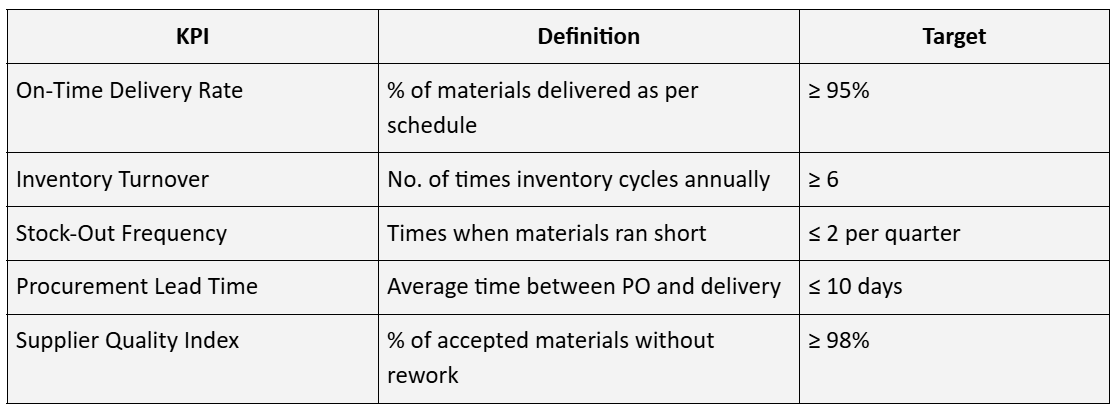
KPIs for Measuring Supplier & Inventory Optimization

KPIs for Measuring Supplier Inventory Optimization

Tracking these KPIs ensures continuous improvement and accountability across your procurement and warehouse ecosystem.

Use Case

Imagine a construction project with multiple subcontractors waiting for rebar and concrete. In such scenarios, even one delayed delivery can halt the entire chain — ultimately increasing idle time and cost.

However, without optimized supplier coordination, these delays become frequent and costly. That’s why using OConstruction’s Vendor & Inventory Module can make all the difference.

With this module, project managers can:

  • Proactively get alerts for upcoming material requirements.
  • Seamlessly issue automated POs to pre-approved vendors.
  • Consistently track deliveries against work progress.
  • Efficiently maintain lean yet sufficient inventory at each site.

As a result, teams achieve timely execution, reduced wastage, and enhanced supplier relationships — ensuring smoother project delivery from start to finish.

Conclusion

Supplier & Inventory Optimization isn’t just a supply-chain concern — it’s a strategic pillar of project success.

When procurement, vendors, and inventory teams collaborate through digital systems, projects stay on schedule and within budget.

The key lies in data-driven decisions, automation, and continuous performance monitoring.

Frequently Asked Questions (FAQs)

1. What is supplier and inventory optimization?

Supplier and inventory optimization is the process of aligning procurement, supplier management, and inventory control to ensure materials are available when needed — without overstocking or causing project delays. It helps balance cost, timing, and supply reliability.

2. Why is supplier optimization important in project management?

Ultimately, supplier optimization ensures you collaborate with reliable, high-performing vendors. As a result, these partners consistently deliver quality materials on time, within scope, and in full alignment with project requirements. This reduces risks like project delays, cost overruns, and rework, while improving overall operational efficiency.

3. How can inventory optimization reduce project costs?

By maintaining optimal stock levels — neither excess nor shortage — you save money on storage, avoid material wastage, and keep cash flow healthy. Smart forecasting and real-time tracking prevent costly last-minute purchases.

4. What are the key techniques used for supplier and inventory optimization?

Common techniques include:

  • Demand forecasting based on project schedules
  • Just-In-Time (JIT) procurement
  • Supplier evaluation and rating systems
  • Automated reorder points
  • Safety stock planning for critical materials

5. How does technology improve supplier and inventory optimization?

Modern platforms like OConstruction integrate procurement, warehouse, and supplier data in real time. Features such as supplier portals, automated purchase orders, and stock-level dashboards enable faster, data-driven decision-making and reduce manual errors.

6. What KPIs should I track to measure supplier and inventory performance?

Key performance indicators include:

  • On-time delivery rate
  • Stock turnover ratio
  • Procurement lead time
  • Supplier quality score
  • Inventory carrying cost

Tracking these metrics helps ensure continuous improvement and accountability.

7. How can Just-in-Time (JIT) procurement help minimize delays?

JIT ensures materials are delivered just before they’re needed, preventing storage bottlenecks and capital lock-up. When linked with real-time project schedules, JIT minimizes both idle time and material unavailability.

8. What are the challenges in balancing procurement and inventory?

To begin with, construction projects often face several challenges — including supplier unreliability, inaccurate demand forecasts, transportation delays, as well as poor communication between procurement and site teams. Moreover, using integrated systems helps overcome these hurdles efficiently.

9. How does OConstruction help with supplier and inventory optimization?

OConstruction Provides a unified dashboard for managing vendors, purchase orders, and inventory levels. With this integrated system, you can track supplier KPIs effortlessly, while also automating reorders to maintain optimal stock levels. Moreover, it helps align procurement activities with project timelines, ensuring that materials arrive exactly when needed. As a result, you gain real-time visibility across all sites — thereby minimizing delays and reducing wastage.

10. What’s the difference between inventory optimization and warehouse management?

Inventory optimization focuses on how much and when to stock, while warehouse management deals with how and where to store materials. Both are interconnected — optimized inventory leads to efficient warehouse operations.

OConstruction Release Notes: Latest Updates and Enhancements

Keeping your projects running smoothly is our top priority at OConstruction. Our latest release notes highlight productivity improvements, performance upgrades, and critical bug fixes across modules. Each update focuses on enhancing user experience, boosting efficiency, and ensuring reliable project workflows.

Here’s a detailed look at the latest OConstruction updates and enhancements that make construction project management more seamless than ever.

Release Update – 22/10: Cross-Tenant & Vendor Fixes

This release improves vendor management and cross-tenant workflows to ensure smoother collaboration and reliable system performance.

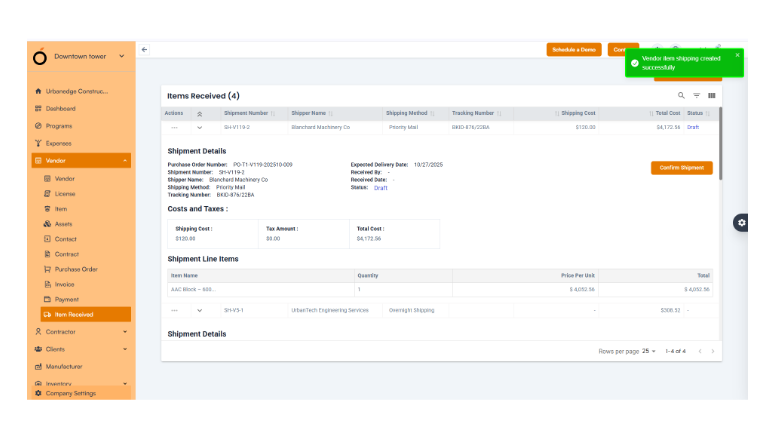
Vendor Item Management

  • Accurate notifications: The incorrect toast messages for Vendor Item Received entries have been fixed.


  • Users now receive clear and accurate feedback, improving confidence during vendor operations.

Cross-Tenant User Invitations

  • Verification issues resolved: Invite users from one tenant to another with different roles, without conflicts.
  • This supports multi-tenant project structures and enhances team collaboration across vendors, auditors, and clients.

OConstruction-Release

Release Update – 21/10: Production Fixes

This update focuses on stabilizing production environments, ensuring error-free billing, and improving overall project visibility.

Invoice Management

  • Invoice creation errors fixed: You can now create invoices even when the PO balance is adjusted, ensuring accurate billing and financial integrity.


Project Card View

  • Relevant project display: Users now see only projects they belong to, making navigation simpler and more relevant.

Vendor Contracts and POs

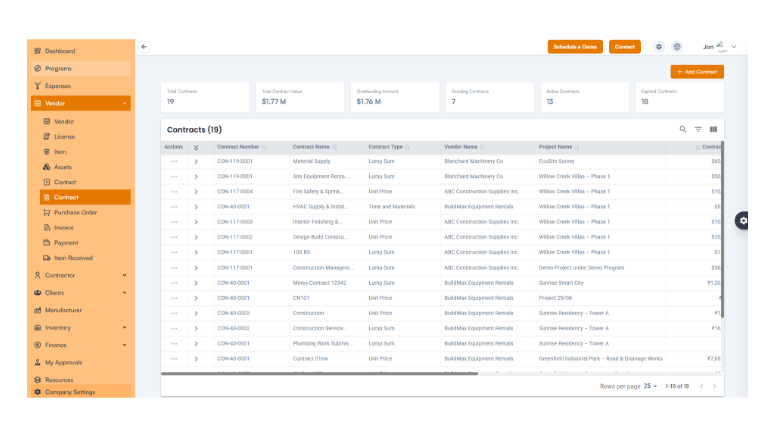
  • Accurate information: Vendor contracts and purchase orders display the correct details, improving procurement visibility.

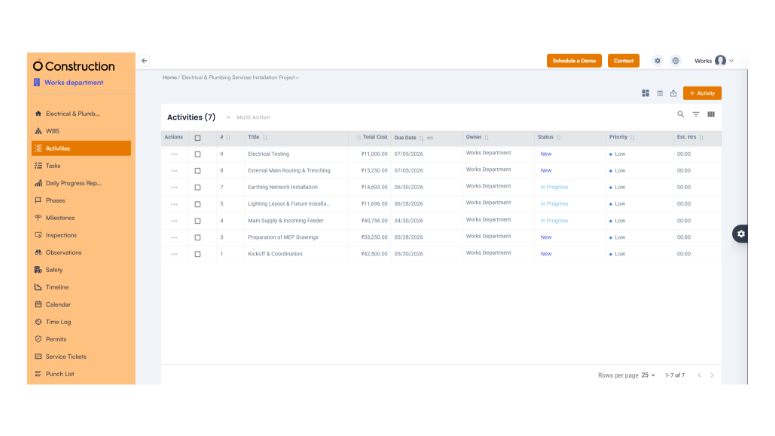
Activity and Task Management

  • Duplicate entry bug resolved and 500 errors removed for smoother task creation and listing.

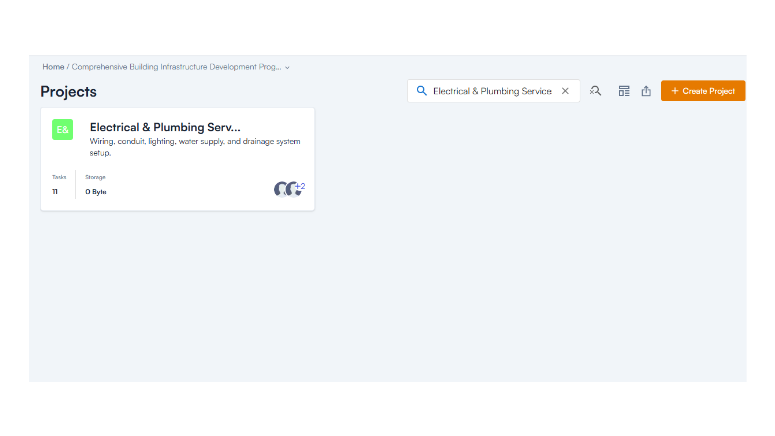
Project Search

  • New search feature added: Users can now quickly locate projects from the Project Card view.

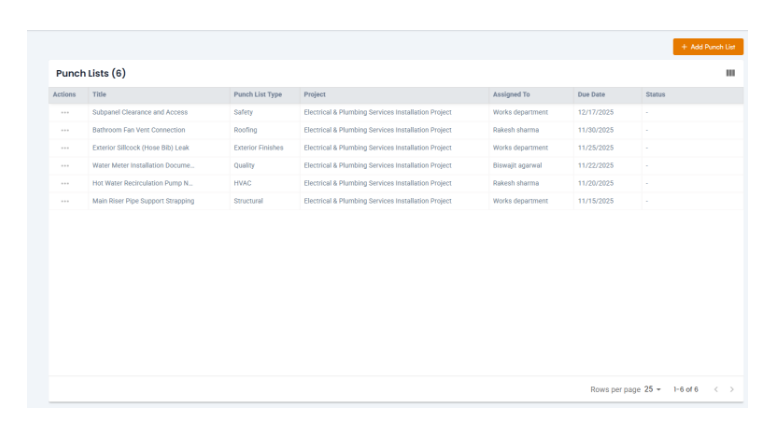
Punch List Management

  • Creation issues fixed: Punch lists now function flawlessly, ensuring complete task tracking.

Release Update – 02/09: Module Enhancements

This update brings major improvements to the Dependencies & Actuals, Client Management, Custom Fields, and License & Certification modules.

Client Operations

  • Accurate project timelines: Effective Start and End Dates now reflect correctly.

License & Certification

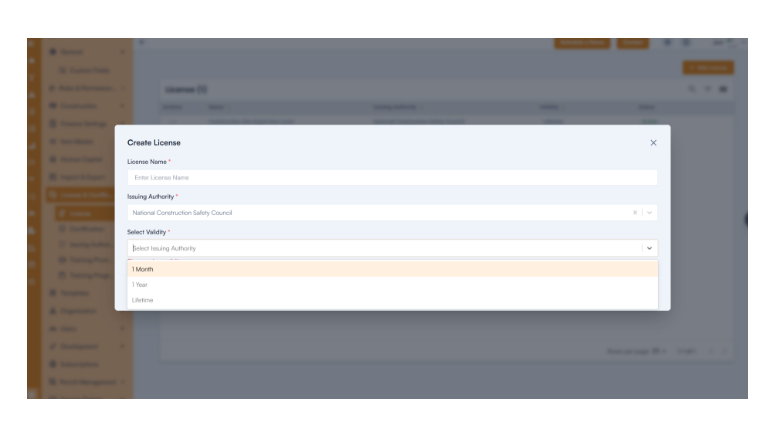
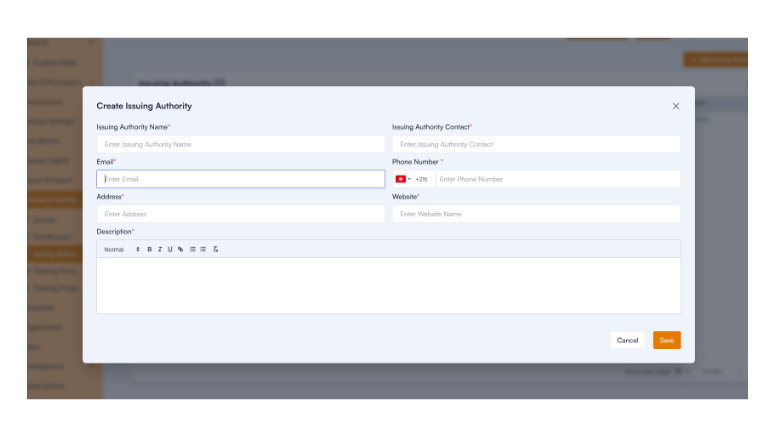
  • Full functionality restored: Users can now create certifications, issuing authorities, and training programs seamlessly.

Release Update – 01/09: WBS & Budget Fixes

Budgeting Improvements

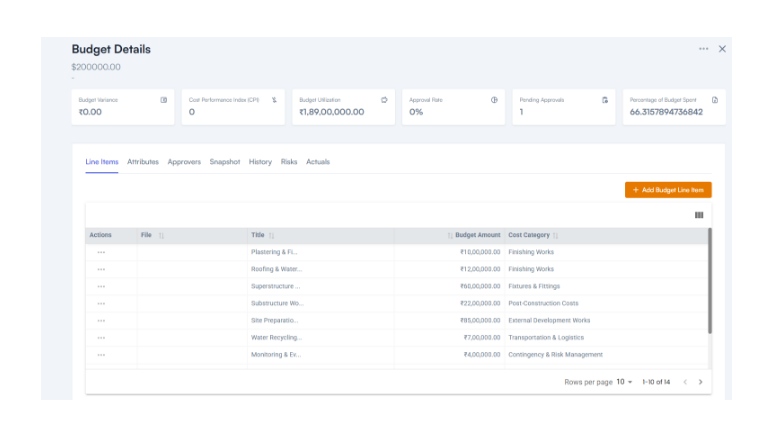
  • Budget control: Line item totals are capped at the allocated budget to prevent overspending.

  • File access fixed: Budget files download correctly.
  • Consistent formats: Warning prompts, currency symbols, and dashboards now display properly.

Release Update – 28/08: Bug Fixes and Improvements

This update enhances usability across Shifts, Item Management, and Asset Management modules.

Shifts Module

  • Entire input fields are now clickable for faster data entry.
  • Mandatory field validation ensures complete, error-free records.
  • Standardized time formats improve clarity.

Item & Industry Management

  • Only active industries are shown in dropdowns for better accuracy.
  • Link multiple categories to a single industry.
  • Item hierarchies now display correctly, improving workflow visibility.

Asset Management

  • Accurate card names and field labels improve usability.
  • Enhanced navigation helps users find details faster.

Change Management

  • We now accept decimal values for cost and time estimates.
  • Toast messages now display accurate feedback.

Vendor & Procurement

  • Fixed default currency issues.
  • Tax rules are enforced consistently.
  • Item names now display correctly in edit mode.

Release Update – 30/07: Introducing New Features

We’ve added powerful new modules to make construction management more efficient and compliant.

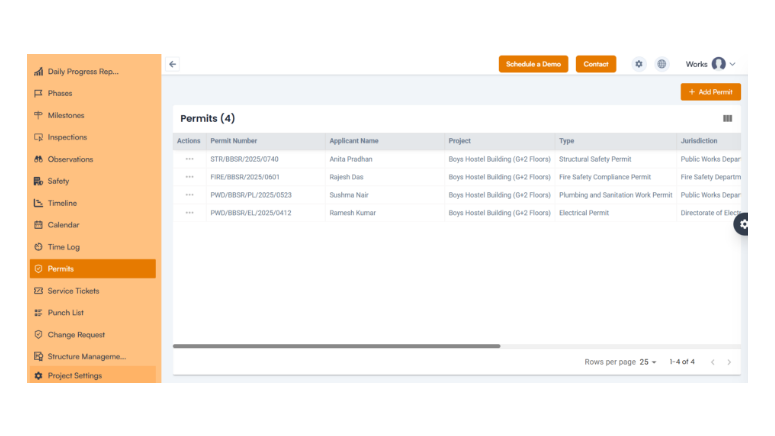
  • Permit Management

Manage and track permits from request to approval—all within the system—to prevent delays and maintain compliance.

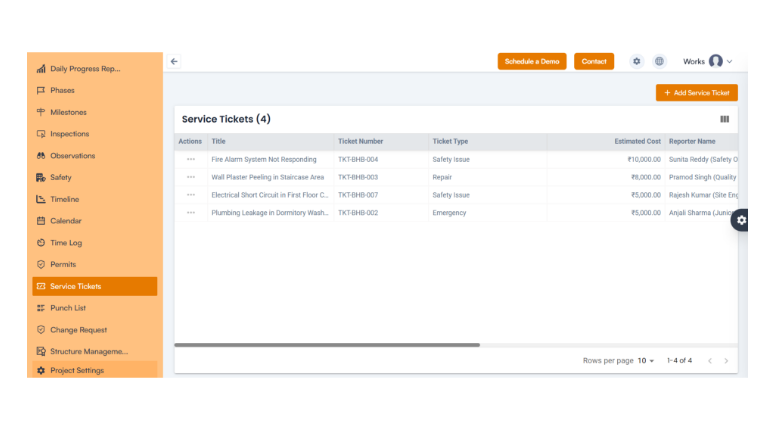
  • Service Management:

Track vendor services, maintenance requests, and operational tasks with complete visibility.

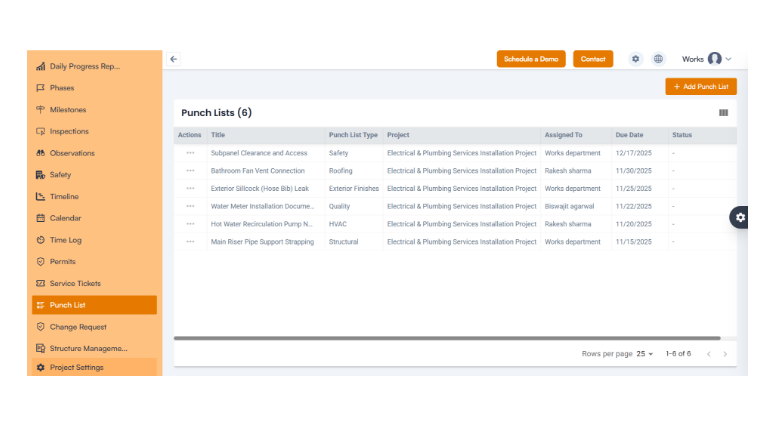
  • Punch List:

Record, assign, and monitor incomplete tasks and complete all project deliverables before closure.

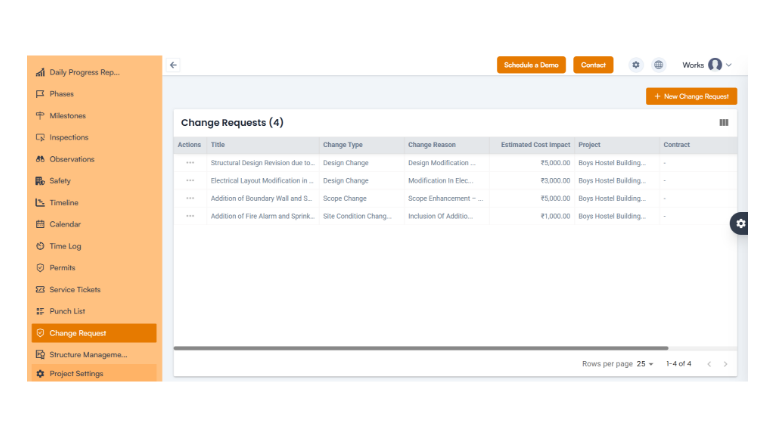
  • Change Request

Easily manage change submissions, approvals, and tracking to stay on schedule while adapting to modifications.

  • Subscription by Feature: Preview future plan-based features through the Moon Plan, allowing proactive planning for upgrades.

Conclusion

At OConstruction, we are continuously improving our platform to deliver a smoother, faster, and more reliable construction project management experience. These updates strengthen operational efficiency, enhance collaboration, and ensure precision across all modules.
Stay tuned for upcoming OConstruction release notes and discover how we’re redefining construction project management—one update at a time.

Category: Construction Academy

Subcategory: Budgeting and Planning

Subcategory: Construction Phase

Subcategory: Design Coordination

Subcategory: Estimation Techniques

Subcategory: Initiation and Feasibility

Subcategory: Introduction

Subcategory: Personal Management

Subcategory: Project Close-Out

Subcategory: Project Scheduling

Subcategory: Project Teams

Subcategory: Proposal Management

Subcategory: Total Quality Management

Subcategory: Tracking and Control

Subcategory: Work Breakdown

Category: Help Desk

Subcategory: Client

Subcategory: Construction 101

Subcategory: Contractor Management

Subcategory: Expense

Subcategory: Finance Budget

Subcategory: Inventory Management

Subcategory: My Approvals

Subcategory: Site Management

Subcategory: Vendor Management