Ensuring Legal Compliance with Vendor and Labor Contracts

Every year, construction firms lose millions due to contract mismanagement and non-compliance. Whether it’s labor violations or poorly structured vendor agreements, the consequences are severe — penalties, project delays, and reputational damage. Legal compliance in construction contracts is no longer just about ticking boxes. With ever-evolving labor laws, environmental standards, and vendor regulations, your contracts must be airtight — and enforceable.

In this blog, we’ll explore the best practices to ensure full compliance with vendor and labor contracts, common pitfalls to avoid, and how platforms like OConstruction help streamline and secure your contract processes.
Best Practices for Compliance

Why Legal Compliance in Contracts Matters More Than Ever

Construction is one of the most regulated industries in the world. Labor laws, safety codes, subcontractor rules, and payment terms — all must be followed to the letter. Even a small slip in contract terms or documentation can result in:

  • Heavy fines and legal penalties
  • Work stoppages or permit revocations
  • Project delays that hurt client trust
  • Damage to brand and future business opportunities

Let’s break this down with real-world relevance.

Use Case 1: Delayed Worker Payments

A mid-sized construction firm failed to adhere to the minimum wage updates in a state labor law. This caused a strike, delayed the site timeline by 4 weeks, and cost the company ₹28 lakhs in penalties and idle machinery.

Use Case 2: Incomplete Vendor Agreements

An infrastructure firm had an informal vendor agreement with a scaffolding supplier. When the vendor underdelivered and breached safety standards, the lack of proper terms made legal enforcement impossible. The firm had to bear the entire rework cost.

Ensuring legal compliance in construction contracts isn’t about fear — it’s about future-proofing your business.

Best Practices to Ensure Contract Compliance (With Action Steps)

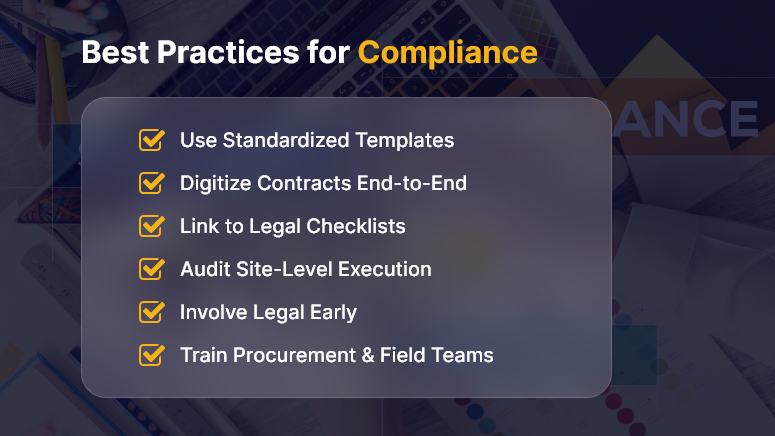
1. Standardize Contract Templates

Create legally vetted templates for vendors and labor contractors based on current regulations. Include essential clauses like:

  • Payment milestones
  • Labor rights and hours
  • Insurance and liability coverage
  • Dispute resolution terms

OConstruction lets you build contract templates that auto-populate key data and stay updated with regulatory changes.

2. Digitize Contract Lifecycle Management

Manual contract tracking = errors + delays.

Instead:

  • Use cloud-based systems to manage drafts, approvals, versions, and renewals.
  • Set automated alerts for contract renewals or compliance milestones.
  • Centralize storage so stakeholders can easily access contract records.

3. Map Contracts to Compliance Checklists

Each contract should tie to a checklist of legal mandates — specific to region, scope, and contract type.

For example:

  • Vendor Contracts → GST, Environmental clearance, Material specs
  • Labor Contracts → Minimum wage laws, EPF/ESI registration, Working hour limits

OConstruction links every contract to dynamic checklists that flag gaps instantly.

4. Audit Frequently (And Don’t Skip the Field)

Your contract is only as good as its enforcement.

  • Conduct quarterly audits of contract execution — especially at sites.
  • Use mobile-friendly tools so on-ground teams can upload evidence (e.g., labor rosters, delivery slips).
  • Track deviations with root cause analysis.

5. Involve Legal and Compliance Early

Too often, legal review comes last. Flip that.

  • Involve legal and compliance teams during vendor onboarding and RFP reviews.
  • Document every negotiation or clause revision inside the system for future reference.
  • Define clear responsibilities for approvals—automated routing helps avoid bottlenecks.

With OConstruction, you can assign roles for every contract step and track approval logs.

6. Train Project and Procurement Teams

Even the best system fails if users don’t understand it.

Run training workshops on:

  • Recognizing risky clauses
  • Labor law changes
  • Digital contract workflows

Empowered teams = fewer errors = better compliance.

Customer Example: Seamless Compliance in Action

For example, BuildEdge Infra, a multi-city contractor, struggled with labor contract tracking across its 7 sites. Using OConstruction’s contract management module:

  • They standardized agreements across vendors.
  • Set up real-time alerts for expiring documents.
  • Enabled mobile audits to ensure on-ground compliance.

As a result, BuildEdge avoided ₹15 lakhs in non-compliance penalties in just one year, and slashed contract approval time by 40%.

Key Takeaways: Contracts Are Your First Line of Defense

Legal compliance in construction contracts is about precision, preparation, and process. If contracts are vague, manual, or delayed, they become liabilities instead of safeguards.

Remember:

  • Standardization and digitization are non-negotiable.
  • Proactive audits and compliance mapping reduce legal risk.
  • Platforms like OConstruction make compliance easy, trackable, and scalable.

Don’t just meet the rules — master them.

Building Safe: 10 Safety Checklist Must-Haves for Every Site

Construction sites are among the most hazardous workplaces — accounting for one in five worker deaths annually, according to OSHA. But many of these accidents are preventable with a structured site safety checklist.

A safety checklist isn’t just a compliance form — it’s a real-time tool to save lives, reduce liability, and build safer, more productive job sites. From personal protective equipment (PPE) to emergency procedures, every checklist item matters.

In this blog, we’ll walk you through 10 essential checklist components, why they matter, and how a digital platform like OConstruction simplifies it all.

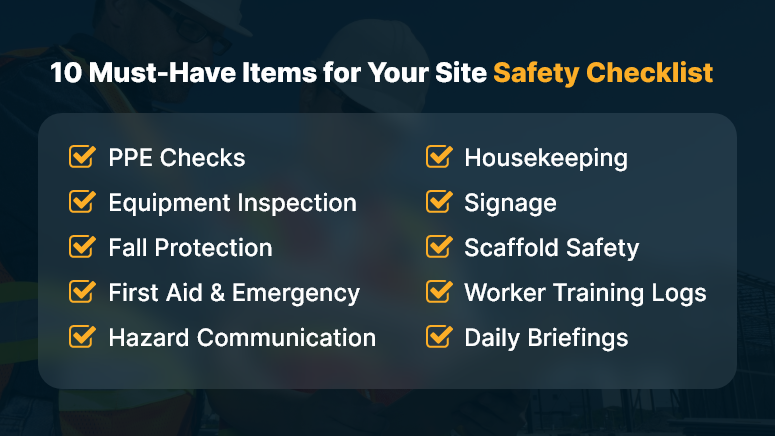
10 Must-Have Items for Your Site Safety Checklist

Why a Site Safety Checklist Is a Must-Have for Every Project

Let’s face it — site safety is more than a legal requirement; it’s a business advantage.

Delays caused by safety violations, lawsuits, and workforce injuries can tank project budgets and timelines. The right safety practices not only prevent loss but also build trust across stakeholders.

Real-World Impacts:

  • General contractors can avoid costly rework by identifying hazards early through routine safety checks.
  • Project managers benefit from real-time visibility into site safety data, reducing incident response time.
  • EHS managers can ensure compliance with OSHA standards while reinforcing a culture of safety.

Without a standardized site safety checklist, important tasks fall through the cracks — and your team is left exposed.

10 Site Safety Checklist Must-Haves (And How to Get Them Right)

Let’s break down the 10 critical components every construction site must cover:

1. PPE (Personal Protective Equipment) Checks

Make sure helmets, gloves, boots, eyewear, and high-vis clothing are available and worn correctly. Inspect for wear-and-tear or expired certifications.

2. Tool and Equipment Inspection

Check that all equipment is operational and tagged for safety. Malfunctioning gear is a top cause of on-site injuries.

3. Fall Protection Systems

Verify the installation and use of guardrails, harnesses, and fall arrest systems—especially for projects above six feet.

4. First Aid & Emergency Supplies

Ensure kits are fully stocked, accessible, and marked. Emergency eye wash stations and fire extinguishers should be part of every site.

5. Hazard Communication

All chemicals and materials must be labeled and have associated SDS (Safety Data Sheets) available to workers.

6. Housekeeping Standards

Clutter, debris, and spills increase risks. Confirm regular cleaning protocols are followed and materials are properly stored.

7. Signage and Barricades

Install visible warning signs in hazardous zones. Temporary barricades should be used to isolate high-risk areas.

8. Scaffold and Ladder Safety

Inspect scaffolds for structural integrity and confirm ladders meet load-bearing and positioning requirements.

9. Worker Training Logs

Track that each worker has completed necessary training: fall protection, lockout/tagout, PPE use, and emergency response.

10. Daily Safety Briefings

Hold toolbox talks at the start of each shift. Document attendance and topics discussed for compliance tracking.

Pro Tip: Use OConstruction’s digital checklists to auto-remind supervisors of daily inspections, document outcomes, and trigger alerts for missing items.

How One Contractor Cut Incident Rates by 45%

BrixCore Projects, a mid-sized contractor in Mumbai, used OConstruction’s safety checklist feature to reduce job-site injuries by 45% in just six months.

Here’s how: They digitized all safety protocols, set auto-reminders for daily inspections, and integrated QR codes for on-site hazard reporting. Field staff could instantly flag safety issues, and managers could act immediately — no paperwork delays.

This resulted in fewer compliance lapses, faster responses to risks, and greater worker confidence on-site.

Key Takeaways: Don’t Just Build Fast — Build Safe

Safety isn’t just a policy—it’s a practice. When it’s built into daily routines, it becomes second nature.

  • A site safety checklist creates structure and accountability on every job site.
  • It reduces risks, ensures compliance, and enhances team confidence.
  • Digital platforms like OConstruction eliminate paperwork delays and ensure real-time visibility into safety tasks.

Want fewer incidents, better compliance, and faster inspections? Start with a checklist that’s smart, mobile, and built-in.

Compliance Audits in Construction: What You Need to Prepare

Imagine pouring months into a construction project — only to be halted mid-progress due to missing paperwork or non-compliance with regulatory norms. It’s more common than you think. Compliance audits in construction are no longer rare events — they’re routine checks that could define your project’s timeline and profitability. Audits cover everything from worker safety to environmental regulations, and failing one can lead to costly penalties or even shutdowns.

It happens more than you’d think. In fact, OSHA issued penalties worth over $146 million in 2023 alone for workplace safety violations.

In this blog, you’ll learn:

  • What compliance audits in construction involve
  • Why they matter now more than ever
  • How you can prepare (and pass) with confidence

Let’s help you get audit-ready, with smart planning and the right tools.

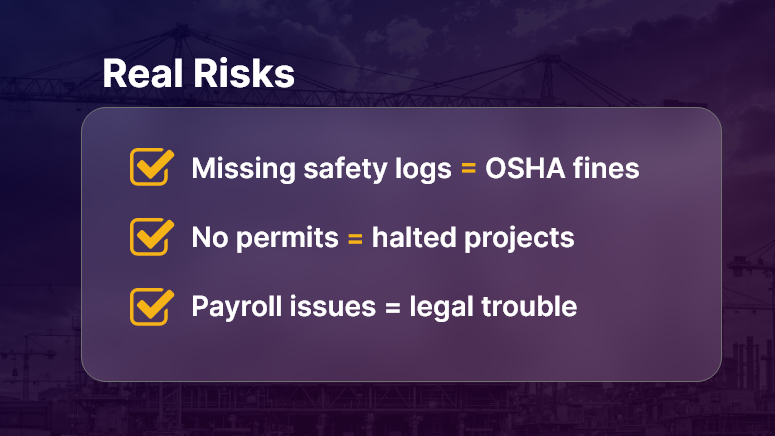
Real Risks

Why Compliance Audits in Construction Matter?

Construction is a high-risk, highly regulated industry. Every stakeholder — contractors, owners, subcontractors, and suppliers — must comply with safety, labor, environmental, and building codes. Audits ensure these rules are followed.

Why Should Construction Companies Care?

  • Reputation at Stake: Non-compliance can lead to fines, lawsuits, and damage to your brand.
  • Delays Hurt the Bottom Line: Projects that stall due to audit failures lose money fast.
  • Liability Protection: Audits verify that your processes protect workers, the public, and your company from harm.

Who Benefits Most?

  • General contractors gain better project visibility and control.
  • Compliance officers avoid scrambling last-minute for documents.
  • Project managers keep timelines on track by anticipating risks.

Real-World Scenarios

  • Workplace Safety Check: An OSHA inspector visits your site after a reported incident. Missing safety logs or expired PPE certifications? Expect fines.
  • Environmental Review: During a road expansion project, missing impact assessments delay permits.
  • Labor Compliance: A government audit reveals underpaid workers and a lack of labor law posters — your entire payroll could be under scrutiny.

Compliance audits in construction aren’t optional — they’re operational necessities.

How to Prepare for Construction Compliance Audits?

Preparation is your best defense. Here’s a deep dive into actionable strategies and industry best practices to keep your project audit-ready.

1. Build a Digital Documentation System

  • Store permits, drawings, safety records, and inspection reports in one secure, searchable system.
  • Make documents accessible to authorized users anytime, anywhere.
  • Tools like OConstruction help digitize and organize records by project or site.

2. Conduct Internal Pre-Audits Regularly

  • Perform routine checks using audit checklists before external auditors arrive.
  • Identify gaps in safety, labor, or environmental compliance.
  • Keep track of action items and close the loop before issues escalate.

3. Maintain Accurate Safety Records

  • Update safety training logs and toolbox talk records on a weekly basis.
  • Track incident reports, near misses, and corrective actions in real time.
  • Use mobile access for foremen or supervisors to submit reports directly from the site.

4. Stay on Top of Regulatory Changes

  • Compliance standards change often — especially labor and environmental ones.
  • Assign a compliance lead to monitor updates and apply changes proactively.
  • Subscribe to regulatory bulletins (like OSHA News).

5. Assign Clear Roles and Accountability

  • Identify who is responsible for compliance on each project.
  • Define escalation workflows — what happens when a non-compliance is spotted?
  • Use a project dashboard to show compliance status in real time.

6. Audit Trail Management

  • Ensure every action — approvals, sign-offs, safety inspections — is timestamped and traceable.
  • Automate notifications and reminders for expiring documents or upcoming inspections.

7. Standardize Procedures Across Sites

  • Use repeatable checklists and templates to standardize workflows.
  • Train site leads and supervisors in audit preparation practices.
  • Store audit SOPs centrally for easy reference.

Use Case: How One Company Passed a Surprise Audit

For example, MetroBuild Infra, a mid-sized infrastructure firm, used OConstruction’s audit-ready checklist and digital safety logs to pass a surprise regulatory audit during a highway overpass project.

  • Before: Scattered files, missed deadlines, last-minute scrambling.
  • After: Centralized records, proactive alerts, 98% compliance audit score.
  • Result: Avoided shutdown, improved trust with regulators, and kept the project on schedule.

Here’s how: Their compliance officer used OConstruction to run weekly internal audits, submit safety documentation through mobile devices, and store environmental certificates in a centralized document vault—available instantly during the inspection.

Key Takeaways

1. Compliance audits in construction are not optional — they’re critical.
They affect safety, finances, timelines, and your ability to win future projects.

2. Preparation is not just about documents — it’s about systems.
When you standardize procedures, assign roles, and go digital, you’re ready anytime.

3. Digital tools simplify compliance.
OConstruction offers real-time dashboards, document management, mobile reporting, and internal audit templates to keep your team compliant without chaos.

FAQs

Q1. What is a compliance audit in construction?
A structured review of whether your project meets safety, labor, environmental, and building regulations.

Q2. How often do audits occur?
Compliance audits can be scheduled or surprise visits—OSHA, EPA, or local authorities can check any time.

Q3. What documents should I keep ready?
Permits, safety logs, payroll records, training certificates, and environmental clearances.

Q4. What happens if you fail an audit?
Expect penalties, work stoppages, reputational damage, and in severe cases, project shutdown.

Q5. How can digital tools help with compliance?
Platforms like OConstruction provide document vaults, dashboards, mobile reporting, and pre-built audit checklists—making you always audit-ready.

Q6. Who is responsible for compliance on a project?
Typically, compliance officers or safety managers, but accountability should be shared across contractors, subcontractors, and project managers.

How to Choose the Right Construction Software for Your Team?

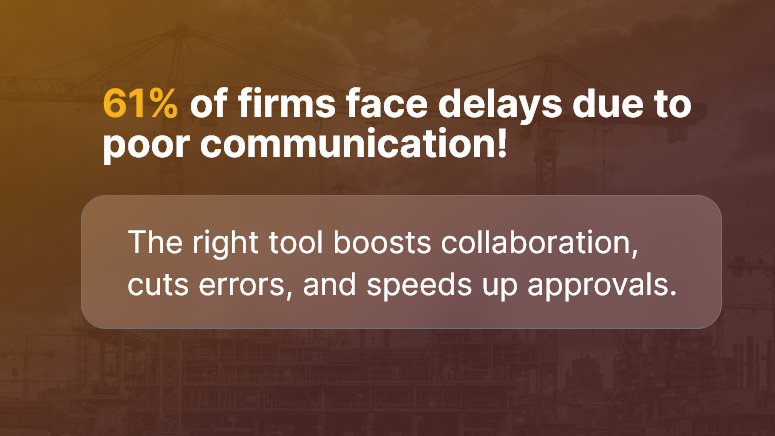
Every construction team knows the frustration of juggling spreadsheets, fragmented tools, and missed deadlines. According to a recent study, 61% of construction firms face delays due to poor project communication. With so much at stake, selecting the right construction software matters more than ever.

In this post, we’ll help you cut through the noise. You’ll learn what truly matters in choosing the best software for your team, why it affects ROI, and how to evaluate tools effectively. By the end, you’ll know exactly how to pick the right system to improve efficiency and reduce errors.

61 of firms face delays due to poor communication!

Why Construction Software Selection Matters (and Who Benefits)

For contractors, project managers, field teams, and ops leaders, choosing the wrong tool can cost time, money, and morale.

Pain Points:

  • Field teams lack access to real-time plans
  • Delays in approvals and RFIs
  • Duplicate data entry across platforms

Who Benefits Most:

  • Commercial contractors managing multiple sites
  • Project managers need real-time visibility
  • Field engineers requiring mobile access
  • Finance teams tracking budgets and permits

Instead of fragmented systems, the right construction software selection ensures your entire team collaborates in one platform, avoiding miscommunication and reducing rework.

Imagine less time chasing signatures and more time getting projects delivered on time and on budget.

Best Practices & Actionable Steps to Select Construction Software

What to Do

  • Define Business Needs First
    Clarify what your team needs: mobile access, document control, budgeting, or scheduling. Avoid choosing a tool without a clear problem to solve.
  • Prioritize Usability & Mobile Access
    Field users should be able to upload photos, manage RFIs, and view plans via phones or tablets. If the interface frustrates them, adoption drops fast.
  • Ensure Seamless Integrations
    Your ideal software should sync with accounting systems, BIM tools, or ERP platforms. Good construction management software reduces manual entry and errors.
  • Look for Role-Based Permissions
    Project managers, subcontractors, and office staff need different levels of access. Choose software that supports granular permissions and audit trails.

What to Avoid

  • Selecting software based on feature count alone
  • Ignoring customer support and training options
  • Underestimating onboarding time and training needs

Quick Wins

  • Trial with a single active project — see how the team adopts and thrives
  • Use built-in mobile apps from day one, not later
  • Set KPIs like approval turnaround time or rework reduction to measure success

Evaluation Framework

  • Identify Core Use Cases: e.g., site access, RFI management, subcontractor coordination
  • Request Demos with Real Scenarios
  • Pilot with Key Team Members
  • Get Feedback & Score Usability
  • Assess ROI: reduced delays, fewer errors, faster approvals

Customer Use Case: Software Selection in Action

For example, Skyline Contractors, a mid-sized commercial builder, evaluated multiple platforms before choosing a system that offered real-time mobile plan access, automated RFI workflows, and integrated budget tracking.

  • They cut RFI turnaround by 45%
  • Reduced document retrieval time from hours to minutes
  • Improved subcontractor compliance submissions by 30%

Here’s how: They piloted the software on two live sites and gathered user feedback regularly. That approach ensured successful adoption across field and office teams.

Key Takeaways & Closing Summary

Choosing the right construction software isn’t just about features — it’s about solving real problems for your field, office, and finance teams.

  • Focus on your team’s pain points first, then evaluate tools
  • Prioritize mobile usability, tight integrations, and role-based permissions
  • Pilot with real projects, measure success, and scale gradually

By taking a structured and team-aligned approach, your construction software selection becomes a transformational step — not just an IT purchase.

Automation in Construction: Where It Works (and Where It Doesn’t)

Automation in construction is no longer just a futuristic buzzword. It’s here, it’s real, and it’s changing how we build. From self-driving excavators to AI-powered scheduling tools, the construction industry is rapidly integrating automation. Yet, while some tasks benefit immensely, others hit walls due to complexity, cost, or human nuance.

In this blog, we’ll break down exactly where automation in construction works, where it doesn’t, and what business leaders should prioritize. Whether you’re a project manager, operations head, or construction tech innovator, this guide gives you clarity.

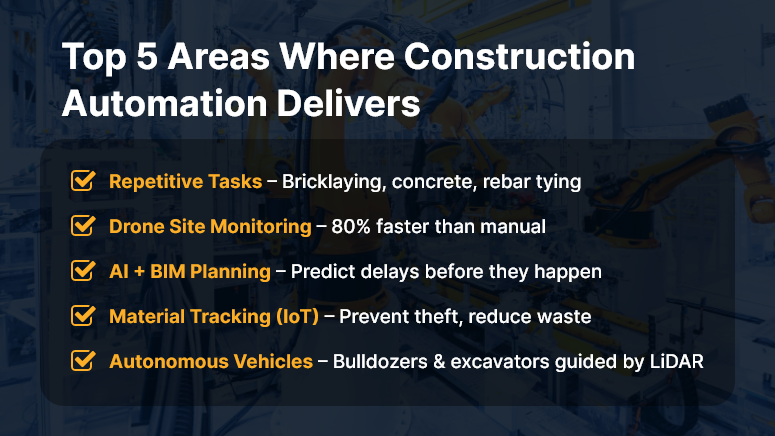
Top 5 Areas Where Construction Automation Delivers

Why Automation in Construction Matters to Your Business

In an industry battling labor shortages, rising material costs, and increasing safety risks, automation offers a much-needed edge.

Why should companies care? Because automation isn’t just about robots and AI — it’s about doing more with less, reducing human error, and speeding up delivery.

Who benefits most?

  • Contractors managing complex, multi-phase projects
  • Developers racing against tight deadlines
  • Site supervisors juggling labor and logistics daily

Real-world use cases:

  • Drones can conduct daily site inspections in 30 minutes instead of 3 hours.
  • Automated rebar tying machines cut labor time by up to 40%.
  • AI scheduling software reduces delays by predicting risks before they escalate.

Yet, not every task is ready for automation. Let’s explore what works — and what doesn’t.

Best Practices: Where Automation Works in Construction (And Where It Doesn’t)

Where Automation Works Well

  1. Repetitive, Labor-Intensive Tasks


    Tasks like bricklaying, concrete pouring, and rebar tying are ideal for automation. Robots excel in consistency and reduce strain injuries.

  2. Site Monitoring with Drones


    Drones can capture aerial data, track progress, and flag safety violations — faster and safer than manual inspection.

  3. BIM and AI for Planning


    Building Information Modeling (BIM) tools integrated with AI help teams forecast project timelines and detect clashes before construction begins.

  4. Material Tracking with IoT

    Sensors and RFID tags provide real-time visibility into material usage, preventing delays and theft.

  5. Automated Equipment and Vehicles


    Self-driving bulldozers and excavators, guided by GPS and LiDAR, enhance precision and reduce accidents.

Where Automation Still Struggles

  1. Creative or Judgment-Based Work


    Design, problem-solving, and on-the-fly decisions still require human nuance.

  2. Unstructured Environments


    Construction sites are dynamic. Not all robots or machines can adapt to terrain changes, weather, or unexpected events.

  3. Specialized Trade Work


    Tasks like plumbing, electrical wiring, or HVAC installation demand precision and adaptability — not ideal for current automation tools.

  4. High Cost vs. ROI


    Some technologies remain too expensive for mid-sized contractors with slim margins.

Quick Wins & Do’s and Don’ts

Do:

  • Start small — automate one workflow (like timesheet tracking or site inspection).
  • Train your workforce to work with, not against, machines.
  • Choose tech that integrates with your current construction platform.

Don’t:

  • Don’t automate for the sake of it. Align automation to business goals.
  • Avoid tools with steep learning curves or poor support.
  • Don’t ignore data security — automated systems need secure infrastructure.

Framework to Apply:

  • Step 1: Identify repetitive, high-volume tasks
  • Step 2: Evaluate ROI of automating each
  • Step 3: Pilot-test with one team or project
  • Step 4: Train users and monitor adoption
  • Step 5: Expand with feedback and continuous improvement

Use Case Example

For example, Skyline Builders, a mid-sized commercial construction company, used drone-based site inspections and AI-based progress tracking on a 12-month high-rise project.

Using the automated system reduced inspection time by 80%, flagged delays early, and improved compliance reporting — all without increasing overhead.

Here’s how: The drone captured daily images. The AI analyzed patterns against the project timeline. The team received visual reports that saved hours of manual coordination.

Key Takeaways & Closing Summary

Automation in construction is a powerful enabler — but only when used strategically.

  • It works best in repetitive, data-heavy, or dangerous tasks like site inspections, material tracking, and earthwork.
  • It still struggles with tasks that demand creativity, adaptability, or deep trade expertise.
  • Start small. Pilot-test. Train your team. Choose scalable tools.

The future of construction isn’t human vs. machine — it’s humans empowered by smart, integrated automation.

Benefits of Using a Centralized Document Management System

Still juggling documents across emails, desktops, and cloud drives? You’re not alone. In today’s construction industry, managing massive volumes of drawings, RFIs, contracts, and compliance paperwork can be a logistical nightmare. A centralized document management system is no longer a luxury — it’s a necessity.

It brings structure to the chaos, making sure teams access the right documents at the right time, from anywhere. In this blog, we’ll break down what it is, why it matters, and how it’s changing the game for modern construction firms.

Let’s dive in and discover how better document control leads to better project outcomes.

Implementation flow

Business Relevance: Why Construction Companies Must Rethink Document Management

In the construction world, delays and cost overruns often trace back to one simple culprit — mismanaged documents. Missing blueprints, outdated versions, compliance gaps, and scattered approvals can derail even the best-laid plans. A centralized document management system eliminates these issues by offering:

  • Single source of truth – Everyone refers to the most updated files.
  • Remote access – Site engineers and project managers can retrieve documents anytime, anywhere.
  • Audit trails – Automatic logs improve accountability and compliance.

Use Cases:

  • Project Site Coordination: Site teams instantly access the latest structural drawings — no more waiting for printouts.
  • Regulatory Compliance: Keep all certifications and safety documentation in one place for easy audits.
  • Subcontractor Communication: Share and track submittals and RFIs with external vendors in real time.

In short, it’s not just about storage — it’s about eliminating chaos and boosting control across your operations.

Actionable Best Practices for Centralized Document Management

A smart document management system can transform how you build. Here’s how to make the most of it:

Do’s

  • Organize by project, not file type: Keep all documents (plans, permits, contracts) grouped by job to speed up search and access.
  • Use version control: Always know who edited what and when, with automatic version tracking.
  • Assign access permissions: Not everyone needs everything. Define roles for viewing, editing, and sharing.
  • Tag documents: Use tags like “RFI,” “approved,” or “under review” for easy filtering.
  • Backup regularly: Choose a system with automated cloud backup to prevent data loss.

Don’ts

  • Avoid storing files on local desktops – increases risk of loss and inconsistency.
  • Don’t skip training – Make sure your team knows how to use the system to its full potential.
  • Don’t allow unrestricted access – Security is key; not every role should edit sensitive documents.

Quick Wins

  • Digitize legacy paper files for faster access and better preservation.
  • Set up document templates for standard processes like submittals or inspections.
  • Enable mobile access so teams in the field aren’t left out.

Step-by-Step Implementation Framework

  • Audit your current document flow – Identify where delays or gaps occur.
  • Select a construction-specific system – Choose tools built for field documentation, drawing markups, and compliance.
  • Migrate critical files first – Start with active projects to get quick wins.
  • Define access roles – Ensure project managers, engineers, clients, and subcontractors have proper permissions.
  • Train your team – Run short onboarding sessions or tutorials.
  • Monitor usage – Use built-in analytics to track file views, downloads, and document aging.

By following this framework, you unlock the full potential of a centralized document system.

Use Case

For example, RedBeam Infra, a mid-sized construction firm, used a centralized document management system to streamline site coordination across 5 locations.

Before, drawings were shared via email and WhatsApp, leading to frequent errors and rework. After implementation:

  • RFIs were resolved 40% faster
  • Rework due to outdated files dropped by 60%
  • Project delivery time improved by 2 weeks

Here’s how: the firm used automated file versioning, access control, and real-time notifications, allowing better collaboration across all teams.

Key Takeaways

A centralized document management system isn’t just digital storage. It’s an operational upgrade for construction firms.

Here’s why it matters:

  • It reduces project delays caused by document mismanagement.
  • It improves compliance by keeping all safety and regulatory documents organized.
  • It ensures that everyone — from office to job site — works with the latest version.

Remember:

  • Start small with critical documents.
  • Train your team early.
  • Monitor usage and scale as needed.

Construction doesn’t wait — and neither should your documents.

Category: Construction Academy

Subcategory: Budgeting and Planning

Subcategory: Construction Phase

Subcategory: Design Coordination

Subcategory: Estimation Techniques

Subcategory: Initiation and Feasibility

Subcategory: Introduction

Subcategory: Personal Management

Subcategory: Project Close-Out

Subcategory: Project Scheduling

Subcategory: Project Teams

Subcategory: Proposal Management

Subcategory: Total Quality Management

Subcategory: Tracking and Control

Subcategory: Work Breakdown

Category: Help Desk

Subcategory: Client

Subcategory: Construction 101

Subcategory: Contractor Management

Subcategory: Expense

Subcategory: Finance Budget

Subcategory: Inventory Management

Subcategory: My Approvals

Subcategory: Site Management

Subcategory: Vendor Management