Top 10 Must-Have Features in a Construction Management Solution

Construction projects today are under more pressure than ever. According to leading industry studies, over 60% of projects run over budget, while nearly 70% experience schedule delays due to miscommunication, inaccurate DPRs, scattered data, and manual updates. These issues don’t just slow work down, they directly impact profitability, cash flow, and client trust. Therefore, choosing the right construction management solution has become a mission-critical decision for project managers, contractors, EPC companies, QS teams, and site engineers.

This blog outlines the Top 10 must-have features you should expect from any modern construction management solution. You will learn how purpose-built tools streamline BOQ management, automate DPR workflows, improve field-to-office visibility, and help teams execute projects with fewer errors, lower costs, and better accountability.

Whether you handle residential, commercial, highway, infrastructure, or industrial construction, this guide explains how a construction management solution elevates your operations and sets your projects up for predictable success.
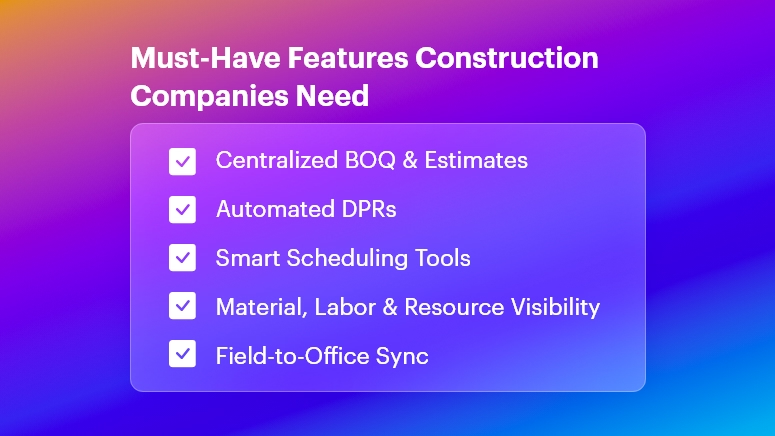
Must-Have Features Construction Companies Need

Why Construction Teams Need a Powerful Construction Management Solution

Construction is complex, fast-changing, and highly interdependent. One small delay — such as a late DPR, missing material, or inaccurate BOQ — can trigger cascading issues across the entire schedule. This is exactly why a robust construction management solution is no longer optional.

Growing Business Pressures in Construction

Modern construction companies face significant operational challenges:

  • Cost overruns caused by inaccurate estimates, fluctuating material prices, and untracked expenses, which lead to escalated budgets and reduced profit margins.
  • Material wastage due to poor tracking and lack of real-time site visibility, resulting in unused inventory, theft, pilferage, or emergency purchases at higher rates.
  • Rework caused by miscommunication or outdated drawings, consuming 10–15% of project costs and unnecessary labor hours.
  • Scattered data stored in Excel sheets, WhatsApp messages, emails, and paper diaries, making it impossible to maintain a single source of truth.
  • Delayed DPR submissions, which leads to inaccurate reporting, billing delays, and poor decision-making.
  • Disconnected tools that fail to sync field activities with office teams, slowing approvals, billing, purchasing, and planning cycles.

These problems occur across all construction segments:

  • Real estate developers struggle with multi-site coordination and contractor monitoring.
  • Infrastructure and road projects face challenges with heavy equipment tracking, material consumption, and schedule slippages.
  • Residential and commercial builders manage high-velocity tasks and subcontractor timelines.
  • EPC companies deal with large-scale BOQs, lengthy approval cycles, and risk of data duplication.

Why Traditional Methods Fail

Manual workflows cannot keep up with the speed of modern construction:

  • Excel sheets break easily, lack version control, and create data silos, making it difficult for teams to stay aligned.
  • WhatsApp messages are unstructured, leading to miscommunication, lost instructions, and zero historical records.
  • Paper-based logs and manual DPRs are prone to errors and delays.
  • Non-integrated tools create blind spots, making cost control and project tracking inefficient.

A modern construction management solution solves these challenges through real-time syncing, digital documentation, automated tracking, and structured workflows. This ensures every stakeholder — from site engineers to project directors — operates with clarity, speed, and accuracy.

Top 10 Must-Have Features in a Construction Management Solution

1. BOQ and Estimate Management

A strong construction management solution must include dynamic BOQ and estimate capabilities.

  • Centralizes all quantities, materials, activities, and rate contracts, ensuring every team member works from a single, version-controlled BOQ.
  • Automates calculations for material requirements, estimated costs, and work packages, reducing manual errors and improving pricing accuracy.
  • Supports multi-level BOQs for EPC, infrastructure, and large commercial projects, enabling granular control over item-level budgeting.

2. DPR Automation and Daily Site Reporting

DPR delays cause downstream issues across billing, planning, and procurement.

  • Automated DPR templates help site engineers submit daily progress in minutes, capturing work done, labor, machinery, and material used.
  • Real-time visibility helps project managers track progress against planned schedules, reducing reporting gaps and manipulation.
  • Photo and document attachments allow accurate verification, improving accountability and reducing disputes.

3. Project Planning and Schedule Tracking

Efficient planning is essential for controlling time, cost, and quality.

  • Built-in Gantt charts and activity sequencing help teams visualize dependencies and set realistic timelines, especially for multi-contractor projects.
  • Real-time schedule tracking highlights delays before they escalate, allowing proactive corrective action.
  • Baseline vs. actual tracking improves forecasting, ensuring leadership always knows where projects stand.

4. Resource, Labor, and Workforce Management

Labor inefficiency is one of the biggest cost drivers in construction.

  • Track labor attendance, productivity, and skill allocation, ensuring optimal workforce utilization across projects.
  • Prevent overstaffing or understaffing, which often leads to productivity loss or unnecessary cost leakage.
  • Generate labor productivity analytics, helping teams benchmark performance across activities and contractors.

5. Material Tracking and Inventory Management

Untracked material is a financial risk.

  • Monitor material requests, issues, transfers, and consumption in real time, eliminating wastage and pilferage.
  • Set reorder levels and automate purchase alerts, ensuring materials arrive before work stops.
  • Track vendor deliveries against PO commitments, reducing discrepancies and billing disputes.

6. Purchase, Vendor, and Procurement Management

Procurement inefficiencies can derail timelines and budgets.

  • Digitize purchase requisitions, approvals, vendor quotes, and POs, enabling faster purchasing cycles.
  • Compare vendor quotations side-by-side, ensuring cost-efficient decisions.
  • Maintain vendor performance metrics, helping businesses negotiate better contracts and avoid unreliable suppliers.

7. Task, Workflow, and Issue Management

Execution requires strong coordination across teams and subcontractors.

  • Assign tasks with deadlines, responsibilities, and dependencies, ensuring daily work clarity.
  • Automated reminders keep everyone aligned, reducing delays due to follow-up gaps.
  • Issue logging helps identify defects, delays, safety observations, and roadblocks, enabling timely resolution.

8. Cost Control and Budget Monitoring

Cost overruns impact margins and client satisfaction.

  • Real-time cost dashboards compare planned budgets with actual spending, helping teams detect leakage early.
  • Track costs across labor, machinery, materials, subcontractors, and overheads, creating transparency and accountability.
  • Predictive forecasting allows leaders to intervene before overruns escalate, improving profitability.

9. Real-Time Field-to-Office Sync

The biggest communication gaps occur when site updates are delayed.

  • Instant syncing of DPRs, materials, approvals, and tasks, removes silos and eliminates outdated information.
  • Project managers, QS teams, and owners receive real-time updates, enabling faster decisions and fewer misunderstandings.
  • Every stakeholder shares the same dashboard, improving coordination across teams and locations.

10. Multi-Site Visibility and Centralized Reporting

Construction businesses often operate across multiple locations.

  • A unified dashboard helps monitor all projects, contractors, and sites in one place, enhancing operational control.
  • Centralized reporting provides insights on productivity, cost, delays, and resource usage, supporting data-driven decision making.
  • Standardized processes ensure consistency, reducing project-level variability and risk.

Best Practices, Frameworks, and Actionable Tips for Implementing a Construction Management Solution

To maximize the impact of a construction management solution, construction teams must adopt structured workflows. Below are actionable, implementation-ready practices.

1. Streamline BOQ and Estimation Processes

  • Always create multi-level BOQs to break down work into granular activities, helping QS teams price accurately and manage variations smoothly.
  • Standardize rate contracts for materials and activities, reducing budget conflicts during execution.
  • Integrate BOQ with material tracking and procurement, ensuring planned materials match actual consumption.

2. Optimize DPR Workflows

  • Use predefined DPR templates to ensure uniform reporting across sites, reducing inconsistencies and missing information.
  • Encourage daily submission deadlines to avoid backlog and maintain freshness of data.
  • Attach photos, location data, and progress notes, improving transparency for remote managers.

3. Strengthen Planning and Scheduling

  • Always create a project baseline before execution begins, allowing teams to measure deviations accurately.
  • Break schedules into weekly and daily execution goals, making them easier to monitor.
  • Use critical-path analysis to identify activities that directly impact project completion dates.

4. Improve Material Management Strategies

  • Track every material issue and return from the store, ensuring consumption accuracy.
  • Monitor supplier reliability by comparing deliveries against POs, identifying chronic delays.
  • Use reorder alerts to avoid work stoppage due to material shortages.

5. Enhance On-Site Coordination and Communication

  • Always use a centralized digital platform instead of WhatsApp for official instructions, ensuring audit trails.
  • Define SOPs for task assignments, approvals, and inspections, removing ambiguity.
  • Document all delays, issues, and dependencies, allowing managers to intervene effectively.

6. Strengthen Cost Control

  • Create cost centers for labor, materials, equipment, and subcontractors, improving financial visibility.
  • Compare planned vs. actual costs weekly, identifying leakage early.
  • Digitize vendor quotes and purchases to prevent price manipulation or duplication.

7. Prevent Rework and Human Errors

  • Maintain version-controlled drawings and documents, preventing outdated plan usage.
  • Use digital checklists and quality workflows, ensuring consistency across teams.
  • Enable issue logging and resolution tracking, reducing repeat mistakes.

8. Improve Multi-Site Coordination

  • Standardize templates for DPRs, BOQs, and approvals across all sites, ensuring uniformity.
  • Monitor cross-project performance metrics, identifying best practices and inefficiencies.
  • Centralize communication and reporting, especially for leadership and regional managers.

Case Study

For example, a mid-sized infrastructure and commercial construction company, adopted OConstruction’s DPR Automation and BOQ Management features to overcome persistent reporting delays and cost miscalculations. Within 90 days, they achieved measurable improvements.

  • DPR completion time dropped by 40%, enabling faster billing cycles.
  • BOQ accuracy improved significantly due to centralized and version-controlled estimates.
  • Material shortages reduced by 30%, thanks to real-time inventory insights.
  • Project managers gained complete visibility into site progress, labor usage, and procurement activities.
  • Rework incidents dropped due to better documentation and daily photo evidence.

Here’s the transformation: What was once a chaotic, paper-driven workflow became a fast, structured, and predictable process powered by a modern construction management solution.

Key Takeaways & Conclusion

Choosing the right construction management solution can dramatically improve project efficiency, financial control, and field visibility. The top 10 features, from BOQ management to DPR automation and cost control, ensure that teams eliminate errors, reduce rework, and improve coordination across sites.

When construction companies adopt these capabilities, they experience:

  • Better planning and predictable execution
  • Higher labor productivity and reduced wastage
  • Accurate, real-time insights for faster decisions
  • Lower cost leakage and improved margins
  • Seamless field-to-office communication

To stay competitive, now is the ideal time to invest in a modern, reliable construction management solution that prepares your organization for future growth.

FAQs

1. What is a construction management solution and why is it essential?

A construction management solution is an integrated platform that helps teams manage BOQs, DPRs, scheduling, materials, and costs. It eliminates manual errors, improves visibility, and streamlines all site-to-office workflows.

2. How does a construction management solution improve DPR accuracy?

It standardizes DPR formats, automates calculations, enables photo attachments, and syncs updates in real time. This ensures accurate reporting, faster approvals, and better decision-making.

3. Can a construction management solution help reduce project delays?

Yes. With features like schedule tracking, task management, automated alerts, and dependency monitoring, teams identify issues early and prevent delays.

4. How does OConstruction support BOQ management?

OConstruction offers multi-level BOQs, centralized rate management, automated quantity calculations, and real-time tracking, ensuring estimated accuracy and cost control.

5. Is a construction management solution suitable for multi-site companies?

Absolutely. It centralizes reporting, standardizes workflows, and gives leadership a real-time consolidated view of all active projects.

6. How does a construction management solution improve cost control?

It tracks planned vs. actual spending, monitors consumption, prevents pilferage, and offers real-time dashboards for financial visibility.

7. Can small construction companies also benefit from a construction management solution?

Yes. Even small contractors gain efficiency by digitizing DPRs, managing materials better, improving labor productivity, and enhancing transparency.

Why the Construction Industry Is Going Fully Paperless

Paper used to be the jobsite’s lifeblood — drawings in tubes, clipboards in trucks, binders in site cabins. Today, leading contractors, owners, and subs are ditching paper for good—not as a gimmick, but because digital-first delivery is now faster, safer, cheaper, and far easier to control. This deep dive explains the “why,” the “what,” and the “how” of going fully paperless, with practical steps you can start using on your next project.

The Big Why: What Paperless Actually Solves

1) Version chaos → Single source of truth

Paper drawings and printed schedules become outdated the moment someone hits “print.” A paperless setup creates a living project record—everyone sees the latest drawings, RFIs, submittals, and changes in one place.

2) Cost and time leakage → Measurable productivity

Printing, couriering, rework due to outdated plans, manual data entry from site forms—all of it adds hidden cost. Digital workflows automate handoffs and push tasks to the next responsible person immediately.

3) Risk and claims → Traceable audit trail

When decisions are captured digitally (with timestamps, versions, and approvals), you build a defensible record that reduces disputes and accelerates claims resolution.

4) Safety and quality → Real-time feedback loops

Inspections, punch lists, and permits move from weekly paperwork to same-day digital checks with photo evidence and geolocation.

5) Environmental impact → Lower footprint

Less paper, ink, transport, and storage—plus safer archiving for decades.

What “Fully Paperless” Looks Like (End-to-End)

A modern, paperless construction stack typically includes:

  • Common Data Environment (CDE): The project’s source of truth for documents, models, and communications.
  • Mobile field apps: For drawings, RFIs, daily logs, safety checks, timesheets, and punch lists—even offline.
  • Digital drawings & models: 2D sheets with hyperlinked callouts and 3D/BIM models for clash detection and quantity takeoff.
  • Workflow automation: RFI → Submittal → Review → Distribution → Change Order, all with rules, SLAs, and auto-routing.
  • E-signatures & forms: Legally binding approvals without printing.
  • QR/NFC tagging: Equipment, rooms, and assets tagged for instant access to specs and history.
  • Photo & drone capture: Progress, safety, and as-built verification with timestamps and locations.
  • IoT sensors: Concrete curing, temperature, humidity, vibration—feeding the CDE.
  • Integrations: ERP, accounting, scheduling, and vendor portals—so data moves, not people.
  • Standards & naming: ISO-style conventions for files, revisions, and metadata to keep things findable for years.

High-Impact Workflows to Digitize First

Drawings & Revisions

  • Publish controlled sets; link details, RFIs, and changes.
  • Enforce “latest only” access; archive prior sets automatically.

RFIs & Submittals

  • Structured forms, mandatory fields, attachments, and due dates.
  • Auto-route to the right reviewer; escalate overdue items.

Change Management

  • Scope change → digital estimate → client e-sign → automatic budget/schedule update.
  • Side-by-side cost deltas and revision cloud links.

Inspections & QA/QC

  • Checklist templates, photo markup, geotags.
  • Punch items auto-assign to trades; close-out tracked by status.

Safety Permits & Meetings

  • Toolbox talks recorded on mobile; attendance with signatures.
  • Permit-to-work and JSA forms are issued and closed digitally.

Timesheets & Daily Logs

  • Crew hours captured on devices; coded to WBS/Cost Codes.
  • Weather, deliveries, equipment usage, and blockers in one daily entry.

Closeout & Handover

  • O&M manuals, warranties, as-builts, and asset registers compiled from the live CDE.
  • Room-by-room QR codes hand the owner a digital twin of documentation.

The Measurable Business Case

Direct savings

  • Printing & courier costs
  • Admin hours re-keying data
  • Rework from building off old drawings

Indirect gains

  • Faster approvals → shorter schedules
  • Stronger claim positions → fewer write-offs
  • Better safety & quality → fewer incidents and callbacks

Simple ROI example

  • Annual printing/courier spend: ₹8,00,000
  • Admin re-entry time saved: 800 hours × ₹600/hr = ₹4,80,000
  • Rework avoided: even a modest ₹6,00,000

Estimated Year-1 impact: ₹19,80,000 saved versus software + rollout of, say, ₹12,00,000 → ROI ≈ 65% in the first year, with higher returns in Year-2 once adoption stabilizes.

(Adjust inputs to your region and volumes—the logic holds.)

Governance: Keep It Clean, Or It Gets Messy Fast

Going paperless is less about tools and more about rules:

  • Naming conventions: Project–Discipline–Area–Type–Revision.
  • Metadata policy: Status (Issued for Construction, Draft, For Review), discipline codes, and revision history are mandatory.
  • Permissions: Role-based access; external collaborators are isolated to what they need.
  • Retention & archive: Define what’s retained (and for how long), and how it’s exported at project close.
  • Owner requirements: Bake handover deliverables into contracts: format, folder structure, model LOD, and warranty data.

Change Management: Bring People With You

  • Executive sponsorship: Make “digital only” a visible leadership priority.
  • Pilot → scale: Start with one project or region; prove the value; iterate.
  • Field-first design: Optimize for foremen and supers on mobile—even offline.
  • Training that sticks: 30-minute task-based sessions (“Raise an RFI from a photo”), short videos, on-cart guides.
  • Incentives: KPIs that count only digital artifacts (no paper exceptions).
  • Champions: One “digital champion” per discipline per site.

Security & Compliance

  • Access control: SSO, MFA, and least-privilege roles.
  • Data residency & backups: Know where your project data lives; automate immutable backups.
  • E-signature legality: Use providers compliant with applicable e-signature laws in your region.
  • Incident response: Document who to call and how to isolate a breach.
  • Vendor due diligence: Review uptime SLAs, encryption, certifications, and export options.

A Practical 30-60-90 Day Plan

Days 0–30: Foundation

  • Select or rationalize your CDE and mobile toolkit.
  • Define naming, permissions, and metadata standards.
  • Digitize drawings, RFIs, submittals; set up e-signatures.
  • Train champions and run sandbox exercises.

Days 31–60: Field Rollout

  • Move daily logs, inspections, timesheets, and punch lists into mobile forms.
  • Turn on auto-routing and deadlines for RFIs/submittals.
  • Establish “latest drawing only” enforcement.
  • Begin weekly adoption dashboards.

Days 61–90: Integrations & Scale

  • Connect accounting/ERP and schedule data for cost and plan alignment.
  • Implement QR/NFC asset tagging in one pilot area.
  • Standardize closeout package structure.
  • Publish lessons learned and lock playbooks.

Key Metrics to Track

  • RFI cycle time (avg days from submit to answer)
  • Submittal on-time rate (%)
  • Rework rate (% of labor/material costs)
  • Field app adoption (% crews submitting digitally)
  • Drawing revision compliance (% interactions on the latest set)
  • Punch close time (avg days to close)
  • Paper cost eliminated (₹ and pages)
  • Schedule variance caused by approvals (days saved)

Common Pitfalls (and How to Avoid Them)

  • “Lift and shift” thinking: Don’t scan forms and call it digital—redesign them to capture structured data.
  • Too many tools: Consolidate. Fewer systems → higher adoption.
  • No offline plan: Choose apps that cache drawings and forms for low-signal sites.
  • Weak standards: Without naming and metadata discipline, your CDE becomes another file dump.
  • Ignoring the owner: Clarify handover requirements early; otherwise, you’ll redo closeout at the end.

Paperless on Different Project Types

  • Residential & mid-rise: Focus on drawings, punch, and QA checklists; keep it simple and mobile-first.
  • Industrial & infrastructure: Add model coordination, sensor data, and rigorous change controls.
  • Fit-outs & fast-track: Automate submittals and approvals; e-signatures are the schedule saver.
  • Public works: Emphasize traceability, accessibility standards, and long-term archiving.

Your First Five Moves (If You Do Nothing Else)

  • Pick a CDE and make it the only official place for drawings.
  • Enforce digital RFIs/submittals with due dates and auto-routing.
  • Put daily logs, inspections, and punch lists on mobile—no paper backup.
  • Turn on e-signatures for change orders and approvals.
  • Publish a one-page “Digital Rules of the Road” and train every foreman.

FAQs

Q1. Are e-signatures legally valid for construction contracts and change orders?

Yes, in most jurisdictions, e-signatures are recognized if captured through compliant providers and your contracts allow them. Align with your legal counsel and client preferences early.

Q2. What if my sites have poor connectivity?

Choose apps with offline mode that cache drawings and forms and sync later. Set a daily sync routine (e.g., before toolbox talks or after shift).

Q3. How do I bring my subcontractors along?

Keep access scoped and simple—trade-specific dashboards, required training, and clear “digital only” clauses in bid and award packages.

Q4. How do I ensure people use the latest drawings?

Disable access to superseded sets, post revision alerts, and require that all field links open the “current” drawing alias inside the CDE.

Q5. What about long-term storage and handover?

Define a standard closeout structure (as-builts, O&M, warranties, asset data). Export both human-readable PDFs and machine-readable data (CSV/COBie) as required by the owner.

How to Handle Delays in Construction Without Losing Client Trust

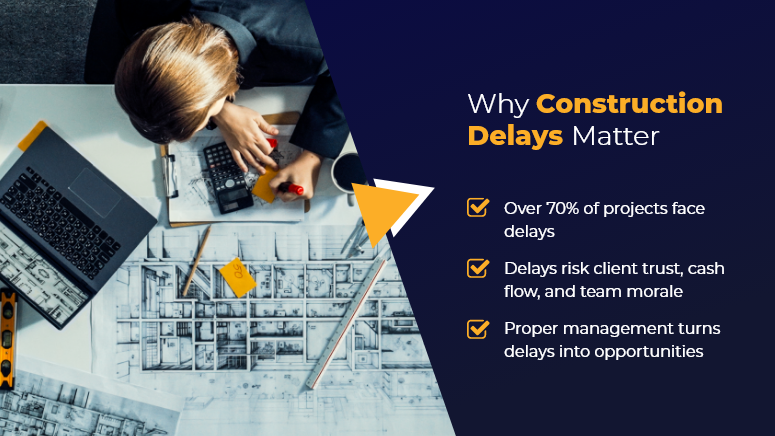
In construction, time is money and trust. Yet, research shows more than 70% of construction projects experience some form of delay. Whether it’s supply chain disruptions, weather conditions, or unforeseen site issues, construction delays can quickly damage client relationships.

However, delays don’t have to mean broken trust. In fact, how you manage them can strengthen your reputation. By being transparent, proactive, and strategic, you can keep your clients informed, maintain confidence, and still deliver high-quality results.

In this article, we’ll explore proven ways to handle construction delays while preserving client trust, and how OConstruction’s integrated tools make the process more manageable and less stressful.

Why Construction Delays Matter

Why Managing Construction Delays Matters

Construction delays are inevitable, but unmanaged delays can lead to costly disputes, legal issues, and reputational damage.

The Business Case

  • Financial Stability – Prolonged delays impact cash flow and increase overhead costs.
  • Client Retention – How you communicate during a delay determines whether a client will hire you again.
  • Team Morale – Clear direction during delays keeps crews focused and productive.

Who Benefits the Most?

  • Project Managers – Reduce the chaos and uncertainty when schedules shift.
  • Contractors & Builders – Maintain relationships that lead to repeat business.
  • Clients & Developers – Receive honest updates and realistic expectations.

Pain vs. Solution

Without proper delay management:

  • Clients feel blindsided by sudden timeline changes.
  • Costs spiral without clear recovery plans.
  • Trust erodes, leading to lost contracts.

With proactive management—especially using OConstruction’s construction project management tools—you can:

  • Track delay causes and impacts in real time.
  • Communicate updates with accurate, data-backed insights.
  • Adjust schedules and resources to recover timelines faster.

Best Practices & Strategies to Handle Construction Delays

1. Identify the Cause Early

  • Document delays as soon as they occur and identify root causes.
  • Use OConstruction’s delay tracking module to categorize delays (weather, supply chain, labor, etc.).

2. Communicate Transparently with Clients

  • Share the issue immediately — before they ask.
  • Explain what happened, the expected impact, and your recovery plan.
  • With OConstruction, you can send real-time progress reports backed by visual dashboards.

3. Provide a Recovery Plan, Not Just a Problem

  • Offer alternative solutions, such as overlapping tasks or bringing in extra crews.
  • Use the platform’s schedule simulation feature to model recovery scenarios.

4. Avoid Overpromising

  • Don’t reduce timelines unrealistically to appease clients—it leads to bigger disappointment.
  • Always base new estimates on verified data and historical project performance.

5. Strengthen Contract Clauses for Delays

  • Include realistic delay clauses and weather contingencies in contracts.
  • Store and manage all contracts in OConstruction’s secure document repository.

6. Keep Internal Teams Aligned

  • Ensure all subcontractors and teams understand the updated schedule.
  • Push instant notifications via OConstruction’s mobile app to keep everyone in sync.

7. Learn from Each Delay

  • Conduct a post-project review to see how delays were handled.
  • Feed these lessons into future construction risk management processes.

Customer Success Story

For example, NorthPoint Builders, a mid-sized general contracting firm, faced a three-week delay when a critical supplier missed a delivery. Instead of avoiding the conversation, they used OConstruction to:

  • Generate a detailed delay impact report.
  • Share a realistic recovery schedule with the client within 24 hours.
  • Track every step of the revised plan through milestone dashboards.

The result? The client appreciated the transparency and awarded them two more projects the following year. Their on-time delivery rate improved by 15%, and internal team coordination became smoother than ever.

Key Takeaways

Construction delays don’t have to destroy client relationships—if you handle them right. The key is to act early, communicate honestly, and back your recovery plan with data.

Actionable Insights:

  • Act quickly – The sooner you address a delay, the easier it is to recover.
  • Communicate clearly – Clients value honesty over sugar-coated updates.
  • Use technology – Platforms like OConstruction make tracking and recovery faster.

By reframing delays as opportunities to showcase professionalism, you can turn potential losses into lasting trust.

How to Avoid Vendor Miscommunication in Construction Projects

Vendor miscommunication is one of the leading causes of construction delays, budget blowouts, and missed deadlines. A single overlooked message, misinterpreted spec, or verbal instruction can send your entire schedule off track. In construction, where timing and accuracy are everything, even minor gaps between project teams and vendors can create costly chaos.

In this blog, we’ll show you how to eliminate vendor miscommunication, streamline collaboration, and deliver projects on time — using practical steps and powerful tools like OConstruction.

Why Vendor Miscommunication is a Big Deal

In construction, vendor miscommunication isn’t just a misstep — it’s a business risk. Here’s what’s at stake:

  • Budget overruns: Misunderstood specs or delays from vendors quickly inflate costs.
  • Schedule delays: Inaccurate timelines or status reports stall progress.
  • Safety concerns: Incomplete or unclear updates can lead to on-site hazards.

Who suffers the most?

  • Project managers, who juggle multiple vendors and schedules
  • Procurement teams, trying to coordinate timely deliveries
  • Field supervisors, relying on real-time updates to avoid errors

Real-Life Scenario:

A contractor sends outdated blueprints to a supplier. Materials arrive cut to the wrong specs. The result? A two-week delay and thousands were lost. In another case, a subcontractor misses a verbal update and skips the site — leaving the crew idle.

Avoid Miscommunication Between Project Teams & Vendors

7 Proven Ways to Avoid Vendor Miscommunication

1. Centralize Communication on a Single Platform

Stop scattering project updates across emails, spreadsheets, and chat threads. Use a centralized tool like OConstruction to:

  • Maintain full visibility for all teams
  • Share real-time updates instantly
  • Control document versions and reduce errors

Result: Everyone stays on the same page — literally.

2. Standardize Vendor Onboarding

Don’t assume vendors know how you work.

  • Set expectations clearly from day one
  • Share your preferred communication channels and frequency
  • Use digital forms to gather vendor info and assign roles

Result: Consistency and fewer misunderstandings from day one.

3. Use Communication Templates

Templates eliminate ambiguity. Standardize your:

  • RFIs
  • Daily reports
  • Task checklists
  • Work orders

Result: Clearer instructions, even when team members change.

4. Automate All Activity Logs

Manual tracking is risky. Let your software handle it.

  • Log every file update, task status, and vendor comment
  • Keep a time-stamped trail for accountability
  • Use built-in alerts to catch missing actions

Result: A digital paper trail that protects your project.

5. Create Vendor Dashboards

Give vendors limited but meaningful access:

  • Assigned tasks and their status
  • Document versions
  • Shared calendars and deadlines

Result: Increased transparency and less back-and-forth.

6. Avoid Verbal-Only Instructions

Train your team to document everything.

  • Use built-in voice-to-text tools in OConstruction
  • Tag vendors in updates to notify instantly
  • Log site instructions in writing — even after a quick call

Result: No more “but you said…” moments.

7. Schedule Weekly Check-Ins and Log Them

Don’t rely on memory.

  • Host short weekly syncs with vendors
  • Use video or chat, but record and assign follow-ups
  • Keep meeting notes in the same platform

Result: Early issue detection and smoother hand-offs.

Use Case: How a Construction Firm Cut Vendor Miscommunication by 60%

Skyline Contractors, a mid-sized construction company, struggled with frequent vendor issues — missed updates, outdated drawings, and late deliveries.

After switching to OConstruction, they:

  • Gave vendors shared timelines and dashboards
  • Required all updates to be logged digitally
  • Used version control to avoid spec errors

The result? A 60% drop in vendor-related issues within 90 days. Projects ran faster, and clients noticed the improvement.

Key Takeaways

  • Vendor miscommunication leads to real costs — both financial and operational.
  • You can’t eliminate mistakes with just emails and calls.
  • Modern construction needs real-time, centralized communication.

Here’s what works:

  • Use one platform to manage all vendor communication
  • Standardize your process with onboarding flows and templates
  • Automate task and comment logging to avoid manual slip-ups
  • Keep vendors looped in with dashboards and shared timelines

By combining these habits with a tool like OConstruction, you transform communication chaos into clarity — and that clarity drives project success.

Top Benefits of OConstruction Project Management

Construction Project Management Software is an intricate, high-stakes endeavor requiring seamless coordination, real-time communication, and meticulous planning.

From managing tight schedules and overseeing on-site activities to staying within budget and ensuring quality control, construction teams face unique challenges every day.

OConstruction  Software is specifically crafted to meet these demands, offering an all-in-one platform to streamline every phase of construction, from initial planning to project delivery.

With OConstruction Managers can:

  • Centralize Communication: Keep all project-related discussions, documents, and updates in one place, reducing misunderstandings and keeping every team member aligned with project goals.
  • Optimize Scheduling and Resource Allocation: Plan every stage of the project, allocate resources effectively, and adjust schedules based on real-time data, ensuring that work progresses smoothly and deadlines are met.
  • Enhance Collaboration Across Teams: Facilitate collaboration between on-site and remote teams, subcontractors, and clients. Real-time access to project updates ensures everyone has the latest information, boosting accountability and teamwork.

With these powerful features, OConstruction transforms the way construction teams operate, enabling them to handle projects of any size with greater precision, speed, and collaboration.

Discover how OConstruction can elevate your project management approach and help your team deliver successful construction projects on time and within budget.

O construction

Conclusion

As construction projects grow in scale and complexity, the need for effective project management becomes more crucial than ever. OConstruction Project Management Software is designed to address the unique challenges faced by construction professionals, empowering teams to operate more efficiently, collaborate effectively, and maintain complete control over every aspect of the project lifecycle.

In a dynamic industry like construction, having a reliable project management solution is key to staying competitive and delivering exceptional results.

OConstruction Project Management Software offers the tools and support needed to manage time, costs, and resources effectively, leading to more successful outcomes, fewer risks, and a stronger bottom line.

Take your construction to the next level with OConstruction. Start a free trial today and experience how OConstruction can transform your projects, improve collaboration, and drive your business forward with confidence.

Category: Construction Academy

Subcategory: Budgeting and Planning

Subcategory: Construction Phase

Subcategory: Design Coordination

Subcategory: Estimation Techniques

Subcategory: Initiation and Feasibility

Subcategory: Introduction

Subcategory: Personal Management

Subcategory: Project Close-Out

Subcategory: Project Scheduling

Subcategory: Project Teams

Subcategory: Proposal Management

Subcategory: Total Quality Management

Subcategory: Tracking and Control

Subcategory: Work Breakdown

Category: Help Desk

Subcategory: Client

Subcategory: Construction 101

Subcategory: Contractor Management

Subcategory: Expense

Subcategory: Finance Budget

Subcategory: Inventory Management

Subcategory: My Approvals

Subcategory: Site Management

Subcategory: Vendor Management