Why Specialty Contractors Need Industry-Specific Project Management Software

Construction projects rarely fail because of a lack of effort — they fail because of poor coordination, fragmented data, and delayed decisions on-site. Specialty contractors working in MEP, HVAC, electrical, plumbing, interiors, facade, fire safety, and EPC packages face even greater pressure.

They operate within tight dependencies, complex BOQs, daily progress tracking, and constant coordination with general contractors and consultants.

However, many teams still rely on generic construction tools, spreadsheets, and WhatsApp updates that were never designed for specialty trade execution. This gap leads to misaligned BOQs, delayed DPRs, cost leakages, and rework — all of which directly impact margins.

This is exactly where specialty contractor software becomes critical.

In this blog, you will learn why generic construction management tools fail specialty contractors, what industry-specific software should deliver, and how OConstruction enables planning, BOQ accuracy, DPR automation, cost control, and real-time site execution — all in one unified platform for modern construction teams.
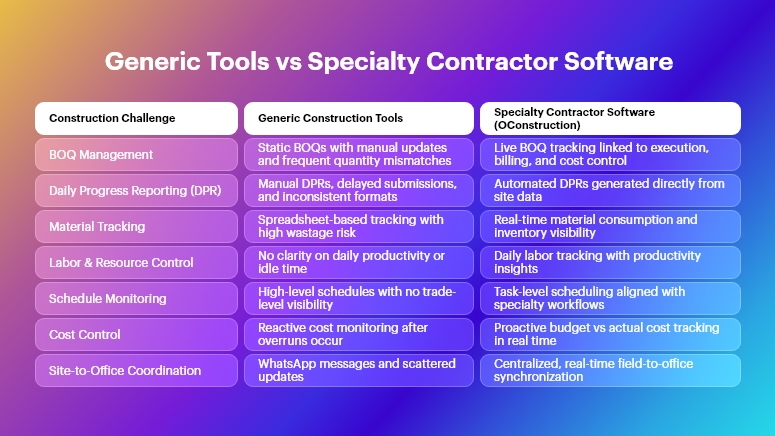
Generic Tools vs Specialty Contractor Software

Why This Matters in Construction

Specialty contractors sit at the execution core of construction projects. Yet they often operate with the least digital visibility.

The Real-World Impact of Poor Systems

When specialty contractors use disconnected tools, the consequences are immediate and costly:

  • Cost overruns due to inaccurate BOQs: Without live BOQ tracking, material quantities drift from estimates, leading to excess procurement, wastage, or shortages that halt work.
  • Delayed DPRs and weak reporting: Manual daily progress reporting results in late submissions, incorrect quantities, and disputes with billing and certification.
  • Rework and coordination failures: When drawings, tasks, and approvals are not synced, teams execute outdated instructions, increasing rework and site conflicts.
  • Material and labor inefficiency: Specialty trades depend on precise sequencing. Poor tracking causes idle labor, underutilized resources, and schedule slippage.

Across Construction Segments

These challenges affect every project type:

  • Real estate projects struggle with interior and MEP coordination delays.
  • Infrastructure and highways face material reconciliation issues across long stretches.
  • Commercial projects encounter billing disputes due to mismatched DPRs.
  • EPC companies battle fragmented data between planning, execution, and finance teams.

Why Excel, WhatsApp, and Generic Tools Fail

Traditional methods fail because they are:

  • Not built for BOQ-driven execution
  • Disconnected from site realities
  • Manual and error-prone
  • Unable to scale across multiple sites

Therefore, modern construction teams require specialty contractor software that reflects how work actually happens on-site — not how it looks in spreadsheets.

Best Practices, Frameworks & Actionable Tips for Specialty Contractors

To succeed, specialty contractors must align planning, execution, and reporting on a single system. Below are implementation-ready best practices — mapped directly to how OConstruction solves them.

BOQ & Estimate Management Best Practices

  • Create execution-linked BOQs, not static documents: BOQs should directly connect to tasks, materials, and billing items so quantities update automatically as work progresses.
  • Track BOQ vs actuals daily: Monitoring planned vs executed quantities helps identify deviations early and prevents end-of-project surprises.
  • Standardize BOQs across sites: Multi-site contractors benefit from reusable BOQ templates that enforce consistency and improve estimation accuracy.

How OConstruction Helps: OConstruction enables live BOQ tracking, variance analysis, and estimate-to-execution linkage, ensuring quantity control from day one.

DPR Automation & Daily Site Logs

  • Capture progress directly from the site: Site engineers should log work progress daily without manual consolidation.
  • Link DPRs to BOQs and tasks: This ensures reported quantities are verifiable and billable.
  • Standardize DPR formats across projects: Consistent reporting improves trust with clients, consultants, and internal teams.

How OConstruction Helps: With DPR automation, OConstruction converts site updates into accurate daily reports — reducing reporting time by up to 40%.

Project Planning & Schedule Tracking

  • Break work into trade-specific tasks: Generic schedules miss specialty dependencies. Tasks should reflect actual site workflows.
  • Monitor slippages in real time: Early alerts help reassign labor or materials before delays escalate.
  • Align schedules with BOQs and resources: Planning should not exist in isolation from quantities and manpower.

How OConstruction Helps: OConstruction provides construction-ready planning and schedule tracking, integrated with BOQs and resource data.

Resource, Labor & Material Tracking

  • Track labor deployment daily: Labor productivity is a major cost driver for specialty contractors.
  • Monitor material consumption vs plan: Prevent pilferage, wastage, and over-ordering.
  • Digitize site inventory movements: Maintain accountability across stores and sites.

How OConstruction Helps: OConstruction enables real-time labor, material, and inventory tracking, improving utilization and reducing wastage.

Cost Control & Budget Monitoring

  • Track costs against BOQ line items: This provides clarity on where margins are gained or lost.
  • Monitor committed vs actual costs: Prevent budget overruns by controlling purchase and subcontracting expenses.
  • Enable role-based cost visibility: Managers see financial health without exposing sensitive data unnecessarily.

How OConstruction Helps: With cost control dashboards, OConstruction delivers real-time budget visibility for specialty contractors.

Multi-Site Coordination & Communication

  • Centralize drawings, tasks, and updates: Avoid conflicting instructions across locations.
  • Replace WhatsApp with structured workflows: Informal communication leads to missed actions and disputes.
  • Ensure field-to-office synchronization: Decisions must reflect real-time site conditions.

How OConstruction Helps: OConstruction provides real-time field-to-office sync, ensuring everyone works from a single source of truth.

Construction Success Story

For example, a mid-sized MEP contracting company adopted OConstruction’s BOQ and DPR automation to overcome recurring billing disputes and reporting delays.

Previously, their site teams spent 3–4 hours daily consolidating DPRs and reconciling quantities. BOQ mismatches led to frequent rework and payment delays.

Within 60 days of using OConstruction:

  • DPR preparation time reduced by 35%
  • BOQ accuracy improved significantly, minimizing quantity disputes
  • Material wastage dropped by 20%
  • Site-to-office communication became real-time

The transformation delivered higher accountability, faster billing cycles, and improved project profitability—without increasing overhead.

Key Takeaways & Closing

Specialty contractors cannot afford tools that ignore on-site realities. Generic construction software lacks the depth, precision, and workflows required for specialty trade execution.

Key takeaways:

  • Specialty contractor software is no longer optional — it is essential
  • BOQ-driven execution and DPR automation prevent cost leakage
  • Real-time visibility improves accountability and decision-making
  • Integrated systems reduce rework, delays, and disputes

By adopting specialty contractor software like OConstruction, teams gain control, clarity, and confidence across planning, execution, and reporting — today and for the future.

FAQs

1. What is specialty contractor software in construction?

Specialty contractor software is designed specifically for trade-based execution, covering BOQs, DPRs, materials, labor, and cost control tailored to specialty contractors.

2. Why do specialty contractors need different software than general contractors?

Because specialty trades rely heavily on quantity tracking, sequencing, and daily execution accuracy—areas where generic tools fall short.

3. How does specialty contractor software improve BOQ accuracy?

It links BOQs directly with execution data, ensuring quantities are tracked and updated in real time.

4. Can specialty contractor software reduce rework?

Yes. By centralizing tasks, drawings, and site updates, it minimizes miscommunication and execution errors.

5. Is specialty contractor software suitable for EPC companies?

Absolutely. EPC firms benefit from integrated planning, cost control, and reporting across multiple packages and sites.

6. How does OConstruction support specialty contractors?

OConstruction offers BOQ management, DPR automation, scheduling, cost control, inventory tracking, and real-time collaboration in one platform.

7. Can small specialty contractors use specialty contractor software?

Yes. Modern platforms like OConstruction are scalable and easy to adopt, even for growing contractors.

Automation in Construction: Where It Works (and Where It Doesn’t)

Automation in construction is no longer just a futuristic buzzword. It’s here, it’s real, and it’s changing how we build. From self-driving excavators to AI-powered scheduling tools, the construction industry is rapidly integrating automation. Yet, while some tasks benefit immensely, others hit walls due to complexity, cost, or human nuance.

In this blog, we’ll break down exactly where automation in construction works, where it doesn’t, and what business leaders should prioritize. Whether you’re a project manager, operations head, or construction tech innovator, this guide gives you clarity.

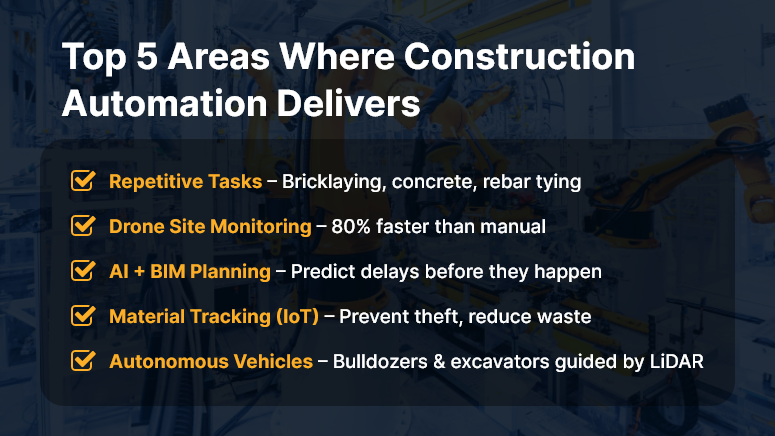
Top 5 Areas Where Construction Automation Delivers

Why Automation in Construction Matters to Your Business

In an industry battling labor shortages, rising material costs, and increasing safety risks, automation offers a much-needed edge.

Why should companies care? Because automation isn’t just about robots and AI — it’s about doing more with less, reducing human error, and speeding up delivery.

Who benefits most?

  • Contractors managing complex, multi-phase projects
  • Developers racing against tight deadlines
  • Site supervisors juggling labor and logistics daily

Real-world use cases:

  • Drones can conduct daily site inspections in 30 minutes instead of 3 hours.
  • Automated rebar tying machines cut labor time by up to 40%.
  • AI scheduling software reduces delays by predicting risks before they escalate.

Yet, not every task is ready for automation. Let’s explore what works — and what doesn’t.

Best Practices: Where Automation Works in Construction (And Where It Doesn’t)

Where Automation Works Well

  1. Repetitive, Labor-Intensive Tasks


    Tasks like bricklaying, concrete pouring, and rebar tying are ideal for automation. Robots excel in consistency and reduce strain injuries.

  2. Site Monitoring with Drones


    Drones can capture aerial data, track progress, and flag safety violations — faster and safer than manual inspection.

  3. BIM and AI for Planning


    Building Information Modeling (BIM) tools integrated with AI help teams forecast project timelines and detect clashes before construction begins.

  4. Material Tracking with IoT

    Sensors and RFID tags provide real-time visibility into material usage, preventing delays and theft.

  5. Automated Equipment and Vehicles


    Self-driving bulldozers and excavators, guided by GPS and LiDAR, enhance precision and reduce accidents.

Where Automation Still Struggles

  1. Creative or Judgment-Based Work


    Design, problem-solving, and on-the-fly decisions still require human nuance.

  2. Unstructured Environments


    Construction sites are dynamic. Not all robots or machines can adapt to terrain changes, weather, or unexpected events.

  3. Specialized Trade Work


    Tasks like plumbing, electrical wiring, or HVAC installation demand precision and adaptability — not ideal for current automation tools.

  4. High Cost vs. ROI


    Some technologies remain too expensive for mid-sized contractors with slim margins.

Quick Wins & Do’s and Don’ts

Do:

  • Start small — automate one workflow (like timesheet tracking or site inspection).
  • Train your workforce to work with, not against, machines.
  • Choose tech that integrates with your current construction platform.

Don’t:

  • Don’t automate for the sake of it. Align automation to business goals.
  • Avoid tools with steep learning curves or poor support.
  • Don’t ignore data security — automated systems need secure infrastructure.

Framework to Apply:

  • Step 1: Identify repetitive, high-volume tasks
  • Step 2: Evaluate ROI of automating each
  • Step 3: Pilot-test with one team or project
  • Step 4: Train users and monitor adoption
  • Step 5: Expand with feedback and continuous improvement

Use Case Example

For example, Skyline Builders, a mid-sized commercial construction company, used drone-based site inspections and AI-based progress tracking on a 12-month high-rise project.

Using the automated system reduced inspection time by 80%, flagged delays early, and improved compliance reporting — all without increasing overhead.

Here’s how: The drone captured daily images. The AI analyzed patterns against the project timeline. The team received visual reports that saved hours of manual coordination.

Key Takeaways & Closing Summary

Automation in construction is a powerful enabler — but only when used strategically.

  • It works best in repetitive, data-heavy, or dangerous tasks like site inspections, material tracking, and earthwork.
  • It still struggles with tasks that demand creativity, adaptability, or deep trade expertise.
  • Start small. Pilot-test. Train your team. Choose scalable tools.

The future of construction isn’t human vs. machine — it’s humans empowered by smart, integrated automation.

Why Digital Transformation is No Longer Optional in Construction

Digital transformation in construction used to be a competitive edge — now it’s survival.

According to a 2023 Deloitte report, 76% of construction firms plan to increase investment in digital tools over the next 12 months. The pressure to modernize is no longer about “staying ahead.” It’s about not falling behind.

Why? Because outdated manual workflows can no longer keep pace with the speed, scale, and complexity of today’s projects. From workforce tracking to budget control to compliance — everything demands real-time visibility and automation.

In this blog, we’ll explore why digital transformation in construction is mission-critical, what’s at stake, actionable strategies for adoption, and how platforms like OConstruction help businesses build smarter.

The Business Case: Why This Matters Now More Than Ever

The construction industry is notorious for productivity lags and paper-based processes. For decades, it lagged behind other sectors in tech adoption. But now, economic pressures, skilled labor shortages, and the increasing complexity of builds are forcing change.

Why Companies Should Care:

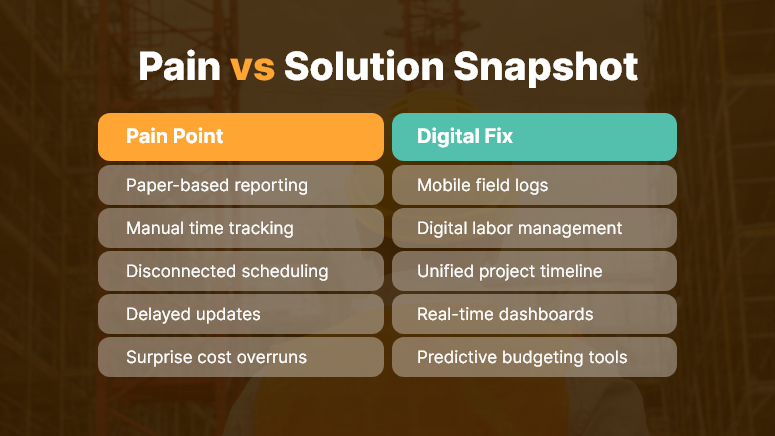
  • Manual errors = cost overruns. A small miscalculation or late update on paper can cost thousands.
  • Disconnected tools = miscommunication. Different teams using siloed tools create confusion and delays.

Lack of data = poor decisions. Real-time project insights lead to faster, smarter responses.

Who Benefits Most from Digital Transformation in Construction?

  • Project Managers: Gain real-time visibility into cost, labor, and progress.
  • Site Supervisors: Track field activity and issues from mobile devices.
  • Finance Teams: Automatically sync budgets, invoices, and approvals.
  • Compliance Officers: Access up-to-date documentation instantly.

Pain vs Solution Snapshot

Best Practices to Drive Digital Transformation in Construction

To succeed with digital transformation, construction businesses must rethink how they plan, operate, and scale. Let’s break down best practices, quick wins, and the strategic path forward.

DO: Start with High-Impact Use Cases

  • Begin with areas like field data collection, time tracking, or project scheduling where returns are immediate.
  • These modules show ROI quickly and help build internal support for broader tech adoption.

DON’T: Adopt Tools Without a Plan

  • Random tool purchases create more confusion than clarity.
  • Instead, align tech adoption with business goals — like reducing rework or improving jobsite safety.

DO: Choose an Integrated Platform

  • Avoid juggling multiple disconnected apps.
  • Use a unified digital platform like OConstruction that centralizes project scheduling, document management, budgeting, and communication.

DO: Train for Digital Readiness

  • One of the biggest barriers isn’t tech — it’s people.
  • Offer role-based onboarding, digital playbooks, and self-serve learning to bring crews up to speed.

DON’T: Wait for the “Perfect Time”

  • There will never be a perfect moment to digitize.
  • Start with a pilot project, gather results, and expand.

DO: Track and Measure Impact

  • Use built-in analytics dashboards to monitor adoption, efficiency gains, and performance metrics.
  • Share wins across the organization to build momentum.

Customer Use Case

For example, TeraBuild Projects, a civil infrastructure contractor, was juggling Excel sheets, whiteboards, and scattered communication apps.

By switching to OConstruction, they streamlined all project management tasks into one platform.

  • Their site supervisors began logging progress from mobile devices.
  • The finance team gained instant visibility into budget spend.
  • Change orders and RFIs were approved 50% faster.

Within 6 months, TeraBuild reduced average project delays by 32% and cut administrative overhead by 40%.

Key Takeaways & Summary

Digital transformation in construction is not a luxury — it’s a strategic necessity. The longer you rely on manual, outdated processes, the more vulnerable you become to delays, errors, and inefficiencies.

Key insights to remember:

  • Speed matters. Real-time collaboration accelerates project outcomes.
  • Visibility matters. Centralized dashboards eliminate blind spots.
    Integration matters. One platform to manage all your workflows is a must.

OConstruction empowers construction teams to transition from fragmented operations to smart, connected, and efficient workflows.

The bottom line?

If you want to remain competitive, digital transformation isn’t optional. It’s fundamental.

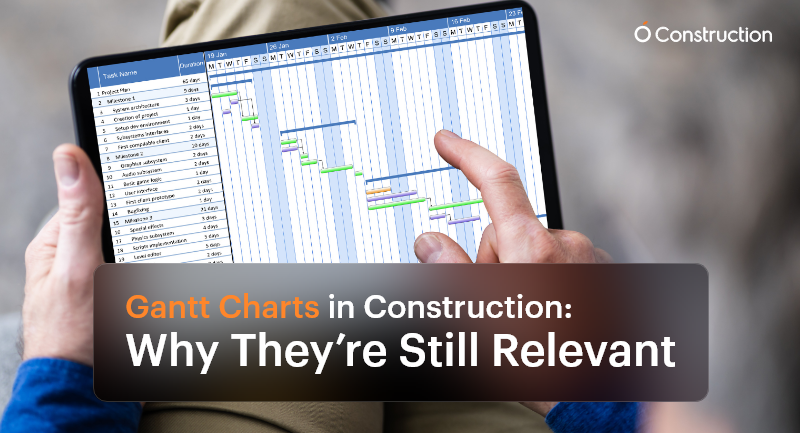
Gantt Charts in Construction: Why They’re Still Relevant

Despite the surge of advanced AI-driven scheduling tools and live dashboards, Gantt charts in construction remain a cornerstone of project management. Why? Because construction is more intricate, deadline-driven, and team-dependent than ever before.

Every team needs a visual and reliable roadmap that brings clarity to the chaos, from project managers and subcontractors to site supervisors and procurement officers. This is where Gantt charts continue to shine.

Why Gantt Charts Still Matter in Construction

Construction is not just about bricks and concrete—it’s about precision planning, coordination, and communication. A single scheduling misstep can cause ripple effects that delay inspections, exceed budgets, or stall final delivery.
Here’s how Gantt charts in construction offer critical value:

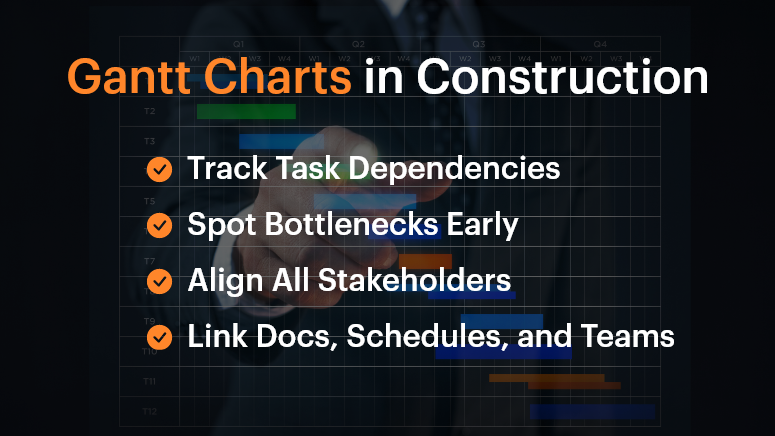
Gantt Charts in Construction

1. Track Dependencies Across Subcontractors

In a construction project, workstreams are tightly connected. Plumbing must be completed before walls are closed. Electrical systems may need to be coordinated with HVAC layouts.

Gantt charts help teams visualize and manage these dependencies—if Task A is delayed, you immediately see how Task B is affected. This preemptive visibility is vital for planning contingencies.

2. Identify Project Bottlenecks Early

As the chart progresses, you can pinpoint lagging tasks before they become full-blown roadblocks. For example, a delayed steel delivery in the foundation phase will affect structural framing and roofing. Gantt charts enable you to identify those early warning signs and make adjustments in real-time.

3. Keep All Stakeholders Aligned

When different teams—from architects to subcontractors—work off the same chart, everyone understands what’s happening and when. This unified view reduces miscommunication and avoids scope creep.

Who Benefits Most from Gantt Charts?

Project Managers

They oversee everything from timelines to team coordination. Gantt charts help them:

  • Visualize overlapping tasks
  • Track milestones
  • Adjust schedules on the fly

Site Supervisors

Working in the field, they need clear, day-to-day task breakdowns. Gantt charts:

  • Show what needs to happen today, tomorrow, or next week
  • Improve coordination between field teams

Procurement Teams

Timing material delivery is critical. Gantt charts let them:

  • Schedule deliveries aligned with task progress
  • Avoid storage or material wastage

Real-World Example: Coordinating Complex Trades

Imagine a multi-story commercial project with concurrent plumbing, HVAC, and electrical work. Gantt charts allow managers to sequence tasks precisely so that the plumbing team completes their install before HVAC ducts are installed, avoiding rework or clashes.

Without this planning, teams step on each other’s toes, leading to delays, friction, and budget overshoots.

Best Practices for Using Gantt Charts in Construction

DOs:

  • Use Dependencies Wisely: Link tasks based on logical, real-world sequences. If one activity slips, the dependent tasks should automatically adjust.
  • Break Down Phases: Don’t lump the entire project into a single line. Divide it into logical segments: design, permitting, site prep, foundation, structure, MEP, interiors, inspections, and handover.
  • Update Frequently: Treat your Gantt chart as a live document. Weekly or daily updates ensure it reflects the real-time site status, not just the plan.

DON’T:

  • Overcomplicate It: Don’t try to document every micro-task. Focus on deliverables and milestones to keep things clean and readable.
  • Use Static Formats: Avoid spreadsheets or printed charts. They become outdated quickly. Use digital, interactive platforms.
  • Work in Isolation: Don’t keep the chart limited to a few managers. Make sure it’s accessible and collaborative for the entire team.

What OConstruction’s Gantt Chart Feature Brings to the Table

OConstruction amplifies the power of Gantt charts with purpose-built features for modern construction workflows:

  • Drag-and-Drop Scheduling: Adjust tasks easily to reflect real-world changes on site.
  • Color-Coded Status: Visual cues show task health—green for done, yellow for pending, red for delays.
  • Real-Time Syncing: Updates from field engineers or subcontractors automatically update the chart.
  • Forecasting: Identify tasks at risk of delay with trend analysis and alert mechanisms.
  • Integrated Documents: Link each task with blueprints, contracts, or RFIs for quick reference.

A Simple Framework to Build Gantt Charts

Here’s how to get started:

  • List Major Phases: Design, site clearance, structural work, MEP, finishing, and handover.
  • Break Into Tasks: Under each phase, define key deliverables (e.g., concrete pour, steel delivery, plumbing inspection).
  • Assign Durations and Owners: Estimate how long each task takes and who’s responsible.
  • Map Dependencies: Connect the tasks that rely on one another.
  • Collaborate: Share with teams and adjust based on their feedback.
  • Publish and Track: Keep the chart open and updated throughout the build.

Customer Story

Build Rite Constructions, a mid-size commercial builder, implemented OConstruction’s Gantt chart feature across five simultaneous projects. The result?

  • 28% reduction in schedule overruns
  • Improved vendor coordination
  • Fewer site clashes between trades
  • Real-time timeline visibility for both on-site teams and HQ

Their secret? They used Gantt charts not just for planning, but for active coordination and adjustment.

Final Thoughts

Gantt charts in construction aren’t just old-school charts—they’re dynamic tools that drive clarity and performance. In today’s fast-moving, multi-stakeholder projects, they provide the structure teams need to stay on track.

With modern tools like OConstruction, Gantt charts become a live, interactive command center for your entire project.

Don’t manage construction chaos. Plan around it—with a Gantt chart that evolves as your project does.

FAQs

Q1. Why are Gantt charts still relevant in modern construction projects?
Because construction involves multiple dependencies, trades, and deadlines, Gantt charts provide a clear visual roadmap that keeps teams aligned, prevents delays, and ensures milestones are met.

Q2. Who benefits most from using Gantt charts in construction?
Project managers, site supervisors, and procurement teams all gain clarity. Gantt charts help managers track milestones, field teams see day-to-day priorities, and procurement plan material deliveries on time.

Q3. How do Gantt charts help with task dependencies?
They make dependencies visible—so if one task slips (like plumbing installation), you immediately see how it impacts the next (like HVAC or electrical work), allowing you to plan contingencies early.

Q4. Can Gantt charts prevent delays and bottlenecks?
Yes. By highlighting lagging tasks in real-time, Gantt charts allow managers to act before issues snowball into schedule overruns.

Q5. What’s the biggest mistake teams make with Gantt charts?
Overcomplicating them. Trying to track every micro-task makes charts unreadable. The focus should be on phases, deliverables, and milestones.

Q6. Why are digital Gantt charts better than spreadsheets or paper charts?
Printed or static charts become outdated quickly. Digital Gantt charts update in real time, are accessible to all stakeholders, and integrate directly with project data.

Why Construction Projects Go Over Budget – and How to Prevent It

Did you know that 9 out of 10 construction projects exceed their budget? Whether it’s a residential build, commercial infrastructure, or a government contract, blowing past the planned costs has become the norm rather than the exception.

From material price fluctuations to poor planning and lack of real-time tracking, the reasons are many, but the consequences are always the same: delays, disputes, and damaged reputations.

In this blog, we’ll break down why construction projects go over budget, what mistakes to avoid, and how you can prevent cost overruns with digital project management tools like OConstruction.

Business Relevance & Why It Matters

For construction businesses, accurate budgeting isn’t just a financial necessity—it’s a strategic advantage. Budget overruns lead to:

  • Shrinking profit margins
  • Lost client trust
  • Project delays and rework
  • Legal or contractual penalties

Who should care?

  • Project Managers are trying to stay on schedule
  • Finance & Procurement teams are monitoring costs
  • Contractors bidding for new jobs
  • Operations heads scaling multiple projects

Use Case 1: A mid-sized contractor wins a hospital construction tender but underestimates steel prices. Six months in, they’re 18% over budget and forced to renegotiate terms.

Use Case 2: A real estate developer launches five residential towers simultaneously but lacks real-time cost visibility. Cost overruns on two sites derail cash flow for the remaining three.

The takeaway: You can’t eliminate unpredictability in construction, but you can eliminate guesswork, miscommunication, and inefficient tracking.

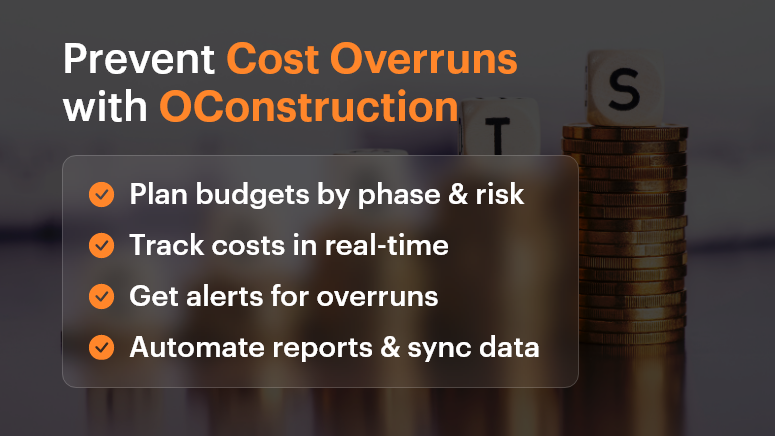
Prevent Cost Overruns with OConstruction

Best Practices, Frameworks, and Actionable Strategies

Do’s and Don’ts of Budget Control

Do: Conduct detailed cost estimation before kickoff

Break down each project phase—design, permits, labor, materials, contingency. Don’t just lump it into one “build” line item.

Don’t: Assume past project budgets will always match future ones

Prices for materials, fuel, labor, and logistics vary. Recheck market conditions and local pricing.

Do: Set up a centralized cost-tracking system

Use OConstruction’s dashboard to assign cost codes, track spending in real time, and compare actual vs. forecast.

Don’t: Rely on spreadsheets or disconnected tools

Manual tracking leads to errors, version control issues, and missed updates.

Quick Wins to Control Costs Early

  • Baseline your budget early. Set realistic expectations with internal stakeholders and clients.
  • Use templates and historical data. Leverage past projects in OConstruction to create smarter forecasts.
  • Account for risks. Add a 5-15% contingency buffer for unknowns.
  • Define a change order process. Make sure scope changes are documented, approved, and re-costed before execution.

A 5-Step Framework to Prevent Construction Cost Overruns

  • Scope Planning

Define deliverables, responsibilities, and phases clearly with all stakeholders. Avoid vague assumptions.

  • Detailed Estimation

Include unit costs, productivity rates, lead times, and inflation where relevant.

  • Digital Budget Tracking

Use OConstruction’s project financials module to track committed costs, invoices, and payments in one place.

  • Issue and Delay Management

Set up automated alerts for schedule slips, budget thresholds, or material delays.

  • Regular Reporting & Forecasting

Generate weekly reports. Adjust projections as needed based on actuals.

Tip: Integrate OConstruction with your accounting or ERP tool for seamless data sync.

Customer Story

For example, Summit Build, a commercial construction firm, used OConstruction’s cost-tracking feature to cut down 12% in preventable overruns within just two quarters.

They were managing three hospital projects and used the platform to:

  • Set real-time alerts when labor costs exceed benchmarks
  • Automate change order documentation and approval workflows
  • Visualize actual vs. forecasted spend in a single dashboard

The result? $750K saved, faster billing cycles, and improved team accountability.

Key Takeaways

Cost overruns are one of the biggest threats to profitability in construction. But they’re not inevitable.

With proper planning, real-time tracking, and digital tools like OConstruction, you can identify risks early, make smarter decisions, and keep your projects on budget and on time.

Start small, implement one strategy at a time, and scale with confidence.

FAQs

Q1. Why do most construction projects go over budget?
Construction projects exceed budgets due to inaccurate cost estimation, rising material prices, poor planning, scope creep, and lack of real-time cost tracking.

Q2. What are the hidden costs in construction projects that teams often miss?
Common hidden costs include permit fees, delays due to weather or labor shortages, design revisions, material wastage, and unplanned change orders.

Q3. How can project managers prevent cost overruns early?
By conducting detailed cost estimation, adding contingency buffers, setting up a change order process, and using digital tools for real-time tracking, project managers can control costs from the start.

Q4. Why are spreadsheets not reliable for construction cost management?
Spreadsheets often lead to errors, version mismatches, and missed updates. A centralized project management software like OConstruction ensures accuracy, transparency, and real-time visibility.

Q5. How does OConstruction help in controlling project costs?
OConstruction provides real-time budget tracking, automated alerts for cost thresholds, change order management, and integration with accounting/ERP tools, helping teams stay on budget.

The Role of Mobile Access in Modern Construction Project Management

Construction is a highly dynamic industry that demands agility, communication, and quick decision-making. Today, leveraging mobile access in construction project management software is transforming the way projects are managed, both on-site and off-site.

As construction projects grow in complexity, having real-time access to project data becomes essential for teams working across different locations.

In this blog, we will discuss the significant benefits of mobile access in construction management software, how it enhances productivity, and why it’s becoming indispensable in modern construction operations.

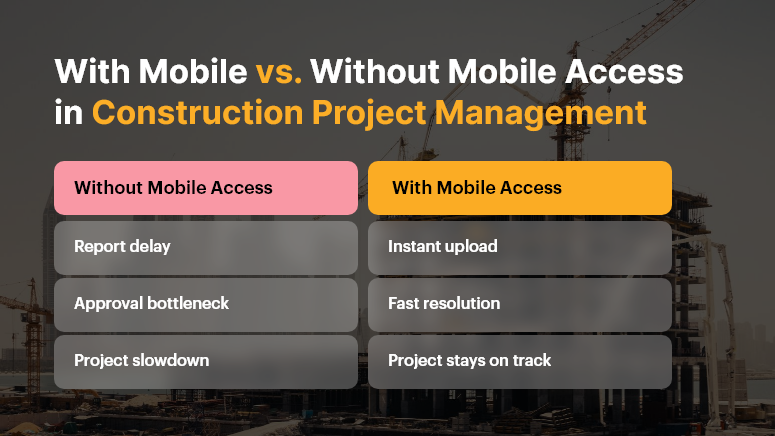
With Mobile vs. Without Mobile Access in Construction Project Management

Why Mobile Access is Essential in Construction Project Management

Managing a construction project involves juggling tasks, timelines, budgets, and resources. Traditionally, communication was limited to phone calls, emails, or in-person meetings, which led to delays and miscommunication. Today, construction project management software with mobile access eliminates these barriers by providing instant updates and real-time collaboration across all stakeholders.

Here’s why mobile access matters in modern construction:

  • Real-Time Communication: Immediate updates, messaging, and notifications between teams and the office.
  • Task Tracking: Managers and field workers can track progress, reassign tasks, and set deadlines directly from their mobile devices.
  • On-Site Documentation: Workers can capture photos, videos, and notes to keep the project documented, eliminating paperwork.
  • Centralized Data Access: Contractors and site managers have access to the latest plans, blueprints, and documents, anywhere, anytime.

Mobile access to construction project management software streamlines workflows, boosts productivity, and reduces the chances of errors, ensuring timely project completion.

Key Benefits of Mobile Access in Construction Project Management Software

Mobile functionality in construction management software provides several advantages that enable projects to run more smoothly and efficiently. Let’s explore these key benefits:

1. Real-Time Updates and Notifications

Construction timelines are fluid, with tasks constantly changing due to unforeseen issues such as weather delays, material shortages, or design changes. Mobile access ensures that:

  • Updates are pushed instantly to team members, whether they are on-site or off-site
  • Supervisors can modify timelines or reassign tasks on the go
  • Critical information, like design changes or new tasks, is immediately accessible

Real-time notifications ensure no one misses important changes, keeping projects on schedule and under budget.

2. Enhanced Collaboration Across Teams

In construction, clear communication between the field and the office is crucial. Mobile access fosters better collaboration by enabling:

  • Sharing of images, documents, and plans between teams instantly
  • Direct messaging within the app eliminates the need for phone calls or emails
  • Seamless coordination between subcontractors, contractors, and project managers

With construction project management software, mobile tools allow teams to collaborate in real-time, regardless of location.

3. Faster Issue Resolution

Construction projects often face unexpected issues, such as design flaws, material shortages, or safety hazards. Mobile access allows field workers to:

  • Capture issues, add notes, and upload photos directly into the project management system
  • Collaborate with architects, engineers, or project managers to resolve problems immediately
  • Track the status of ongoing issues and the steps being taken to fix them

The ability to address issues in real-time leads to faster resolutions and minimized downtime, keeping projects on track.

4. On-the-Go Task and Resource Management

Managing tasks and resources is a dynamic, ongoing process in construction. Mobile access allows construction managers to:

  • Assign or modify tasks while on the move, keeping the project fluid and adaptable
  • Monitor team productivity in real-time and adjust resources as needed
  • Access up-to-date reports on project status, labor utilization, and material inventory

Construction project management software with mobile functionality ensures that no task is missed and resources are allocated efficiently, improving overall productivity.

5. Access to Key Documents Anytime, Anywhere

Blueprints, RFIs, and project plans are central to every construction project. With mobile access to construction project management software, your team can:

  • Open and view up-to-date drawings, documents, and specifications on-site
  • Use version-controlled documents to ensure everyone is working with the most recent information
  • Quickly access technical manuals, safety guidelines, and site-specific documents without leaving the field

This level of accessibility reduces the need for time-consuming back-and-forth between the office and job site, ensuring quick decisions can be made.

Top Mobile Features to Look For in Construction Project Management Software

When selecting construction project management software for mobile access, consider tools that offer the following features to maximize efficiency:

  • Cross-platform mobile apps (iOS and Android)
  • Offline capabilities for areas with poor internet connectivity
  • Push notifications for instant task and schedule updates
  • Document and photo upload features for field documentation
  • Task tracking with real-time status updates
  • Voice memo support for quick communication
  • GPS and location tagging for tracking on-site progress
  • Mobile-friendly Gantt charts and timelines

These features ensure that your construction management software adapts to the unique demands of the field while offering powerful on-the-go capabilities.

Improving Field Productivity with Mobile Access

Field productivity is a critical driver of project success, as every hour counts on construction sites. With mobile access, construction teams can:

  • Minimize downtime: Access to real-time information means fewer delays waiting for approvals or updates.
  • Increase efficiency: Workers can quickly check task lists, upload updates, and communicate with project managers without leaving the job site.
  • Track time and resources: Keep track of labor hours, equipment usage, and material deliveries to maintain budget and schedule adherence.

Mobile access through construction project management software allows managers to keep their team aligned and focused, driving increased productivity.

Case Example: Real-Time Mobile Access in Action

Let’s look at an example of how mobile access changes the course of a construction project:

  • Without mobile access: A supervisor notices a discrepancy in the foundation layout. They write it down, go back to the trailer, file a report, and wait for approval. This causes delays and potentially costly rework.
  • With mobile access: The supervisor takes a photo, tags the issue with a note, and instantly uploads it into the software. The project manager receives it in real-time, consults with the architect, and approves the fix — all within minutes. The issue is resolved quickly, saving both time and money.

This shows how real-time mobile access helps avoid delays, reduce rework, and keep projects within budget.

Challenges You Can Overcome with Mobile Construction Project Management Software

Using construction project management software with mobile capabilities helps mitigate some of the industry’s common challenges, including:

  • Communication breakdowns between the office and field teams
  • Missed or outdated documents that cause confusion or delays
  • Duplicated efforts or rework due to untracked task progress
  • Project delays caused by inefficient approvals and decision-making
  • Budget overruns from untracked changes or errors

Mobile-enabled construction software offers a comprehensive solution to these problems, helping teams work smarter, not harder.

Conclusion

Mobile access is transforming the construction industry. By integrating construction project management software with mobile functionality, project teams gain real-time collaboration, increased efficiency, and greater control over tasks and resources. As the construction industry moves toward digital solutions, having the right mobile tools ensures smoother workflows, fewer errors, and timely project delivery.

FAQs

Q1. Why is mobile access important for small construction teams?

Even small teams benefit from mobile access as it improves communication, task tracking, and document sharing, reducing the time spent on administrative tasks and enabling real-time updates.

Q2. Is mobile construction software secure?

Yes, modern construction project management software uses encryption, secure cloud storage, and role-based access to protect sensitive data.

Q3. Can construction workers use mobile apps offline?

Many mobile apps offer offline functionality, allowing users to update information when connectivity is restored.

Category: Construction Academy

Subcategory: Budgeting and Planning

Subcategory: Construction Phase

Subcategory: Design Coordination

Subcategory: Estimation Techniques

Subcategory: Initiation and Feasibility

Subcategory: Introduction

Subcategory: Personal Management

Subcategory: Project Close-Out

Subcategory: Project Scheduling

Subcategory: Project Teams

Subcategory: Proposal Management

Subcategory: Total Quality Management

Subcategory: Tracking and Control

Subcategory: Work Breakdown

Category: Help Desk

Subcategory: Client

Subcategory: Construction 101

Subcategory: Contractor Management

Subcategory: Expense

Subcategory: Finance Budget

Subcategory: Inventory Management

Subcategory: My Approvals

Subcategory: Site Management

Subcategory: Vendor Management