
Construction projects rarely fail because of a lack of effort — they fail because of poor coordination, fragmented data, and delayed decisions on-site. Specialty contractors working in MEP, HVAC, electrical, plumbing, interiors, facade, fire safety, and EPC packages face even greater pressure.
They operate within tight dependencies, complex BOQs, daily progress tracking, and constant coordination with general contractors and consultants.
However, many teams still rely on generic construction tools, spreadsheets, and WhatsApp updates that were never designed for specialty trade execution. This gap leads to misaligned BOQs, delayed DPRs, cost leakages, and rework — all of which directly impact margins.
This is exactly where specialty contractor software becomes critical.
In this blog, you will learn why generic construction management tools fail specialty contractors, what industry-specific software should deliver, and how OConstruction enables planning, BOQ accuracy, DPR automation, cost control, and real-time site execution — all in one unified platform for modern construction teams.
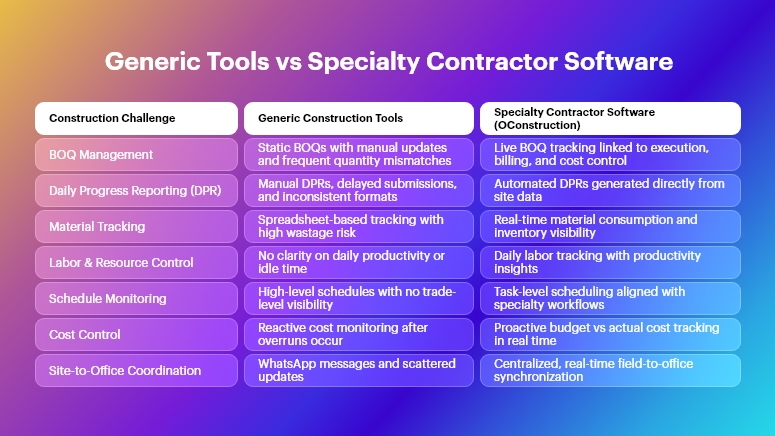
Why This Matters in Construction
Specialty contractors sit at the execution core of construction projects. Yet they often operate with the least digital visibility.
The Real-World Impact of Poor Systems
When specialty contractors use disconnected tools, the consequences are immediate and costly:
- Cost overruns due to inaccurate BOQs: Without live BOQ tracking, material quantities drift from estimates, leading to excess procurement, wastage, or shortages that halt work.
- Delayed DPRs and weak reporting: Manual daily progress reporting results in late submissions, incorrect quantities, and disputes with billing and certification.
- Rework and coordination failures: When drawings, tasks, and approvals are not synced, teams execute outdated instructions, increasing rework and site conflicts.
- Material and labor inefficiency: Specialty trades depend on precise sequencing. Poor tracking causes idle labor, underutilized resources, and schedule slippage.
Across Construction Segments
These challenges affect every project type:
- Real estate projects struggle with interior and MEP coordination delays.
- Infrastructure and highways face material reconciliation issues across long stretches.
- Commercial projects encounter billing disputes due to mismatched DPRs.
- EPC companies battle fragmented data between planning, execution, and finance teams.
Why Excel, WhatsApp, and Generic Tools Fail
Traditional methods fail because they are:
- Not built for BOQ-driven execution
- Disconnected from site realities
- Manual and error-prone
- Unable to scale across multiple sites
Therefore, modern construction teams require specialty contractor software that reflects how work actually happens on-site — not how it looks in spreadsheets.
Best Practices, Frameworks & Actionable Tips for Specialty Contractors
To succeed, specialty contractors must align planning, execution, and reporting on a single system. Below are implementation-ready best practices — mapped directly to how OConstruction solves them.
BOQ & Estimate Management Best Practices
- Create execution-linked BOQs, not static documents: BOQs should directly connect to tasks, materials, and billing items so quantities update automatically as work progresses.
- Track BOQ vs actuals daily: Monitoring planned vs executed quantities helps identify deviations early and prevents end-of-project surprises.
- Standardize BOQs across sites: Multi-site contractors benefit from reusable BOQ templates that enforce consistency and improve estimation accuracy.
How OConstruction Helps: OConstruction enables live BOQ tracking, variance analysis, and estimate-to-execution linkage, ensuring quantity control from day one.
DPR Automation & Daily Site Logs
- Capture progress directly from the site: Site engineers should log work progress daily without manual consolidation.
- Link DPRs to BOQs and tasks: This ensures reported quantities are verifiable and billable.
- Standardize DPR formats across projects: Consistent reporting improves trust with clients, consultants, and internal teams.
How OConstruction Helps: With DPR automation, OConstruction converts site updates into accurate daily reports — reducing reporting time by up to 40%.
Project Planning & Schedule Tracking
- Break work into trade-specific tasks: Generic schedules miss specialty dependencies. Tasks should reflect actual site workflows.
- Monitor slippages in real time: Early alerts help reassign labor or materials before delays escalate.
- Align schedules with BOQs and resources: Planning should not exist in isolation from quantities and manpower.
How OConstruction Helps: OConstruction provides construction-ready planning and schedule tracking, integrated with BOQs and resource data.
Resource, Labor & Material Tracking
- Track labor deployment daily: Labor productivity is a major cost driver for specialty contractors.
- Monitor material consumption vs plan: Prevent pilferage, wastage, and over-ordering.
- Digitize site inventory movements: Maintain accountability across stores and sites.
How OConstruction Helps: OConstruction enables real-time labor, material, and inventory tracking, improving utilization and reducing wastage.
Cost Control & Budget Monitoring
- Track costs against BOQ line items: This provides clarity on where margins are gained or lost.
- Monitor committed vs actual costs: Prevent budget overruns by controlling purchase and subcontracting expenses.
- Enable role-based cost visibility: Managers see financial health without exposing sensitive data unnecessarily.
How OConstruction Helps: With cost control dashboards, OConstruction delivers real-time budget visibility for specialty contractors.
Multi-Site Coordination & Communication
- Centralize drawings, tasks, and updates: Avoid conflicting instructions across locations.
- Replace WhatsApp with structured workflows: Informal communication leads to missed actions and disputes.
- Ensure field-to-office synchronization: Decisions must reflect real-time site conditions.
How OConstruction Helps: OConstruction provides real-time field-to-office sync, ensuring everyone works from a single source of truth.
Construction Success Story
For example, a mid-sized MEP contracting company adopted OConstruction’s BOQ and DPR automation to overcome recurring billing disputes and reporting delays.
Previously, their site teams spent 3–4 hours daily consolidating DPRs and reconciling quantities. BOQ mismatches led to frequent rework and payment delays.
Within 60 days of using OConstruction:
- DPR preparation time reduced by 35%
- BOQ accuracy improved significantly, minimizing quantity disputes
- Material wastage dropped by 20%
- Site-to-office communication became real-time
The transformation delivered higher accountability, faster billing cycles, and improved project profitability—without increasing overhead.
Key Takeaways & Closing
Specialty contractors cannot afford tools that ignore on-site realities. Generic construction software lacks the depth, precision, and workflows required for specialty trade execution.
Key takeaways:
- Specialty contractor software is no longer optional — it is essential
- BOQ-driven execution and DPR automation prevent cost leakage
- Real-time visibility improves accountability and decision-making
- Integrated systems reduce rework, delays, and disputes
By adopting specialty contractor software like OConstruction, teams gain control, clarity, and confidence across planning, execution, and reporting — today and for the future.
FAQs
1. What is specialty contractor software in construction?
Specialty contractor software is designed specifically for trade-based execution, covering BOQs, DPRs, materials, labor, and cost control tailored to specialty contractors.
2. Why do specialty contractors need different software than general contractors?
Because specialty trades rely heavily on quantity tracking, sequencing, and daily execution accuracy—areas where generic tools fall short.
3. How does specialty contractor software improve BOQ accuracy?
It links BOQs directly with execution data, ensuring quantities are tracked and updated in real time.
4. Can specialty contractor software reduce rework?
Yes. By centralizing tasks, drawings, and site updates, it minimizes miscommunication and execution errors.
5. Is specialty contractor software suitable for EPC companies?
Absolutely. EPC firms benefit from integrated planning, cost control, and reporting across multiple packages and sites.
6. How does OConstruction support specialty contractors?
OConstruction offers BOQ management, DPR automation, scheduling, cost control, inventory tracking, and real-time collaboration in one platform.
7. Can small specialty contractors use specialty contractor software?
Yes. Modern platforms like OConstruction are scalable and easy to adopt, even for growing contractors.