Margins in construction are thin, projects are complex, and labor is your largest controllable cost. Yet many contractors still manage crews with paper timesheets, scattered WhatsApp messages, and Excel files. The result? Time theft, ghost workers, payroll disputes, low productivity, and zero visibility into what actually happens on site each day.
At the same time, experts note that digital tools can dramatically improve labor management in construction, especially in markets like India that employ tens of millions of workers in this sector. Therefore, the conversation has shifted from “Should we digitize?” to “Which platform should we choose?”
This guide will walk you through the top 10 construction workforce management software in 2026, what each does best, and how to decide which one fits your business. If you’re a contractor, project manager, EPC firm, or construction business owner, this overview will help you align field productivity, labor compliance, and real-time reporting with your overall project goals.
What Is Construction Workforce Management Software?
Construction workforce management software is a specialized digital platform that helps you:
- Plan, schedule, and allocate crews across multiple projects and sites.
- Track time, attendance, and location for on-site and field teams — often with GPS, geofencing, or biometric features.
- Monitor productivity, safety, and compliance, including certifications and fatigue management.
- Integrate labor data with payroll, cost control, and project performance, so that every labor hour gets correctly billed and costs.
Unlike generic HR or attendance systems, construction workforce management software understands shifting crews, multiple subcontractors, changing job sites, and complex project schedules. This niche focus is what makes these tools so powerful for contractors.
Why Workforce Management Matters Even More in 2026
The direction of the industry is very clear:
- Labor productivity is under a microscope. Recent research on labor productivity frameworks in construction shows that better measurement and management of workforce performance directly improve project outcomes and margins.
- Digital tools are now a competitive necessity. Industry experts highlight how digital platforms can enhance labor tracking, documentation, and coordination in large construction markets, reducing chaos and improving organization.
- AI and connected job sites are emerging. From AI-driven safety analytics to predictive scheduling, tech is quickly evolving to reduce risk and increase predictability on complex sites.
In 2026, contractors that do not adopt construction workforce management software risk:
- Poor visibility into actual labor costs and productivity.
- Frequent disputes around overtime, attendance, and subcontractor billing.
- Compliance and safety gaps due to manual record-keeping.
- Difficulty scaling from a few projects to a multi-site, multi-city portfolio.
On the other hand, those who embrace construction workforce management software can standardize processes, capture accurate field data, and make decisions based on real-time jobsite intelligence, not guesswork.
How We Evaluated the Top 10 Tools
Before jumping into the list, here’s how this blog evaluates each construction workforce management software platform:
- Construction-focused: Built primarily for construction and field crews, not just generic HR.
- Field usability: Mobile apps, offline-friendly workflows, and easy adoption for workers and foremen.
- Time & attendance accuracy: GPS, geofencing, biometrics, or robust validation to reduce time theft and buddy-punching.
- Integration & reporting: Ability to connect with payroll, ERP, project management, or cost control systems and generate actionable dashboards.
- Scalability & compliance: Support for multi-project environments, regional labor rules, and audit-ready records.
With that in place, let’s look at the top 10 construction workforce management software in 2026.
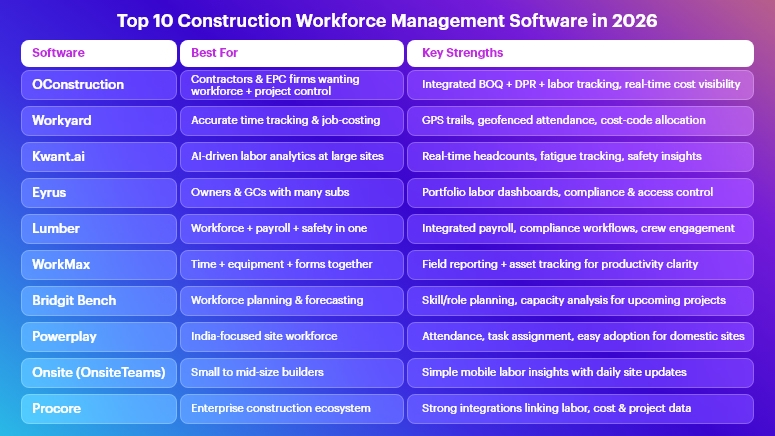
Top 10 Construction Workforce Management Software in 2026
OConstruction
Best for: Contractors and EPC firms who want workforce, BOQ, DPR, and project management in a single platform.
- Although OConstruction is best known as an end-to-end construction project management software (planning, tracking, BOQ management, DPR automation, cost control, and site execution), it naturally becomes a powerful construction workforce management software when you connect tasks, schedules, and DPRs to actual crews.
- Integrated project + workforce view: Because planning, scheduling, and site execution live in one system, you can see which team is doing what, where, and against which BOQ item or cost code, instead of jumping between disjointed tools.
DPR-driven labor visibility: Daily progress reporting captures manpower deployed, activities completed, and site issues, giving you clear traceability from labor hours to delivered quantities and cost impact. - Stronger cost control: Linking workforce deployment with budgets and BOQs helps you spot overstaffing, overtime surges, or underutilized teams early, before they hurt margins.
Workyard
Best for: Contractors that need highly accurate GPS time tracking and labor cost allocation.
Workyard offers workforce management software focused on field labor accuracy, with construction-specific scheduling, cost tracking, and GPS-backed time logs.
- Precise GPS trails & geofenced clock-ins ensure that workers clock in at the correct site, reducing time theft and increasing billing accuracy.
- Job-costing and cost-code mapping help finance and QS teams understand exactly how labor hours are split across activities, projects, and tasks.
- Mobile-first experience makes adoption easier for crews and foremen who live on their phones, not in spreadsheets.
Pricing
Starter – $6/mo per user
Pro – $13/mo per user
Enterprise – On request
Kwant.ai
Best for: Large contractors focused on real-time labor insights, safety, and fatigue management.
Kwant.ai positions itself as an end-to-end construction workforce management platform with IoT and AI capabilities.
- Real-time labor tracking with smart badges or sensors gives live headcounts and attendance by zone, improving emergency readiness and planning.
- AI-driven scheduling and fatigue monitoring help reduce incidents by identifying teams that may be overworked or deployed incorrectly.
- Insurance-grade reporting and safety analytics support better risk management and compliance with owners and insurers.
Eyrus
Best for: Owners and general contractors needing portfolio-level labor visibility.
Eyrus is highlighted in industry guides as a leading construction workforce management software for capturing labor productivity, project timelines, and compliance at scale.
- Access control + workforce data combine to show who is on site, for how long, and under which subcontractor, giving a clear audit trail.
- Real-time dashboards let project owners see labor trends, productivity shifts, and potential issues before they escalate.
- Compliance and safety tracking improve oversight of training, certifications, and onboarding for large, complex projects.
Lumber
Best for: Contractors wanting an all-in-one workforce, payroll, and safety solution.
Lumber is an all-in-one construction workforce management platform that connects time tracking, payroll, safety, compliance, and field productivity.
- Integrated payroll and time tracking reduce errors and manual re-entry, which is critical when handling multiple crews, union rules, or complex pay structures.
- Safety and compliance workflows enable crews to log toolbox talks, incidents, and checks as part of their day, instead of as an afterthought.
- Rewards and recognition features help companies keep high-performing workers engaged and reduce turnover on key projects.
WorkMax
Best for: Firms that want time tracking plus equipment and field reporting.
WorkMax is built to bring all field workforce data into one place, combining time tracking, custom forms, asset management, and project visibility.
- Time Tracking tied to projects and tasks gives accurate labor reporting for billing and performance analysis.
- Custom forms allow teams to capture safety checklists, daily logs, and inspections digitally, replacing paper or ad-hoc app usage.
- Asset and equipment visibility alongside labor data helps determine true productivity, especially where heavy equipment is key.
Bridgit Bench
Best for: Medium to large contractors focused on long-term workforce planning and forecasting.
Bridgit Bench is explicitly designed for construction companies to plan, allocate, and forecast workforce needs across projects.
- Role-based planning lets you see which project managers, engineers, or supervisors are over- or under-allocated, months in advance.
- What-if scenario planning supports business development by checking whether you actually have capacity for that next big project before you bid.
- Integration with existing project systems helps ensure your workforce plan aligns with live project schedules and updates.
Powerplay
Best for: Contractors in India and similar markets who need end-to-end site and workforce management.
Powerplay offers a construction app that covers workforce, time tracking, scheduling, site inspections, and more.
- Construction time tracking and workforce modules help contractors see how many workers are present at each site and what they are assigned to.
- Communication and coordination tools reduce miscommunication between site engineers, supervisors, and the back office, especially when multiple small projects run in parallel.
- Local understanding of Indian construction workflows and constraints can make adoption smoother for domestic firms.
OnsiteTeams
Best for: Small to mid-size builders wanting a simple, mobile-first workforce app.
Onsite (sometimes known as OnsiteTeams) is a construction application that focuses on labor activities, productivity, and salaries, via an easy, field-friendly interface.
- Real-time labor insights help owners see which sites are properly staffed and which are falling behind, even if they are not physically present.
- Daily reports and site updates improve transparency between management and the site, allowing faster decisions and less rework.
- Material tracking alongside the workforce provides a more complete picture of site progress than attendance alone.
Procore
Best for: Enterprises seeking a full construction OS with workforce as part of a broader ecosystem.
Procore is widely recognized as an all-in-one construction management platform that covers project management, financials, and field productivity. While not purely a workforce tool, its ecosystem often includes:
- Labor and time tracking integrations that capture hours worked, link them with cost codes, and push approved data to payroll.
- Field productivity workflows that combine labor, quantities, and costs, enabling more accurate reporting to owners and internal stakeholders.
- Strong integration capabilities with niche workforce and HR systems, making it a good hub for large enterprises that use multiple tools.
Honorable mentions: You’ll also see tools like MobiClocks and various time-tracking apps targeting construction-specific attendance and location management; these can be great add-ons or stepping stones for digital transformation.
How to Choose the Right Construction Workforce Management Software
Even with a solid list of the top 10 construction workforce management software in 2026, the “right” platform depends heavily on your context. Consider these factors:
Project scale & geography:
If you run a few local residential sites, you may want a lightweight mobile app that solves attendance and basic reporting. However, if you’re managing dozens of sites across regions, you’ll need enterprise-grade visibility, compliance, and integrations.
Depth of project integration:
Some tools, like OConstruction and Procore, link workforce data directly to schedules, BOQs, budgets, and DPRs, giving you an end-to-end view from crew deployment to cost and progress. Others focus mainly on time & attendance, which is simpler but less powerful.
Compliance, safety, and audit readiness:
If you operate under stringent safety regulations, union rules, or government contracts, prioritize tools with strong audit logs, certification tracking, and safety workflows. Platforms like Kwant.ai, Eyrus, or Lumber can be especially helpful here.
Ease of adoption on site:
A sophisticated system that crews hate will fail. Look for intuitive mobile interfaces, low-friction clock-ins, and clear benefits for supervisors and workers, not just for head office.
Integration with your tech stack:
Check how each construction workforce management software connects with your payroll, ERP, and project management systems. Proper integration prevents double entry, reduces errors, and increases trust in the data.
Key Takeaways
- Workforce is your highest variable cost, and in 2026, you can no longer afford to manage it through manual logs and fragmented apps.
- The best construction workforce management software combines accurate time tracking, smart scheduling, safety, and cost visibility into one coherent workflow.
- Tools like Workyard, Kwant.ai, Eyrus, Lumber, WorkMax, Bridgit Bench, Powerplay, Onsite, and Procore all address different parts of the problem — from GPS attendance to AI scheduling and portfolio-level planning.
- OConstruction stands out when you want workforce management tightly integrated with BOQ, DPR, planning, and site execution, so that every labor hour is tied back to real deliverables and cost codes.
Ultimately, the winners in 2026 will be the companies that connect workforce data with project performance — and act on those insights quickly.
FAQs
1. Why do I need construction workforce management software if I already use Excel and WhatsApp?
Because spreadsheets and chats don’t give you real-time, auditable, and structured data. Construction workforce management software standardizes attendance, scheduling, approvals, and reporting, which reduces disputes, leakage, and rework.
2. How does construction workforce management software improve productivity?
It improves productivity by making labor deployment visible, measurable, and optimizable. When you see who is working where, on which activities, and at what cost, you can reassign crews, fix bottlenecks, and cut unproductive time much faster.
3. Can I integrate construction workforce management software with my existing payroll system?
Yes, most leading tools offer APIs, exports, or direct integrations with payroll and HR systems so that approved hours flow seamlessly into payroll, reducing manual entry and errors.
4. Will workers resist using apps and digital systems on site?
Some may at first; however, if the chosen construction workforce management software is mobile-friendly and reduces friction (for example, easier clock-ins, fewer paper forms, and faster payments), adoption usually improves rapidly.
5. How does OConstruction fit into a workforce management strategy?
OConstruction links planning, BOQ, DPR, and execution, so workforce data is captured as part of daily project workflows — not in a separate silo. This makes it easier to see how labor usage affects progress, cost, and profitability across sites.
6. Is construction workforce management software only for large enterprises?
Not at all. Many tools on this list have SMB-friendly pricing and modular features, so smaller contractors can start with time tracking and DPR, then gradually expand to analytics, integrations, and advanced planning.
7. How do I get started with construction workforce management software in 2026?
Begin with a pilot on 1–2 representative projects, define clear KPIs (reduction in time theft, fewer payroll disputes, better labor productivity), and then roll out the solution across your portfolio once you see measurable improvements.